emojicon: the first heading is Discontinued
GitHub describes it as A library to show emoji in TextView, EditText (like WhatsApp) for Android. The repository metadata lists Java as its primary language. The metadata lists the Apache-2.0 license. This article stays within the project description and details documented in the GitHub repository README.
At a glance
- What is it?
- An Android library that made emoji render in text views and edit fields the way a messaging app does, with a whole-activity hook and layout attributes for size and alignment. It says up front that it is finished and names what to use instead.
- Who is it for?
- Read this repository as a reference rather than as a dependency. The reason is not that the code is unusable but that the ecosystem moved and the author says so in the first line, pointing at another library instead.
- Can I use it commercially?
- Yes. Apache-2.0 is a permissive licence: you can use, modify and sell software built on it, as long as you keep its copyright and licence notices.
- Is it still maintained?
- Probably not. The repository last received commits 77 months ago, on June 13, 2020.
- What is it written in?
- Mainly Java, according to GitHub's language statistics.
Answers come from the project's GitHub data, last synced on October 22, 2026, and from our analysis. They are not legal advice.
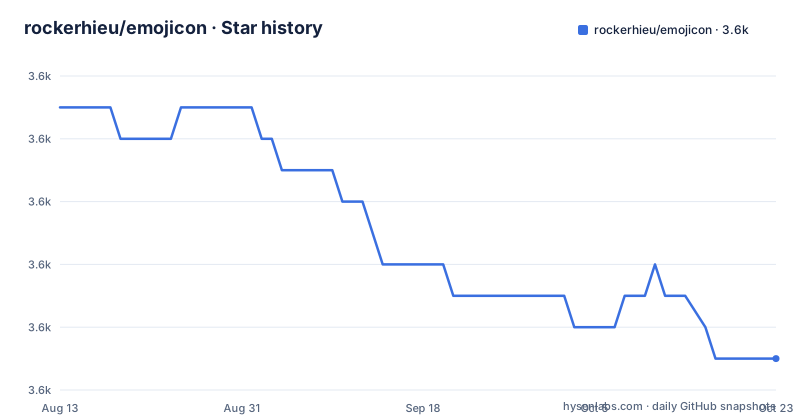
Star history
- rockerhieu/emojicon3,587 ★ · -8
| Repository | 2026-08-13 | 2026-10-22 |
|---|---|---|
| rockerhieu/emojicon | 3.6k | 3.6k |
-8 Stars in the last 70 days, measured from the daily GitHub snapshot. Compare with other projects
Editorial analysis
The status is the first thing in the file
The readme opens with a heading reading Discontinued and a paragraph that says the project is finished, that readers should consider another alternative, and names one specifically. That is the entire status section, and it is worth reading as a design decision rather than an omission. The author then does something unusual: an invitation to anyone who wants to continue the work to do it on their own fork, with the promise that they will promote it in the readme if they do. That converts a dead repository into a fork-friendly one, and it is the reason the code is still worth reading even though the dates say otherwise. A library that tells you exactly what replaced it is more useful than one that simply stops being updated.
Five widgets, and two of them are pickers
The usage list is short and splits cleanly in two. Three are display or input components: a text view that renders emoji, an edit field that renders emoji, and a multi-field autocomplete-capable text view that does the same. The other two are fragments that exist so a user can choose, not so a developer can display. One presents emoji in a grid for selection, the other presents several sets of them. That split is the library's actual contribution to an application, because rendering emoji in a text field is the easy half, while letting somebody pick one inside a fragment is the half every messaging application ends up writing for itself. The naming follows the same pattern throughout, with the component names built from the library's own slightly unusual spelling of the word.
Size and alignment are layout attributes
Two attributes control how the emoji look, and both are set in the layout rather than in code. One takes a size and the other takes an alignment, with the documented example using baseline alignment so that an emoji sits on the same line as the text around it rather than floating above or below it. Using a custom namespace in the layout is what makes those attributes possible, and the example declares it on the root element before using it on the widget. The text itself is set through the ordinary text attribute, and the example puts a private-use codepoint straight into that string, which tells you the library substitutes glyphs by character rather than by a markup convention. Nothing about that approach is obsolete, which is why the layout half of this library still reads as a reasonable way to do the job.
The activity hook has an ordering requirement
Beyond the widgets there is a whole-activity helper, and the example shows an ordering constraint that is easy to get wrong. Your activity has to be a subclass of the framework's compatibility activity class, and the helper must be called before you call the superclass initialisation method, not after it and not later in the method. That constraint is the price of the convenience: one call transforms every emoji-bearing widget in the activity without you touching the layout or the code, and to do that it has to install itself at the earliest safe point. The readme links out to a separate repository for the details, which suggests the helper grew into its own project rather than remaining a single class.
The documented Gradle line uses a removed configuration
The build instructions are one line, and they will not work as written on a current build tool.
compile 'io.github.rockerhieu:emojicon:<latest-version>'The dependency is declared with a configuration that Gradle removed years ago, in favour of separate ones for implementation and for what a library re-exports, and the version is a placeholder in angle brackets rather than a number. Copying the line produces a build failure that mentions a configuration nobody recognises, which is an unhelpful first impression for a library people are arriving at from search. The coordinates themselves are fine and follow the common pattern for a Java package hosted on a code forge. The practical note is that you will be translating this line rather than pasting it, and that the placeholder is a reminder to look up which tagged version you actually want.
Continuous integration is a file from the first era of hosted CI
The repository layout is from the same period. The continuous integration configuration sits at the root under the older filename convention that the first generation of hosted build services expected, rather than in a directory with a modern name. The build itself is a two-module project: a library directory and a separate example directory with its own build file and its own ignore rules, which is the arrangement you want for a library because it proves the library works as a dependency rather than only as source. The Gradle wrapper is committed for both shell families, the settings file is a plain one, and there is an images directory for the screenshots the documentation refers to. Nothing here is maintained, and all of it still builds or still explains what the project was.
The artwork came from a third-party cheat sheet
The acknowledgements section names where the emoji graphics came from, which is a third-party sheet of emoji images rather than a platform font. That is the practical reason this library existed: rendering colour emoji in a text view required shipping image assets, because the platform did not provide them for that purpose at the time. The licence section reproduces the full permissive licence text inline in the readme rather than linking to it, with a copyright line dated 2014. Three dates frame the project as a whole: the initial tagged release in 2014, the last tag in 2016, and the last commit to the branch in 2020, which is later than the last release and consistent with someone tidying up after announcing the end.
Editorial conclusion
Read this repository as a reference rather than as a dependency. The reason is not that the code is unusable but that the ecosystem moved and the author says so in the first line, pointing at another library instead. Two things to settle before you copy any of it. The Gradle line in the documentation uses a configuration that current build tools no longer have, so you will need to translate it rather than paste it. And the whole-activity hook has a hard ordering requirement, calling it before the superclass initialisation, which will bite you if you move it later in the method.
Frequently asked questions
What does the emojicon library do?
It renders emoji in Android text views and edit fields the way messaging applications do. It ships a text view, an edit field, and a multi-field autocomplete view that all render emoji, plus two fragments for letting a user pick emoji from a grid or from several sets.
Is the emojicon Android library still maintained?
No. The readme's first heading says Discontinued and tells readers to consider another alternative, naming one specifically. The author also invites anyone who wants to continue the work to do it on a fork that will be promoted in the readme.
How do I control emoji size and alignment in emojicon?
Both are set in the layout file through two custom attributes, one for size and one for alignment, declared through the library's own namespace on the root element. The documented example uses baseline alignment so emoji sit on the same line as the surrounding text.
How do I use the emojiconize helper?
Your activity has to be a subclass of the compatibility activity class, and you call the helper on it before calling the superclass initialisation method, not after. The readme links to a separate repository for the rest of the details.
Official sources
Add this badge to your README
If you maintain this project, the badge below links readers to this analysis and shows its maintenance status from the daily GitHub snapshot. Paste the markdown into your README; add ?metric=license or ?metric=stars to the image URL for a different field.

[](https://hysenlabs.com/projects/rockerhieu-emojicon)Star history chart for your README
[](https://hysenlabs.com/projects/rockerhieu-emojicon)