microsocks: a SOCKS5 server small enough to sit on a cheap router
tiny, portable SOCKS5 server with very moderate resource usage
At a glance
- What is it?
- A multithreaded SOCKS5 server written in C, one thread per client, no config file, and a static binary under 50 KB when linked against musl.
- Who is it for?
- microsocks is at its best as a way to route TCP through a machine you already have, particularly a small one with little RAM to spare, where the choice is between a few hundred kilobytes of C and a general purpose proxy stack. The README settles the hard questions well: the thread-per-client model, the smallest safe stack size, the 50 KB figure under musl, and the exact command line.
- Can I use it commercially?
- Check first. The repository uses a licence we do not classify automatically, so read its LICENSE file before any commercial use.
- Is it still maintained?
- Yes. The repository last received commits 29 days ago.
- What is it written in?
- Mainly C, according to GitHub's language statistics.
Answers come from the project's GitHub data, last synced on October 23, 2026, and from our analysis. They are not legal advice.
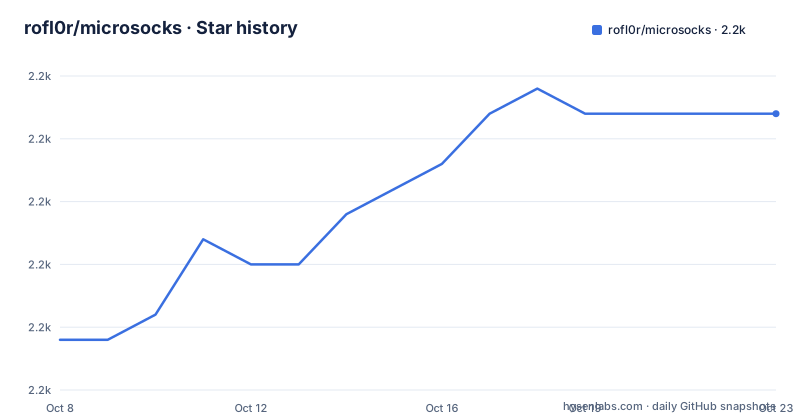
Star history
- rofl0r/microsocks2,221 ★ · +9
| Repository | 2026-10-08 | 2026-10-23 |
|---|---|---|
| rofl0r/microsocks | 2.2k | 2.2k |
9 Stars in the last 15 days, measured from the daily GitHub snapshot. Compare with other projects
Editorial analysis
A box you already have, tunnelling TCP through it
The README states the purpose in one sentence: a SOCKS5 service that you can run on your remote boxes to tunnel connections through them, if for some reason SSH doesn't cut it for you. That is the whole pitch, and it is worth being precise about what it is not. There is no encryption layer, no certificate handling, no key exchange. SOCKS5 is a protocol for telling a server which host and port you want reached, and microsocks implements that protocol as a server. Traffic between client and server travels in the clear unless you put something else around it.
That makes the comparison with SSH more about ergonomics than about security. SSH gives you a shell you did not necessarily want and encrypts by default. microsocks gives you a proxy endpoint that browsers and command line tools already know how to speak, and the README positions it as the option for when an SSH tunnel is the wrong shape for the job rather than a better one.
The resource story is what makes it distinctive. The README describes spawning a thread with a low stack size for every client, and says the main process basically doesn't consume any resources at all, with the only real limits being file descriptors and RAM. That is a straightforward thread-per-connection design with a deliberate attempt to keep each thread cheap, and it is the reason a server this small can usefully run on a consumer router.
The project is also an explicit successor. The README names its predecessor rocksocks5 and lists the changed goals: prefer usage of standard libc functions over homegrown ones, no artificial limits, and do not aim for minimal binary size but for minimal source code size plus maximal readability, reusability and extensibility. Those three bullets explain most of the code decisions you will meet.
Thread per client, and the stack size you may need to raise
One thread per client is an old design and it has a well known failure mode, which the README addresses directly instead of leaving you to guess. If you experience segfaults, try raising the `THREAD_STACK_SIZE` in sockssrv.c for your platform in steps of 4KB, and if that fixes your issue, file a pull request. The project is running at the smallest safe thread stack size to minimize overall memory usage, and the troubleshooting note exists because that smallest value is not equally safe on every platform.
The 4KB granularity and the request for a pull request are the two details worth noting. This is a constant you are expected to tune for your own kernel and libc, and the project treats a local fix as something to contribute back rather than a private workaround.
Resource exhaustion is handled the same way, with a decision rather than a shrug. The README says microsocks is designed to handle resource exhaustion gracefully by simply denying new connections, instead of calling abort() as most other programs do these days. That is the single most important line in the README for anyone running this on shared hardware: when the box runs out of file descriptors or memory, the existing connections are not taken down with it. You get refused new ones instead.
For sizing, the README gives a concrete anchor rather than a vague claim about efficiency. If optimized for size, the program when static linked against musl libc is not even 50 KB, which the README says is easily usable even on the cheapest routers. Static linking against musl is how you get a single file with no shared library dependencies, which is the form that matters for embedded targets.
The command line, and the default that listens on every interface
There is no configuration file. The README makes ease-of-use a design goal and puts it plainly: everything can be done from the command line and it doesn't even need any parameters for quick setup. The complete set of options is short enough to print in full:
microsocks -1 -q -t timeout -i listenip -p port -u user -P passw -b bindaddr -w wlDefaults are listenip `0.0.0.0` and port `1080`. Read that pair carefully, because it is the one detail in this project where the convenient default and the safe default disagree. A no-argument invocation binds to every interface on the machine with no authentication, which on a host with an exposed port is an open proxy anyone on the internet can use. The README presents this as the quick setup path, which is fair, but the practical habit is to start with `-i 127.0.0.1` and a password, then widen the interface once authentication is in place.
The rest of the flags are conventional. `-q` disables logging. `-b` specifies which ip outgoing connections are bound to, which matters on multi-homed hosts. `-t` takes a timeout in seconds, default 0, and the README explains the special case: if timeout is set to 0, block until the OS signals activity. `-u` and `-P` set the credentials.
Two flags change the protocol surface rather than the logging. Authentication is listed as supporting three modes: none, password, and one-time. The one-time mode is `-1`, and it is the most interesting option in the whole list, covered in the next section.
Letting clients that cannot send credentials use the proxy anyway
Some clients cannot do what they are asked. The README names the case directly: `-1` activates auth_once mode, and once a specific ip address authenticates successfully with user/pass it is added to a whitelist and may use the proxy without auth. The stated use is programs like firefox that don't support user/pass auth, and the stated workaround is that you would basically make one connection with another program that supports it, and then you can use firefox too.
The authentication step is one command:
curl --socks5 user:password@listenip:port anyurlSo the model is: a client that can authenticate knocks once from the address you will later use, and that address is then trusted. It is a deliberate weakening, scoped by IP, and it works because the whitelist is keyed on the source address rather than on anything the browser sends.
The `-w` flag is the more general form of the same idea, and it does double duty. It allows a comma-separated whitelist of ip addresses that may use the proxy without user/pass authentication, with the README's examples `-w 127.0.0.1,192.168.1.1,::1` and `-w 10.0.0.1`. The same entry documents the security consequence: to allow access ONLY to those ips, choose impossible to guess user/pw combo. In other words the whitelist is not an alternative to authentication but a carve-out from it, and the README is direct that you should still set a password you would not guess.
The supported protocol features are listed as authentication in those three forms, IPv4, IPv6 and DNS, and then TCP with the parenthetical no UDP at this time. That last one is the functional limit to plan around.
Four source files that map cleanly onto those decisions
The Makefile is short enough to read as documentation. It declares four sources, and the split tells you where each responsibility lives:
PROG = microsocks
SRCS =  sockssrv.c server.c sblist.c sblist_delete.c
LIBS = -lpthread
CFLAGS += -Wall -std=c99
`sockssrv.c` is the accept loop and the threading, which is where `THREAD_STACK_SIZE` lives and therefore where the troubleshooting note applies. `server.c` is the SOCKS5 protocol handling. `sblist.c` and `sblist_delete.c` are a list data structure with its own header, which is the reusable piece the README's goals ask for.
Two details in the build are worth naming. The flags are `-Wall -std=c99`, so this is C99 with warnings on, and `-lpthread` is the only library beyond libc, which is consistent with the README's preference for standard libc functions over homegrown ones. The file ends with an include for `config.mak`, and the comment at the top explains that if you want to change or override some variables, do so in a file called config.mak, which gets included automatically if it exists. Overriding the cross compiler and the install prefix is therefore a one-liner rather than a fork of the build:
printf 'CC=i686-musl-linux-gcc\nprefix=/usr\n' > config.mak
make
The install path goes through a checked-in script rather than invoking the toolchain directly. The Makefile sets `INSTALL = ./install.sh`, and the install target runs it with the destination path and mode 755, so packaging behaviour lives in `install.sh` and can be adjusted without touching the Makefile. The tree also carries `create-dist.sh` for building releases and `microsocks.1`, a man page, which is where the flags are documented formally rather than in the README.
No UDP, an unstated licence, and a gap between the last tag and the last commit
Three things a reader should check for themselves.
The first is UDP. The supported features list says TCP, no UDP at this time, and that is the whole of the SOCKS5 protocol this server does not implement. Protocols layered on SOCKS5 that carry UDP traffic, including some DNS resolution paths and most game and voice traffic, will not work through it. If you need UDP you need a different server; the README is not ambiguous about this, and it is the one capability gap in an otherwise complete implementation.
The second is the licence, and here the repository contradicts itself in a way worth pausing on. GitHub reports the licence field for this repository as NOASSERTION, which means its detection did not classify it, while the file tree includes a file named `COPYING`. Those two facts sit together without either one resolving the other: the metadata gives you no terms, and the presence of a file conventionally named COPYING suggests terms are stated somewhere in the repository rather than absent. The file itself is not part of what can be read here, so the practical advice is short: open COPYING before you vendor this code, because an unclassified licence field is not a licence grant.
The third is the release cadence against the commit history. Three releases are visible: v1.0.3 on 2022-02-03, v1.0.4 on 2024-02-26, and v1.0.5 on 2025-02-07. That is an interval measured in years between tags. The repository is not archived, and the last push was on 2026-09-24, which is roughly nineteen months after v1.0.5. So the pattern is small ongoing fixes landing on master without a tag for each one. For a server you run on a remote box, the practical consequence is that you are tracking a branch rather than consuming releases, and 30 open issues against 2207 stars is consistent with a stable, low-churn project rather than an abandoned one.
Editorial conclusion
microsocks is at its best as a way to route TCP through a machine you already have, particularly a small one with little RAM to spare, where the choice is between a few hundred kilobytes of C and a general purpose proxy stack. The README settles the hard questions well: the thread-per-client model, the smallest safe stack size, the 50 KB figure under musl, and the exact command line. It does not settle the licence, because GitHub reports NOASSERTION while the tree carries a file named COPYING, so read that file yourself before you build on this. UDP is the gap to plan around, and the README is plain that it is absent. The last commit landed on 2026-09-24 while the newest release tag is v1.0.5 from 2025-02-07, so expect steady small fixes on master and treat tags as infrequent. Start by running it bound to loopback and adding a whitelist before you expose it on any network.
Frequently asked questions
What is microsocks and what does it actually do?
It is a multithreaded SOCKS5 server written in C. It listens for SOCKS5 clients and relays their TCP connections to the hosts they ask for, with one low-stack-size thread per client and no configuration file.
Does microsocks support UDP?
No. The README lists its supported features as authentication in none, password and one-time forms, plus IPv4, IPv6 and DNS, and then states TCP with no UDP at this time. Anything requiring SOCKS5 UDP association will not work through it.
How do I use a client that does not support SOCKS5 username and password authentication?
Start microsocks with `-1`, the auth_once mode. Authenticate once from an IP-aware client such as curl with `--socks5 user:password@listenip:port anyurl`, and that address is added to the whitelist, so a browser at the same address can then use the proxy without sending credentials.
How small is microsocks, and can it run on a router?
The README states that when optimized for size and statically linked against musl libc, the program is not even 50 KB, and says that makes it easily usable even on the cheapest routers. It also notes its predecessor rocksocks5 could be built down to about 10 KB static with IPv4 only, at the cost of compile time defines.
Is microsocks encrypted, and is it safer than an SSH tunnel?
It is not encrypted. SOCKS5 relays connections in the clear, and microsocks implements no transport security of its own, so it suits cases where SSH is the wrong shape for the job rather than where you want stronger protection than SSH already gives you.
Official sources
Add this badge to your README
If you maintain this project, the badge below links readers to this analysis and shows its maintenance status from the daily GitHub snapshot. Paste the markdown into your README; add ?metric=license or ?metric=stars to the image URL for a different field.

[](https://hysenlabs.com/projects/rofl0r-microsocks)Star history chart for your README
[](https://hysenlabs.com/projects/rofl0r-microsocks)Was this useful?