One SQLite store under every session, and a skill count quoted three ways
Claude Code learns from your corrections: self-correcting memory that compounds over 50+ sessions. Context engineering, parallel worktrees, agent teams, and 17 battle-tested skills.
At a glance
- What is it?
- Pro Workflow keeps corrections, research wikis and quality gates for coding agents, and most of its behaviour happens in hooks that fire before you type. Two of the numbers it advertises do not agree with each other, and the fallback installer labelled for any agent hardcodes one vendor's directory.
- Who is it for?
- Pro Workflow fits a solo developer or small team that already lives in Claude Code and keeps losing the same corrections, and the mechanism behind that claim is inspectable: one SQLite file, a schema shipped as SQL, and rules loaded on session start. Four things to settle first.
- Can I use it commercially?
- Not without permission. GitHub finds no licence file in the repository, and without a licence all rights are reserved by default: you may read the code but not reuse it. Check the README, or ask the authors, before using it.
- Is it still maintained?
- Yes. The repository last received commits 54 days ago.
- What is it written in?
- Mainly JavaScript, according to GitHub's language statistics.
Answers come from the project's GitHub data, last synced on November 22, 2026, and from our analysis. They are not legal advice.
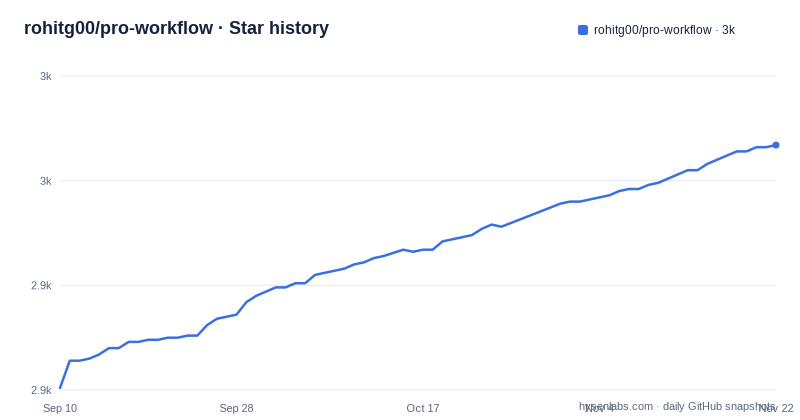
Star history
- rohitg00/pro-workflow2,967 ★ · +116
| Repository | 2026-09-10 | 2026-11-22 |
|---|---|---|
| rohitg00/pro-workflow | 2.9k | 3k |
116 Stars in the last 73 days, measured from the daily GitHub snapshot. Compare with other projects
Editorial analysis
The skill count is quoted three ways and the change log is a version behind
The numbers do not line up. The repository summary promises 17 battle-tested skills. The banner at the top of the documentation counts 41 skills, 8 agents, 23 commands, and 33 hook scripts across 22 events. The installation section then repeats 41 skills and 23 commands as what gets installed. So the smallest of the three figures is the project's own one-line description, and it is 24 short of what the documentation tells you will land on disk.
The version section is behind as well. The newest section of the documentation is titled What is new in v3.3, while package.json declares version 3.4.0 and the newest release tag is pro-workflow v3.4.0, published 2026-09-28 after v3.3.0 on 2026-05-09. Nothing anywhere describes what v3.4.0 changed, so the release notes for the current version have to come from the git history or the announcements rather than from the repository.
Licence metadata is empty while the package manifest says MIT
Three licence signals exist and one of them says nothing. The licence field carried with the repository is empty, so a scanner reading metadata gets no terms at all. package.json declares MIT in its licence field. The documentation links a LICENSE file in the branch it points at. Only one of those three is a text anybody can read without opening the repository, and the empty field is the one most tooling trusts.
This is a small thing with an easy fix and a real cost when it is ignored. A dependency scanner, a corporate policy check, or a licence allowlist will read the metadata field and find nothing, which usually means manual review rather than automatic acceptance. The tree lists LICENSE at the root, so the terms are available. Nothing in the documentation quotes them, summarises them, or states which files they cover, including the templates and skills directories that the package publishes.
The sixty second tour ends at item four with nothing after it
The quick tour is the most concrete part of the documentation, and it stops one line early. The block numbers three steps and then prints a fourth label with nothing under it, so the last example in the sequence is missing.
# 1. Self-correction (existing)
/learn-rule          # capture a correction
/wrap-up             # end session, persist learnings, audit changes
/insights            # heatmaps, trends, productivity

# 2. Knowledge plane (v3.3, new)
/wiki init agent-memory --title "Agent Memory" --flavor research
/wiki page agent-memory wiki/concepts/episodic-memory.md --type concept
/wiki ask "what is episodic memory" --wiki agent-memory

# 3. Auto-research (budget-capped, opt-in)
/wiki seed agent-memory "memory consolidation in agents"
/wiki research agent-memory --max-pages 5 --budget-usd 0.50

# 4.
What survives that is still the most useful line in the file, because it is the only place with hard numbers attached to the research feature. Auto-research is opt-in, takes a page cap and a dollar cap per run, five pages and fifty cents in the example, so the growth-while-you-sleep claim comes with a meter attached rather than being open ended.
Quality gates split into an LLM pass and a deterministic guard
The gate story is one list with two different kinds of enforcement in it. Quality gates are described as LLM-powered hooks, deterministic git and secret guards, compaction-aware state, and cost tracking. The secret and git checks are deterministic, which means they are rules someone wrote. The rest runs through a model, which means the text of your session can become input to a model call. Nothing in this repository says what is redacted before that happens, or which provider the hooks call.
The two hook events that matter most are named with their behaviour. SessionStart loads all learnings and lists the registered wikis. UserPromptSubmit auto-injects the top three wiki hits when a prompt mentions an indexed topic, which means the lookup is driven by what you type. That is the feature working as designed and it is also the reason to read the hook list before installing: this project's value depends on reading your prompts and writing, and part of its enforcement asks a model to judge the result.
Two runtime dependencies, one of them a native module
The dependency list is short enough to read in one glance: @modelcontextprotocol/sdk at 1.31.0 and better-sqlite3 at 12.6.2, with a Node engine floor of 18. TypeScript, tsx and the type packages are development dependencies, not runtime ones. So the search layer, the wiki index and the whole memory story rest on one native SQLite binding, and that binding is compiled rather than shipped.
That single fact explains the installation wrinkle the documentation does warn about. If the doctor command reports KB: missing, the fix given is to go into the plugin directory, run npm install and npm run build, because the SQLite components need a build step some marketplaces skip. The build itself is a TypeScript compile followed by a one-line node command that copies src/db/schema.sql into dist/db, so the database schema travels as a SQL file beside the compiled output rather than being created in code.
The published package ships the instruction set, not just a library
package.json declares a library entry point at dist/index.js with types at dist/index.d.ts, and then publishes far more than a library. The files list carries dist, scripts, hooks, commands, agents, contexts, templates, rules, references, skills, docs, three example and config files, and the README. So the tarball a package manager installs is the whole instruction bundle: the commands, the hook scripts, the agent definitions and the rules.
The repository root matches that shape and adds one detail worth noticing. Alongside src/ and scripts/ sit .claude-plugin/ and .cursor-plugin/, two plugin manifests for two different hosts, which is why the documentation offers a native plugin path and a generic skills path rather than one installer. It also means the size of what you install is dominated by prompt text, and that any copy command aimed at your agent directory moves behaviour, not just files.
The fallback labelled any agent, any OS hardcodes .claude
The manual path is the interesting failure case, because it is the one a reader copies when the two installers do not work. Its summary label promises any agent on any operating system, and then every destination in the block belongs to one vendor.
git clone https://github.com/rohitg00/pro-workflow.git /tmp/pw
cd /tmp/pw && npm install && npm run build

cp -r /tmp/pw/templates/split-claude-md/* ./.claude/
cp -r /tmp/pw/skills    ~/.claude/skills/
cp -r /tmp/pw/commands  ~/.claude/commands/
cp    /tmp/pw/hooks/hooks.json ~/.claude/hooks.json
The prose does admit the adjustment, saying to point the destination at your own agent's skill directory and giving two examples, but nothing derives it and no verification follows the copy. The repair path for a missing KB has the same shape, since it navigates to a path with a wildcard in it under a vendor directory. If you are not on Claude Code, every line of this block has to be rewritten by you.
Thirty adapter names printed under a heading that says thirty-two
The compatibility list is the broadest claim in the documentation and it does not add up. The hero says the bundle works with Claude Code, Cursor and 32 or more agents. The section heading names six products and then 26 more, which is thirty-two. The roster printed underneath contains thirty names, from cursor and codex through to zencoder, so the count in the prose is two higher than the list it introduces.
Two entries in that roster are also legacy handles. The notes say windsurf relaunched as Devin Desktop, which speaks the Agent Client Protocol, and that gemini-cli was superseded by the Antigravity CLI for consumers. The advice given is that the old names still resolve but that you should target the current product, and antigravity appears in the roster alongside gemini-cli, so the two coexist by design. After installing through either path, one more step is required: skills sync registers the skills with the target agent's configuration.
Editorial conclusion
Pro Workflow fits a solo developer or small team that already lives in Claude Code and keeps losing the same corrections, and the mechanism behind that claim is inspectable: one SQLite file, a schema shipped as SQL, and rules loaded on session start. Four things to settle first. Decide whether LLM-backed hooks are acceptable on your prompts, since the quality gates mix model calls with deterministic guards and the repository says nothing about redaction. Read the LICENSE file, because the licence metadata is empty while package.json declares MIT. Count the roster for yourself, since thirty adapter names are printed under a heading that claims thirty-two, and two of them are rebranded products. And expect a build step on first run, because better-sqlite3 is a native module and the documented failure mode is a doctor command reporting KB: missing.
Frequently asked questions
what is pro workflow
Pro Workflow is a workflow system for Claude Code built on one SQLite store underneath every session. Corrections become FTS5-searchable rules that load on session start, research lands in persistent wikis with a BM25 query path, and hooks add quality gates. The package manifest declares version 3.4.0 with two runtime dependencies.
How many skills and commands does pro-workflow install?
The documentation counts 41 skills and 23 slash commands, plus 8 agents and 33 hook scripts across 22 events. The repository's own summary line says 17 skills, so the two published figures do not agree.
What does pro-workflow need before it works?
Node 18 or newer, and a compiled build of better-sqlite3. The documented failure mode is a doctor command reporting KB: missing, fixed by running npm install and npm run build inside the plugin directory, because the SQLite components need a build step some marketplaces skip.
Can pro-workflow be used with agents other than Claude Code?
Yes, through npx skills add rohitg00/pro-workflow, which installs the skill bundle into each agent's native skill directory, followed by skills sync to register them. The roster prints 30 adapter names, and the notes say the resolver takes an owner/repo form rather than a marketplace slug.
Is the pro-workflow licence clear from its metadata?
Not from the metadata. The repository's licence field is empty, while package.json declares MIT and the documentation links a LICENSE file at the root of the branch. Read that file rather than relying on either metadata field, and check what it covers for the templates and skills directories.
Official sources
Add this badge to your README
If you maintain this project, the badge below links readers to this analysis and shows its maintenance status from the daily GitHub snapshot. Paste the markdown into your README; add ?metric=license or ?metric=stars to the image URL for a different field.

[](https://hysenlabs.com/projects/rohitg00-pro-workflow)Star history chart for your README
[](https://hysenlabs.com/projects/rohitg00-pro-workflow)Was this useful?