The RS School app runs on Turbo, Podman and a hardcoded admin list
An application for the RS School education process
At a glance
- What is it?
- rsschool-app is the application behind app.rs.school, written in TypeScript across a Next.js client and a NestJS API, with a Koa.js backend the README already marks as deprecated. The setup path is documented down to the SQL snapshot, and the parts worth reading twice are the ones in the repository rather than in the README: a workspace list that disagrees with package.json, two test runners, prebuilt master images, and an admin allowlist written into docker-compose.yml.
- Who is it for?
- rsschool-app fits a contributor who wants to work on a real education platform with a real database, has Podman available, and can live with a master-branch workflow rather than releases. It does not fit a team looking for a versioned artefact to depend on, since the repository has no GitHub releases and the package is marked private, and it does not fit a reviewer who wants one backend, since the README still names Koa.js as a deprecated backend alongside NestJS.
- Can I use it commercially?
- Yes, with conditions. MPL-2.0 is a weak copyleft licence: you can use it inside commercial and closed-source software, but if you distribute changes to its own files, you must publish those changes under the same licence.
- Is it still maintained?
- Yes. The repository last received commits 11 days ago.
- What is it written in?
- Mainly TypeScript, according to GitHub's language statistics.
Answers come from the project's GitHub data, last synced on November 14, 2026, and from our analysis. They are not legal advice.
Star history
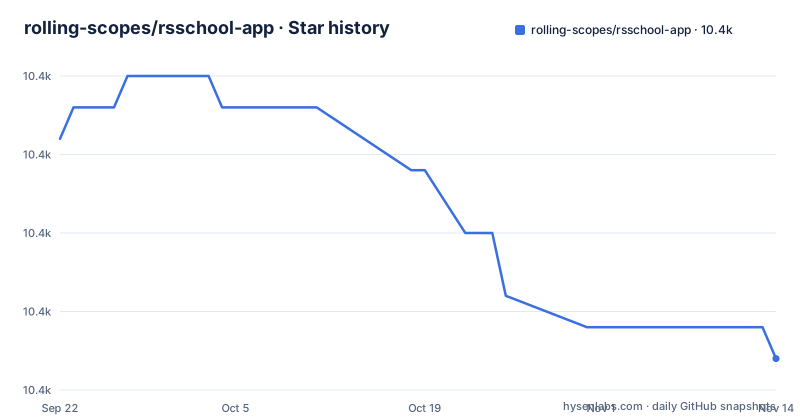
- rolling-scopes/rsschool-app10,391 ★ · -7
| Repository | 2026-09-22 | 2026-11-14 |
|---|---|---|
| rolling-scopes/rsschool-app | 10.4k | 10.4k |
-7 Stars in the last 53 days, measured from the daily GitHub snapshot. Compare with other projects
Editorial analysis
The README says three workspaces, package.json declares two
The Getting Started section says the repository is organized into 3 workspaces, `server`, `nestjs` and `client`, each with its own package.json and npm scripts. The root package.json disagrees: its workspaces array holds `nestjs` and `client`, and nothing else. There is no `server` directory at the top level either, the tree shows client/, nestjs/, common/, setup/, tools/ and docs/.
The same mismatch shows up in the install step, which says `npm install` installs dependencies in the root folder and in `client` / `server` folders. npm will follow the workspaces array, not the prose.
That is a small thing to trip over, but it costs a newcomer a few minutes of looking for a directory that does not exist. The rest of the setup steps do name the right files: copies of `server/.env.example` and `nestjs/.env.example` are to be renamed to `server/.env` and `nestjs/.env`, which is the same inconsistency one level down, since only the nestjs copy has a matching directory in the repository.
npm start is a Turbo fan-out, not a process
The root scripts do not run anything themselves. `start` is `turbo run start`, `build` is `turbo run build`, and the same pattern covers `lint`, `test`, `test:ci`, `compile` and `openapi`. turbo.json sits at the root, so every command a developer types at the root is a task graph executed across the workspaces that declare it.
The engines field sets the floor: node ^22.13.0 || ^24.0.0 || >=26.0.0 and npm >=10, which is stricter than the Node.js LTS wording in the prerequisites list. Two commands do not go through Turbo. `format` and `ci:format` call oxfmt, pinned at 0.38.0, so formatting is a single repository-wide tool rather than a per-workspace script.
The practical consequence is that the root scripts are all-or-nothing in terms of wiring: if one workspace has a broken task definition, the root command that fans out to it fails for the whole repository, and you cannot skip it without dropping into the workspace directory.
The local database is a Podman container fed by a SQL dump
There is no migration story to follow on a first run. The database comes up as a container and then a snapshot is loaded into it:
npm install
npm run db:up
npm run db:restore
npm start
`db:up` is `podman compose -f ./setup/docker-compose.yml up -d`, and `db:restore` pipes the committed snapshot into that container:
podman exec -i db psql -U rs_master -d rs_school < ./setup/backup-local.sqlThe snapshot itself comes from `db:dump`, which runs pg_dump with PGPASSWORD=12345678 hardcoded in the script, and `db:dump:win` is the same dump without the inline password, which is what a Windows shell needs. The database user in every one of those commands is rs_master.
So the local environment is defined by a SQL file in setup/ rather than by migrations you run yourself, and the credentials for it are committed in package.json. That is fine for a laptop and is one of the first things to change if this setup is copied onto a shared machine.
docker-compose.yml pulls :master images and names the admins
The compose file at the repository root does not build anything. It runs two prebuilt images from GitHub's registry, ghcr.io/rolling-scopes/rsschool-app-client:master and ghcr.io/rolling-scopes/rsschool-app-nestjs:master, publishing 8081 to 8080 for the client and 8082 to 8080 for the API, with restart: on-failure and a shared network. The client depends on nestjs.
Two things in that file deserve a second read. The images are tagged master, so a compose run tracks whatever the branch holds rather than a fixed version. And RSSHCOOL_USERS_ADMINS is a literal list of GitHub usernames in the file, apalchys, dzmitry-varabei, mikhama, sonejka, aaliakseyenka, anik188 and alreadybored, while RSSHCOOL_USERS_HIRERS is passed in from the environment.
Everyone else is configured by environment variable, with the compose names prefixed RSSHCOOL_ and mapped to your own RSSHCOOL_ variables: database host, username, password and database name, the GitHub OAuth client id, secret and callback, the JWT signing secret, AWS keys, region and REST API details. Running the file as shipped means running with someone else's admin list.
Jest and Vitest both appear in the root manifest
The root devDependencies carry jest 30.2.0 with @types/jest 30.0.0 alongside @vitest/coverage-v8 ~5.0.0 and @vitest/eslint-plugin ^1.6.27. Two runners are declared for one repository, and the tree agrees: vitest.shared.mts sits next to turbo.json, and there is no jest config at the root to match.
Tests still run through Turbo, with `test` and `test:ci` as separate tasks, so a workspace chooses what its test script calls and the root just fans out. Which runner a given workspace uses is not answerable from the root manifest alone.
The linting setup is split the same way. eslint 10.0.3 runs with eslint.config.mjs at the root, and eslint-plugin-boundaries 5.4.0 is present, which suggests import boundaries between packages are linted.
Node 22 is the floor and Nest is pinned at the root
Two version decisions live in the root package.json and both constrain the workspaces. The engines block requires node ^22.13.0 || ^24.0.0 || >=26.0.0 and npm >=10. The overrides block pins @nestjs/common, @nestjs/core and @nestjs/platform-express to 11.1.29, regardless of what a workspace asks for.
The overrides are the part with teeth. An override at the root applies to the whole tree, so a Nest upgrade is not a per-workspace decision: someone has to edit the root manifest, and every workspace moves together. The same file pins four root dependencies with exact versions, axios 1.8.4, lodash 4.17.21, typeorm 0.3.20 and dayjs at ^1.11, which is a small set for a project this size and suggests the workspaces carry the rest.
TypeORM being the only data layer dependency at the root is also the answer to where persistence lives, and it pairs with the openapi script that runs through Turbo for anyone who needs the generated API surface.
NestJS and a Koa.js backend the README calls deprecated
The technology overview lists NestJS and Koa.js together, marking the latter as a deprecated backend, with Node.js underneath both. So the repository contains two API implementations and only one of them is meant to be extended, and the deprecated one is still named in the stack summary a newcomer reads first.
The client side is Next.js with React, the end-to-end layer is Playwright, the database is PostgreSQL, and deployment is Podman. That combination is what makes the local setup above look the way it does: a containerised database, a snapshot restore, and a Turbo fan-out, with no separate Docker daemon named anywhere in the prerequisites, which list Git 2.10+, Node.js LTS, Podman and podman-compose instead.
If you are evaluating the project as a codebase, the two backends are the first thing to map. Every hour spent in the deprecated Koa.js layer is an hour spent in code the project has already decided against.
No releases, so master is the only handle on a version
The repository has no GitHub releases on record, and the package itself is marked private with version 1.0.0 in package.json. There is no release to pin, no changelog at the top level, and no upgrade path between versions, because versions of this application are not published as artefacts.
What there is instead is a set of operational surfaces. Deployment runs through GitHub Actions, with a deploy workflow, onto AWS EC2 with RDS for PostgreSQL and S3, watched through CloudWatch. Errors go to Sentry at rs-school.sentry.io, and Checkly is used for the other half of the monitoring, with a public status page at status.rs.school.
The last push to master was on 2026-11-02. So the code moves continuously while the version stays at 1.0.0 forever, and the honest way to describe a deployment of this application is by commit. Contribution is funded through Open Collective under rsschool, and the code itself is MPL-2.0, with the rest of the contributor guidance in CONTRIBUTING.md, GUIDELINES.md, DOMAIN.md and AGENTS.md at the repository root.
Editorial conclusion
rsschool-app fits a contributor who wants to work on a real education platform with a real database, has Podman available, and can live with a master-branch workflow rather than releases. It does not fit a team looking for a versioned artefact to depend on, since the repository has no GitHub releases and the package is marked private, and it does not fit a reviewer who wants one backend, since the README still names Koa.js as a deprecated backend alongside NestJS. Before you start, check three things: your Node and npm versions against the engines fields (node ^22.13.0 || ^24.0.0 || >=26.0.0, npm >=10), whether the docker-compose.yml admin allowlist and the db:dump script are acceptable on your machine, and which of the two declared workspaces, client or nestjs, the change you have in mind actually lives in.
Frequently asked questions
How do I run rsschool-app locally?
Clone the repository, run npm install, then npm run db:up to start the local database and npm run db:restore to load a test snapshot, copy server/.env.example and nestjs/.env.example to server/.env and nestjs/.env, run npm start, and open http://localhost:3000. Prerequisites are Git 2.10+, Node.js LTS, Podman and podman-compose.
Why does rsschool-app need Podman for local development?
Podman is the deployment tool in the stack, and the database step is a compose run: npm run db:up executes podman compose against ./setup/docker-compose.yml, and npm run db:restore pipes a SQL snapshot into the db container with psql.
What Node version does rsschool-app require?
The root package.json sets engines to node ^22.13.0 || ^24.0.0 || >=26.0.0 and npm >=10. The prerequisites section of the README asks for Node.js LTS, so the manifest is the stricter of the two.
Does rsschool-app publish versioned releases?
No GitHub releases exist for the repository, and the root package is private with version 1.0.0. The compose file at the root runs images tagged :master from ghcr.io, so a deployment is identified by commit rather than by release.
Where is rsschool-app monitored?
Sentry at rs-school.sentry.io and Checkly, on AWS EC2 with RDS, S3 and CloudWatch behind a GitHub Actions deploy workflow. A public status page sits at status.rs.school.
Official sources
Add this badge to your README
If you maintain this project, the badge below links readers to this analysis and shows its maintenance status from the daily GitHub snapshot. Paste the markdown into your README; add ?metric=license or ?metric=stars to the image URL for a different field.

[](https://hysenlabs.com/projects/rolling-scopes-rsschool-app)Star history chart for your README
[](https://hysenlabs.com/projects/rolling-scopes-rsschool-app)Was this useful?