romkatv/gitstatus: Fast Git Status for Bash and Zsh Prompts
Git status for Bash and Zsh prompt
At a glance
- What is it?
- romkatv/gitstatus places Git branch and working tree information inside interactive Bash and Zsh prompts through a C++ daemon. Its speed-focused design is clear, but the project explicitly has limited support and no new features planned.
- Who is it for?
- Adopt romkatv/gitstatus if interactive prompt latency matters and you are comfortable with a narrowly maintained tool. Do not adopt it if you need a broad support commitment or an actively expanded feature set.
- Can I use it commercially?
- Yes, with conditions. GPL-3.0 is a copyleft licence: if you distribute software that includes it, you must release that software's source code under the same licence. Running it internally without distributing it does not trigger that obligation.
- Is it still maintained?
- Yes. The repository last received commits 40 days ago.
- What is it written in?
- Mainly C++, according to GitHub's language statistics.
Answers come from the project's GitHub data, last synced on October 23, 2026, and from our analysis. They are not legal advice.
Star history
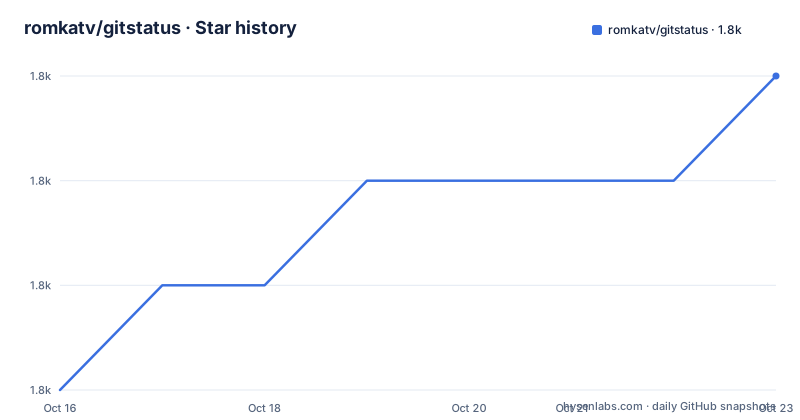
- romkatv/gitstatus1,841 ★ · +3
| Repository | 2026-10-16 | 2026-10-23 |
|---|---|---|
| romkatv/gitstatus | 1.8k | 1.8k |
3 Stars in the last 7 days, measured from the daily GitHub snapshot. Compare with other projects
Editorial analysis
Why gitstatus targets shell prompts
romkatv/gitstatus is designed for people who want Git information to appear continuously in an interactive Bash or Zsh prompt. Its target is not the ordinary command-line workflow around `git status` and `git describe`. Instead, it addresses the repeated cost of collecting repository state every time a shell displays its prompt. A prompt is evaluated frequently, so a slow status command can be felt during ordinary navigation, branch switching, staging, and committing.
The README describes gitstatus as a 10x faster alternative to `git status` and `git describe`, with the stated primary use case of a fast Git prompt. That performance claim belongs to the project documentation, not to an independent result reproduced here. The practical adoption criterion is therefore narrower: does the prompt need low-latency repository status, and is the extra daemon integration acceptable?
The project fits users who already depend on Bash or Zsh and want branch, commit, divergence, stash, merge, conflict, staged, unstaged, and untracked information in the prompt. It is less suitable for users who want a general Git dashboard, a replacement for every `git status` command, or a shell-independent status display. The repository is not archived, and the last push was on 2026-09-13, but the README explicitly says that support is very limited, no new features are in the works, and most bugs will go unfixed.
The gitstatusd daemon and shell bindings
The central implementation is `gitstatusd`, a C++ binary. The shell side does not assemble every status field by repeatedly invoking Git. Instead, the repository supplies Zsh and Bash bindings that communicate with `gitstatusd` over pipes. The daemon handles the repository inspection work, while the shell scripts decide when to query it and how to display the returned values.
The distinction between the high-level and low-level scripts matters in Zsh. `gitstatus.prompt.zsh` is the simple integration that produces a usable prompt. `gitstatus.plugin.zsh` provides lower-level bindings for communication with `gitstatusd`. The README also documents a more advanced Zsh configuration that starts a named `gitstatus` instance with `gitstatus_start`, queries it with `gitstatus_query`, and reads fields such as `VCS_STATUS_LOCAL_BRANCH`, `VCS_STATUS_COMMIT`, and the counts for staged, unstaged, and untracked changes.
The daemon is built from C++ source files under `src`, with the `Makefile` compiling them into `usrbin/gitstatusd`. The build uses `libgit2` through `-lgit2`, along with pthreads. This architecture is appropriate for a focused prompt component, but it also means the shell integration is part of the product rather than a disposable formatting script. Users changing the prompt format should account for the lifecycle of the daemon and the timing of shell queries.
Installing the Zsh prompt integration
For Zsh, the README gives a source installation as the direct route when a theme is not already providing gitstatus integration. The first command clones the repository into the home directory. The second adds the prompt script to `.zshrc`. After starting a new Zsh session, the prompt should include the basic Git status supplied by `gitstatus.prompt.zsh`.
git clone --depth=1 https://github.com/romkatv/gitstatus.git ~/gitstatus
echo 'source ~/gitstatus/gitstatus.prompt.zsh' >>! ~/.zshrc
The README also documents Homebrew installation for macOS users who already use Homebrew. In that case, the script is loaded from the package prefix rather than from `~/gitstatus`.
brew install romkatv/gitstatus/gitstatus
echo "source $(brew --prefix)/opt/gitstatus/gitstatus.prompt.zsh" >>! ~/.zshrc
For customization, the README says to set `PROMPT` or `RPROMPT` after sourcing `gitstatus.prompt.zsh`, then insert `${GITSTATUS_PROMPT}` where the status should appear. This example places the directory and privilege marker on the left and Git status on the right.
source ~/gitstatus/gitstatus.prompt.zsh
PROMPT='%~%# '
RPROMPT='$GITSTATUS_PROMPT'
The README warns that code based on `gitstatus.prompt.zsh` communicates synchronously with `gitstatusd`. In a large repository or on a slow machine, that design can make the prompt slow. It identifies asynchronous `gitstatus_query` as the way to avoid the problem, while also noting that this is challenging to implement correctly.
Installing the Bash prompt integration
Bash uses `gitstatus.prompt.sh`. The README's source installation clones the repository and sources that file from `.bashrc`. The documented first result is a basic prompt containing Git status. The repository already includes the shell script, so the source route does not require a separate package manager.
git clone --depth=1 https://github.com/romkatv/gitstatus.git ~/gitstatus
echo 'source ~/gitstatus/gitstatus.prompt.sh' >> ~/.bashrc
For users with Homebrew, the README provides a package-based route. The source path then points at the Homebrew installation directory.
brew install romkatv/gitstatus/gitstatus
echo "source $(brew --prefix)/opt/gitstatus/gitstatus.prompt.sh" >> ~/.bashrc
The README says to customize Bash by setting `PS1` after loading `gitstatus.prompt.sh` and inserting `${GITSTATUS_PROMPT}`. The exact complete Bash customization example is not documented in the excerpt. The basic installation and script path are documented, but shell-specific prompt precedence should be checked in the user's existing `.bashrc`.
As with Zsh, the repository offers a low-level plugin file, `gitstatus.plugin.sh`, alongside the high-level prompt script. The README excerpt does not provide the complete Bash low-level example, so it would be unsafe to infer its query lifecycle or exported variable names.
What the prompt can display
The Zsh prompt format exposes several repository signals. `${GITSTATUS_PROMPT}` can include the current branch, a tag such as `v1`, or a short commit identifier when neither a branch nor tag is present. It also reports divergence from a remote, divergence from the push remote, stash count, merge state, conflict count, staged change count, unstaged change count, and untracked file count.
The documented segments are intentionally compact. For example, `⇣1` means that the local branch is behind its remote by one commit, `⇡2` means that it is ahead by two commits, `+7` represents seven staged changes, `!8` represents eight unstaged changes, and `?9` represents nine untracked files. `merge` indicates that a merge is in progress, although the README notes that it can represent another action as well.
`$GITSTATUS_PROMPT_LEN` is available for logic that needs the printed length of `$GITSTATUS_PROMPT`. The README points to `gitstatus.prompt.zsh` as an example of using that value to truncate the current directory. This is useful for prompt layouts that need to reserve terminal width, but it also shows that display formatting remains a shell scripting concern. gitstatus supplies repository data, while the prompt script controls the final composition.
Build mechanics and maintenance trade-offs
The repository includes a Makefile for building `gitstatusd`. The default target is `all`, and the build expects a C++ compiler, `libgit2`, and pthreads. The compiler settings include C++14, optimization, and the GitStatus version read from `build.info`. The `clean` target removes the object directory, while `zwc` compiles the Zsh files and `pkg` creates a package.
The Makefile's documented targets provide a direct build path for contributors or users who need a local binary.
makeThe README excerpt does not give a complete prerequisite installation tutorial for Linux distributions, nor does it describe package formats beyond the documented Homebrew route. A source build should therefore be treated as a repository-level operation, not as a fully specified system installation guide.
Maintenance is the central trade-off. The repository is not archived, and the last push was on 2026-09-13. However, the README's project status says there is very limited support, no new features are in the works, and most bugs will go unfixed. The GPL-3.0 license also matters for redistribution and modification, but this review does not provide legal advice. Users who need frequent fixes, broad shell coverage, or an expanding feature roadmap should treat the stated maintenance policy as a boundary rather than an incidental warning.
Editorial conclusion
Adopt romkatv/gitstatus if interactive prompt latency matters and you are comfortable with a narrowly maintained tool. Do not adopt it if you need a broad support commitment or an actively expanded feature set. First verify that the supplied prompt scripts work with your shell configuration and accept the repository's stated maintenance boundary.
Frequently asked questions
How do I install romkatv/gitstatus for Zsh?
Clone the repository into `~/gitstatus` and source `gitstatus.prompt.zsh` from `~/.zshrc`, or use the documented Homebrew package. The README also identifies Powerlevel10k as a theme with first-class gitstatus integration, in which case installing gitstatus separately is not required.
How do I install romkatv/gitstatus for Bash?
Clone the repository into `~/gitstatus` and add `source ~/gitstatus/gitstatus.prompt.sh` to `~/.bashrc`. A Homebrew installation route is also documented.
What information can romkatv/gitstatus show in the shell prompt?
The documented prompt can show the current branch, tag or commit, remote and push-remote divergence, stash count, merge state, conflicts, staged changes, unstaged changes, and untracked files. The exact symbols depend on the high-level Zsh prompt format documented by the README.
Does romkatv/gitstatus still receive new features?
No. The README explicitly says that no new features are in the works and that most bugs will go unfixed. It also describes project support as very limited.
Official sources
Add this badge to your README
If you maintain this project, the badge below links readers to this analysis and shows its maintenance status from the daily GitHub snapshot. Paste the markdown into your README; add ?metric=license or ?metric=stars to the image URL for a different field.

[](https://hysenlabs.com/projects/romkatv-gitstatus)Star history chart for your README
[](https://hysenlabs.com/projects/romkatv-gitstatus)Was this useful?