Krita: A GPL-3.0 Digital Painting Stack Built for Professional Artwork, Not for Developers
Krita is a free and open source cross-platform application that offers an end-to-end solution for creating digital art files from scratch built on the KDE and Qt frameworks.
At a glance
- What is it?
- Krita is a cross-platform C++ application for digital painting, aimed at working artists. This review covers its nightly and developer builds, CI status table, and the project's explicit ban on AI-assisted development until October 2026.
- Who is it for?
- Adopt Krita if you are a digital artist or a developer contributing to a mature, GPL-3.0 painting tool with an active KDE community. Do not adopt it if you need a lightweight editor or want to use AI tools in your workflow: the README states a moratorium on AI-assisted development until October 2026, a date that has now passed, so check the project's current position.
- Can I use it commercially?
- Yes, with conditions. GPL-3.0 is a copyleft licence: if you distribute software that includes it, you must release that software's source code under the same licence. Running it internally without distributing it does not trigger that obligation.
- Is it still maintained?
- Yes. The repository last received commits 1 day ago.
- What is it written in?
- Mainly C++, according to GitHub's language statistics.
Answers come from the project's GitHub data, last synced on November 14, 2026, and from our analysis. They are not legal advice.
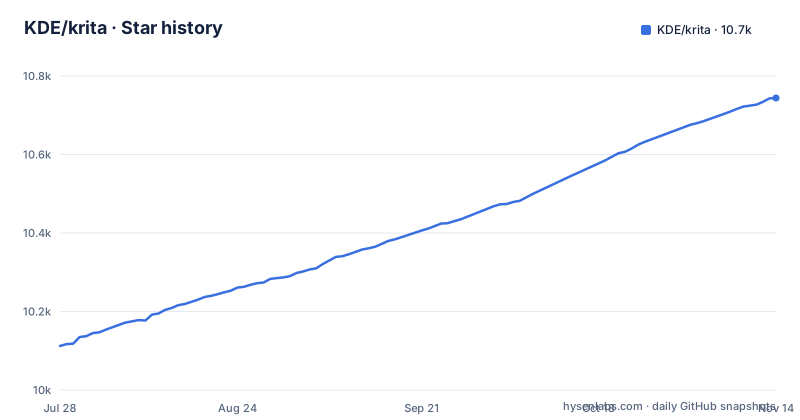
Star history
- KDE/krita10,744 ★ · +632
| Repository | 2026-07-28 | 2026-11-14 |
|---|---|---|
| KDE/krita | 10.1k | 10.7k |
632 Stars in the last 109 days, measured from the daily GitHub snapshot. Compare with other projects
Editorial analysis
The Problem Krita Solves and Who It Serves
Krita is a free, open source digital painting application built on KDE and Qt frameworks. It targets artists who need to create professional work from start to finish, not just sketch or edit photos. The README names comic book artists, illustrators, concept artists, matte and texture painters, and the digital VFX industry as the intended users. For engineers, the key takeaway is that Krita is a user-facing product, not a library or a framework. The codebase is C++ and the project is hosted on KDE's own infrastructure, with GitHub serving only as a mirror. That distinction matters: if you plan to submit patches, use invent.kde.org rather than the GitHub mirror; bugs are tracked at bugs.kde.org. The project's scope is broad, covering everything from canvas input to file export, which is why it is a large, complex codebase rather than a simple utility.
Architecture and Data Flow: What the Repository Shows
The repository layout is not described in detail in the README, but the project is described as built on the KDE and Qt frameworks. The README does not specify the internal modules, but it links to the API documentation at api.kde.org, which would show the class hierarchy. The CI status table has three columns: Master, Stable (the krita/5.2 branch) and Release (the releases page). The project also maintains nightly builds for both unstable master and the stable 5.2 branch, which tells you that the codebase is continuously integrated and packaged.
Getting It Running: Nightly Builds and CI Artifacts
The README does not give a single command to build Krita from source. Instead, it points to the online building documentation at docs.krita.org/en/untranslatable_pages/building_krita.html. What it does provide is a set of CI artifact paths for nightly builds. For unstable builds, you download from https://cdn.kde.org/ci-builds/graphics/krita/master/. For stable nightly builds, the path is https://cdn.kde.org/ci-builds/graphics/krita/krita-5.2/. These are prebuilt binaries, so you can run Krita without compiling. For developers, the README explains how to get a Linux build with debug symbols: go to the Jobs section on invent.kde.org, find the latest linux-debug-weekly job, and download the AppImage from the artifacts. Similarly, there are ASAN builds for both Linux and Windows. For Linux, you download an AppImage and set the environment variable ASAN_OPTIONS=new_delete_type_mismatch=0:detect_leaks=0 before running it. For Windows, you download a zip, extract it, set the same variable, and then run krita.com from the bin directory. The Windows instructions stress that you must cd into the bin directory, otherwise ASAN cannot locate llvm-symbolizer.exe and backtraces will lack symbols. That is a specific, actionable detail.
The AI Moratorium: A Hard Constraint on Contribution
The most unusual piece of information in the README is the AI moratorium. The Krita developer community has decided to ban the use of AI tools to assist development until October 2026, a date that has now passed, so check the project for its current position. The stated reasons are threefold: backlash from users and supporters, the absence of a KDE-wide policy that could conflict, and the belief that AI development itself might change. This is a concrete policy that affects any contributor. If you are an engineer who relies on AI code completion or generation, you cannot use those tools when working on Krita. The moratorium is not a suggestion; the README says 'the use of AI when working on Krita is not allowed.' It also means the project's development workflow is deliberately conservative. For a professional artist evaluating Krita as a tool, this policy is irrelevant, but for a developer considering contributing, it is a boundary you must respect.
Limitations and Wrong Tool Cases
Krita is not the right tool if you need a lightweight image editor or a quick screenshot annotator. Its focus is on professional painting, which means a heavy dependency on Qt and KDE libraries, and a larger memory footprint than simpler tools. The README does not list system requirements, but the availability of ASAN builds suggests the codebase is complex enough to warrant memory debugging. Another limitation is the documentation gap: the README gives no build instructions, no dependencies list, and no configuration keys. You must go to an external site to learn how to compile, and the CI table explicitly notes that nightly builds are not covered, so the status indicators may be misleading. The project also has a freeze status system, but the README only shows that master currently allows features and strings, which means there is no feature freeze in place. That is a positive for active development but a risk for stability if you are tracking master. If you need a stable build, use the stable 5.2 nightly builds rather than master.
Alternatives: MyPaint and GIMP
The obvious alternative to Krita is MyPaint, which is also an open source painting application. Krita's own description calls it an end-to-end solution for creating digital art files from scratch. Another alternative is GIMP, which is more of a general image editor than a painting tool. GIMP's architecture is plugin-based and its user interface is geared toward photo manipulation, not natural media painting. If you are an engineer evaluating which to adopt for a project, the choice depends on whether you need a tool for creating digital art files from scratch, or whether a simpler tool would suffice. The README does not mention these competitors, but the project's own description makes the distinction clear: Krita is for creating art from scratch, not for editing existing images.
Maintenance and License Cost
Krita is licensed under GPL-3.0 as a whole, with individual files possibly having different but compatible licenses. That means if you integrate Krita's code into a proprietary product, you must comply with the GPL's copyleft terms. For an engineer, this is a significant consideration: you cannot use Krita's source in a closed-source application without releasing your own code under a compatible license. Maintenance cost is high because the project is large and depends on KDE libraries, which have their own release cycles. The README notes that the CI status table does not cover nightly builds. The project also has an active bug tracker at bugs.kde.org, which is the place to report issues, but the README does not give a response time or SLA. If you plan to use Krita as a dependency, be prepared for a steep learning curve and a heavy build environment.
Editorial conclusion
Adopt Krita if you are a digital artist or a developer contributing to a mature, GPL-3.0 painting tool with an active KDE community. Do not adopt it if you need a lightweight editor or want to use AI tools in your workflow: the README states a moratorium on AI-assisted development until October 2026, a date that has now passed, so check the project's current position. Before contributing, verify the current freeze status on the master branch and read the building documentation at docs.krita.org, because the README gives no build commands and the CI table omits nightly coverage. The project's real value is its end-to-end art pipeline, not a developer-friendly API.
Frequently asked questions
Is Krita actually free?
Yes. Krita is described as a free and open source digital painting application, licensed as a whole under the GNU Public License Version 3, with individual files free to carry a different but compatible license. Third party code sits in 3rdparty, 3rdparty_plugins and 3rdparty_vendor with terms of its own.
how to install krita
The README gives no install command and defers the rest. The project website is krita.org, the nightly directory for master is cdn.kde.org/ci-builds/graphics/krita/master/ and the 5.2 line is at cdn.kde.org/ci-builds/graphics/krita/krita-5.2/, while building from source is documented at docs.krita.org.
how to use krita
The user manual is the reference, at docs.krita.org/en/user_manual.html. Krita is aimed at artists working from start to end, and is used by comic book artists, illustrators, concept artists, matte and texture painters and in the digital VFX industry.
how to use krita on ipad
The project does not address iPad in the README. What the tree does show is mobile work oriented toward Android, with README.android.md and config-android-stdio-forwarding.h.cmake at the root, so treat iPad availability as unconfirmed here and check krita.org before planning around it.
Is Krita just as good as Photoshop?
The project publishes no comparison with any other application. It describes Krita as an end to end solution for creating digital art files from scratch, built on the KDE and Qt frameworks, which is a statement about scope rather than a claim of parity. The feature and workflow documentation is at docs.krita.org/en/user_manual.html.
Official sources
Add this badge to your README
If you maintain this project, the badge below links readers to this analysis and shows its maintenance status from the daily GitHub snapshot. Paste the markdown into your README; add ?metric=license or ?metric=stars to the image URL for a different field.

[](https://hysenlabs.com/projects/kde-krita)Star history chart for your README
[](https://hysenlabs.com/projects/kde-krita)Was this useful?