Maya needs macOS 26.3 and its README documents version 1.1
🖥️ 📱 ▶️ Wrap your iPhone screen recordings in a beautiful device frame, add cinematic zoom moments, and export ready-to-share videos.
At a glance
- What is it?
- A Swift and AVFoundation app that wraps iPhone screen recordings in device mockups, where the details worth reading are two separate export pipelines, a sandbox that adopts your file on load, and defaults built from the author's own brand hex.
- Who is it for?
- For turning an iPhone screen recording into something you can post, this does the job with a real editor rather than a template, and the transparent export path is the reason to care: HEVC with alpha means the framed device composites into another app's interface, which is the in-app tutorial case no mp4 can serve. Three things to check first.
- Can I use it commercially?
- Yes. MIT is a permissive licence: you can use, modify and sell software built on it, as long as you keep its copyright and licence notices.
- Is it still maintained?
- Yes. The repository last received commits 84 days ago.
- What is it written in?
- Mainly Swift, according to GitHub's language statistics.
Answers come from the project's GitHub data, last synced on November 15, 2026, and from our analysis. They are not legal advice.
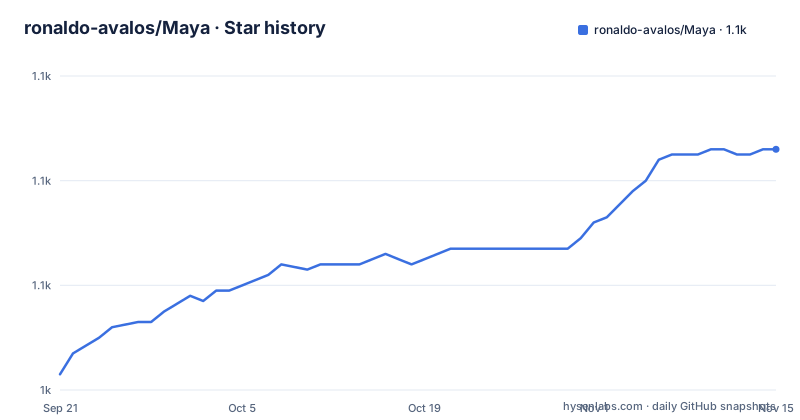
Star history
- ronaldo-avalos/Maya1,086 ★ · +43
| Repository | 2026-09-21 | 2026-11-15 |
|---|---|---|
| ronaldo-avalos/Maya | 1k | 1.1k |
43 Stars in the last 55 days, measured from the daily GitHub snapshot. Compare with other projects
Editorial analysis
The release notes describe 1.1 and the newest tag is 1.2
The release history runs on minor versions only. v1.0 is dated 2026-05-22, v1.1 on 2026-08-02 and v1.2 on 2026-08-23. The last commit on the default branch carries the same date as the v1.2 tag, and the repository is not archived.
The section headed as new in 1.1 lists four things: visible tap feedback with Ripple, Pulse and Ring styles; direct tap placement on the device screen with timing, colour and size controls in a dedicated timeline track and editor panel; smoother zoom editing with a continuous live preview while dragging and timeline snapping when the drag ends; and editor reliability work including a settings sidebar that stays usable in compact windows.
Nothing in the visible text describes what v1.2 changed. So a reader arriving at the repository gets a 1.1 feature list, a 1.2 download and no account of the difference, and the project does have a maintainer-facing release document at the root to put the details somewhere.
The pattern is worth noting once and then dropping: the feature sections describe the current behaviour rather than tracking a changelog, and individual items carry no version markers. The changelog is a separate file, and for a project on minor versions with a release every few weeks, that file is the one to read.
macOS 26.3 is the floor, and the build is an Xcode project
Two version floors are stated and both are high. Running Maya requires macOS 26.3, named as Tahoe, or later. Building it requires Xcode 26.5 or later. There is no lower bound offered and no alternative path described.
That is a real constraint on who can use the thing. A floor at a specific point release of a named macOS version excludes every earlier system, so the addressable audience is whatever share of machines already runs that release. For a tool whose entire input is an iPhone screen recording, the target user is often someone who has just bought a device, which is at least directionally consistent, but the app does not degrade on older systems and does not say it would.
The signing situation is the opposite of most projects in this category and is worth stating plainly: Maya is signed with a Developer ID and notarized by Apple, so it opens with a normal double-click and needs no security workaround. The download is a single disk image fetched from the releases page, with a project website alongside it.
Building from source is three commands, and the third is opening the project:
git clone https://github.com/ronaldo-avalos/Maya.git
cd Maya
open Maya.xcodeproj
An Xcode project directory is committed at the root and there is no package manifest, so there is no SwiftPM build path. Anything that wants to compile this in CI has to drive Xcode.
Named device frames fix the radius, and Generic and No-frame open it up
Framing is the core feature and it has a fixed and a free mode.
The fixed side is a list of real devices: iPhone 17 Pro, iPhone 16 Pro, iPhone 15 Pro, iPad Pro 11 inch in landscape, and MacBook Pro 14. The iPhones carry their titanium colour variants, with Cosmic Orange, Deep Blue, Silver and the natural, black, white and desert options named, and model and colour switch from the sidebar in one click. Each frame comes with the correct screen cutout and corner radius for that device, which is the point: the mockup is right because it was drawn for that device.
The free side is two other modes. Generic gives a brand-agnostic frame with a bezel width and bezel colour you set. No frame ships the bare recording with rounded corners only. And here is the detail: the corner radius slider appears only in those two modes. Pick a named iPhone and the radius is whatever that device has. Pick Generic and you can dial from sharp to stadium.
Around the device sits a canvas with five ratios, 1:1, 9:16, 4:5, 4:3 landscape and 16:9 widescreen, which covers Reels, Shorts, TikTok, YouTube, X and in-app overlays from one source. The device can be scaled and repositioned by slider and by dragging. A drop shadow is optional, with colour, blur, X and Y offset and opacity.
The default palette is the author's own brand colour
The background picker has five modes and two of them ship with colours that are not the user's.
Solid offers a brand-aligned palette plus a custom hex field. Gradient offers eight curated brand presets. Every one of those eight is described as derived from the app's official colour, given as the hex value `#6466FA`. So the default solid swatches and all eight gradient presets are one designer's brand, and an export made without touching the background settings carries that hex into the file.
That is a defensible default for a tool built by one person, and it is also a small trap for a marketing clip: the palette that looks deliberate is not yours. Anyone producing client work has to reach for the custom hex field, and the alternative mode, Image, means supplying your own asset and using scale-to-fill.
The fifth mode, Video Blur, takes the poster frame of your own video and blurs it as a backdrop, described as a Keynote-style treatment. That mode is generated from the content rather than from a fixed palette, which makes it the one background that is inherently brand-neutral.
None is the sixth thing worth noting: it shows a Photoshop-style checkered preview in the editor and exports with transparency, which is the entry point to the alpha pipeline described next.
Two export pipelines exist and only one of them is hand written
Export comes in two shapes, and the difference between them is the reason this app exists.
With a background, the output is an mp4 in H.264 at 1080 by 1080 or whatever aspect you chose. That is the ordinary social-media path.
With the background set to None, the output is a mov with HEVC and an alpha channel. The intended use is compositing the framed device over any interface inside another player, with AVPlayer and AVKit named as the consumers, plus Final Cut and Motion. That is the in-app tutorial case, where the device frame has to sit on transparent pixels rather than on a background colour.
Producing HEVC with alpha is not something the standard export session does, so the app carries a second pipeline for it: a hand-written asset reader and asset writer path with a custom video compositing implementation, and VideoToolbox is used for the encoder properties. Per-frame compositing is done with Core Image and Metal.
Everything else in the timeline bakes into both exports. Speed changes, zooms and tap animations are not overlays applied afterwards, so the transparent file is a real video rather than a video plus a sidecar.
Concurrency is handled the other way round, by keeping the work off the main thread. Swift's observation macros and actors are used, with export running on a dedicated actor so the interface never blocks. The player view is an AppKit view representable wrapping AVPlayerLayer, inside a SwiftUI app.
Loading a recording adopts it into the sandbox, which writes to your disk
Maya runs sandboxed, and it has a stated strategy for getting your file inside: hard links or copies, with videos brought into the sandbox container on load.
The reason given is thread safety of the read path, that AVFoundation reads work from any thread once the file lives in the container. That is a real constraint, since a sandboxed app cannot read arbitrary paths from a background queue the way it can read its own container.
The consequence is that opening a recording has a side effect on the filesystem. A hard link adds a directory entry, which costs no additional space and leaves the original untouched, but a hard link can only join two paths on the same volume. Drop a recording from an external drive into an app whose container lives on the internal disk and the link cannot be made, so the copy path runs and the file now exists twice. Nothing in the description says which path is taken or whether the user is told.
This is the right trade for a media app, because it is the difference between a preview that works and one that intermittently fails on a worker thread. It is also the kind of behaviour worth confirming before you hand the app a large file from an external volume, since the second copy is not free and does not announce itself.
The snap grid is a quarter second and it matches the scrub shortcut
The timeline's editing model is built around a quarter-second unit, and the pieces line up in a way that suggests one design decision rather than several.
Zoom events settle to 0.25 second intervals or to the nearby playhead when a drag ends, so a zoom cannot land at an arbitrary fraction of a second unless it is deliberately dropped next to the playhead. The keyboard shortcuts scrub by 0.25 seconds with the arrow keys and by 1 second with shift held, which is four grid steps. Speed segments run from 0.25 to 4 times with presets for common rates, so the slowest and fastest available playback differ by a factor of sixteen and the grid unit is shared with that range.
A zoom event carries a start, a duration, a scale, a focus position of top, centre or bottom, independent timing for the zoom in and the zoom out, and an animation curve. Six curves are offered: Spring, which is the default and described as a soft overshoot, Bouncy, Smooth, Snappy, Gentle and Linear. Five presets combine scale, focus, duration and curve, named Quick Punch, Dramatic, Top Focus, Bottom Focus and Soft Reveal, each with a looping visual preview.
Tap events are positioned by clicking the device screen at the playhead, styled as Ripple, Pulse or Ring, and live on their own track, rendering identically in the live canvas and in the export. Trim is set with draggable in and out handles or marked with I and O at the playhead, and option plus delete resets it.
Editorial conclusion
For turning an iPhone screen recording into something you can post, this does the job with a real editor rather than a template, and the transparent export path is the reason to care: HEVC with alpha means the framed device composites into another app's interface, which is the in-app tutorial case no mp4 can serve. Three things to check first. The OS floor is macOS 26.3, so confirm your machine qualifies before anything else. The named device frames fix the corner radius and the default palettes are the author's brand colour, so if you need your own brand you are in the custom hex path from the start. And the build needs Xcode, because the project ships as an Xcode project with no package manifest.
Frequently asked questions
What does the Maya app do and what does it need?
It is a native macOS app that wraps iPhone screen recordings in device mockups, adds zoom and tap events, adjusts pacing and exports shareable clips. It requires macOS 26.3 or later, a recording in mp4 or mov, and Xcode 26.5 or later to build from source.
Which device frames does Maya ship with, and can I change the corner radius?
It ships iPhone 17 Pro, 16 Pro and 15 Pro with their titanium colour variants, iPad Pro 11 inch in landscape, and MacBook Pro 14. Each named frame carries the correct cutout and corner radius for that device. The radius slider only appears in Generic mode, which has adjustable bezel width and colour, and in No frame mode.
How does Maya export a transparent video?
With the background set to None, it exports a mov using HEVC with an alpha channel, for compositing the framed device over any interface inside another player, or in Final Cut and Motion. That path uses a hand-written asset reader and writer pipeline with custom video compositing, since the standard export session does not produce alpha. With a background it exports an H.264 mp4 instead.
What are the default background colours in Maya?
Solid mode offers a brand-aligned palette plus a custom hex field, and Gradient mode offers eight curated presets, all of them described as derived from the app's own official colour, the hex value #6466FA. An export made without changing the background therefore carries the author's brand colour rather than yours.
Does Maya work outside macOS, and can I build it without Xcode?
It is macOS only, with macOS 26.3 as the stated floor. Building requires Xcode 26.5 or later, and the repository ships an Xcode project at the root with no package manifest, so there is no SwiftPM build path. The download is a notarized disk image signed with a Developer ID, so it opens with a normal double-click.
What does Maya do to my video file when I open it?
The app is sandboxed and adopts the file into its container on load, by hard link where that is possible or by copy otherwise, so that AVFoundation reads work from any thread. A hard link cannot span volumes, so a recording on an external drive is copied and then exists in two places.
Official sources
Add this badge to your README
If you maintain this project, the badge below links readers to this analysis and shows its maintenance status from the daily GitHub snapshot. Paste the markdown into your README; add ?metric=license or ?metric=stars to the image URL for a different field.

[](https://hysenlabs.com/projects/ronaldo-avalos-maya)Star history chart for your README
[](https://hysenlabs.com/projects/ronaldo-avalos-maya)Was this useful?