mastering-zsh: A Practical Guide to Advanced Zsh Customization
Advanced topics to take advantage of zsh 👩💻👨💻
At a glance
- What is it?
- mastering-zsh is a documentation workshop for people who already use zsh and want to understand its configuration, history, prompts, hooks, helpers, navigation, and file-management features. It deliberately avoids shell customization frameworks and focuses on the underlying zsh mechanisms.
- Who is it for?
- Adopt mastering-zsh if you already know basic command-line use and want to customize zsh without hiding the mechanics behind a framework. Do not use it as a complete zsh reference or expect installation, licensing, release, or operational guidance from this repository.
- Can I use it commercially?
- Not without permission. GitHub finds no licence file in the repository, and without a licence all rights are reserved by default: you may read the code but not reuse it. Check the README, or ask the authors, before using it.
- Is it still maintained?
- Activity is slowing. The repository last received commits 6 months ago.
- What is it written in?
- GitHub does not report a main language for this repository.
Answers come from the project's GitHub data, last synced on November 7, 2026, and from our analysis. They are not legal advice.
Star history
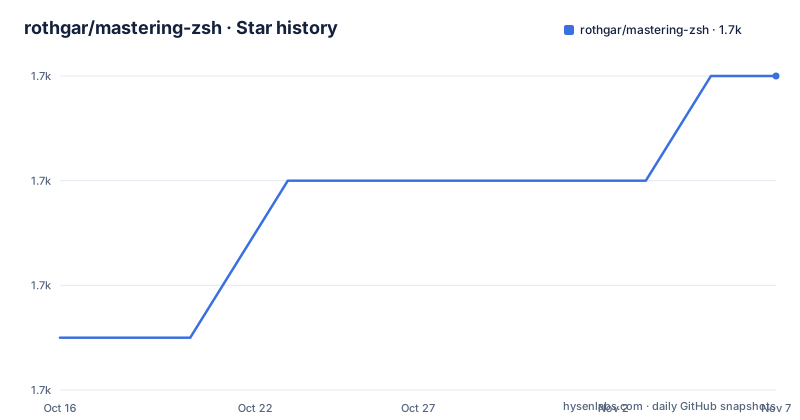
- rothgar/mastering-zsh1,658 ★ · +5
| Repository | 2026-10-16 | 2026-11-07 |
|---|---|---|
| rothgar/mastering-zsh | 1.7k | 1.7k |
5 Stars in the last 22 days, measured from the daily GitHub snapshot. Compare with other projects
Editorial analysis
What mastering-zsh teaches and who it is for
mastering-zsh is an advanced zsh tutorial organized around configuration and daily shell use. The repository is aimed at people who are already using zsh, or who want to start using it and already understand basic command-line work. Its stated prerequisites include knowing how to run a command, set a variable, and use command history. That boundary matters because the project is not presented as a beginner shell tutorial. It assumes familiarity with the shell and uses that foundation to explain customization and more advanced usage.
The repository focuses on features intended to improve productivity and help users get more from zsh. Its table of contents covers configuration files for general behavior, history, prompts, and hooks. It also covers helper mechanisms such as aliases, variables, functions, widgets, and completions. Separate usage sections address line movement, navigation, and file management. A final reference section is listed under Miscellaneous.
The project is intentionally selective. The README says it will not cover every zsh feature and directs readers to the man pages for that. It also does not use frameworks to customize the shell. Readers can use oh-my-zsh, prezto, or other frameworks, but the tutorial presents them as optional starting points rather than prerequisites. Its central choice is to teach zsh features directly so that the user can understand how the customization behaves.
The documentation path through zsh configuration
The repository layout shows a documentation-based workshop rather than an application with an executable package. The `docs/` directory contains separate Markdown files for configuration, helpers, usage, and reference topics. The configuration path begins with `docs/config/general.md`, followed by focused pages for history, prompts, and hooks. This structure separates shell behavior from the mechanisms used to customize it.
That separation gives the project a clear practical sequence. General configuration is presented first, while history and prompt changes have their own pages. Hooks receive separate treatment because they belong to shell behavior and customization rather than to a single setting. The README does not provide the contents of these pages, so it does not establish which individual options or commands each one uses. It does establish the areas the tutorial intends to cover.
This is a documentation choice with a trade-off. Readers who want a quick configuration recipe may find a general manual less convenient than a preset framework. In exchange, the repository does not require adopting a third-party configuration system to follow its examples. The README explicitly frames frameworks as useful for getting started quickly, but says they do not explain the advanced zsh features covered here. The project is therefore better suited to readers who want to inspect and understand the shell layer than to readers who want to install a complete opinionated setup.
Aliases, variables, functions, widgets, and completions
The helper section identifies five distinct customization mechanisms: aliases, variables, functions, widgets, and completions. Keeping these categories separate is useful for a tutorial because each represents a different level of shell behavior. An alias can shorten or reinterpret a command form, while a variable stores a value for use in configuration or commands. A function can group shell behavior into a named operation. A widget is presented as its own zsh helper category, and completions are treated as a separate topic rather than as an incidental part of prompt setup.
The README does not show the examples from these pages, so it would be inaccurate to claim a particular key binding, function signature, completion function, or variable name. The visible contribution is the taxonomy. It gives readers a map of the helper areas that a customized zsh environment may contain and connects those areas to the repository's `docs/helpers/` directory.
This design is particularly relevant to users who want to move beyond simply copying a prompt or a framework theme. The documentation appears to treat customization as a set of zsh concepts that can be studied independently. At the same time, the repository does not promise a complete catalog. The README again directs readers to the zsh man pages when they need feature coverage beyond the selected material.
Interactive navigation and file-management topics
The usage section addresses line movement, navigation, and file management. These topics sit alongside the helper and configuration sections, which indicates that the tutorial is concerned with interactive work rather than only startup configuration. The repository lists dedicated pages for each area: `docs/usage/line_movement.md`, `docs/usage/navigation.md`, and `docs/usage/file_management.md`.
The split reflects different kinds of shell work. Line movement concerns editing a command line, navigation concerns moving through or locating content in the shell environment, and file management concerns working with files from the command line. The README does not document the particular key bindings, commands, options, or behaviors used in those pages, so the article cannot safely turn those topic names into unsupported instructions.
For an experienced zsh user, this is the most relevant part of the table of contents to inspect first. The repository promises practical examples intended to improve productivity, and its usage pages are where those examples should be located. For a new user, the pages may be less approachable because the README assumes prior knowledge of command-line usage. The project does not describe itself as a complete course in zsh syntax or shell fundamentals.
Installation, releases, licensing, and maintenance
The README does not provide installation steps, package-manager commands, configuration snippets, or a first-use procedure. It directs readers to the documentation pages listed in the table of contents and says to use the zsh man pages for features not covered by the tutorial. Because no installation instructions are available in the repository content described here, this review does not include commands or a code example that could not be verified.
The repository has no GitHub releases, and its license is listed as unknown. That means the available project metadata does not establish a release cadence, an upgrade procedure, or the permissions and obligations attached to redistribution. Readers who need to reuse or distribute material should determine the licensing status from authoritative project files before relying on the documentation. This article does not provide legal advice or infer a license from the fact that the repository is public.
The repository is not archived. Its last push was on 2026-05-08. There are no GitHub releases, so the last push is the only maintenance signal available here, and it does not by itself establish release-based maintenance or a stable upgrade path. The repository is a documentation workshop with a small visible structure, `README.md`, `docs/`, and `img/`, rather than a package with declared versions.
Editorial conclusion
Adopt mastering-zsh if you already know basic command-line use and want to customize zsh without hiding the mechanics behind a framework. Do not use it as a complete zsh reference or expect installation, licensing, release, or operational guidance from this repository. Verify first that the linked documentation topics cover the exact features you need and compare those explanations with the relevant zsh manual pages.
Frequently asked questions
What is mastering-zsh for?
It is a tutorial for people who already know basic command-line usage and want to understand advanced zsh customization. The README focuses on productivity features rather than every zsh capability.
Does mastering-zsh require oh-my-zsh or prezto?
No. The README says the tutorial will not use frameworks and presents oh-my-zsh, prezto, and other options as choices readers may use separately. It does not make any framework a prerequisite.
Which zsh customization topics does mastering-zsh cover?
Its table of contents lists general configuration, history, prompts, hooks, aliases, variables, functions, widgets, completions, line movement, navigation, and file management. It does not claim to cover every zsh feature and points readers to the man pages for the rest.
Official sources
Add this badge to your README
If you maintain this project, the badge below links readers to this analysis and shows its maintenance status from the daily GitHub snapshot. Paste the markdown into your README; add ?metric=license or ?metric=stars to the image URL for a different field.

[](https://hysenlabs.com/projects/rothgar-mastering-zsh)Star history chart for your README
[](https://hysenlabs.com/projects/rothgar-mastering-zsh)Was this useful?