Zhihu++ splits into a 4 MB Lite build and a Full build with on-device embeddings
Project brief: Zhihu++ | ++: Ad-free, low cost, AI powered zhihu android 3rd-party client. AI .
At a glance
- What is it?
- The README of zly2006/zhihu-plus-plus is short and written in Chinese, but it names more engineering than a typical ad-free reader: a Lite APK under 4 MB, a Full build carrying an onnx runtime for embedding based filtering, a local recommendation algorithm that depends on a crawler nobody explains, three ways to log in including manual cookie entry, and opt-in telemetry that records your IP address.
- Who is it for?
- Zhihu++ is a reasonable pick for someone who already has a Zhihu account and wants the Android app without ads and promoted posts, and the Lite build is small enough that trying it costs almost nothing. Two things deserve a look first: the local recommendation mode needs a crawler the documentation never explains, and every session ultimately rides on a reimplemented signature algorithm plus private APIs that Zhihu can change without notice.
- Can I use it commercially?
- Yes, with strict conditions. AGPL-3.0 is a network copyleft licence: if people use a modified version over a network, for example as a hosted service, you must offer them its source code under the same licence.
- Is it still maintained?
- Yes. The repository received new commits within the last day.
- What is it written in?
- Mainly Kotlin, according to GitHub's language statistics.
Answers come from the project's GitHub data, last synced on November 14, 2026, and from our analysis. They are not legal advice.
Star history
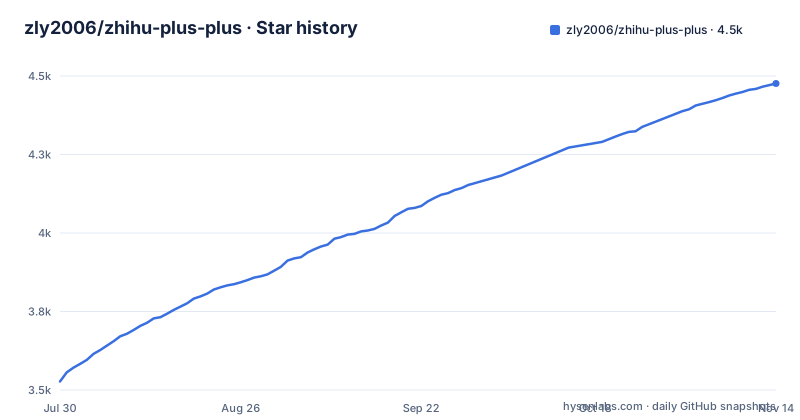
- zly2006/zhihu-plus-plus4,476 ★ · +949
| Repository | 2026-07-30 | 2026-11-14 |
|---|---|---|
| zly2006/zhihu-plus-plus | 3.5k | 4.5k |
949 Stars in the last 107 days, measured from the daily GitHub snapshot. Compare with other projects
Editorial analysis
Lite weighs under 4 MB, and Full exists for the onnx runtime
The size claim is the project's opening argument: Zhihu's own Android client is 110 MB or more, while the Lite APK is under 4 MB. There are two builds and the README explains the trade in plain terms. Full bundles an onnx framework so that inference runs offline on the device, which is what enables smart content filtering based on LLM embeddings. Lite drops that framework, so it has no smart content filtering, but it is smaller and faster.
The author is unusually blunt about why Full exists. The onnx framework is described as a personal technical experiment in on-device AI, and the note underneath concedes that several related features are not written yet, giving a local personal knowledge base as the example and marking it as something the author has not got around to. So the Full build is partly a platform for future work rather than a finished feature set. Which build to take is left as a choice for the user, with no version numbers, no per-build changelog and no minimum Android version stated anywhere in the file.
Three login doors, and one of them is a cookie you paste yourself
Authentication is offered three ways: a phone verification code, a QR code scan that signs the account in on a computer, and setting the cookie manually. The manual path is the one to understand before using the app, because it means a live session token is typed into the client by hand and then lives on the device.
Underneath those doors the project does something that most third-party clients avoid saying plainly. It implements the zse96 v2 signature algorithm and states that this lets it call 99 percent of the web-side APIs, and it can also simulate the Android-side API calls. That 99 percent figure carries no measurement behind it anywhere in the file, so treat it as an estimate rather than a test result. The practical consequence is structural: a client that reproduces a proprietary signing scheme and calls undocumented endpoints depends on the server keeping that scheme unchanged. Nothing in the documentation describes what happens when a signature check fails, whether a session gets invalidated, or whether an account can be affected by it.
Local recommendation depends on a crawler the README never explains
The recommendation story is the part with the most original claim. The project describes its own local recommendation algorithm as completely independent of Zhihu's algorithm, with the recommendation work done on the device, and says the weights can be customised freely. The catch is stated in the same sentence: the algorithm relies on a crawler running. Nowhere does the README say what that crawler fetches, how often it runs, where it stores what it collects, or how to start it.
The feed itself is more concrete. The home tab offers Web, Android, local and hybrid recommendation modes, and the app can switch between the logged-in and logged-out recommendation states specifically to avoid an information bubble. Alongside it sit a follow tab that can show where an activity came from, the hot list, the Zhihu daily digest, and search with hot-search terms, history, and sort, type and time filters.
The blocking system exports its word list, and one mode needs Full
Blocking is the widest feature surface and it comes in two very different technologies. Plain blocked words support regular expressions, and blocked users and blocked topics are separate lists, with topics also filtered out of the pin feed. The NLP layer is different: it matches on LLM embeddings and vector similarity, and it is available only in the Full build. The README also lists AI-based blocking of answers, reverse blocking, quality filtering, filter statistics, a record of what has been blocked, and export and import of the blocked word list for moving it between devices.
That export is the most useful detail for anyone who cares about the list rather than the reader, because it means the filter is data you own instead of a setting trapped in one install. Two things are missing from the account. Nothing says how a word list behaves when the embedding model behind the Full build changes, and nothing says how the two modes interact when a phrase is blocked by regex and also scores high on similarity. Separately, the feature list includes blocking Zhihu's Salt Select paid column, so paid-column promotions are removed from the feed rather than unlocked.
Telemetry is opt-in and still records your IP address
A client whose headline is privacy states its telemetry in four bullets, and the framing matters: it collects anonymous usage data only if you agree, the switch lives in settings, refusing has no effect on any feature. The four collected items are the number of app launches, the time of each launch, your IP address, and the Zhihu account ID after it has been anonymised with SHA256, and only when you are logged in. The README then states that nothing else is collected, naming browsing history, the input and output of the recommendation algorithm, and blocked word lists as examples.
That disclosure is more specific than most projects manage, and the hashed account ID is the right shape for the job. The item that deserves a second look is the IP address, which is the one field that can tie sessions to a place and a household on its own. It is listed plainly rather than buried, so a reader who objects can decide with full information, and the opt-out path is stated to cost nothing functionally. That is the honest version of a privacy tradeoff, even if the privacy pitch in the title makes the list look heavier than it is.
AIGC marking is a vote, and the tree carries a directory named for it
Among the community features there is one worth isolating: you can mark suspected AI generated content by name, and the app can show which marks counted and who cast them. Marking suspected generated content by vote is a different design from silently hiding posts, because it leaves the judgement visible and lets other people check it.
The top-level tree holds a directory called `aigc-vote-server/`, which suggests the votes are aggregated somewhere outside the app rather than kept on the device. The README does not say whether marking works offline, what happens when that server cannot be reached, who operates it, or whether a marked item is hidden by default or only labelled. For a project whose selling point is that recommendation and filtering happen locally, this is the one feature where the boundary between local judgement and outside coordination is left undefined, and it is worth asking about before relying on the label.
Shared Kotlin core, Rust modules for the signature, and a nightly tag
The build layout matches the feature claims more closely than the README does. Core code is shared through Kotlin Multiplatform between Android and an experimental desktop client. The tree carries `app/`, `shared/`, `shared-local-db/`, `desktopApp/` and `macosApp/`, and two Rust directories whose names line up with the two hardest parts described in the feature list: `rs-zse-sign/` for the signature algorithm and `rs-hf-tokenizer/` for the tokenizer, alongside `sentence_embeddings/` for the embedding based filter and a `.gitmodules` file, so at least some dependencies arrive as submodules. The desktop side ships a Windows MSI and a Linux AppImage that both bundle a Java runtime so nothing else has to be installed, and macOS gets an arm64 native application, with the desktop version labelled experimental.
Release cadence follows the same pattern as the tooling: a rolling `nightly` tag dated 2026-11-03, then 0.31.1 on 2026-10-23 and 0.31 on 2026-10-12, and the last push is dated 2026-11-02. The README closes by naming alternatives that also need no root, Hydrogen and Zhihu--, plus an unofficial Swift port for iOS, with an explicit note that listing them implies no endorsement from this project. It is a Chinese-language file with no build command anywhere, so installation happens through the releases pages rather than from the repository.
Editorial conclusion
Zhihu++ is a reasonable pick for someone who already has a Zhihu account and wants the Android app without ads and promoted posts, and the Lite build is small enough that trying it costs almost nothing. Two things deserve a look first: the local recommendation mode needs a crawler the documentation never explains, and every session ultimately rides on a reimplemented signature algorithm plus private APIs that Zhihu can change without notice. Before installing something you intend to keep, check the block word export format, confirm the telemetry switch really is off in settings, and decide whether the rolling nightly tag or a numbered build suits you.
Frequently asked questions
What is Zhihu++ and what does it do?
Zhihu++ is a third-party Zhihu client written in Kotlin, aimed at Android with an experimental desktop version. It removes ads, promotional posts, sales-driven content and the Salt Select paid column, adds a local recommendation algorithm, blocked word lists, export of content to PDF, image, Markdown and HTML, and nominative marking of suspected AI generated content. The license is AGPL-3.0.
What is the difference between the Lite and Full builds of Zhihu++?
The Lite APK is under 4 MB and has no smart content filtering, but it is smaller and faster. Full bundles an onnx framework for offline on-device AI inference, which is what powers LLM embedding based filtering, and the author describes that on-device AI work as a personal experiment with features such as a local personal knowledge base still unwritten.
How can you log in to Zhihu++?
Three ways are offered: a phone verification code, scanning a QR code to sign in on a computer, and setting the cookie manually. The app implements the zse96 v2 signature algorithm, which the README says allows calling 99 percent of the web-side APIs, and it can also simulate the Android-side API calls.
What data does Zhihu++ collect?
Telemetry is opt-in and can be refused or switched off in settings with no loss of function. When enabled it collects the app launch count, the launch time, your IP address, and the Zhihu account ID anonymised with SHA256 if you are logged in. The README states that nothing else is collected, including browsing history, recommendation algorithm input and output, and blocked word lists.
Does the Zhihu++ desktop version need Java installed separately?
No. The Windows MSI and the Linux AppImage both bundle a Java runtime, so downloading and installing is enough, and macOS is served an arm64 native application. The desktop client is described as experimental, and its core code is shared with the Android app through Kotlin Multiplatform.
What is Zhihu and what is it used for?
The README does not introduce Zhihu as a product, it assumes you already know it. What the feature list reveals about its shape is a question and answer site with long-form articles, short posts called pins, collections, a hot list, a daily digest, nested comment replies, notifications, official verification badges, and a paid membership column called Salt Select that this client blocks.
Official sources
Add this badge to your README
If you maintain this project, the badge below links readers to this analysis and shows its maintenance status from the daily GitHub snapshot. Paste the markdown into your README; add ?metric=license or ?metric=stars to the image URL for a different field.

[](https://hysenlabs.com/projects/zly2006-zhihu-plus-plus)Star history chart for your README
[](https://hysenlabs.com/projects/zly2006-zhihu-plus-plus)Was this useful?