RikkaHub: an Android chat client whose biggest warning is about forks
RikkaHub is an Android APP that supports for multiple LLM providers.
At a glance
- What is it?
- RikkaHub is a native Android client for talking to OpenAI, Google and Anthropic compatible APIs, with provider switching, MCP support, a proot Linux workspace for agents and a QR code format for moving a provider between devices. It takes no pull requests, ships under AGPL-3.0, and its README spends as much space on sponsors and relay services as on the app.
- Who is it for?
- RikkaHub suits an Android user who has several model providers and wants one conversation surface that switches between them, plus extras like prompt variables and character card import. It does not suit a team that intends to contribute patches, a desktop-first workflow, or anyone who would rather not hand an API key to a third-party relay.
- Can I use it commercially?
- Yes, with strict conditions. AGPL-3.0 is a network copyleft licence: if people use a modified version over a network, for example as a hosted service, you must offer them its source code under the same licence.
- Is it still maintained?
- Yes. The repository last received commits 1 day ago.
- What is it written in?
- Mainly Kotlin, according to GitHub's language statistics.
Answers come from the project's GitHub data, last synced on November 14, 2026, and from our analysis. They are not legal advice.
Star history
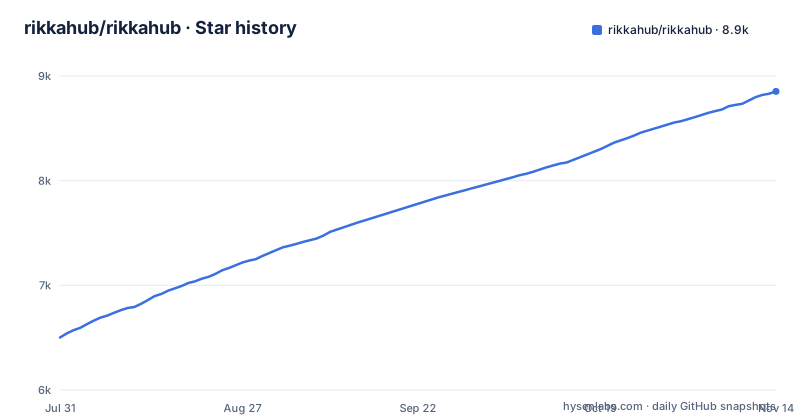
- rikkahub/rikkahub8,853 ★ · +2,351
| Repository | 2026-07-31 | 2026-11-14 |
|---|---|---|
| rikkahub/rikkahub | 6.5k | 8.9k |
2,351 Stars in the last 106 days, measured from the daily GitHub snapshot. Compare with other projects
Editorial analysis
One Android app, and the provider is the thing you swap
RikkaHub is described as a native Android LLM chat client that supports switching between different providers for conversations. That is the whole product idea in one line, and the feature list unpacks it.
Provider support is custom API, custom URL and custom models, with the compatibility claim stated as all OpenAI, Google, Anthropic compatible APIs. If your provider speaks one of those dialects, the app can talk to it. Providers can also be moved between devices as QR codes, which is a small feature with a real use: set a provider up once and hand it to a phone rather than retyping keys.
There is also freedom below the API line. Custom HTTP request headers and request bodies are supported, so a gateway that needs an unusual header is reachable.
Two routes to install, and the README marks one as recommended: the website at rikka-ai.com/download, and Google Play under the package `me.rerere.rikkahub`.
The README's own warning is about forks, not about bugs
The one WARNING block in the document is not about features or compatibility. It is this: there are many forked versions of RikkaHub, issues with forks are unrelated to RikkaHub, so please use forks with caution to avoid privacy leaks or excessive permission requests.
That is a specific threat model for a chat client. The app holds API keys, conversation history, and whatever documents you attach. A fork that asks for more permissions, or that points your traffic elsewhere, is the failure mode that matters here, and a fork with a similar name and icon is exactly how that happens.
So the install instruction is effectively a supply chain instruction. Download from the official website or Google Play, and treat any other build as a different application with the same name.
One more detail in the README points the same way: the star history chart is wired to the re-ovo/rikkahub repository, so the project has moved between owners, and forks taken from the earlier location may be old.
The sponsor table doubles as a map of the relay market
The sponsor section is unusually large, and the entries describe an industry rather than a feature set.
Aihubmix is recommended as a one-stop shop for mainstream models worldwide, naming OpenAI, Claude, Google Gemini, DeepSeek and Qwen among hundreds more. APIMart is a low-cost API platform for image and video generation, quoting GPT-Image-2 from $0.006 per image and describing an asynchronous API where you submit a task, get an ID, and fetch results by polling or callback. MaruCode describes a self-operated account pool with transparent rates, and 随想AI中转 sells relay access to Claude, Codex and Gemini with claims of no data resale, pay per use and 99.9% availability.
The interesting entry is ztest.ai, described as an independent verification platform whose results are public, with 23 probes across six dimensions covering protocol, identity, capability, content integrity, security and performance, used to detect faked or degraded models behind a relay.
So the README acknowledges the relay layer exists, and one sponsor exists to audit it. That is worth knowing before you paste an API key into either the app or a relay.
Multimodal input and a proot Linux workspace for agents
The feature list runs past chat in both directions. On input it handles images, text documentation, PDF and Docx. On output it renders Markdown with code highlighting, LaTeX formulas, tables and Mermaid.
The largest single item is Workspace, described as a proot-based Linux agent environment. That is a Linux userland running inside the app, without a rooted device, which is what makes an agent able to run shell commands and a file system rather than only produce text.
Around that sit MCP support and agent customisation, so external tools can be attached to a conversation. Search is a separate feature with its own provider list, Exa, Tavily, Zhipu, LinkUp, Brave and Perplexity, rather than being folded into the model.
One smaller item is easy to miss: prompt variables substitute things like the model name or the current time into a prompt.
Memory, translation and Silly Tavern cards on import
Three features make this a chat client rather than an API tester.
The first is file-based memory, so the conversation can carry facts forward across sessions instead of starting blank each time. The second is AI translation inside the app, which matters for a client whose audience spans Chinese and English READMEs: the repository ships README_ZH_CN.md and README_ZH_TW.md alongside the English one.
The third is Silly Tavern character card import, which means personas written for another character chat format can be brought in rather than retyped.
None of these are exotic, and together they describe the gap the app is aiming at: a place to hold long-running conversations with several providers, rather than a hosted service that keeps the history.
The privacy boundary moves with that choice. The prompts go to whichever provider you selected, and if that provider is a relay, to the relay as well.
No pull requests, and a google-services.json is needed before the build works
The development section is short and contains two statements that decide whether you can contribute at all.
The first is flagged IMPORTANT: this project does not accept pull requests.
The second is a tip: you need a `google-services.json` file at the `app` folder to build the app. That file is a Firebase configuration, so a fork of the source is not immediately buildable without supplying your own.
Development happens in Android Studio, and the documented stack is Kotlin as the language, Koin for dependency injection, Jetpack Compose for the UI, DataStore for preference storage, Room for the database, Coil for image loading, Material 3 Expressive for design, Navigation 3, OkHttp as the HTTP client and kotlinx.serialization for JSON.
Funding runs through Ko-fi and 爱发电.
Taken together: this is a distribution of an application rather than an open development project, and the AGPL-3.0 licence governs the code you receive rather than a contribution workflow.
The repository is wider than an Android app, including a TypeScript module
The tree explains more than the README does. Beyond the `app/` module and the Gradle files, there are directories named for individual capabilities: `ai/`, `search/`, `speech/`, `oauth/`, `workspace/`, `mediagen/`, `document/`, `material3/`, `common/`, `terminal/`, `tools/`, `ui/` and `web/` alongside `web-ui/`.
Two of those need explanation. There is a web front end next to the Android app, which matches the feature claim of web access for multi-platform use. And there is a TypeScript surface inside a Kotlin project: the root `package.json` declares a single dependency, `@types/ink`, and there is a `bun.lock` beside it.
There are also agent configuration directories at the root, `.agents/` and `.claude/`, plus an `AGENTS.md` and a `skills-lock.json`, which is the pattern a repository uses when it wants coding assistants to read the same instructions a human contributor would.
Releases move fast: 3.1.1 on 2026-10-24, 3.1.0 on 2026-10-19 and 3.0.0 on 2026-10-18, with the last push on 2026-11-02.
Editorial conclusion
RikkaHub suits an Android user who has several model providers and wants one conversation surface that switches between them, plus extras like prompt variables and character card import. It does not suit a team that intends to contribute patches, a desktop-first workflow, or anyone who would rather not hand an API key to a third-party relay. Verify three things before you install: that you are installing the build from the official website or Google Play rather than a fork, since the README warns about privacy leaks and excessive permission requests in forks; which relay or provider endpoint you are about to point the app at; and whether the features you want are in the version you can get, given the project takes no pull requests and ships releases frequently instead.
Frequently asked questions
how to use rikkahub
Install it, then add a provider. Providers are configured with a custom API endpoint, URL and model list, covering OpenAI, Google and Anthropic compatible APIs, and a provider can be moved between devices as a QR code. From there you start a conversation, pick the search providers you want, and use prompt variables for things like the model name or the time.
How do I download RikkaHub?
The README gives two routes: the website download at rikka-ai.com/download, which it marks as recommended, and Google Play under the package id me.rerere.rikkahub. It also warns that many forked versions exist and that issues with forks are unrelated to the project, advising caution to avoid privacy leaks or excessive permission requests.
Can I contribute code to RikkaHub?
Not through pull requests. The README states in an IMPORTANT note that this project does not accept pull requests. It is developed in Android Studio, and a tip in the same section says you need a google-services.json file in the app folder to build the app, so forking the source does not by itself give you a buildable project.
Official sources
Add this badge to your README
If you maintain this project, the badge below links readers to this analysis and shows its maintenance status from the daily GitHub snapshot. Paste the markdown into your README; add ?metric=license or ?metric=stars to the image URL for a different field.

[](https://hysenlabs.com/projects/rikkahub-rikkahub)Star history chart for your README
[](https://hysenlabs.com/projects/rikkahub-rikkahub)Was this useful?