DPI Detector: reading a filtered path instead of a dead site
DPI detection tool for internet censorship testing. Identifies TLS, TCP, HTTP, DNS blocking and 16-20KB connection drops
At a glance
- What is it?
- DPI Detector is a Python console tool for measuring censorship on Russian networks: it finds and classifies blocks on sites, hostings and CDNs, plus provider DNS substitution, instead of only reporting a host as unreachable. Its prebuilt binaries are still v4.2.4 artifacts while the container image always pulls the newest build, so the two install paths measure different code.
- Who is it for?
- DPI Detector earns the download if you have to tell one kind of block from another on a Russian line, because the report names TCP RST, Connection Abort and TLS MITM where a reachability check only says the host failed. It is the wrong tool for a reachability answer, and it cannot give an honest reading while bypass software is running.
- Can I use it commercially?
- Yes. MIT is a permissive licence: you can use, modify and sell software built on it, as long as you keep its copyright and licence notices.
- Is it still maintained?
- Yes. The repository last received commits 4 days ago.
- What is it written in?
- Mainly Python, according to GitHub's language statistics.
Answers come from the project's GitHub data, last synced on October 23, 2026, and from our analysis. They are not legal advice.
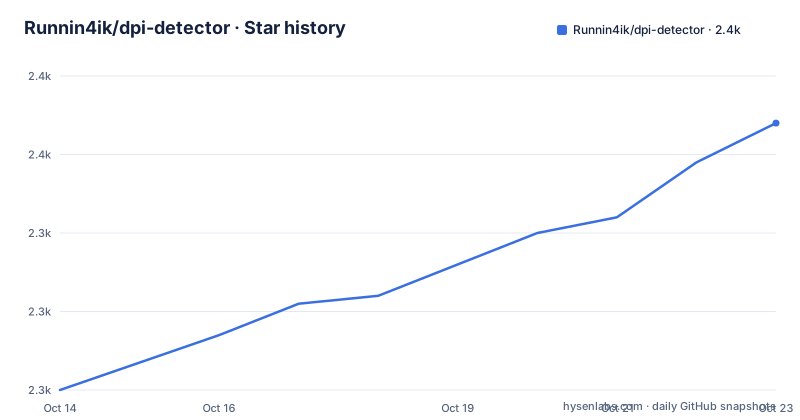
Star history
- Runnin4ik/dpi-detector2,354 ★ · +34
| Repository | 2026-10-14 | 2026-10-23 |
|---|---|---|
| Runnin4ik/dpi-detector | 2.3k | 2.4k |
34 Stars in the last 9 days, measured from the daily GitHub snapshot. Compare with other projects
Editorial analysis
Where the 14 to 34KB window gives a block away
The gap it targets is a host that answers for one client and fails for another, and the failure class named TCP 16-20KB covers connections that complete the handshake, carry payload, and then abort partway through. The stated window is 14 to 34KB after transfer begins, against CDNs and hostings, which is why a clean handshake proves very little on its own here.
The thresholds are not buried inside the entry script. tcp16.json sits at the repository root, config.yml keeps timeouts, DNS servers, the address family and concurrency beside it, domains.txt holds the host list, and whitelist_sni.txt holds the SNI names tried when looking for a name the path lets through. Every one of those is editable, which is also the trap: two machines running the same binary produce different tables as soon as their lists differ.
Console output goes through rich, which requirements.txt pins alongside httpx[socks,http2] and PyYAML.
DNS checks for UDP 53 interception and stub answers
The DNS half of a run is separate from the TCP half and answers different questions. Three findings are produced: interception of UDP/53, substitution of the returned address with a stub, and blocking of the encrypted resolvers DoH and DoT. Each lands in its own slot, so a resolver that answers with the wrong address is not filed under the same heading as one that never answers at all.
The third finding matters most for anyone who has already reacted to a bad lookup by switching resolvers. If the encrypted path is also blocked, that attempt fails silently in most clients, and the only visible symptom is that nothing loads. A check that names DoH and DoT separately turns that silence into a line in the report.
Which servers are queried, and over which family, are menu choices rather than a shipped file, with IPv4 and IPv6 available side by side. The repository description compresses the scope into one line: TLS, TCP, HTTP, DNS blocking, plus 16-20KB connection drops.
RST, Connection Abort, TLS MITM and timeouts kept apart
Five labels carry the verdict: TCP RST, Connection Abort, Handshake/Read Timeout, TLS MITM and SNI blocking. Keeping them apart is the entire value of the tool.
A refused connection and a stream that dies after 14 to 34KB render as the same error page in a browser, and they support completely different statements about what sits on the path. A reset arrives before any payload moves; a truncated stream arrives after the server already agreed to serve. A handshake that never completes points somewhere else again, and an intercepted TLS session is neither of those.
The availability check runs TLS 1.2, TLS 1.3 and HTTP against each host in the list and records which of the three answered. Reading a run means reading those per-protocol results, not hunting for one blocked or unblocked flag at the bottom of the screen.
A first run with a timeout, one domain and a proxy
A source install is ordinary: pip reads requirements.txt, which pins httpx[socks,http2]==0.28.1, h2==4.3.0, hpack==4.1.0, socksio==1.0.0, rich==15.0.0 and PyYAML==6.0.3. The entry point is the single script dpi_detector.py, and it accepts switches as well as a bare run.
git clone https://github.com/Runnin4ik/dpi-detector.git
cd dpi-detector
python -m pip install -r requirements.txt
python dpi_detector.py -t 2 -d discord.com -p socks5://127.0.0.1:1080
Four lines: fetch, enter the directory, install the pinned requirements, then run one host with a timeout of 2 seconds and route the probe through a SOCKS5 endpoint. A bare python dpi_detector.py opens the menu instead, where timeouts, your own domain lists, DNS servers, the address family and concurrency of 1, 5, 20, 50 or 100 are all settable.
Concurrency is not a cosmetic number here. Runs at 1 and at 100 are not comparable, so a saved result carries no meaning without the value that produced it.
Two container tags and a compose file that ignores your config
The container path and the binary path are not the same surface. The console build carries the :latest tag and launches interactively, with --pull=always making Docker fetch the newest published image rather than reuse a stale layer.
docker run --rm -it --pull=always ghcr.io/runnin4ik/dpi-detector:latestThe second tag, :web, adds a browser interface on port 7681 and runs detached with a restart policy.
docker run -d --name dpi-detector-web -p 7681:7681 --restart unless-stopped ghcr.io/runnin4ik/dpi-detector:webOpen http://localhost:7681, or the same port on the host address. The only environment variable set is TERM=xterm-256color, which is a colour hint for console tables.
Here is the trap. All four host mounts in the compose file are commented out, so a config.yml you edit next to docker-compose.yml is never read, and the run silently uses the copy baked into the image.
version: "3.8"
services:
  dpi-detector-web:
    image: ghcr.io/runnin4ik/dpi-detector:web
    ports:
      - "7681:7681"
Uncomment the volumes block to mount your own config.yml, domains.txt, whitelist_sni.txt and tcp16.json into /app, otherwise the defaults the Dockerfile copied in are what gets measured against.
Bypass software in the path rewrites the answer
A detector is only honest about the path it actually walks, and the project says so in a warning placed above the download instructions. With bypass software such as zapret or GoodbyeDPI running, results are distorted. The stated remedy is a procedure rather than a disclaimer: switch the bypass off before starting, or confirm that it processes all packets, ALL mode, instead of only a list. Which of the two you chose matters for the next run, because the report then records what the path did with that bypass still in front of it.
Nothing in this project alters packets to make a site load. The detection side ends at the report.
Wrong-tool cases follow from the same place. If the question is whether a host answers right now, one connection attempt is enough and this run is overkill. If the question is what the middle of the path does to a TLS stream, a named classification is far more useful than a timeout line. And because the domain list is yours to replace, a clean result on a domain list someone else chose tells you nothing about the domains you omitted.
Binaries pinned at v4.2.4 while the container ships v5
This is the discrepancy to settle before measuring anything. Every prebuilt binary linked from the download table is a v4.2.4 artifact: the Windows 10/11 executable, the legacy Windows 7/8 build, the Linux x86_64, ARM64, ARMv7 and x86 files, and the macOS Apple Silicon (M1-M4) and Intel builds. The one-line installers repeat the same pin, and the newest release tag is v5.0.0-alpha.20, dated 2026-09-24, after alpha.19 and alpha.18 on 2026-09-18. Docker, launched with --pull=always, always takes the newest build instead. A binary install and a container install can therefore be measuring different code.
The same gap runs through the dependencies. The requirement line states rich>=14.3.2 while requirements.txt pins rich==15.0.0, and both files ship together in one repository. The supported floor is Python 3.8, named in the badge and written as target-version py38 in pyproject.toml, while the image builds FROM python:3.14-alpine. That is a wide spread for a project that chose an old floor on purpose.
Two packaging details follow the same pattern: pytest>=8.0.0 sits in the requirements.txt that the production image installs, and pyproject.toml silences lint for tests/* outright while permitting unused imports in dpi_detector.py alone. Line length is capped at 120 with E501 disabled, because Rich console layouts run long.
The repository is MIT licensed, and the last push was on 2026-09-28.
One vantage point answers one question
Every reading describes the path your own machine is on, and nothing aggregates across networks. A second reading is easy to arrange: the SOCKS5 switch sends the same checks through a proxy, which relocates the exit point, and the menu's IPv4 and IPv6 choice decides which family the probes take. Comparing those two outputs is the closest this project comes to a before and after, and it works because the labels are identical either way.
The alternative approach is a remote probe, where the check runs inside someone else's network and reports back. The difference is vantage, not accuracy: a local run sees your provider's equipment, including anything sitting between your router and the provider.
The image offers no help there. Its build stage pulls build-base and yaml-dev, installs, removes both in the same layer, and adds an unprivileged user with uid 1000 before the entry point runs, so the container has no privileged access to the host's traffic either.
FROM python:3.14-alpine
RUN apk add --no-cache --virtual .build-deps build-base yaml-dev \
    && pip install --no-cache-dir -r requirements.txt \
    && apk del .build-deps \
    && adduser -D -u 1000 app
USER app
ENTRYPOINT ["python", "dpi_detector.py"]
The README does not document remote execution, scheduled re-runs or a results format to import later, which leaves a local run as a snapshot you have to record yourself.
Editorial conclusion
DPI Detector earns the download if you have to tell one kind of block from another on a Russian line, because the report names TCP RST, Connection Abort and TLS MITM where a reachability check only says the host failed. It is the wrong tool for a reachability answer, and it cannot give an honest reading while bypass software is running. Check which build you have before trusting a result: every prebuilt binary is a v4.2.4 artifact, while Docker always takes the newest image. An edited domains.txt changes the outcome as much as the tool choice does.
Frequently asked questions
What does DPI Detector actually measure?
It analyses traffic censorship on Russian networks and classifies blocks of sites, hostings and CDNs, the TCP16-20 class that aborts a connection partway through, plus substitution of DNS queries by the provider. It names the failure mode rather than only reporting that a host did not answer.
Does DPI Detector give a correct result while a VPN or bypass tool is running?
The project warns that bypass tools such as zapret or GoodbyeDPI distort the results, and asks you to switch them off first or confirm they process all packets, ALL mode, rather than only a list. Routing the run through a SOCKS5 proxy, as in socks5://127.0.0.1:1080, changes which path is being measured rather than removing the interference.
How do I run DPI Detector in Docker and open the web interface?
The console image is ghcr.io/runnin4ik/dpi-detector:latest, run with --pull=always so the newest build is fetched each time, and the browser interface is the separate tag ghcr.io/runnin4ik/dpi-detector:web published on port 7681. The address to open is http://localhost:7681.
Which platforms have ready-made DPI Detector builds?
Windows 10/11 and a legacy Windows 7/8 executable, Linux builds for x86_64, ARM64, ARMv7 and 32-bit x86, and macOS builds for Apple Silicon (M1-M4) and Intel. Android Termux and iOS a-Shell have instructions rather than binaries, and every downloadable build is tagged v4.2.4.
What Python version and libraries does DPI Detector need?
The README states Python 3.8+, with httpx[socks,http2]>=0.28.1, rich>=14.3.2 and PyYAML>=6.0.3, while requirements.txt pins rich==15.0.0 and PyYAML==6.0.3. The container image builds FROM python:3.14-alpine, so the packaged runtime is far newer than the stated floor.
Official sources
Add this badge to your README
If you maintain this project, the badge below links readers to this analysis and shows its maintenance status from the daily GitHub snapshot. Paste the markdown into your README; add ?metric=license or ?metric=stars to the image URL for a different field.

[](https://hysenlabs.com/projects/runnin4ik-dpi-detector)Star history chart for your README
[](https://hysenlabs.com/projects/runnin4ik-dpi-detector)Was this useful?