youtube-shorts-pipeline is a content engine called Verticals v3, and its anti-hallucination gate is a prompt
Automated YouTube Shorts pipeline: news → script → AI visuals → voiceover → captions → upload
At a glance
- What is it?
- A pipeline that turns a topic into a published short video across six stages, generalised in v3 from a news tool to a niche-configurable engine. What is worth reading closely is where the guarantees are enforced: the no-fabrication rule is an instruction to the model, the cheapest voice provider was broken by its vendor, and the two dependency files disagree about a provider the readme advertises.
- Who is it for?
- Verticals is worth reading if you are building automated short-form video and want a stage structure you can inspect and resume, because the per-stage design and the niche profile as a single editable file are the useful parts. Three things to settle.
- Can I use it commercially?
- Yes. MIT is a permissive licence: you can use, modify and sell software built on it, as long as you keep its copyright and licence notices.
- Is it still maintained?
- Yes. The repository last received commits 159 days ago.
- What is it written in?
- Mainly Python, according to GitHub's language statistics.
Answers come from the project's GitHub data, last synced on November 15, 2026, and from our analysis. They are not legal advice.
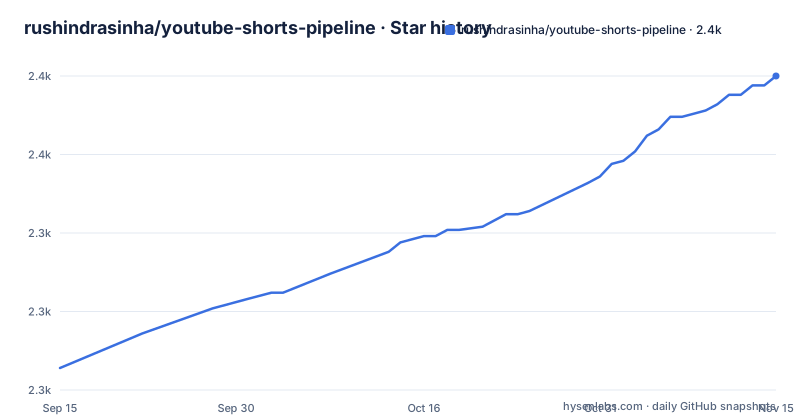
Star history
- rushindrasinha/youtube-shorts-pipeline2,375 ★ · +93
| Repository | 2026-09-15 | 2026-11-15 |
|---|---|---|
| rushindrasinha/youtube-shorts-pipeline | 2.3k | 2.4k |
93 Stars in the last 61 days, measured from the daily GitHub snapshot. Compare with other projects
Editorial analysis
The anti-hallucination gate is an instruction to the model
The research stage is where the pipeline makes its strongest claim, and the claim is worth reading precisely.
The stage searches a search engine, optionally scrapes the source URLs it finds, and then the document says every name, number and claim in the final script traces back to that research, calling it the anti hallucination gate and explaining that the model is instructed to use only facts from the research data and never its training knowledge.
So the gate is a sentence in a prompt. There is no citation table, no per-claim source pointer, and no step described that would fail the run when a number in the script has nothing behind it.
That is not a criticism of the design so much as a calibration point. Prompt-level instruction to a model reduces fabrication; it does not eliminate it, and this is the one stage of a six-stage pipeline where a silent error becomes a published video. A model that misremembers a date or invents a statistic will be described in the output exactly like a fact that was researched.
The mitigation available to the user is outside the pipeline: read the script, and check the numbers in it, before the upload stage runs. The upload is private by default, which gives you a window to do that.
Two dependency files disagree, and the missing one is a provider the readme lists
The repository has both a package metadata file and a requirements file, and they do not match.
The package metadata declares eleven dependencies: the Anthropic client, a requests library, an imaging library, a feed parser, three Google API client and auth libraries, a speech-to-text package, a YAML library, and the text-to-speech client. All eleven have version ranges with upper bounds.
The requirements file has the same eleven, with the same ranges, plus one more:
anthropic>=0.39.0,<1.0
litellm>=1.60.0,<2.0.0
requests>=2.31.0,<3.0
Pillow>=10.0.0,<11.0
A router library, present in the requirements file and absent from the package metadata.
That matters because the script stage is documented as generating through several providers including that router, and because the install instructions tell you to install from the requirements file. So the documented path works and the packaging path does not: anyone who installs the package rather than cloning the repository gets a distribution that cannot use one of the providers the readme advertises.
The version ranges themselves are disciplined, every one of them capped, which makes the missing entry look like an oversight rather than a policy. The development extra is a test runner and a mocking library, and the package finder is scoped to one namespace.
The free voice provider was broken by its vendor and the fix was a version bump
One of the release notes is entirely about a dependency failing, and it is the most honest line in the document.
The text-to-speech client is pinned to a major version above seven, and the note explains that the previous major line is rejected by the provider with forbidden responses, citing a status code.
So the recommended default voice, described elsewhere as free and cross-platform with several hundred voices, stopped working for a whole major version of its own client library, for a reason that had nothing to do with this project. A user on the older line got HTTP errors from a service they did not choose and cannot audit.
The pin in both dependency files now reflects that, which is the correct response and the reason to notice: the cheapest path through this pipeline is also the one with no contract. Every other provider in the list is a commercial API with a price and a key, and this one is a Microsoft service accessed through a client library whose compatibility is not guaranteed.
The readme does not say what to do if the provider changes again, and the pipeline offers no fallback to the paid providers for the voice stage. It does list one fallback for images, where a generation failure substitutes simple frames so assembly still completes.
One section promises TikTok export in this release and another lists it as unshipped
The Upload stage description ends with a claim about upcoming support: it publishes to YouTube privately by default with a title, description, tags, captions and a generated thumbnail, and then says TikTok and Instagram export is coming in the next minor version.
The next minor version is the current release. The section above it, listing what is implemented today, ends with a line of things not shipped yet, and the first of them is upload to the three short-video platforms other than YouTube.
So the same document, in two sections, says the feature is arriving in v3.1 and that v3.1 does not have it. The version heading above both is v3.1.0.
Everything else in that not-shipped list is a roadmap item rather than a promise, and the document says so in the same sentence. Which makes the Upload stage's sentence the outlier: it is the only place in the readme where something described as upcoming is attached to a version number that has already been released.
For anyone building on this, the practical answer is in the list rather than in the prose: YouTube upload is the only platform implemented.
The niche intelligence is four hook templates in a YAML file
The feature the readme says makes this different from every other tool in the category is a directory of YAML files, and the example is short enough to read in full.
name: tech
display_name: "Tech & AI News"

script:
  tone: "informed, slightly opinionated, conversational"
  pacing: "fast, dense with facts, no filler"
  hooks:
    - pattern: "contrarian_take"
      template: "Everyone is celebrating {topic}. Here's why that's a problem."
    - pattern: "breaking_news"
      template: "This just happened and nobody is talking about it."
So a niche profile is a tone string, a pacing string and a list of hook patterns, each one a template with a placeholder. What the readme calls niche intelligence is this file read by each stage: the script stage takes the tone and the hooks, the visual stage takes a vocabulary, the caption stage takes a font, the music stage takes a mood.
Fifteen profiles ship, plus a general fallback, and building your own means copying one and editing it. The architecture diagram, which is where the readme summarises the whole design, says fifteen built in and does not mention the fallback.
The hook templates are the part to look at first, because they are what actually appears in your published video. They are genre conventions, and they are the same four strings for every topic in the niche.
Cost per video is stated three times with no breakdown
The headline block gives a cost and a duration, and the paragraph beneath it gives both again.
Topic in, published short out, any niche, at a stated fraction of a dollar per video. Then the same figure again, attached to ninety seconds of video and about three minutes of wall time.
There is no derivation anywhere in the document. No model is named for the cost, no provider is priced, no stage is broken down, and the two figures are not reconciled with each other. A pipeline with six stages, at least four of which call a paid API, has a cost that depends almost entirely on which model you configure and how long the script is.
The interesting part is that the three-minute wall time is the more falsifiable of the two, and it is the one that would change most with your hardware and your provider. The readme also claims fifteen ready-made profiles can be built in five minutes, which is the other unbacked number in the same paragraph.
The document is otherwise precise about what is not implemented, listing a user interface, container support, a notebook service, several providers and two image backends as roadmap items. It is the cost figure, of everything on the page, that is the least substantiated.
The product is Verticals v3 and the repository is named for the old pipeline
The readme opens with a note that exists because the two names do not match: the product is called one thing, and the GitHub repository is named for what the product used to be.
So the install instructions clone a repository whose name describes an earlier version, change into a directory with that name, and then invoke a module with a third name:
git clone https://github.com/rushindrasinha/youtube-shorts-pipeline.git
cd youtube-shorts-pipeline
pip install -r requirements.txt

python -m verticals run --topic "your topic" --niche tech
Three names in four lines. The distribution name in the package metadata is the third one, and the version in that file matches the release.
The changelog explains the rename: the previous major version was an esports news pipeline, and this one is described as a general purpose content engine for any niche, topic or creator. The readme says the old news flag still works for backwards compatibility, while recommending the newer topic flag as the public interface.
So the public surface has been renamed once and the deprecated flag is still accepted. A script written against the old interface will keep running, which is friendly, and will also keep a name in it that no longer describes what the tool does.
Both diagrams stop mid-word, and a skill file is never mentioned
Two illustrations in the readme are incomplete, and both stop in the middle of a word rather than at a line boundary.
The architecture diagram is the six-stage flow, from research through script, visuals, voice, captions and assembly to upload, with a niche profile box above it. The diagram breaks inside the visuals column, partway through a cell that starts with the image provider's name. So the third stage of the pipeline is the one you cannot see the full width of.
The niche profile example breaks inside a template string, in the middle of a sentence in the fourth hook pattern. That one is more annoying, because the hooks are the part of the profile you would most want to copy.
Neither is marked as partial, and the section headings around them are not truncated, so a reader skimming the page sees two diagrams that look finished.
The tree also holds a skill definition file, a references directory, a scripts directory, a tests directory and two worked examples, and the readme's visible text does not mention any of them. The skill file in particular suggests the pipeline is packaged for an agent to drive, which is a materially different way to use it from the command line the documentation covers.
Editorial conclusion
Verticals is worth reading if you are building automated short-form video and want a stage structure you can inspect and resume, because the per-stage design and the niche profile as a single editable file are the useful parts. Three things to settle. The claim that every claim in the script traces back to research is enforced by telling the model not to use its training knowledge, so verify the numbers yourself before publishing. The cost and duration figures in the readme have no breakdown, so budget from your own provider prices rather than from the stated number. And install from the requirements file rather than the package metadata, because the metadata is missing a provider the documentation lists.
Frequently asked questions
What is the youtube-shorts-pipeline repository?
It is the open source engine called Verticals v3, and the readme notes the name difference explicitly. The pipeline runs six stages from a topic to a published short video: research, script, visuals, voiceover, captions, assembly, then upload. The previous major version was an esports news pipeline and this one is described as general purpose for any niche.
How does the Verticals pipeline stop the AI from making things up?
By instruction rather than mechanism. The research stage searches a search engine and optionally scrapes sources, and the readme says the model is instructed to use only facts from that research and never its training knowledge. No citation check or per-claim source check is described, and the upload is private by default so the script can be checked first.
What does the Verticals niche profile contain?
A YAML file with a display name, a script tone, a pacing rule and a list of hook patterns, each one a template string with a placeholder. Every stage reads from it: the script stage takes tone and hooks, the visual stage a vocabulary, captions a font, music a mood. Fifteen profiles ship plus a general fallback, and you add your own by copying one.
Which video platforms can the Verticals pipeline upload to?
YouTube, privately by default, with a title, description, tags, subtitles and a generated thumbnail. The not-shipped list in the same readme includes upload to the other short-video platforms, even though the upload stage paragraph says that support is coming in the next minor version, which is already released.
How do I install the Verticals pipeline?
Clone the repository, change into the directory, install from the requirements file, and run the module with a topic and a niche. Install from the requirements file rather than the package metadata, because the requirements file includes a provider router that the package metadata omits and that the readme lists as a supported script provider.
What are the dependency and platform requirements for Verticals?
Python 3.10 or newer. Eleven dependencies are declared in the package metadata, all with upper bounds, plus a provider router that appears only in the requirements file. Transcription uses a local speech-to-text package and the voice stage can use a free cross-platform text-to-speech client, two paid providers, or a local system command as a fallback.
Official sources
Add this badge to your README
If you maintain this project, the badge below links readers to this analysis and shows its maintenance status from the daily GitHub snapshot. Paste the markdown into your README; add ?metric=license or ?metric=stars to the image URL for a different field.

[](https://hysenlabs.com/projects/rushindrasinha-youtube-shorts-pipeline)Star history chart for your README
[](https://hysenlabs.com/projects/rushindrasinha-youtube-shorts-pipeline)Was this useful?