rustc_codegen_gcc: a GCC backend for rustc built on libgccjit
libgccjit AOT codegen for rustc
At a glance
- What is it?
- rustc_codegen_gcc is a work in progress code generation backend for rustc that hands code generation to GCC through libgccjit, which opens up architectures LLVM does not support and lets GCC's own optimisations apply. It is aimed at compiler hackers and at anyone who needs Rust on a platform the default toolchain cannot reach, and it needs a patched libgccjit to work at all.
- Who is it for?
- rustc_codegen_gcc suits a compiler developer testing GCC's optimiser inside the Rust toolchain, and a user who needs to compile Rust for a target LLVM does not cover and who is prepared to build a patched GCC. It does not suit ordinary Rust development, since the default LLVM backend remains the right tool for that, and it does not suit anyone who wants stable, documented behaviour, because the project describes itself as work in progress.
- Can I use it commercially?
- Yes. Apache-2.0 is a permissive licence: you can use, modify and sell software built on it, as long as you keep its copyright and licence notices.
- Is it still maintained?
- Yes. The repository received new commits within the last day.
- What is it written in?
- Mainly Rust, according to GitHub's language statistics.
Answers come from the project's GitHub data, last synced on November 7, 2026, and from our analysis. They are not legal advice.
Star history
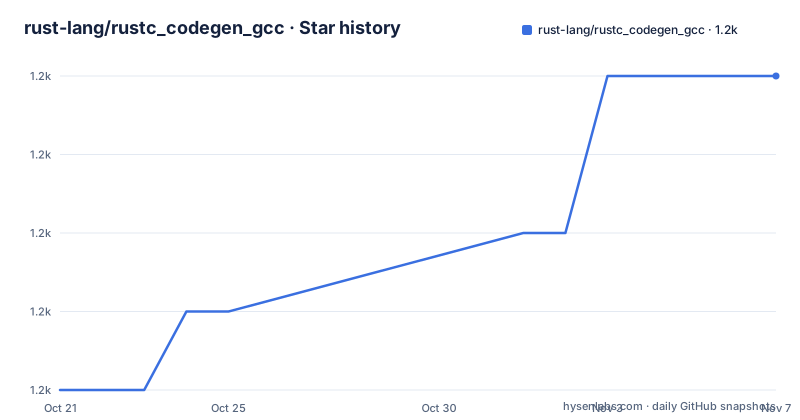
- rust-lang/rustc_codegen_gcc1,185 ★ · +4
| Repository | 2026-10-21 | 2026-11-07 |
|---|---|---|
| rust-lang/rustc_codegen_gcc | 1.2k | 1.2k |
4 Stars in the last 17 days, measured from the daily GitHub snapshot. Compare with other projects
Editorial analysis
Why a GCC backend exists at all
rustc_codegen_gcc is a GCC code generation backend for rustc, which means it can be loaded by the existing rustc frontend but benefits from GCC, in the sense that more architectures are supported and GCC's optimizations are used. The project description calls it a WIP libgccjit codegen backend, and the README is titled as a work in progress.
The motivation is stated in two parts. The primary goal is to be able to compile Rust code on platforms unsupported by LLVM, and the secondary goal is to check whether using the GCC backend provides any run-time speed improvement for programs compiled with rustc. Both are research questions rather than product goals, and the second one is the interesting one, because the answer determines whether this is a long term alternative backend or a portability tool with an interesting side effect.
There is a naming point worth clearing up, since it confuses people who have read about libgccjit elsewhere. Despite its name, libgccjit can be used for ahead-of-time compilation, as is used here. libgccjit is normally associated with just-in-time compilation, and the fact that this project drives it as an ahead-of-time code generator is what makes the whole thing possible with rustc's existing pipeline.
The repository is hosted under the rust-lang organisation, which signals that this is an official sandbox for the project rather than a personal experiment, and there are chat channels on IRC and Matrix for it. The licence is dual, MIT OR Apache-2.0, with both LICENSE-APACHE and LICENSE-MIT files at the top level, and the Cargo manifest records the same dual licence.
The patched libgccjit requirement
The single most important operational fact in the README is that this requires a patched libgccjit in order to work. You need to use the fork of GCC published by the rust-lang organisation, which already includes these patches.
The good news is that you probably do not need to build that fork yourself. The default configuration downloads a libgccjit built in the CI that already contains the patches, so the default path is a download rather than a multi-hour GCC build. The build script is the y.sh script at the root of the repository, and the quick start sequence is short.
git clone https://github.com/rust-lang/rustc_codegen_gcc
cd rustc_codegen_gcc
cp config.example.toml config.toml./y.sh prepare # downloads and patches sysroot
./y.sh build --sysroot --release
# Verify setup with a simple test
./y.sh cargo build --manifest-path tests/hello-world/Cargo.toml
# Run full test suite (expect ~100 failing UI tests)
./y.sh test --releaseThat last comment is worth pausing on. The expected state of the full test suite includes roughly a hundred failing UI tests. That is the honest baseline of a work in progress backend, and it tells you what kind of project this is: a place where a failing test is a to-do item rather than a blocker. The dependencies are listed too, rustup, DejaGnu for running the libgccjit test suite, and additional packages including flex, libmpfr-dev, libgmp-dev, libmpc3 and libmpc-dev.
The README also notes that you can update rustc_codegen_gcc without worrying about GCC, so the two move independently as long as you stay on the default configuration.
Building your own GCC when you need to test a patch
If you have written a patch for GCC and want to test it against this backend, you need to build the fork yourself, and the README lays out the sequence. The instructions come from the GCC online documentation for the JIT internals, which the README recommends reading if you hit problems.
git clone https://github.com/rust-lang/gcc
sudo apt install flex libmpfr-dev libgmp-dev libmpc3 libmpc-dev
mkdir gcc-build gcc-install
cd gcc-build
../gcc/configure \
    --enable-host-shared \
    --enable-languages=jit \
    --enable-checking=release \
    --disable-bootstrap \
    --disable-multilib \
    --prefix=$(pwd)/../gcc-install
make -j4
Two of those configure flags matter for a compiler project. The --enable-checking=release flag turns on extra checks, and the comment in the README explains why, it enables extra checks which allow to find bugs. The --enable-host-shared flag builds GCC as a shared library, which is what makes the libgccjit shared object that the backend loads at runtime. The --disable-bootstrap option saves the time a full three stage bootstrap would take, which is the right trade for a development build.
To run the libgccjit tests themselves you need the C++ language enabled as well, so --enable-languages=jit,c++, and DejaGnu installed. The test invocation is make check-jit, and a single test can be run with make check-jit RUNTESTFLAGS pointing at a specific file in jit.dg.
The path to your own build then goes into config.toml, in the gcc-path setting, and the download-gccjit setting has to be commented out so the script does not overwrite your build with the downloaded one.
gcc-path = "[MY PATH]"
# download-gccjit = true
Running rustc and Cargo through the backend
The usage section is short because the wrapper script does the work. You run the prepare step and then the build step, in that order.
./y.sh prepare
./y.sh build --sysroot
To check that everything is working, the project builds a hello world crate from the tests directory.
./y.sh cargo build --manifest-path tests/hello-world/Cargo.tomlFor Cargo itself, the channel has to be set, and it is derived from whether you built in release mode.
CHANNEL=release $CG_GCCJIT_DIR/y.sh cargo runIf you compiled cg_gcc in debug mode, that is, you did not pass --release to the build step, you use CHANNEL=debug instead, or omit CHANNEL=release entirely. The same applies to running rustc directly.
CHANNEL=release ./y.sh rustc my_crate.rsThe manual form is documented but explicitly not recommended. It shows the shape of the invocation, which is worth reading even if you never type it, because it names the moving parts. The library path and library path environment variable both point at the gcc-path value, the toolchain comes from the rust-toolchain.toml in the CG_GCCJIT_DIR directory, panic is set to abort, the codegen backend flag points at the built librustc_codegen_gcc.so shared object, and the sysroot comes from the build_sysroot directory.
LIBRARY_PATH="[gcc-path value]" LD_LIBRARY_PATH="[gcc-path value]" rustc +$(cat $CG_GCCJIT_DIR/rust-toolchain.toml | grep 'channel' | cut -d '=' -f 2 | sed 's/"//g' | sed 's/ //g') -Cpanic=abort -Zcodegen-backend=$CG_GCCJIT_DIR/target/release/librustc_codegen_gcc.so --sysroot $CG_GCCJIT_DIR/build_sysroot/sysroot my_crate.rsThe -Zcodegen-backend flag is the interesting part, because it is the seam where an unofficial backend attaches to the existing compiler.
Environment variables for inspecting GCC internals
A large part of the README is devoted to environment variables, and they fall into two groups. The first group is about debugging, and it is unusually thorough.
There are variables to dump all compilation modules, with CG_GCCJIT_DUMP_ALL_MODULES set to 1 creating a dump for each module during compilation and storing it in /tmp/reproducers/, and CG_GCCJIT_DUMP_MODULE to dump one named module. There is a variable to dump a C-like representation to /tmp/gccjit_dumps with debug info enabled, and then a whole ladder of internal representations. CG_GCCJIT_DUMP_RTL dumps RTL for virtual registers, CG_GCCJIT_DUMP_RTL_ALL dumps all RTL passes, CG_GCCJIT_DUMP_TREE_ALL dumps all tree or GIMPLE passes, CG_GCCJIT_DUMP_IPA_ALL dumps all interprocedural analysis passes, CG_GCCJIT_DUMP_CODE dumps the final generated code, CG_GCCJIT_DUMP_GIMPLE dumps the initial GIMPLE representation, and CG_GCCJIT_DUMP_EVERYTHING enables all of the intermediate representations and passes. There is also CG_GCCJIT_KEEP_INTERMEDIATES to keep the intermediate files, and CG_GCCJIT_VERBOSE for verbose output from the GCC driver.
The second group is about the build itself. CG_RUSTFLAGS sends additional flags to rustc, and the README notes it can be used to build the sysroot without unwinding by setting CG_RUSTFLAGS=-Cpanic=abort, which is a workaround for a class of problems when the sysroot and the code generator disagree about unwinding. CG_GCCJIT_LIBRARY_PATH adds a custom path to the libgccjit library file to load, and if the file is not found or cannot be loaded, it errors rather than falling back silently.
For a project whose whole purpose is to look at what GCC does with Rust code, this set of switches is the actual working surface, and it is far more complete than a typical compiler backend offers.
The Rust side of the tree and how the pieces fit
The repository layout is a standard rustc backend shape. The src/ directory holds the backend itself, build_system/ has the support scripts, patches/ holds the patches that get applied to the sysroot, target_specs/ has the target specification files, tools/ has helper tooling, tests/ holds the test suite including the hello world crate, and example/ holds small Rust programs used as inputs. The build_system/ and scripts/ directories are where the y.sh driver and the patching logic live, and the libgccjit.version file records the version of GCC that the backend is pinned to.
The Cargo manifest shows the shape of the crate. It is a dylib, which is what a rustc codegen backend has to be, since the compiler loads it as a shared object at the -Zcodegen-backend path. The gccjit crate is a dependency at version 7.2.0 with the dlopen feature, which is how the backend loads the libgccjit shared library at runtime rather than linking against it at build time. The object crate is used for reading object files back, with std and read features and default features off, and tempfile is there for the dumping functionality. There is a commented out git dependency and a commented out local path dependency for gccjit.rs, which suggests the crate is normally pulled from crates.io but a fork can be substituted.
The feature flags are minimal and honest. A master feature maps onto gccjit/master, and default is master, so the default build tracks the development branch of the gccjit bindings rather than a release. The dev dependencies are lang_tester and boml for the language test suite, and libc for the C interface. The test harness is custom, with a test named lang_tests pointing at tests/lang_tests.rs and harness set to false, which is what lets the project run a compiler test suite with its own conventions rather than the standard libtest harness.
Where rustc_codegen_gcc is the wrong tool
Three cases argue against it. The first is ordinary Rust development. The LLVM backend is the default, it is the one the language is designed around, it has the best debugging story and the best target coverage, and nothing in this project changes that for the vast majority of users. Choosing this backend means accepting a work in progress with roughly a hundred failing UI tests in the default configuration, which is a research baseline rather than a release.
The second case is a project that just needs a new architecture. The goal here is to compile Rust on platforms LLVM does not support, but reaching that goal means building or downloading a patched GCC, dealing with a sysroot that has to be prepared and patched, and then living with a backend whose compatibility with the Rust language is still being measured by its own test suite. If your real problem is a missing target, a cross compilation toolchain for that target is a much smaller project than a compiler backend.
The third case is anyone who needs reproducibility from a released artifact. The repository publishes no GitHub releases, the version in the Cargo manifest is 0.1.0, and the default feature tracks the master branch of the gccjit crate, so what you build today can differ from what you build next month. The dual MIT or Apache-2.0 licence is the most permissive combination available, so licensing is never the obstacle; the obstacle is that the artefact is a moving tip rather than a versioned release.
The debugging environment variables are worth calling out as the practical strength. A developer working on GCC's optimiser, or on the interaction between rustc's MIR and GCC's GIMPLE pipeline, gets dumps of every intermediate representation, from the initial GIMPLE through the tree, RTL and IPA passes to the final code. For that specific research question this is a better instrument than anything the LLVM path offers, and it is the reason the project is worth a place in the rust-lang organisation despite being a research tool.
Editorial conclusion
rustc_codegen_gcc suits a compiler developer testing GCC's optimiser inside the Rust toolchain, and a user who needs to compile Rust for a target LLVM does not cover and who is prepared to build a patched GCC. It does not suit ordinary Rust development, since the default LLVM backend remains the right tool for that, and it does not suit anyone who wants stable, documented behaviour, because the project describes itself as work in progress. Before you start, read the README note about the patched libgccjit requirement, decide whether the default configuration that downloads a prebuilt patched library is acceptable to you, and note that the last push was on 2026-10-14.
Frequently asked questions
What is rustc_codegen_gcc?
It is a work in progress code generation backend for rustc that hands code generation to GCC through libgccjit, so it loads into the existing rustc frontend while getting GCC's architectures and optimisations. The primary goal is compiling Rust on platforms LLVM does not support.
Do I need a patched libgccjit to use rustc_codegen_gcc?
Yes. The README states it requires a patched libgccjit and points to the rust-lang fork of GCC that already includes the patches. The default configuration downloads a libgccjit built in the CI with those patches, so you do not have to build the fork yourself unless you are testing your own GCC patch.
How do I build and test rustc_codegen_gcc?
Clone the repository, copy config.example.toml to config.toml, then run ./y.sh prepare to download and patch the sysroot and ./y.sh build --sysroot --release to build. Verify with ./y.sh cargo build --manifest-path tests/hello-world/Cargo.toml, and run the suite with ./y.sh test --release, expecting roughly a hundred failing UI tests.
How do I point rustc_codegen_gcc at my own GCC build?
Build the rust-lang fork of GCC with --enable-host-shared and --enable-languages=jit, then set the gcc-path value in config.toml to the directory holding libgccjit.so and comment out the download-gccjit setting so the script does not replace your build with the downloaded one.
Official sources
Add this badge to your README
If you maintain this project, the badge below links readers to this analysis and shows its maintenance status from the daily GitHub snapshot. Paste the markdown into your README; add ?metric=license or ?metric=stars to the image URL for a different field.

[](https://hysenlabs.com/projects/rust-lang-rustc-codegen-gcc)Star history chart for your README
[](https://hysenlabs.com/projects/rust-lang-rustc-codegen-gcc)Was this useful?