ip-as-logo sends six corner-set animal mascots down one prompt
A compact Agent Skill for highly simplified, rounded, subtly neo-skeuomorphic IP mascot logos.
At a glance
- What is it?
- An Agent Skill whose only job is to brief an image model for rounded, three-color mascot squares. It holds a narrow subject default, refuses SVG, and delivers one-pass batches without retries.
- Who is it for?
- Adopt ip-as-logo if your host agent already has GPT Image 2 or one of the listed alternatives and you want six rounded animal mascots from a single request. Skip it if you need vector output, a fixed brand palette system, or a subject outside the familiar-animal default.
- Can I use it commercially?
- Yes. MIT is a permissive licence: you can use, modify and sell software built on it, as long as you keep its copyright and licence notices.
- Is it still maintained?
- Yes. The repository last received commits 9 days ago.
- What is it written in?
- GitHub does not report a main language for this repository.
Answers come from the project's GitHub data, last synced on November 15, 2026, and from our analysis. They are not legal advice.
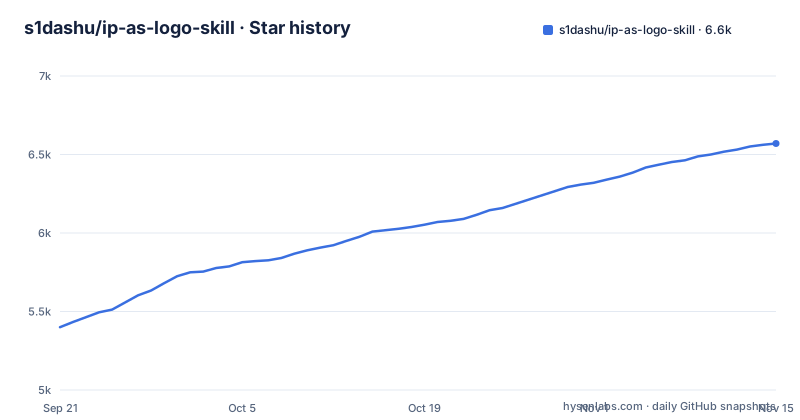
Star history
- s1dashu/ip-as-logo-skill6,570 ★ · +1,170
| Repository | 2026-09-21 | 2026-11-15 |
|---|---|---|
| s1dashu/ip-as-logo-skill | 5.4k | 6.6k |
1,170 Stars in the last 55 days, measured from the daily GitHub snapshot. Compare with other projects
Editorial analysis
A SKILL.md and an assets directory, with nothing to build
ip-as-logo is instruction text, not a program. The repository root holds .gitignore, LICENSE, README.md, SKILL.md and an assets directory. There is no build step, no package manifest and no runtime entry point. What ships is a set of rules a compatible agent reads before it touches an image model.
That makes adoption cheap and the surface small. The skill follows the open Agent Skills format, so it is not welded to one agent product. Codex, Coze, Doubao, YouMind, Manus, Gemini Apps and Replit Agent are all named as supported hosts, and the same SKILL.md travels when you switch between them.
Two facts are worth settling before you install anything. The project publishes no GitHub releases, so there is no versioned changelog to diff and no version constraint to pin. The last push landed on 2026-10-30 and the repository is not archived, which means changes arrive when the author pushes them rather than on a schedule. The repository is licensed MIT.
Three directions first, then A1 through C2 from opposite corners
A run does not begin with six images. Once the skill decides it has enough context, it presents three concise design directions and proposes generating six independent images, then stops and waits. It proceeds without pausing only when you have already explicitly authorized six outputs. If it is running inside a product repository, it inspects relevant read-only context before asking anything, and when that context is thin it asks one consolidated round of background questions instead of drip-feeding them.
The six slot labels are load-bearing. When you accept all three directions, the batch is A1, A2, B1, B2, C1 and C2: two variants per direction. Every variant emerges from the lower-left, including when you pick a single direction, and silhouette, expression, crop and colors vary instead of the emergence side. Every candidate emerges from the lower-left rather than the center or bottom-center and fills roughly 85 to 95 percent of the square so the figure stays visually dominant, though the skill does not prescribe exact edge contact or a fixed crop.
One escape hatch exists. Reject the proposed quantity or distribution and your replacement instructions take precedence, so the lower-left placement is a default rather than an enforced constraint.
The generation prompt never uses the word logo
The text that reaches the image model is deliberately narrower than the project name. Although the repository is called ip-as-logo, the prompt describes only a requested square character image. It never calls the result a logo, brand mark, app icon or icon asset, and it does not prepend use-case metadata that would reveal those purposes.
Color handling follows the same restraint. Every default candidate uses exactly three semantic colors: two IP base colors for the character plus one named solid background color filling the square. The prompt names that background color directly and avoids terms such as `opaque`, `alpha` and `transparency`, which the README says can distract the model from the intended result. Supply no palette and the skill gently lowers background saturation, keeping the color clearly chromatic and clean rather than vivid, gray or muddy.
Form constraints are written as adjectives, not recipes: barely-there neo-skeuomorphic depth, thick rounded forms, no sharp or fragile details, roughly four to seven large basic shapes. The README states that percentages and prescribed gradient or shading formulas stay out of the prompt entirely.
Animals by default, and the categories the skill refuses
The subject default is narrow on purpose. In an open-ended batch, the expectation set in the documentation is that 95 to 100 percent of candidates are familiar animals, each tied to a product attribute or brand promise. Non-animal subjects are limited to a small minority with a direct product connection, and never used merely to manufacture novelty. Variety inside that range comes from species or breed, ear and muzzle proportions, expression, lower-left emergence and varied crop, silhouette and how the secondary color is organized.
The excluded list is as specific as the default. Clocks, locks, industrial tools, measuring instruments, vehicles, abstract machines, fantasy artifacts and obscure creatures are not default company mascots. Objects, machines and fantasy items need a clear product reason before the skill will go there, which in practice means you have to argue for the subject in the request.
Colors have one documented escape route. The skill no longer reserves any fraction of the batch for two-color images. A two-color result is generated only when you explicitly request it, and then facial marks come from background-colored negative space rather than a third color. Ask for a palette and it gets used; say nothing and the three-color default holds.
npx skills@latest add pulls SKILL.md and the assets folder
The documented install path is a single command through the Agent Skills CLI. Run it from a terminal:
npx skills@latest add s1dashu/ip-as-logo-skillThe installer detects the repository's root SKILL.md, prompts you to choose a supported coding agent, and installs the complete ip-as-logo directory including its supporting assets. If the host agent has no supported image model, the README says to enable a suitable tool or provide its API key.
For an installation that follows you across projects, the same command takes one flag:
npx skills@latest add s1dashu/ip-as-logo-skill --globalFirst use is an ordinary request to your agent. The README's example is intentionally plain:
Create a very simple, cute rounded ghost IP character on a solid deep navy background.Expect three directions back before any image appears. One prerequisite decides whether the request works at all: the host agent needs a top-tier image model, with GPT Image 2 preferred, or Seedance 5.0 Pro, Nano Banana Pro (Gemini Image Pro) or Nano Banana 2 (Gemini Image Flash).
One pass, no retries, and never a six-image contact sheet
Generation is treated as a creative draw, not a pipeline with a repair loop. Each requested candidate is generated once, and one-pass batch generation preserves and delivers every returned image without filtering and without automatic retries. If a draw comes out wrong, nothing in the skill tries again. The layout shortcut people expect is also ruled out: every result is a separate full-resolution square asset, never a six-image contact sheet.
Batching hands the real cost to the host runtime. Compatible agents may generate the six candidates in parallel with subagents up to the runtime's available concurrency, using additional waves when needed. On a host with a single concurrent slot you wait through six sequential calls.
The skill checks for a supported top-tier image model before it generates and asks you to enable one or supply its API key when none is found. It never falls back to SVG. A different image model may be used only with explicit user consent, and the README attaches no guarantee of equivalent quality.
If you would rather not run it at all, the homepage at https://ipaslogo.com offers a searchable library of ready-made logos backed by Cloudflare R2 and Supabase, described as free for commercial use. That route gives up the product-context reading and the three-direction step, and hands you a fixed catalogue instead.
Editorial conclusion
Adopt ip-as-logo if your host agent already has GPT Image 2 or one of the listed alternatives and you want six rounded animal mascots from a single request. Skip it if you need vector output, a fixed brand palette system, or a subject outside the familiar-animal default. Verify first that the CLI finds the root SKILL.md in the repository and that your host exposes a named image model, since the skill never falls back to SVG and never retries a bad draw.
Frequently asked questions
What does ip-as-logo actually install on my machine?
The Agent Skills CLI detects the repository's root SKILL.md, asks which supported coding agent you want, and installs the complete ip-as-logo directory along with its supporting assets. Adding the --global flag makes that installation available across projects instead of just the current one.
Which image models does ip-as-logo support?
GPT Image 2 is the preferred model, with Seedance 5.0 Pro, Nano Banana Pro (Gemini Image Pro) and Nano Banana 2 (Gemini Image Flash) named as alternatives. The skill checks for one of these before generating and asks you to enable a tool or provide an API key when none is available.
Why does ip-as-logo propose three directions before generating images?
Once context is sufficient the skill always presents three concise directions and proposes generating six independent images, then waits for your agreement. When the subject is left open it proposes familiar animal mascots first, each tied to a product attribute or brand promise.
Can ip-as-logo produce SVG or other vector output?
No. The skill never falls back to SVG, and every result is delivered as a separate full-resolution square image rather than a six-image contact sheet. Another image model may be substituted only with explicit user consent, with no guarantee of equivalent quality.
What happens when one generated mascot in an ip-as-logo batch looks wrong?
Nothing automatic. Each candidate is generated once, and the batch is delivered without filtering or automatic retries. Correcting a bad result means asking the agent for a new batch rather than relying on a built-in retry path.
Official sources
Add this badge to your README
If you maintain this project, the badge below links readers to this analysis and shows its maintenance status from the daily GitHub snapshot. Paste the markdown into your README; add ?metric=license or ?metric=stars to the image URL for a different field.

[](https://hysenlabs.com/projects/s1dashu-ip-as-logo-skill)Star history chart for your README
[](https://hysenlabs.com/projects/s1dashu-ip-as-logo-skill)Was this useful?