blink.cmp: the Neovim completion plugin that ships its own fuzzy matcher
Performant, batteries-included completion plugin for Neovim
At a glance
- What is it?
- A batteries-included completion engine for Neovim with pluggable sources, a Rust fuzzy matcher behind an optional switch, and a version 2 line that is still moving fast enough to break your config.
- Who is it for?
- blink.cmp is a good fit if you want completion that works before you configure anything, and a poor fit if you need a config format that will not move for a year. The engine, the source system and the fuzzy matcher are all documented off the repository on the two documentation sites, one tracking the stable line and one tracking main.
- Can I use it commercially?
- Yes. MIT is a permissive licence: you can use, modify and sell software built on it, as long as you keep its copyright and licence notices.
- Is it still maintained?
- Yes. The repository last received commits 3 days ago.
- What is it written in?
- Mainly Lua, according to GitHub's language statistics.
Answers come from the project's GitHub data, last synced on October 20, 2026, and from our analysis. They are not legal advice.
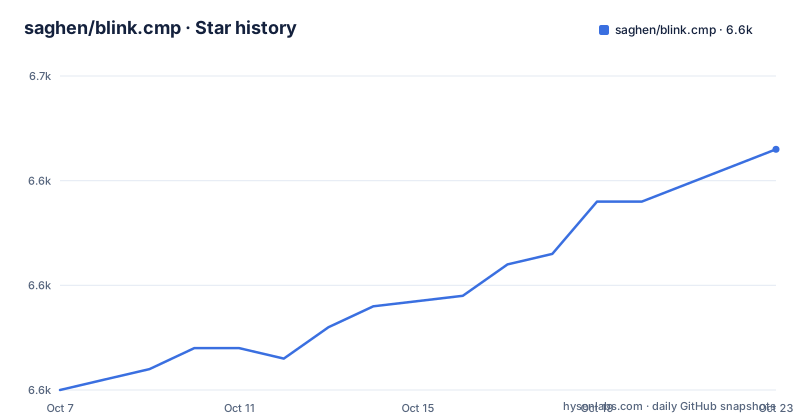
Star history
- saghen/blink.cmp6,638 ★ · +18
| Repository | 2026-10-07 | 2026-10-20 |
|---|---|---|
| saghen/blink.cmp | 6.6k | 6.6k |
18 Stars in the last 13 days, measured from the daily GitHub snapshot. Compare with other projects
Editorial analysis
Two live documentation sites and a warning above both
The first thing on the README is a warning, and it is unusually direct. Version 2 is under active development with many breaking changes, and the README suggests staying on the stable line by using `branch = 'v1'` or `version = "1.*"` in a lazy.nvim config. For version 2 it points at blink.lib, which must be installed through your package manager, and at UPGRADE.md in the repository as the migration guide.
That warning shapes everything else about evaluating the project. There are two documentation sites: the stable one at cmp.saghen.dev and a second tracking main at main.cmp.saghen.dev. Reading the wrong one is the most likely way to end up with a config that does not work, and the README does the navigation for you rather than leaving you to guess.
There is also a second-order effect worth planning for. If your plugin manager follows the default branch, you will be moved to version 2 the moment it lands, with no action from you. Pinning the branch is the documented remedy, and it is the difference between an upgrade you schedule and one that happens to you.
The feature list is short because it works without configuration
The claim at the top is that it works out of the box with no additional configuration, and the feature list is arranged to support that. Completion updates on every keystroke, with the README quoting 0.5 to 4 milliseconds asynchronous on a single core. There is typo-resistant fuzzy matching with a frecency bonus and a proximity bonus, extensive LSP support with its own tracker page, snippet support, external sources, auto-brackets driven by semantic tokens, signature help, command line completion and terminal completion.
Two of those carry caveats you should notice. Signature help is marked experimental and opt-in. Terminal completion is marked as 0.11 and later only, and the README is explicit that no shell completion source exists yet, with contributions welcome. A feature listed without a qualifier is usually finished; a feature listed with one is a shape you can plan around.
Snippet support is broader than it first appears. It handles native `vim.snippet`, including friendly-snippets, and also LuaSnip and mini.snippets, so you are not locked into one snippet engine. For sources, there is a community list and a separate compatibility layer, blink.compat, that lets existing nvim-cmp sources run unchanged. That compatibility path is the practical reason to try this before migrating your source set.
A Lua plugin with a real Rust crate inside it
GitHub reports the project language as Lua, which is accurate for the plugin but incomplete. There is a Cargo manifest at the root for a crate called blink-cmp-fuzzy, and its library target points straight into the Lua tree:
[lib]
path = "lua/blink/cmp/fuzzy/rust/lib.rs"
crate-type = ["cdylib"]
The dependencies explain what the crate is for: the regex crate, frizbee for the matching itself, mlua with the module and luajit features so the library can be called from Lua, thiserror for error types, plus blake3 and bincode, which point to cache keys and serialisation rather than matching.
The build story follows from that. There is a build.rs at the root, a Cross.toml for cross-compiling prebuilt binaries, and a Cargo.lock. Release 1.10.0 added a large set of prebuilt binary targets, covering arm64 and x86_64 on OpenBSD and FreeBSD plus arm64 Windows, and the same release moved the fuzzy matching onto a stable release of frizbee so it no longer needs nightly Rust. Whether you compile it or download a prebuilt binary is the difference between needing a Rust toolchain and needing a wget.
The Nix files are also there, with a flake and a lock file, so a reproducible developer environment is available rather than assumed.
The 1.10 line contradicts its own plan for ending it
The release notes are worth reading closely because they contain a small contradiction. Version 1.10.0, published in March 2026, opens its highlights by stating that it will be the final 1.x release before 2.0. The same notes describe new features: a stable Rust fuzzy matcher, more prebuilt binary targets, and a fix so that `:h 'formatoptions'` no longer breaks auto insert.
Then two more 1.x releases followed. 1.10.1 came out the next day with a single fix, changing os to system_info, and 1.10.2 arrived in April with layout work on components, column alignment, a gap for empty columns, and a cmdline addition. So the release that announced the end of the line was not the end of the line.
There is an upside to reading that way. Nothing in 1.10.1 or 1.10.2 looks like a feature freeze; they are the kind of small fixes a maintainer lands while the next major is still in development. The practical consequence for you is that the last stable tag is a moving target, so pin a version rather than tracking the branch if you want a config that keeps working.
The cmdline work is a good example of where this plugin's effort goes. A trigger character for option access and a guard improvement are not headline features, but command line completion is a mode most people use daily.
Maintained by a named group rather than one person
The README credits a long list of people with specific jobs, which is a decent proxy for how the project is run. The nvim-cmp author is credited as the inspiration, with path and cmdline implementations modified for this plugin. A snippets implementation was adapted from another plugin, and the design and testing help is attributed to two people, one of them specifically on Rust.
Then there is a contributors block with roles rather than just names: the author of blink.compat and its maintainer, a second maintainer, the windowing code, CI and prebuilt binaries, the Nix flake plus nixpkg and nixvim packaging, a mini.snippets source, a vsnip source, terminal completions, dot-repeat, a complete_func source, and community moderation and help.
For an evaluation, the relevant point is that the critical paths are not single-maintainer dependencies. The compatibility layer has a named owner, the binary distribution has a named owner, and packaging is handled separately from the plugin. The repository is not archived and the last push was on 2026-09-20, so development is current.
There is also a repro.lua at the root, which is the kind of file that tells you a plugin has a working strategy for reproducing and debugging completion behaviour.
What the repository does not tell you
Installation is one sentence on the README: head over to the documentation website, either the stable one for version 1 or the site tracking main for version 2. That is the whole instruction. Everything else, including the lazy.nvim snippet, the source list, the signature and snippet configuration and the fuzzy settings including the Rust versus Lua implementation switch, is on the documentation sites.
That split is deliberate and reasonable for a plugin whose configuration surface is large, but it means the repository cannot answer the two questions that matter most when choosing a completion engine: how much it costs when many sources are enabled, and what happens to your config when the next major lands. The performance figure in the README is a single number, 0.5 to 4 milliseconds asynchronous on a single core, with no breakdown by source count or buffer size.
There is no packaging to speak of in the repository either: no version manifest to compare, just the tags, the changelog and UPGRADE.md. If you are weighing this against the built-in completion or against nvim-cmp, the honest answer is that you will have to read the configuration docs and try it, because the README is an advertisement with an accurate feature list attached, not a manual.
Editorial conclusion
blink.cmp is a good fit if you want completion that works before you configure anything, and a poor fit if you need a config format that will not move for a year. The engine, the source system and the fuzzy matcher are all documented off the repository on the two documentation sites, one tracking the stable line and one tracking main. What the repository itself settles is the build story: a Lua plugin with a Rust crate compiled through build.rs, cross-compiled through Cross.toml, and a Nix flake for reproducible environments. Start on version 1 by pinning the branch, get your sources working, and read UPGRADE.md before letting a plugin manager move you to version 2.
Frequently asked questions
How do I install blink.cmp?
The README keeps installation on the documentation sites rather than in the repository: use the stable site for version 1 and the site tracking main for version 2. If you use lazy.nvim and want the stable line, pin the branch as v1 or set the version constraint to 1.*, since following the default branch moves you to version 2 when it lands.
Does blink.cmp require a Rust toolchain?
Not necessarily. The fuzzy matcher lives in a Rust crate built through build.rs, but the repository also ships prebuilt binaries and a Cross.toml for cross-compiling them, and release 1.10.0 added arm64 and x86_64 targets for OpenBSD and FreeBSD along with arm64 Windows. The fuzzy matching itself is also described as optional in the configuration docs.
Can I keep using my nvim-cmp sources?
Yes, through a compatibility layer. The README links blink.compat as a compatibility layer for nvim-cmp sources, and also points at a community source list for plugins built directly against this engine. Snippet engines are covered too, with support for native vim.snippet, LuaSnip and mini.snippets.
Is version 2 of blink.cmp ready for a stable config?
The README warns that version 2 is under active development with many breaking changes and suggests staying on the stable line with branch v1 or a 1.* version constraint. It also requires blink.lib to be installed through your package manager, and points at UPGRADE.md in the repository for the migration path.
Official sources
Add this badge to your README
If you maintain this project, the badge below links readers to this analysis and shows its maintenance status from the daily GitHub snapshot. Paste the markdown into your README; add ?metric=license or ?metric=stars to the image URL for a different field.

[](https://hysenlabs.com/projects/saghen-blink-cmp)Star history chart for your README
[](https://hysenlabs.com/projects/saghen-blink-cmp)Was this useful?