OmniXAI: nineteen dependencies, three ceilings and ten with none
OmniXAI: A Library for eXplainable AI
At a glance
- What is it?
- A Salesforce explainable AI library covering twenty-five methods over four data types. The manifest pins numpy below 1.24 and scikit-learn below 1.2 while leaving ten of its nineteen dependencies entirely unconstrained, requires the OpenAI SDK whether or not you use the GPT explainer, and has not been released since April 2024.
- Who is it for?
- OmniXAI suits an explainability researcher working with tabular data on a pinned scientific stack, who wants one interface across attribution, counterfactual and surrogate methods rather than five separate packages. It does not suit anyone whose environment has already moved to numpy 2 or scikit-learn 1.2, and it does not suit a time-series project, where the coverage is three methods out of twenty-five.
- Can I use it commercially?
- Yes. BSD-3-Clause is a permissive licence: you can use, modify and sell software built on it, as long as you keep its copyright and licence notices.
- Is it still maintained?
- Yes. The repository last received commits 166 days ago.
- What is it written in?
- Mainly Jupyter Notebook, according to GitHub's language statistics.
Answers come from the project's GitHub data, last synced on November 15, 2026, and from our analysis. They are not legal advice.
Star history
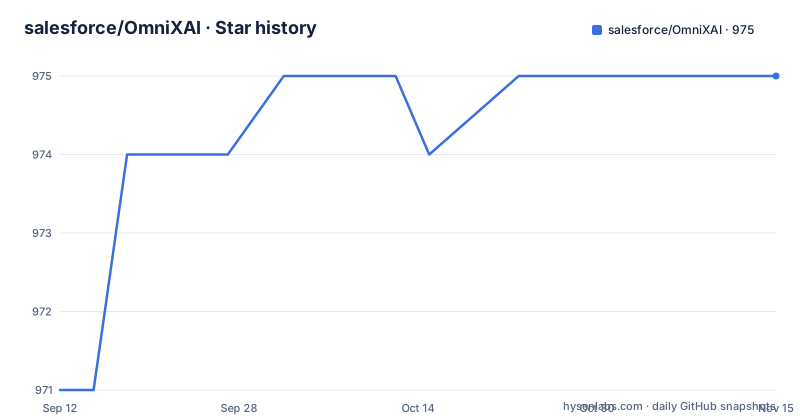
- salesforce/OmniXAI975 ★ · +4
| Repository | 2026-09-12 | 2026-11-15 |
|---|---|---|
| salesforce/OmniXAI | 971 | 975 |
4 Stars in the last 64 days, measured from the daily GitHub snapshot. Compare with other projects
Editorial analysis
Three hard ceilings and ten dependencies with no floor or ceiling
The install requirements are nineteen entries and they divide sharply. Three carry upper bounds that are dated: `numpy>=1.17,<1.24`, `scikit-learn>=0.24,<1.2`, and `pillow<10.0`. The first two are the ones that matter, because those versions are from the previous major generation on both sides, so an environment already on numpy 2 or scikit-learn 1.2 cannot install this alongside them. The other sixteen split into those with only a floor, such as pandas, scipy, scikit-image, shap, hnswlib and statsmodels, and those with no constraint at all: `matplotlib`, `lime`, `SALib`, `dill`, `tqdm`, `wheel`, `packaging`, `ipython`, `tabulate` and `openai`. Ten unconstrained entries in a scientific library means the resolver is free to pick a version the code was never tested against, and matplotlib is the one most likely to cause that.
The primary language is a notebook sitting at the repository root
The repository is recorded as a Jupyter Notebook project, and the reason is one file. The root listing contains `PiML_explainable_models.ipynb` alongside `setup.py`, `omnixai/`, `docs/`, `tutorials/` and the usual governance files. A single notebook at the root of a library repository changes what language-based tooling sees, because byte counting wins on total size rather than on file distribution. It also means the project presents itself to automated classifiers as a notebook collection rather than as a Python package, which is not how anyone uses it: the package is installed from an index with a standard setup script and a namespace package declaration. The rest of the root is conventional, including a codeowners file, a copyright header template and a pre-commit configuration, so this is one stray artefact rather than a repo organised around notebooks.
The newest release is from April 2024 and the branch moved in June 2026
Three releases are on record and the numbers are consistent with the manifest, which also declares the current version. They are v1.3.0 from 2023-05-27, v1.3.1 from 2023-07-16, and v1.3.2 from 2024-04-25. The default branch was pushed on 2026-06-02. So there are more than two years of commits that no release covers, and the version string in the manifest will keep reporting the same number regardless. Unlike several projects where the manifest and the tags drift apart, here they agree and both are simply old. The practical consequence is that pinning to the latest release pins you to a tree from April 2024, and installing from the branch gives you something with no version identity at all. The What's New section, which describes an experimental GPT explainer, sits alongside the 2024 release rather than after it, so it is not clear from the version history when that work landed.
The dashboard demo is a per-deployment Heroku subdomain
One of the nine table-of-contents entries is a dashboard demo, and where it points is the finding:
https://omnixai-24e10803fd23.herokuapp.com/That is a host name with a generated subdomain prefix, not a stable vanity domain. A deployment-scoped subdomain of that shape is not something a project keeps pointed at indefinitely, and there is no alternative link for the same demo. Compare the other destinations in the same list, which are durable: the documentation and tutorials both sit under the project's own open-source hosting, the contributing guide has an anchor on that site, and the technical report and citation section has a permanent home. So eight of nine navigation targets are stable and one is a throwaway host. The first badge in the header is worse, since it links to a bare fragment and goes nowhere at all.
MACE is named in the prose and absent from the methods table
The What's New paragraph describes an experimental GPT explainer and names its inputs: it leverages the outcomes produced by SHAP and MACE to formulate the input prompt for ChatGPT, then ChatGPT analyses those results and produces the explanation. MACE appears nowhere else on the page. It is not a row in the twenty-five-row capability table, it is not in the model-type column, it is not in the data-type columns, and the installation extras do not mention it either. SHAP, by contrast, is a row, has a footnote explaining which model types it accepts for tabular, image and text data, and carries an installation requirement. So the one method the newest feature is built on is documented only in a sentence, while every other method gets a row and a column. The README also misspells explanation as explaination once in the introduction, which suggests the page has not had a full read since the table was assembled.
Images get fourteen methods and time-series gets three
The capability table is where the library's balance shows, and it is lopsided in a way the four-data-type claim does not prepare you for. Counting the checkmarks down the image column gives fourteen methods: prediction metrics, feature visualization, feature maps, LIME, SHAP, integrated gradients, counterfactuals, contrastive explanation, Grad-CAM and Grad-CAM++, Score-CAM, Layer-CAM, smooth gradient, guided backpropagation, and learning to explain. The time-series column gives three: prediction metrics, SHAP and counterfactuals. Tabular is the broadest at roughly fifteen, text sits in the middle at five, and time-series is the outlier. That is an understandable outcome, since image attribution has a decade of established methods and time-series explanation has fewer, but a reader arriving from the introduction sentence promising explanation for various types of data will not find the balance described anywhere.
There are four extras and the installation page documents three
The installation section names three extras and their purposes: a plotting extra for visualization, a vision extra for vision tasks, and an NLP extra for natural language tasks. The setup script declares four:
"bentoml": ["bentoml>=1.0.0"],alongside the plot extra, which pulls a dashboard stack, the vision extra, which pulls the deep learning pair and a headless OpenCV build, and the NLP extra, which pulls a toolkit and a text-privacy package. The fourth is a model serving framework, and it appears in no line of the installation documentation. A fifth extra named for all of them is then assembled programmatically by concatenating the values of the other four, so the aggregate is never written out and cannot drift out of sync. The omission matters differently from the version ceilings: a serving extra nobody documents is dead weight nobody installs, while a ceiling nobody can satisfy is a hard stop.
The OpenAI SDK is required, not an extra, and the GPT explainer is tab-only
Two things about the newest feature are easy to miss. First, the OpenAI client appears in the base install requirements rather than in an extra, so every installation of the library brings in the SDK whether or not anyone uses the GPT explainer. Second, the capability table puts the GPT explainer in exactly one cell: model type black box, explanation type local, data type tabular. The prose says the same thing, describing plain text explanations generated for a classification or regression model on tabular datasets. So the headline feature is simultaneously the most demanding in terms of dependencies and the narrowest in terms of applicable data. The accuracy caveat is stated plainly alongside it, that the generated results may not be one hundred percent accurate, with a promise to keep improving the input prompts.
Editorial conclusion
OmniXAI suits an explainability researcher working with tabular data on a pinned scientific stack, who wants one interface across attribution, counterfactual and surrogate methods rather than five separate packages. It does not suit anyone whose environment has already moved to numpy 2 or scikit-learn 1.2, and it does not suit a time-series project, where the coverage is three methods out of twenty-five. Check four things first. Check your numpy and scikit-learn versions against the ceilings, because they are upper bounds from 2022 and pip will refuse or downgrade. Check which data type you actually need, because the method counts are lopsided. Check whether you want the GPT explainer, since that is what pulls the OpenAI SDK and it is a required dependency rather than an extra. And check the version you are installing, because the newest release predates the last two years of commits by a wide margin. The licence is BSD-3-Clause and the default branch was pushed on 2026-06-02.
Frequently asked questions
What is explainable AI and how does it work?
In this library, explainers are organised along two axes, global versus local, and model-specific versus model-agnostic. The global methods include feature analysis, feature selection, prediction and bias metrics, partial dependence plots, accumulated local effects, sensitivity analysis, permutation explanation and feature visualization. Local methods include LIME, SHAP, counterfactuals, what-if, integrated gradients, learning to explain, surrogate models for linear and tree learners, and a family of image attribution methods.
Is ChatGPT an explainable AI?
This library does not treat it as one. The experimental GPT explainer uses ChatGPT to turn the output of two other explainers, SHAP and MACE, into a natural-language explanation, so the model summarises attributions it did not compute. The generated text is described as possibly not fully accurate, and the explainer is limited to tabular classification and regression models.
Which data types does OmniXAI support?
Tabular, image, text and time-series, but the coverage is uneven. Roughly fifteen methods apply to tabular data and fourteen to images, while text has five and time-series has three: prediction metrics, SHAP and counterfactuals. The README links to a comparison table against other explainability toolkits.
How do I install OmniXAI with plotting support?
Install from the index with pip install omnixai, or from source with pip install . or an editable install. The plotting extra is requested as pip install omnixai[plot], which brings in the charting and dashboard stack. There is also a vision extra, an NLP extra, an undocumented serving extra, and an aggregate extra that combines all of them.
Official sources
Add this badge to your README
If you maintain this project, the badge below links readers to this analysis and shows its maintenance status from the daily GitHub snapshot. Paste the markdown into your README; add ?metric=license or ?metric=stars to the image URL for a different field.

[](https://hysenlabs.com/projects/salesforce-omnixai)Star history chart for your README
[](https://hysenlabs.com/projects/salesforce-omnixai)Was this useful?