EDR-200 contains 201 trajectories, and the root package.json names a different repository
Salesforce Enterprise Deep Research
At a glance
- What is it?
- A multi-agent research system with four specialised search agents, an extensible tool layer, human steering, and a public dataset of full reasoning trajectories. The engineering leaves traces: two dependency manifests with different pins, a licence mismatch in the JavaScript metadata, a documented test directory that is not in the tree, and tracing enabled by default in the sample environment.
- Who is it for?
- The system design is more interesting than the packaging. A planning agent that decomposes the query, four search agents scoped to different source types, a reflection step that notices what it does not know, and a steering surface a human can interrupt are the pieces that make long research runs inspectable rather than opaque.
- Can I use it commercially?
- Yes. Apache-2.0 is a permissive licence: you can use, modify and sell software built on it, as long as you keep its copyright and licence notices.
- Is it still maintained?
- Yes. The repository last received commits 20 days ago.
- What is it written in?
- Mainly Python, according to GitHub's language statistics.
Answers come from the project's GitHub data, last synced on November 15, 2026, and from our analysis. They are not legal advice.
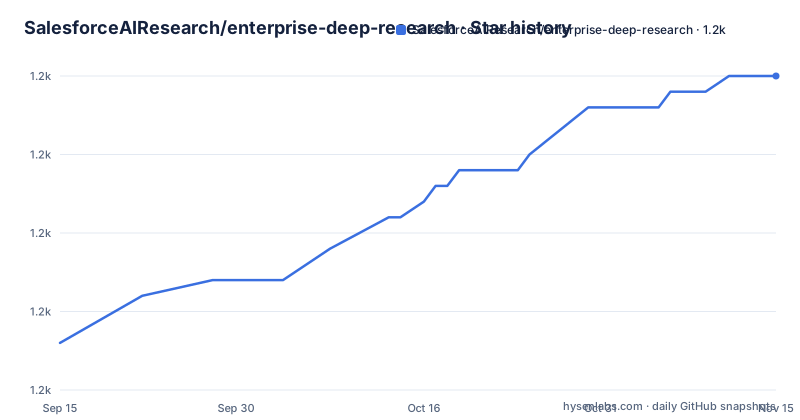
Star history
- SalesforceAIResearch/enterprise-deep-research1,225 ★ · +17
| Repository | 2026-09-15 | 2026-11-15 |
|---|---|---|
| SalesforceAIResearch/enterprise-deep-research | 1.2k | 1.2k |
17 Stars in the last 61 days, measured from the daily GitHub snapshot. Compare with other projects
Editorial analysis
The dataset is named EDR-200 and contains 201 trajectories
The most substantial artefact here is the public dataset, badged at the top of the page and hosted for download. It is described as containing 201 complete agentic research trajectories, made up of 99 queries from one research benchmark and 102 from a consulting-style benchmark. Ninety-nine plus 102 is 201, and the name says 200. The arithmetic is not the point; the shape is. The stated difference from prior benchmarks is that these expose the full reasoning process across search, reflection and synthesis steps rather than only the finished output, which makes planning and decision-making behaviour analysable instead of inferred from a final answer. That is worth more to a reader building a competing system than a leaderboard position is.
Two documented defaults are contradicted by the sample configuration
The environment section gives an optional settings list with defaults, and the sample file at the root disagrees with it twice. The maximum number of web research loops is documented as defaulting to ten; the sample file sets three. The provider selector is documented as defaulting to OpenAI; the sample file sets Google. Neither difference is explained, and the sample file is the thing you copy on installation, so in practice the sample wins and the documentation is describing something else. The sample file also carries settings the documentation never mentions, including a flag to generate activity messages with a second, cheaper model pair, a full-page fetch toggle, and a tracing switch that is already true.
The recommended start command binds every network interface
One command serves both the backend and the pre-built frontend, and it is written with a host flag that listens on all interfaces rather than on loopback. The development command repeats the same binding with a reload flag. That matters more here than in a typical web app, because this service carries a natural-language-to-SQL tool in its tool ecosystem, a client for external tool servers, and the ability to run experiment code during a research stage. The setup is a two-language build in one repository, and getting to the point where anything runs takes the documented sequence:
git clone https://github.com/SalesforceAIResearch/enterprise-deep-research.git
cd enterprise-deep-research

# Python environment
python -m venv venv
source venv/bin/activate  # Windows: venv\Scripts\activate
pip install -r requirements.txt

# Configure environment
cp .env.sample .env
# Edit .env with your API keys

# Frontend setup
cd ai-research-assistant && npm install && npm run build && cd ..
Note that the clone step has no tag or branch pinned, so the default branch is what you get. A quick start that exposes all of that on every interface is a default worth changing on the first run. Nothing on the page explains the intended deployment topology, and there is no authentication setting among the documented variables at all.
Tracing is on in the sample configuration and absent from the documentation
The sample environment file sets a tracing switch for the model framework to true, ships a matching API key field, and leaves the endpoint and project name empty. That is a third-party service receiving your research traces, enabled by the file you are told to copy, and the documentation's list of required variables does not mention it, so a reader following the setup has no reason to notice. The same file is quietly wider than the docs in another way. It carries keys for three separate search and scraping vendors, with the selector defaulting to one of them, while the required-variables list names only that one. Two other keys exist in the sample and nowhere in the documentation.
The root JavaScript manifest names another repository and a different licence
The repository root contains a Node manifest, and it is not this project's. Its name is a generic word, its version is 1.0.0, and its test script prints an error and exits with a failure, which is the default a generator writes. Its description describes a system for integrating model providers with a code interpreter sandbox. Its repository, issues and homepage fields all point at a different account's repository entirely. And its licence field says ISC while the repository is licensed under Apache 2.0. Nothing in the tree suggests this file is load-bearing, but it is a licence statement in a repository that ships a licensing guide and a codeowners file, and it contradicts both.
Two dependency manifests with different pins, and the Python manifest is a template
There are two ways to install this and they disagree. The documented path installs from the requirements file. The project manifest exists alongside it, and it is clearly generated rather than finished: its name describes a research agent, its author field is the literal word user with an example address, and its dependency list omits the fast API server, the tracing client, the numerical stack and the entire file and media processing block that the requirements file carries. Where the two overlap they pin differently, including a code interpreter dependency that one file opens at a lower bound and the other pins to an exact pre-release, and a workflow library that one file opens at a lower bound and the other pins exactly. Two sources of truth for one environment, and the requirements file is also the one with the longer tail: it adds a PDF and document parsing stack, image libraries, an optical character recognition wrapper, speech recognition, a video library and a speech-to-text model, none of which appear in the project manifest. If you only install from the project manifest you get a library and not the application.
The documented test directory is not in the tree, and seven test scripts are
The development section says to run the test runner against a tests directory. There is no tests directory among the top-level entries. What is there is a row of loose scripts at the root: agent tests, benchmark tests, graph tests, specialised search tests, unified query tests, visualisation tests, a graph test and a model test, plus a stray HTML file that looks like a scratch page from stream testing. Two log workflow files also sit at the root rather than in a workflows directory, and no such directory appears in the listing at all. The structure diagram on the page is cut off mid-comment and shows three directories out of roughly forty. It is a research codebase that grew at the root, and the documentation has not caught up.
Editorial conclusion
The system design is more interesting than the packaging. A planning agent that decomposes the query, four search agents scoped to different source types, a reflection step that notices what it does not know, and a steering surface a human can interrupt are the pieces that make long research runs inspectable rather than opaque. The dataset is the real contribution, since publishing full trajectories instead of final answers lets anyone study how the planning and reflection behaved. Three things to check before you deploy it. The documented start command binds all network interfaces on a service that carries a natural-language-to-SQL tool and a client for external tool servers, so bind loopback unless you have decided otherwise. The sample environment turns on third-party tracing by default with no endpoint filled in, and the documentation never mentions it. And two dependency manifests disagree about pins, so decide which one is authoritative before you build anything on it.
Frequently asked questions
What is Enterprise Deep Research?
A multi-agent research system with a master planning agent for adaptive query decomposition, four specialised search agents for general, academic, GitHub and LinkedIn sources, a visualisation agent, an extensible tool layer built on the model context protocol, and a reflection mechanism that detects knowledge gaps.
Can you steer Enterprise Deep Research while it runs?
Yes. It offers real-time steering commands for continuous refinement plus optional human-in-the-loop guidance, exposed through both the web interface and dedicated steering modules in the source tree.
What does the EDR-200 dataset contain?
201 complete agentic research trajectories, made up of 99 queries from DeepResearch Bench and 102 from DeepConsult. They expose the search, reflection and synthesis steps rather than only final outputs, which the project presents as the difference from prior benchmarks.
Which model providers does Enterprise Deep Research support?
Five, each with a listed default: OpenAI, Anthropic, Google, Groq and SambaNova. SambaNova lists exactly one available model, and two of the five defaults are DeepSeek weights served by Groq and SambaNova.
What do I need to run Enterprise Deep Research?
Python 3.11 or newer and Node 20.9.0 or newer. Clone the repository, create a virtual environment, install from the requirements file, copy the sample environment file and fill in keys, build the React frontend, then serve the backend and the built frontend from one command.
Which benchmarks does the project support?
Three: DeepResearchBench for broad research evaluation, ResearchQA for question answering with citation verification, and DeepConsult for consulting-style analysis tasks. Detailed instructions live in the benchmarking guide.
Official sources
Add this badge to your README
If you maintain this project, the badge below links readers to this analysis and shows its maintenance status from the daily GitHub snapshot. Paste the markdown into your README; add ?metric=license or ?metric=stars to the image URL for a different field.

[](https://hysenlabs.com/projects/salesforceairesearch-enterprise-deep-research)Star history chart for your README
[](https://hysenlabs.com/projects/salesforceairesearch-enterprise-deep-research)Was this useful?