MCP-Universe, a benchmark whose whole argument is that real servers are the hard part
MCP-Universe is a comprehensive framework designed for RL training, benchmarking, and developing AI agents for general tool-use.
At a glance
- What is it?
- MCP-Universe 1.1.3 evaluates models against live MCP servers rather than simulated tools, and ships an orchestrator, a dashboard, and MCPMark support around it. Here is what it actually wires up.
- Who is it for?
- MCP-Universe fits a team that has concluded a model's tool-use score on simulated functions tells them nothing about production, and that has the infrastructure budget to stand up real servers and real credentials. The live-server design is the contribution and also the cost: every run touches the network and every evaluation depends on a service being up.
- Can I use it commercially?
- Yes. Apache-2.0 is a permissive licence: you can use, modify and sell software built on it, as long as you keep its copyright and licence notices.
- Is it still maintained?
- Yes. The repository last received commits 39 days ago.
- What is it written in?
- Mainly Python, according to GitHub's language statistics.
Answers come from the project's GitHub data, last synced on November 15, 2026, and from our analysis. They are not legal advice.
Star history
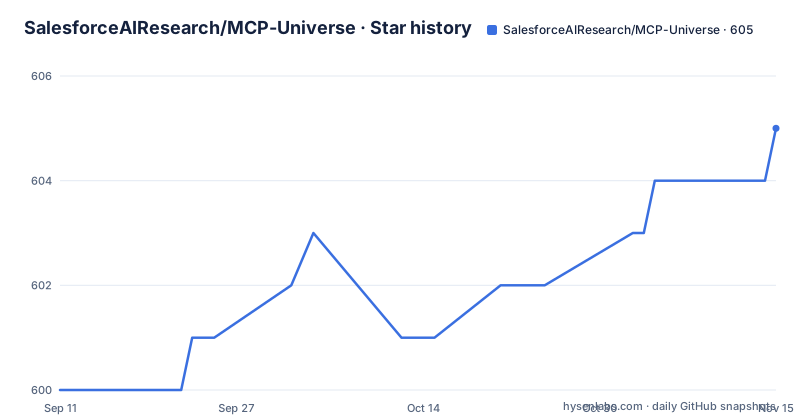
- SalesforceAIResearch/MCP-Universe605 ★ · +5
| Repository | 2026-09-11 | 2026-11-15 |
|---|---|---|
| SalesforceAIResearch/MCP-Universe | 600 | 605 |
5 Stars in the last 65 days, measured from the daily GitHub snapshot. Compare with other projects
Editorial analysis
The benchmark's argument is that real servers are the hard part
The stated critique of existing work is that the tasks are too simple, and the four claims about what they capture instead are specific. Long-horizon reasoning across multi-step tasks. Large, unfamiliar tool spaces with diverse servers rather than a handful of hand-written functions. Real data sources and live environments. And dynamic evaluation with time-sensitive ground truth, which is the one that has consequences for anyone using the results. That last item means a score is only valid against the state of the world when it was produced, which is a different contract from a static question set with a fixed answer key. It also means the evaluation itself has an operational cost that a self-contained benchmark does not.
Six component directories under one application layer
The architecture is a package tree with six parts. Agents hold base implementations for different agent types, workflows are the orchestration and coordination layer, the MCP directory handles protocol management and external service integration, the LLM directory provides multi-provider support, benchmarking is the evaluation and testing framework, and the dashboard is the visualisation and monitoring interface. Above them sits an application layer with four surfaces: the dashboard, a web API, a Python library, and the benchmarks themselves. The diagram names two of the four technologies, a Python web framework for the dashboard component and an ASGI server for the web API component. So the split that matters for a user is that the library and the benchmark are usable without running a server, while the dashboard and the API are not.
The diagram names one dashboard framework and the run target starts another
There is a small inconsistency worth checking before you plan around it. The architecture diagram labels the dashboard with a Python UI library that serves its own interface, while the Makefile's dashboard target launches the dashboard module through an ASGI server instead, pointing at an application object inside the package. Both paths exist in the repository, and neither is described as deprecated. The practical effect is that there are two ways to bring up the monitoring surface with different characteristics, and the README does not say which one to prefer. If you are scripting CI around either, pick one and note it, because a target that starts a server will behave differently from a library-hosted interface.
MCP+ claims half to three quarters of tool-output tokens are waste
The context-management piece is a separate project with its own site and its own two claims. The premise is that MCP tools return large, verbose outputs that waste the context window and cost money, and the mechanism is post-processing: the client is wrapped so that only the relevant information is extracted before anything reaches the model. The headline is a token saving of fifty to seventy-five percent on tool outputs, and the second claim is that it needs no code changes because it drops in as a replacement for a standard MCP client. Both are the project's own numbers rather than an independent measurement, so treat the range as a claim. The thing to notice is where the compression happens: after the tool runs, in the client, which means it cannot reduce the cost of the tool call itself.
Wide and deep means more parallel tool calls per turn
The research agent work is dated and specific. Introduced in February 2026, the approach scales the width of a research agent by making more parallel tool calls in a single turn rather than going deeper sequentially. The reported effect is improved accuracy on three benchmarks alongside reduced turns, lower API cost, and lower wall-clock time, and the specific figure quoted is that their agent with a mid-tier model reaches 62.2 percent on one of them against 54.9 percent for a high-tier model running the deep research approach. So the claim is not that wider is better in general, but that a mid-tier model with more parallelism beats a top-tier model with less, which is a cost argument as much as an accuracy one.
Two dependency lists that do not match each other
The project ships both a package manifest and a requirements file, and they are not the same list. The manifest declares around forty dependencies, almost all of them pinned to an exact version, with only a handful carrying a lower bound. The requirements file starts from the same core and then adds things the manifest does not list: a PostgreSQL driver and an async ORM, NumPy, a Notion client for the MCPMark tasks, and a small group for deep research including an imaging library, a dataset library, a spreadsheet writer, and a Vertex AI client. That difference is easy to miss and expensive to debug, because installing from the manifest gives you a tree that differs from the one the project's own instructions tell you to install. The exact pins are a deliberate choice for reproducibility, and the same choice means every security update is a commit rather than a resolution.
The example environment file wires up a dozen services
The template configuration is the clearest statement of what a run actually touches. It sets a gateway address, Redis host and port for the task queue, and a Kafka host, port, and topic name. It names two SQLite addresses for a tracer collector and a callback handler, which tells you that trace collection is a first-class path rather than a log file. Then it lists API keys for seven model providers plus a local Ollama address and a local inference endpoint that ships with a non-empty placeholder token, which you should replace before copying the file anywhere. Below that come credentials grouped by service: two search APIs, Google Maps, GitHub, Google Sheets, a filesystem directory, Slack, Postgres, Notion, a scraping and summarisation pair, a Python sandbox, and Blender. Then a second block of settings for the MCPMark suites specifically.
The Makefile brings up five containers and a SQL code-generation step
Local infrastructure is scriptable, which is the most useful thing in this repository for someone who wants to run an evaluation. There are targets that start Redis, Postgres, Kafka, and RabbitMQ, each pinning an image tag and exposing the ports you would expect, plus a matching target to stop and remove each one. There is a database creation target and a database drop target that run inside the Postgres container, and migration targets that call a separate migration tool against a connection string defined at the top of the file. That string contains a username and password in plain text, which is fine for a local container and worth noticing before you copy the file. There is also a code-generation target for a SQL layer, which tells you the queries are generated from a schema description rather than written by hand. Getting to the point where those targets are useful takes a plain three-step setup, plus one platform-specific package:
git clone https://github.com/SalesforceAIResearch/MCP-Universe.git
cd MCP-Universepython3 -m venv venv
source venv/bin/activateand then the two requirements files, one for runtime and one for development. On Linux the extra system package is the PostgreSQL client headers, and on macOS it is a Homebrew Postgres:
sudo apt-get install libpq-devbrew install postgresqlThat pair is the only platform fork in the setup, and it is there because the ORM layer needs those headers at install time.
Editorial conclusion
MCP-Universe fits a team that has concluded a model's tool-use score on simulated functions tells them nothing about production, and that has the infrastructure budget to stand up real servers and real credentials. The live-server design is the contribution and also the cost: every run touches the network and every evaluation depends on a service being up. It is a poor fit if you want a hermetic, reproducible, cheap score. Before you plan a run, count the services the example environment expects, decide whether your ground truth can survive a data source changing underneath it, and pin your dependency list yourself, because the two lists in the repository do not agree.
Frequently asked questions
What does MCP-Universe benchmark?
Language models and agents interacting with real Model Context Protocol servers rather than simulated tools. The stated goals are long-horizon reasoning across multi-step tasks, large unfamiliar tool spaces, real data sources and live environments, and dynamic evaluation with time-sensitive ground truth.
What infrastructure does MCP-Universe need to run?
Python 3.10 or higher and Docker for the containerised MCP servers, with Postgres and Redis described as optional. The example environment file goes further and expects a gateway, a task queue, a message broker, two search APIs, a filesystem directory, a sandbox, and credentials for several model providers.
Does MCP-Universe support the MCPMark benchmark?
Yes. MCPMark evaluations run inside the framework, with a guide in the benchmark configuration directory covering how to run the tasks and how the reported scores align. The example environment file also carries a separate settings block for the MCPMark Postgres, filesystem, GitHub, and Notion suites.
What does MCP+ claim to save?
The project's own figures are fifty to seventy-five percent of tokens on tool outputs, by post-processing MCP client responses so only relevant information reaches the model. It is presented as a drop-in replacement needing no code changes, and it lives in a separate project with its own documentation site.
What is the Wide and Deep research agent?
A research agent introduced in February 2026 that scales the width of a research loop by making more parallel tool calls per turn instead of going deeper sequentially. The reported effect is better accuracy on three benchmarks with fewer turns, lower API cost, and lower wall-clock time, including a mid-tier model beating a top-tier one running deep research.
Official sources
Add this badge to your README
If you maintain this project, the badge below links readers to this analysis and shows its maintenance status from the daily GitHub snapshot. Paste the markdown into your README; add ?metric=license or ?metric=stars to the image URL for a different field.

[](https://hysenlabs.com/projects/salesforceairesearch-mcp-universe)Star history chart for your README
[](https://hysenlabs.com/projects/salesforceairesearch-mcp-universe)Was this useful?