Uni2TS: the PyTorch library behind Moirai, with pinned dependencies and a data conversion step
Unified Training of Universal Time Series Forecasting Transformers
At a glance
- What is it?
- Uni2TS is Salesforce AI Research's PyTorch library for pre-training, fine-tuning, inference and evaluation of the Moirai family of time series forecasting transformers. This analysis covers what the library bundles, the dependency pins that shape an install, and the data preparation fine-tuning demands.
- Who is it for?
- Uni2TS suits researchers and engineers who want pretrained Moirai models for zero-shot forecasts or fine-tuning on their own series, and who can live inside an older PyTorch range. Anyone who needs a current torch release, or a library that is past alpha status, should check the pinned versions in pyproject.toml before committing.
- Can I use it commercially?
- Yes. Apache-2.0 is a permissive licence: you can use, modify and sell software built on it, as long as you keep its copyright and licence notices.
- Is it still maintained?
- Yes. The repository last received commits 166 days ago.
- What is it written in?
- Mainly Jupyter Notebook, according to GitHub's language statistics.
Answers come from the project's GitHub data, last synced on November 15, 2026, and from our analysis. They are not legal advice.
Star history
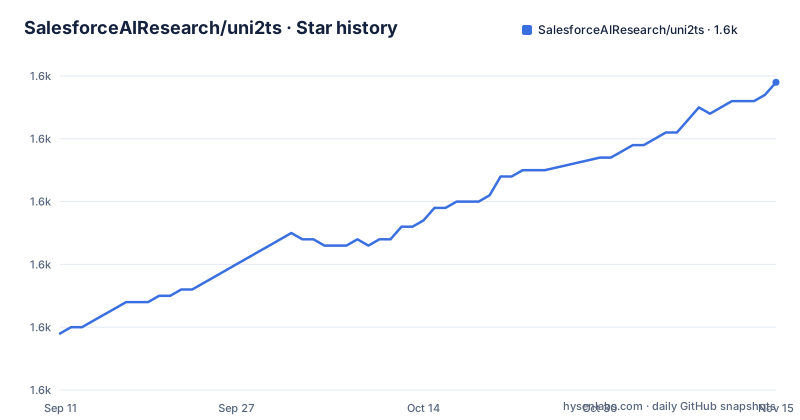
- SalesforceAIResearch/uni2ts1,629 ★ · +40
| Repository | 2026-09-11 | 2026-11-15 |
|---|---|---|
| SalesforceAIResearch/uni2ts | 1.6k | 1.6k |
40 Stars in the last 65 days, measured from the daily GitHub snapshot. Compare with other projects
Editorial analysis
One library covers pre-training, fine-tuning, inference and evaluation of Moirai models
Uni2TS describes itself as a PyTorch based library for research and applications in time series forecasting. It offers a unified framework for large-scale pre-training, fine-tuning, inference and evaluation of what it calls Universal Time Series Transformers. The models behind it are the Moirai family: Moirai-1.0-R, released in March 2024 together with the Uni2TS library, the paper and the LOTSA data; Moirai-1.1-R in small, base and large sizes from June 2024; Moirai-MoE small and base from October 2024; and Moirai-2.0-R-small from August 2025. The Moirai paper was accepted to ICML 2024 as an Oral presentation. Weights are hosted on Hugging Face, not inside the repository, so a clone gives you code and examples while the models arrive through huggingface_hub at run time. The repository also carries evaluation code for TimesFM, Chronos and VisionTS on the Monash, LSF and PF benchmarks, which lets you compare other forecasters under the same harness. The GIFT-Eval benchmark, with its own leaderboard, lives in a separate repository.
The dependency pins keep torch below 2.5 and numpy on the 1.26 line
pyproject.toml is where installation friction hides. The package requires Python 3.10 or newer and pins torch>=2.1,<2.5, lightning>=2.0, gluonts~=0.14.3, numpy~=1.26.0, scipy~=1.11.3, einops==0.7.*, hydra-core==1.3, datasets~=2.17.1 and python-dotenv==1.0.0. It also pulls in jax[cpu], jaxtyping, orjson, tensorboard, multiprocess, safetensors and huggingface_hub>=0.23.0. The practical consequences are clear. If your environment already runs torch 2.5 or later, or numpy 2, pip will either downgrade them or refuse to resolve, so put Uni2TS in its own virtual environment instead of an existing project. The classifier in the same file reads Development Status :: 3 - Alpha, which is the project's own statement about maturity, and the interfaces may change between releases. There are three optional extras: dev for pytest, black, isort and pre-commit, notebook for jupyter, ipywidgets and matplotlib, and build-lotsa for the packages needed to rebuild the LOTSA data, namely buildings_bench, pyreadr, tables and subseasonal-data.
Installing from source needs an empty .env file, and PyPI is the shortcut
The source route clones the repository first:
git clone https://github.com/SalesforceAIResearch/uni2ts.git
cd uni2ts
Then it creates a virtual environment:
virtualenv venv
. venv/bin/activate
The editable install includes the notebook extra:
pip install -e '.[notebook]'The last source step is odd on first sight: create a .env file.
touch .envThat file is not decoration. The data builder reads a CUSTOM_DATA_PATH entry from it later, and python-dotenv is a pinned dependency for that reason. A shorter option is published on PyPI:
pip install uni2tsThe PyPI route gets you the library but not the example notebooks, the cli directory with its Hydra configurations, or the project folder with the benchmark scripts. For anything beyond a first zero-shot forecast, those files are what you need, so the clone is the better starting point if you plan to fine-tune.
Zero-shot forecasting goes through GluonTS and expects a wide pandas DataFrame
The getting started example makes zero-shot forecasts from a pretrained model. Data is loaded with pandas in the form of a wide DataFrame, and Uni2TS relies on GluonTS for inference because it supplies helpers such as train and test splitting and rolling evaluation. The imports show the moving parts: PandasDataset and split from gluonts, hf_hub_download from huggingface_hub, plot_single from uni2ts.eval_util.plot, and the MoiraiForecast, MoiraiModule, MoiraiMoEForecast and MoiraiMoEModule classes. Three constants steer the run. MODEL chooses among moirai, moirai-moe and moirai2, SIZE chooses among small, base and large, and PDT sets the prediction length as any positive integer, with CTX giving the context length. A catch sits between that selector and the release notes. The note for Moirai 2.0 lists only a small checkpoint, and Moirai-MoE lists small and base, so not every model and size pair in the selector corresponds to a published weight file. Confirm the checkpoint exists on Hugging Face before you set SIZE.
Fine-tuning starts with converting your series into the Uni2TS dataset format
Fine-tuning does not read a CSV directly. Uni2TS uses the Hugging Face datasets library for loading, so your data has to be converted first. The guide uses the ETTh1 dataset from the Long Sequence Forecasting benchmark. Step one points the converter at an output directory through the .env file:
echo "CUSTOM_DATA_PATH=PATH_TO_SAVE" >> .envStep two runs the simple builder, with a dataset_type of wide, long or wide_multivariate:
python -m uni2ts.data.builder.simple ETTh1 dataset/ETT-small/ETTh1.csv --dataset_type wideFor a validation set, the date_offset option takes a datetime string and the offset option takes an integer, and the two are mutually exclusive. Either marks the last time step of the train set, and the validation split is saved with the suffix _eval:
python -m uni2ts.data.builder.simple ETTh1 dataset/ETT-small/ETTh1.csv --date_offset '2017-10-23 23:00:00'Adding the --normalize flag scales the data using the mean and standard deviation of the training portion. For more complicated datasets, example/prepare_data.ipynb goes further, and shell scripts for formal LSF fine-tuning live under project/moirai-1.
Command line jobs are driven by Hydra configuration, not by flags you remember
Fine-tuning, evaluation and even pre-training are run through scripts in the cli directory, with configuration files in cli/conf managed by the Hydra framework. Hydra means that settings are composed from YAML files and overridden at launch, which helps reproducibility because a run is described by its configuration, but it asks you to learn its override syntax. The project folder holds per-model material, with project/moirai-1 for the original models and fine-tuning on the LSF benchmark, project/moirai-moe-1 for Moirai-MoE inference code, and project/benchmarks for the evaluation of other forecasters. Notebook examples sit in example: moirai_forecast.ipynb, moirai_forecast_pandas.ipynb, prepare_data.ipynb and lotsa_v1_weighting.ipynb. Because the primary language reported for the repository is Jupyter Notebook, a good deal of the usable guidance is in notebooks and not in prose. If you want to script a fine-tune from your own pipeline, read the cli scripts and the Hydra configs rather than guessing at argument names.
The newest release is Moirai 2.0 from November 2025, and the code was last pushed in June 2026
The repository is not archived. Its last push was on 2 June 2026, so recent work exists, but the tagged releases are further back. 2.0.0 is titled Moirai 2.0 Release and dates from 4 November 2025, 1.2.0 from 28 November 2024 and 1.1.0 from 14 June 2024. The release cadence is roughly yearly, which fits the research cycle of new model families, and it means that bug fixes after a release arrive on the main branch long before they reach a tag. With a pre-release alpha status and pins as tight as torch<2.5, treat each upgrade as something to test on your own data. The top-level files include AI_ETHICS.md, CODEOWNERS, CITATION.cff and SECURITY.md, and the license is Apache-2.0. The maintainers listed in pyproject.toml are Gerald Woo and Juncheng Liu. For published work, use CITATION.cff so that your citation names the correct paper for the model you ran.
Editorial conclusion
Uni2TS suits researchers and engineers who want pretrained Moirai models for zero-shot forecasts or fine-tuning on their own series, and who can live inside an older PyTorch range. Anyone who needs a current torch release, or a library that is past alpha status, should check the pinned versions in pyproject.toml before committing.
Frequently asked questions
What is Uni2TS?
Uni2TS is a PyTorch library from Salesforce AI Research for pre-training, fine-tuning, inference and evaluation of Universal Time Series Transformers such as the Moirai models.
How do I install Uni2TS?
Run pip install uni2ts for the PyPI package, or clone the repository, create a virtual environment and run pip install -e '.[notebook]'. It requires Python 3.10 or newer.
Which models does Uni2TS support?
The README lists Moirai-1.0-R, Moirai-1.1-R, Moirai-MoE and Moirai-2.0-R-small, with weights hosted on Hugging Face. Evaluation code for TimesFM, Chronos and VisionTS is also included.
Does Uni2TS work with the latest PyTorch?
The pyproject.toml pins torch>=2.1,<2.5, so releases from 2.5 onward fall outside the declared range. Use a separate virtual environment for it.
Official sources
Add this badge to your README
If you maintain this project, the badge below links readers to this analysis and shows its maintenance status from the daily GitHub snapshot. Paste the markdown into your README; add ?metric=license or ?metric=stars to the image URL for a different field.

[](https://hysenlabs.com/projects/salesforceairesearch-uni2ts)Star history chart for your README
[](https://hysenlabs.com/projects/salesforceairesearch-uni2ts)Was this useful?