Filerobot Image Editor for React and VanillaJS
Edit, resize, and filter any image! Any questions or issues, please report to https://github.com/scaleflex/filerobot-image-editor/issues
At a glance
- What is it?
- Filerobot Image Editor is an MIT-licensed JavaScript component for adding crop, resize, filters, annotations, watermarks, and image adjustments to a web application. It fits teams needing an embedded editor, though its dependencies, experimental state export, and undocumented persistence details require evaluation.
- Who is it for?
- Adopt Filerobot Image Editor when users need an interactive editing surface inside an existing web application and the host can meet its dependency and font requirements. Do not choose it when you need only deterministic server-side image conversion or a dependency-free editing layer.
- Can I use it commercially?
- Yes. MIT is a permissive licence: you can use, modify and sell software built on it, as long as you keep its copyright and licence notices.
- Is it still maintained?
- Yes. The repository last received commits 145 days ago.
- What is it written in?
- Mainly JavaScript, according to GitHub's language statistics.
Answers come from the project's GitHub data, last synced on November 7, 2026, and from our analysis. They are not legal advice.
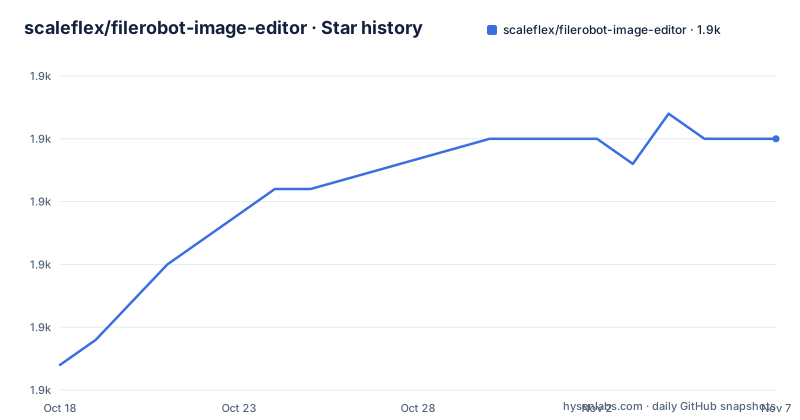
Star history
- scaleflex/filerobot-image-editor1,930 ★ · +9
| Repository | 2026-10-18 | 2026-11-07 |
|---|---|---|
| scaleflex/filerobot-image-editor | 1.9k | 1.9k |
9 Stars in the last 20 days, measured from the daily GitHub snapshot. Compare with other projects
Editorial analysis
Why Filerobot Image Editor belongs in a web product
Filerobot Image Editor addresses a specific product requirement: placing image editing controls inside a web application without building every editing operation and its surrounding interface from scratch. Its audience is developers working on upload, content, commerce, or media workflows that need an interactive editor rather than a server-side conversion command.
The README lists resize, crop, flip, finetune, annotation, watermark, and filters as core operations. It also documents live comparison between the original and modified image, history management through undo, redo, and reset, multiple annotation selection and transformation, and customization of the image file on save. These features make it more relevant to products where a user edits an asset and continues working with it in the application.
An experimental feature can export the current design state and load it later so an editing session can continue. That could fit draft or deferred editing workflows, but the experimental label matters. The repository does not publish a design-state schema or version migration policy in the README, so an application should not assume that saved state will remain compatible across every future package release.
Filerobot Image Editor is not presented as a batch-processing service or command-line program. Its documented delivery formats are JavaScript packages, a React component, and a VanillaJS browser bundle. That scope points toward applications where the edited output is handled by the host after the user saves it.
The component architecture behind browser-based editing
The README describes Filerobot Image Editor as a VanillaJS-based library that can be bridged into frameworks, including React. Its React integration depends on `react`, `react-dom`, `react-konva`, and `styled-components`. This points to a component and canvas-based editing architecture rather than a collection of ordinary HTML controls alone. The visible documentation does not expose enough internal implementation detail to describe individual rendering modules with confidence.
The application supplies a source image to the editor. From there, the documented feature set covers pixel or composition changes, comparisons with the original, annotation manipulation, and history operations. On save, the React example passes `editedImageObject` and a design state to `onSave`. The README also describes saving an editable design state separately from the rendered image, although that capability remains experimental.
This interface creates two output paths that a host application must distinguish. The edited image is the visible asset, while design state is intended to preserve editing context. The README does not identify the type of `editedImageObject`, the complete set of `onSave` arguments, or whether design-state loading performs file validation. Those points should be checked in the package type definitions or implementation before designing persistence around them.
The repository root uses Yarn workspaces through the `packages/*` entry and includes Vite, Rollup, Babel, and Lerna tooling. That layout indicates that the project is built as a package monorepo. It does not imply that consumers must clone this repository, since the documented installation paths use published npm packages or a CDN asset.
Installing Filerobot Image Editor through npm or CDN
React integrations require the component package plus compatible versions of React and its declared peer stack. The README lists the prerequisite installation as follows:
npm install --save react react-dom react-konva styled-componentsIts compatibility table pairs React v17.x with react-konva versions from `>= v17.0.1-1` through `<= v17.0.2-6`, and React v18.x with `react-konva` 18.x. These are named version boundaries from the README, not a statement that every later release combination is supported.
Install the React component package with:
npm install --save react-filerobot-image-editorFor the documented VanillaJS npm path, install both packages:
npm install --save filerobot-image-editor react-filerobot-image-editorThe README adds that applications using npm versions below 7 do not need to install `react-filerobot-image-editor` for this path. Existing lockfiles and dependency resolution should therefore be checked before copying that instruction into a mixed-version project.
A browser integration can load the VanillaJS production bundle:
<script src="https://scaleflex.cloudimg.io/v7/plugins/filerobot-image-editor/latest/filerobot-image-editor.min.js"></script>This route is VanillaJS only and references `latest`, which the README defines as the last production version. The library does not include its font by default. The host must load Roboto at weights 400 and 500, or configure another available `fontFamily`, before loading the plugin. Arial is the documented fallback when Roboto is unavailable.
Opening the React editor on a real image
The first React use has two responsibilities: keep editor visibility in application state and provide the image that should be opened. The README example imports the default component and the exported `TABS` and `TOOLS` values, then sets `isImgEditorShown` to `true` from an `openImgEditor` function.
After opening the component, set its `source` to the image URL and handle `onSave`. The README states that this callback receives an `editedImageObject` and a design state. In a real application, those values need to be passed to the product's existing asset or draft workflow. The documentation does not show an upload endpoint or prescribe whether the edited image should be stored locally, uploaded immediately, or retained in application state.
The first useful verification is therefore not visual polish alone. Confirm that the source image opens, at least one crop or resize operation changes the displayed result, and the history controls return the design to an earlier state. Then save it and inspect the object received by `onSave` in the browser's developer tools. That inspection can answer integration questions that the README leaves open, including the object's concrete runtime type and the design-state representation.
The README does not document keyboard shortcuts, accessibility guarantees, supported browser versions, or mobile layout limits in the visible installation and example sections. If any of those are acceptance criteria, they should be checked against the hosted preview and package implementation before adoption.
Where design-state export remains an integration risk
The ability to export a design state and reopen it later is the project's most consequential experimental boundary. A rendered image cannot carry all editor context by itself, so a design-state mechanism is useful when users must resume annotations, watermark placement, filters, or transformations. The README lists this capability but does not provide a format sample, schema identifier, or stability guarantee.
Applications must decide what happens when the source image changes, becomes unavailable, or differs in dimensions from the original. The README does not state whether the loader validates those cases or how it reports incompatible state. It also does not specify whether design state references the source by URL, identifier, or another value. That missing contract makes database design and migration planning more demanding than storing the edited image alone.
The saved-file customization feature has similar boundaries. The README says image file output can be customized, but it does not enumerate supported formats, naming options, compression settings, or metadata handling. These behaviors should not be inferred from property names without checking the configuration reference and type declarations.
Treat design-state export as optional until its runtime format and version compatibility are confirmed. The basic save callback may still fit applications that only need the edited image, but long-term editing sessions depend on undocumented persistence semantics.
Filerobot Image Editor versus deterministic server processing
The clearest alternative is a dedicated server-side image processor invoked with explicit crop, resize, rotation, or format-conversion parameters. The distinction is not that both projects can alter dimensions. Their execution models are different.
Filerobot Image Editor exposes an interactive interface with history, filters, drawings, watermarks, and user-driven operations. A server-side processor usually receives a structured request, runs as application infrastructure, and returns a file without retaining an editing session. The first fits products where users need to compose and compare an image before saving. The second fits deterministic pipelines, background jobs, and environments where output parameters must be controlled outside the browser.
Filerobot Image Editor does not replace upload storage, server-side validation, or content delivery. The README does not claim that final files are compressed, renamed, or persisted by the library. Those tasks remain with the host application. Selecting the component therefore adds a user interface layer rather than removing the need for server-side asset handling.
A dependency-light application with one fixed transformation requirement may prefer the focused processor. A product needing a browser editing surface with saved design context has a more direct use for Filerobot Image Editor.
Release cadence, upgrade exposure, and MIT terms
The repository is not archived, and its last push was on 2026-06-16. That date confirms recent repository activity, although it does not guarantee compatibility with every consumer or prove that every package receives frequent releases.
The documented release history lists v4.9.1 on 2024-12-30, v4.9.0 on 2024-10-27, and v4.8.1 on 2024-05-16. The most recent listed release predates the latest push, so repository activity alone should not be treated as a new release. Before upgrading, compare the changelog for changes to save callbacks, configuration, state loading, React support, and VanillaJS bridges rather than updating only the package version.
The root `package.json` and README identify the project as MIT licensed. That covers use and modification under the licence's conditions, but it does not settle questions about Roboto, uploaded images, third-party packages, CDN availability, or the separate obligations of a deploying application. The README's instruction to import the font from the host side makes font availability and licensing a separate integration check.
Upgrades also involve the surrounding stack because `react-konva`, `styled-components`, React, and DOM are relevant to installation and compatibility. Pin the package version used by an application, retain the font assets it expects, and verify save compatibility with any persisted design state before deploying an upgrade.
Editorial conclusion
Adopt Filerobot Image Editor when users need an interactive editing surface inside an existing web application and the host can meet its dependency and font requirements. Do not choose it when you need only deterministic server-side image conversion or a dependency-free editing layer. Before integration, verify React and react-konva compatibility, font loading, save output, and the version stability of experimental design-state exports.
Frequently asked questions
How do I install Filerobot Image Editor in a React application?
Install `react-filerobot-image-editor` and the documented dependencies. The README requires matching React and react-konva versions: React v17.x uses the specified 17.x range, while React v18.x uses react-konva 18.x.
Can Filerobot Image Editor be used with VanillaJS?
Yes. The README documents an npm package named `filerobot-image-editor` and a CDN bundle for VanillaJS only. It also says the default Roboto font must be imported by the host application.
Can I reopen an edited design in Filerobot Image Editor?
The README says the current design state can be exported and loaded later, but it labels this feature experimental. It does not document a schema, version migration process, or compatibility guarantee.
Official sources
Add this badge to your README
If you maintain this project, the badge below links readers to this analysis and shows its maintenance status from the daily GitHub snapshot. Paste the markdown into your README; add ?metric=license or ?metric=stars to the image URL for a different field.

[](https://hysenlabs.com/projects/scaleflex-filerobot-image-editor)Star history chart for your README
[](https://hysenlabs.com/projects/scaleflex-filerobot-image-editor)Was this useful?