fping is for probing many hosts at once, and its privilege model is the design decision
High performance ping tool
At a glance
- What is it?
- fping is a C program that sends ICMP echo probes to many network hosts, similar to ping but aimed at batches rather than one host at a time, and it has been a standard tool since Roland Schemers published the first version in 1992. The current maintainer is David Schweikert, and the project ships a container image, an unprivileged mode for rootless environments, and a manual page that is the real documentation.
- Who is it for?
- fping suits a network engineer or a platform team that needs a scripted answer about which of a few thousand addresses are up, and that runs the tool in containers or under a restricted service account. It does not suit someone who wants a single interactive ping, since that is what the system ping is for, and it is not a monitoring system, because it keeps no history and tells you nothing about latency over time.
- Can I use it commercially?
- Check first. The repository uses a licence we do not classify automatically, so read its LICENSE file before any commercial use.
- Is it still maintained?
- Yes. The repository last received commits 2 days ago.
- What is it written in?
- Mainly C, according to GitHub's language statistics.
Answers come from the project's GitHub data, last synced on November 7, 2026, and from our analysis. They are not legal advice.
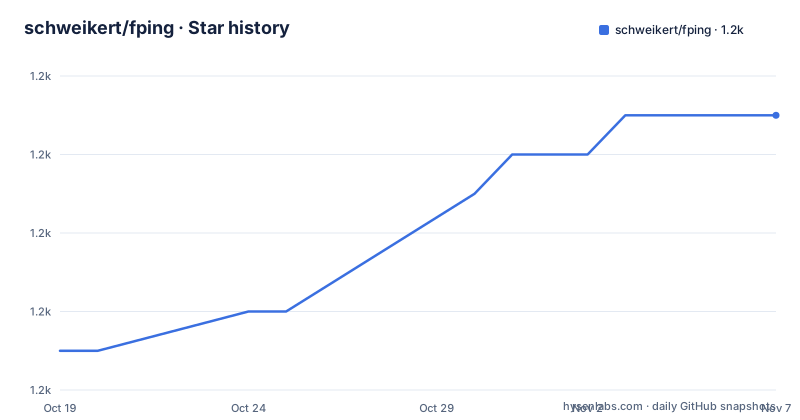
Star history
- schweikert/fping1,237 ★ · +6
| Repository | 2026-10-19 | 2026-11-07 |
|---|---|---|
| schweikert/fping | 1.2k | 1.2k |
6 Stars in the last 19 days, measured from the daily GitHub snapshot. Compare with other projects
Editorial analysis
Thirty years of a tool that pings in parallel
fping is described as a program to send ICMP echo probes to network hosts, similar to ping, but much better performing when pinging multiple hosts, and the history is given in one sentence. Roland Schemers published a first version of it in 1992 and it has established itself since then as a standard tool.
The framing is precise about where the performance comes from. It is not that fping sends one probe faster than ping does. It is that fping is built to do many hosts at once, which is the operation that the system ping is bad at. The system ping is a conversational tool for one host, and the usual way to use it on a list is a shell loop that runs it once per address, sequentially, with the startup cost of a process per host and the wait of a full round trip timeout on each one that does not answer.
That gap is the whole reason fping exists, and it is a gap that shows up in two places. A network discovery sweep over a range is the obvious one. The other is a monitoring check, where the question is not about one host but about a set of them, and where the tool's output has to be read by a script rather than by a person.
The maintainer credit in the README is David Schweikert, and the credits list the previous maintainer, RL "Bob" Morgan, and Jeroen Massar for the initial IPv6 support, with a pointer to the CHANGELOG for the rest. The project is hosted at fping.org, and there is a mailing list for users at groups.google.com/group/fping-users.
The privilege model is where the deployment decisions live
Sending ICMP echo probes is a privileged operation on a normal system, and fping gives three ways to deal with that, and the choice is more consequential than it looks.
The first is to make the binary setuid, so that it can open a raw socket regardless of the invoking user. The second is to give it capabilities, and the README gives the Linux command:
sudo setcap cap_net_raw,cap_net_admin+ep fpingThe third is to not be privileged at all. If you cannot run fping as root and cannot use the cap_net_raw capability, you can also run fping in unprivileged mode. This works on macOS and also on Linux, provided that your GID is included in the range defined in /proc/sys/net/ipv4/ping_group_range, and the README calls it particularly useful for running fping in rootless and unprivileged containers.
That third option is the one worth understanding, because it is the difference between a tool that only works on a rootful host and one that fits a container image or a non-root service account. The Linux mechanism is a group membership, so the group range on the host has to be wide enough to include the user's group, and a container that is not sharing the host's network namespace or its sysctls will not get it for free.
One option is excluded from the unprivileged path. The --fwmark option needs root or cap_net_admin, so anything that sets a firewall mark on the outgoing packets requires the higher privilege even when the rest of the tool is running unprivileged.
Building from source takes four steps
The source build is an autotools build, and the README lists the steps in order.
First, if you got the source from GitHub rather than from a release tarball, run the autogen script:
./autogen.shThen run configure with the correct arguments, and the README points at ./configure --help for what those are. Then make and make install:
make; make installAnd then the privilege step, which is the same setuid or setcap decision described above, with the Linux command being sudo setcap cap_net_raw,cap_net_admin+ep fping.
The autogen step is conditional and that condition is the useful detail. Release tarballs already contain the generated build system, so a user who downloaded a tarball does not need autoconf and automake installed, while a user who cloned the repository does. The README also ships an autoclean.sh script at the top level, which is the reverse operation for people who want to go back to a clean tree.
The repository is set up for the usual C project automation, with configure.ac and Makefile.am at the top level, a src/ directory holding the implementation, doc/ holding the manual page source, contrib/ for contributed material and ci/ for continuous integration scripts, and a set of pipelines in .github and azure-pipelines.yml.
The container image is built from the develop branch
The Docker section is short, and it contains one detail that matters for how you deploy it.
The image can be used directly from GitHub, and the tag given is ghcr.io/schweikert/fping:latest. The examples use podman, and the README says you can replace podman with docker if you prefer:
podman pull ghcr.io/schweikert/fping:latestand then the run:
podman run --rm ghcr.io/schweikert/fping:latest 127.0.0.1The detail is the sentence above the examples. You can use the current Docker image from the develop branch, which means the published latest tag tracks the development branch rather than a tagged release. The default branch of the repository is develop, and the most recent published releases are v5.5, v5.4 and v5.3, so the image and the release tags are not the same line of artefacts.
That matters for a container image specifically, because a container is deployed by tag and something like :latest that moves is harder to pin. A team that wants reproducible deployments has to take the image digest rather than the tag, or build from a release tag themselves.
The unprivileged mode from the previous section is what makes the image usable in practice, when the container runs fping without root or raw-socket capabilities, and the ping_group_range requirement is the thing to check on the host before the container will answer.
The manual page is the documentation, and the help output is not
The usage section is two lines long, and that is a deliberate choice rather than an omission.
You are pointed to the fping(8) manual page for usage help, and the parenthesis explains the fallback: fping -h will also give a minimal help output. So the full reference is the manual page, which lives in the repository as doc/fping.pod, the Pod source format that generates the troff man page.
For a tool with three decades of history and a large option set, that is the right place for the documentation. The Pod source is in the repository, so the manual can be read before installing anything, and the man page is generated from the same source that ships with the package, which removes the possibility of the website and the binary disagreeing.
The minimal help output is the part to be aware of, because it means that the flags are not discoverable from the binary alone. A user who has just installed fping and types the help flag will not see the full option list, and the manual page is the reference to consult instead.
That same pattern of established, stable tooling shows in the project structure. The tests and the Docker image have their own workflow badges, there is a CodeQL analysis workflow, coverage is reported through Coveralls, and the build is also scanned by Coverity, which is a reasonable amount of machinery for a C program that has been in continuous use since 1992.
Where fping fits, and what it is not
The alternative to fping is the system ping, and the difference in approach is the whole point.
A system ping is interactive and conversational. It resolves a name, sends probes to one host, prints a line per reply, and offers statistics at the end when you interrupt it. fping is a batch tool. It takes a list of targets, probes them, and prints one line per host, which is a format designed to be read by a script rather than by a person, and it can also take a range instead of a list.
That difference in output shape is what makes the two tools complementary rather than competing. The system ping answers the question about one host in front of you, and fping answers the question about a set of hosts in a form you can pipe into something else.
What fping is not is a monitoring system. It reports reachability at the moment it runs and keeps no history, so the question of whether a host was reachable yesterday is not answered by it, and a team that needs that has to store the output somewhere and keep it. It is also not a service level measurement tool, since the round trip time it reports is a property of one probe at one moment.
The adoption question is therefore narrow and easy to answer. If you need to sweep a range, to check a list of endpoints from a script, or to run reachability checks from a container without root, fping is the right tool, and the privilege setup is the only thing to get right.
A stable tool with an active maintenance line
The recent releases are v5.5 from 2025-12-31, v5.4 from 2025-08-19 and v5.3 from 2025-01-02, and the repository is not archived with the last push on 2026-09-28. The default branch is develop, and the release tags are cut from it.
That is the profile of a mature utility: infrequent, deliberate releases, continuous work on the development branch, and a release every few months. There is no packaging change to plan for and no migration to run, because the tool is a single binary with a stable command line and a manual page that has been refined over three decades.
The licence is worth reading in the repository rather than from a badge. The topic list marks the project as BSD licensed and the repository carries a COPYING file, while the licence field records a custom licence that GitHub cannot classify, which is the usual result of a BSD derived licence with project specific wording. For a tool that most people install from their distribution's package manager rather than from source, the practical effect is small, but a company that ships fping inside its own product image should read COPYING rather than assume a stock BSD grant.
The final point is the one the project itself makes in the credits. fping exists because someone needed to ping many hosts quickly in 1992, it has been maintained by three people since then, and the CHANGELOG is where the rest of the contributors are recorded. A tool with that history and that release discipline is not interesting because it is new, and that is not a criticism of it.
Editorial conclusion
fping suits a network engineer or a platform team that needs a scripted answer about which of a few thousand addresses are up, and that runs the tool in containers or under a restricted service account. It does not suit someone who wants a single interactive ping, since that is what the system ping is for, and it is not a monitoring system, because it keeps no history and tells you nothing about latency over time. Verify first how your environment grants raw socket access, because the setuid, setcap and ping_group_range routes are mutually exclusive strategies with different security postures, and check whether the container image you pull tracks the develop branch, which the README says the published image is built from.
Frequently asked questions
What is fping used for?
It is a program to send ICMP echo probes to network hosts, similar to ping but much better performing when pinging multiple hosts. It is aimed at sweeps and scripted reachability checks rather than at an interactive conversation with one host.
How do I run fping without root on Linux?
Use the unprivileged mode, which works on macOS and on Linux provided your GID is included in the range defined in /proc/sys/net/ipv4/ping_group_range. The README calls it particularly useful for running fping in rootless and unprivileged containers, while the --fwmark option still needs root or cap_net_admin.
How do I build fping from source?
Run ./autogen.sh if you got the source from GitHub, then run ./configure with the right arguments, then make and make install, and finally give the binary the privileges it needs, either setuid or with sudo setcap cap_net_raw,cap_net_admin+ep fping on Linux.
Where is the fping documentation?
The README points to the fping(8) manual page, whose source is doc/fping.pod in the repository, and notes that fping -h only gives a minimal help output rather than the full option list.
How do I run fping in a container?
Pull the image ghcr.io/schweikert/fping:latest and run it with a target, for example podman run --rm fping:latest 127.0.0.1, using podman or docker as you prefer. The README notes that the published image is built from the develop branch.
Official sources
Add this badge to your README
If you maintain this project, the badge below links readers to this analysis and shows its maintenance status from the daily GitHub snapshot. Paste the markdown into your README; add ?metric=license or ?metric=stars to the image URL for a different field.

[](https://hysenlabs.com/projects/schweikert-fping)Star history chart for your README
[](https://hysenlabs.com/projects/schweikert-fping)Was this useful?