scikit-image pins Python 3.12 and splits its scipy floor for WebAssembly
Image processing in Python
At a glance
- What is it?
- scikit-image is a Python image processing library with a compiled core, which is why its pyproject.toml carries a build extra with meson, ninja, Cython and pythran. Installation is a single pip or conda line, but the declared floors are strict and one of them changes under Emscripten.
- Who is it for?
- Adopt scikit-image when you want an image processing library that lives inside a normal Python dependency set, with the API documentation, user forum and developer forum already in place. It is the wrong choice if you need an older Python, since the floor is 3.12 and numpy 2.2, or if you want a pure Python install with no compiler in the loop, because the C classifier and the meson plus Cython build extra say otherwise.
- Can I use it commercially?
- Check first. The repository uses a licence we do not classify automatically, so read its LICENSE file before any commercial use.
- Is it still maintained?
- Yes. The repository last received commits 2 days ago.
- What is it written in?
- Mainly Python, according to GitHub's language statistics.
Answers come from the project's GitHub data, last synced on November 22, 2026, and from our analysis. They are not legal advice.
Star history
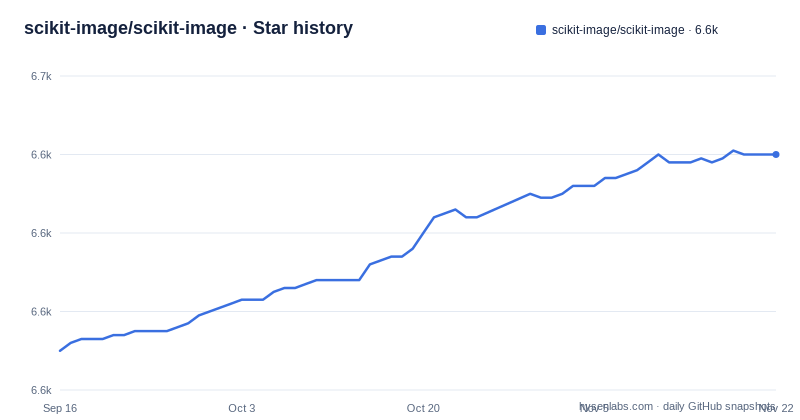
- scikit-image/scikit-image6,640 ★ · +50
| Repository | 2026-09-16 | 2026-11-22 |
|---|---|---|
| scikit-image/scikit-image | 6.6k | 6.6k |
50 Stars in the last 67 days, measured from the daily GitHub snapshot. Compare with other projects
Editorial analysis
The floor is Python 3.12, numpy 2.1 and a dynamically read version
scikit-image declares its runtime requirements in pyproject.toml, and the first two numbers decide whether an environment can take it at all. Python must be 3.12 or newer, and the classifiers name 3.12, 3.13, 3.14 and 3.15 with a 3 :: Only marker, so there is no Python 2 or 3.11 path. numpy must be 2.2 or newer, which is a newer floor than most scientific Python stacks still carry.
The rest of the list is short and each name has a job: scipy, networkx at 3.4 or newer, pillow at 10.1 or newer, imageio, tifffile, packaging at 24 or newer, and lazy-loader at 0.6 or newer. The version is dynamic, meaning it is read from the package rather than written in pyproject.toml, and the maintainers are listed as scikit-image developers with a mailing list address on the scientific-python forum rather than as individuals.
The declared audience in the classifiers is developers and science and research, under the topic of scientific and engineering libraries, and the operating systems listed are Windows, POSIX, Unix and MacOS.
Two dependency lines change depending on what you build for
The dependency list is where a normally tidy package gets interesting. scipy appears twice, with the condition attached to each line: 1.15 or newer everywhere except Emscripten, and 1.14 or newer when the target platform is Emscripten. Emscripten is the compiler toolchain behind WebAssembly, so a browser build of the same library is allowed an older scipy.
The second conditional detail is an exclusion rather than a lower bound: imageio must be 2.33 or newer and specifically not 2.35.0. A pinned-out patch release inside a permissive range is the kind of line that tells you a bug was found and the fix has not shipped in the next patch yet, or that a specific release behaves differently. Either way, a resolver will refuse to build an environment that happens to have exactly that version.
tifffile carries a calendar bound rather than a version scheme, 2025.1.10, and packaging has a floor of 24. Read together with the Python 3.12 floor, the practical effect is that scikit-image tracks recent releases of its own dependencies closely rather than accepting old ones.
Installation is one line, and the compiled core sits behind a build extra
The documented install paths are the two package managers a scientific Python user already has:
pip install scikit-image
conda install -c conda-forge scikit-image
pyproject.toml's optional-dependencies list includes a build extra that holds the toolchain:
'meson-python>=0.16',
'ninja>=1.11.1.3',
'Cython>=3.2',
'pythran>=0.16',
Two compilers' worth of machinery, in other words. meson-python is the build backend wrapper, ninja is the build runner, Cython and pythran generate and compile extension code, and the classifier list includes Programming Language :: C alongside Python. The repository root confirms it with a meson.build file, a requirements directory and a src directory rather than a flat package of Python files.
Cython must be 3.2 or newer, and the comment above the extra says to keep the build-system requires in step when these entries change. So there are two places to update when the toolchain moves, and getting that wrong is the kind of failure that shows up as a build error rather than an import error.
requirements.txt is four includes, not a pinned list
The top-level requirements file contains no versions at all. It is four include directives:
-r requirements/default.txt
-r requirements/build.txt
-r requirements/test.txt
-r requirements/developer.txt
That means a single requirements.txt deliberately resolves to runtime, build, test and developer dependencies together, split across a requirements directory in the repository root.
The extras in pyproject.toml take a different approach. There is a data extra for pooch 1.6.0 or newer, a developer extra with pre-commit, ipython and a pinned docstub, and an asv extra, and the developer extra itself asks for scikit-image[asv]. Optional test data and developer tooling are therefore opt-in by extra, while the four include files are what a plain pip install -r would pull.
One environment.yml sits alongside them for conda users, and an INSTALL.rst is linked from the README for anything the two commands above do not cover.
Benchmarks and release tooling live in the tree, not in the docs
The repository carries the machinery a maintainer needs, and the file names make the workflow legible. asv.conf.json and a benchmarks directory belong to airspeed velocity, the benchmarking tool referenced by the asv extra, so regression numbers are part of the project rather than an afterthought. A .spin directory and the spin dependency in the build extra point at a task runner for the repeated commands, and a Makefile-free layout keeps those commands in configuration.
Release and citation metadata are committed too. CITATION.cff holds citation metadata and RELEASE.txt is the release note file, and the README points at LICENSE.txt for terms. SUPPORT and process files are similarly present in the root: SECURITY.md, CODE_OF_CONDUCT.md, CONTRIBUTING.md, CONTRIBUTORS.md and TODO.txt. Two smaller details are worth naming because they are unusual: .git-blame-ignore-revs exists to hide formatting-only commits from blame, and .coderabbit.yaml configures an automated review bot.
For testing, .binder and .circleci directories point at hosted notebook environments and continuous integration respectively, while .codecov.yml and a pre-commit config cover coverage and hooks.
The last release is v0.26.0 while main keeps taking commits
The release history shows a normal pre-release sequence rather than a gap. v0.26.0rc1 was published on 2025-12-09, v0.26.0rc2 on 2025-12-18, and the final v0.26.0 on 2025-12-20, so the two release candidates sat nine days apart and the final landed two days after the second.
Work has not stopped since. The last push to the main branch was on 2026-10-30, and v0.27.0rc1 was published on 2026-10-27, so the next release line is already in testing while the newest final release remains 0.26.0. For a library with a 0.x version number and a Development Status :: 4 - Beta classifier, that gap between the last tag and current main is normal rather than alarming, but it does mean pip will not hand you whatever is on main.
Licence handling has a similar shape. The repository metadata reports no recognised licence identifier, while pyproject.toml declares the OSI approved BSD licence in its classifiers and points [project.license] at LICENSE.txt. Anyone checking terms should open that file rather than trust the metadata field.
The citation is a 2014 paper, and the forums split users from contributors
The README asks users to cite the project, and gives a specific reference rather than a general request: the scikit-image: Image processing in Python paper in PeerJ 2:e453 from 2014, with a DOI, and an author list running from Stefan van der Walt and Johannes L. Schoenberger through Juan Nunez-Iglesias, Francois Boulogne, Joshua D. Warner, Neil Yager, Emmanuelle Gouillart and Tony Yu, plus the contributors. The repository holds the same metadata as CITATION.cff.
Community channels are split by role, which is unusual enough to note. Questions go to a user forum at forum.image.sc under the scikit-image tag, contributor discussion goes to a developer forum on the scientific-python Discourse under a contributor category, and there is also a Zulip chat linked from the README. Stack Overflow carries a scikit-image tag as well. Documentation lives on the project website, with a stable documentation path separate from the site root.
So a bug report and a question about a broken filter are aimed at different places, and the developer forum is where module internals are discussed rather than where usage is answered.
Editorial conclusion
Adopt scikit-image when you want an image processing library that lives inside a normal Python dependency set, with the API documentation, user forum and developer forum already in place. It is the wrong choice if you need an older Python, since the floor is 3.12 and numpy 2.2, or if you want a pure Python install with no compiler in the loop, because the C classifier and the meson plus Cython build extra say otherwise. Before pinning it in an environment, check the two conditional lines in the dependency list, since the scipy floor and the imageio exclusion both depend on what you are building for, and note that v0.26.0 from 2025-12-20 is the latest final release, with v0.27.0rc1 published on 2026-10-27.
Frequently asked questions
How do I install scikit-image?
The README gives two commands: pip install scikit-image, or conda install -c conda-forge scikit-image. For anything those do not cover, it points to the INSTALL.rst file in the repository.
what is scikit image
scikit-image is a Python library for image processing, described as Image processing in Python and classified as a scientific and engineering library for developers and research audiences. It needs Python 3.12 or newer and has a compiled core built with meson, ninja, Cython and pythran.
is scikit image a library
Yes, it is a Python library rather than an application: its classifiers include Topic :: Software Development :: Libraries and Programming Language :: Python :: 3 :: Only, and the project metadata declares a dynamic version read from the package. Installation is through pip or conda-forge.
how to install scikit image in jupyter notebook
The environment still needs the package installed first, with pip install scikit-image or conda install -c conda-forge scikit-image; the notebook then imports it like any other library. The repository also carries a .binder directory for hosted notebook environments.
Official sources
Add this badge to your README
If you maintain this project, the badge below links readers to this analysis and shows its maintenance status from the daily GitHub snapshot. Paste the markdown into your README; add ?metric=license or ?metric=stars to the image URL for a different field.

[](https://hysenlabs.com/projects/scikit-image-scikit-image)Star history chart for your README
[](https://hysenlabs.com/projects/scikit-image-scikit-image)Was this useful?