ScoopInstaller's Main bucket is a directory of manifests, a test script and a deprecated graveyard
The default bucket for Scoop. This is the default bucket for Scoop and is added by default.
At a glance
- What is it?
- The default bucket for the Windows package manager holds its current manifests in one folder, retired ones in another, runs two unnamed workflows, and keeps both its contributing guide and its inclusion criteria in repositories other than this one.
- Who is it for?
- This is infrastructure rather than software, and it should be read that way: nobody installs a bucket, a maintainer reviews manifests against it. The one thing worth acting on is the deprecated directory, because a package that moves there is a package that someone can still have installed.
- Can I use it commercially?
- Yes. Unlicense is a permissive licence: you can use, modify and sell software built on it, as long as you keep its copyright and licence notices.
- Is it still maintained?
- Yes. The repository received new commits within the last day.
- What is it written in?
- Mainly PowerShell, according to GitHub's language statistics.
Answers come from the project's GitHub data, last synced on November 14, 2026, and from our analysis. They are not legal advice.
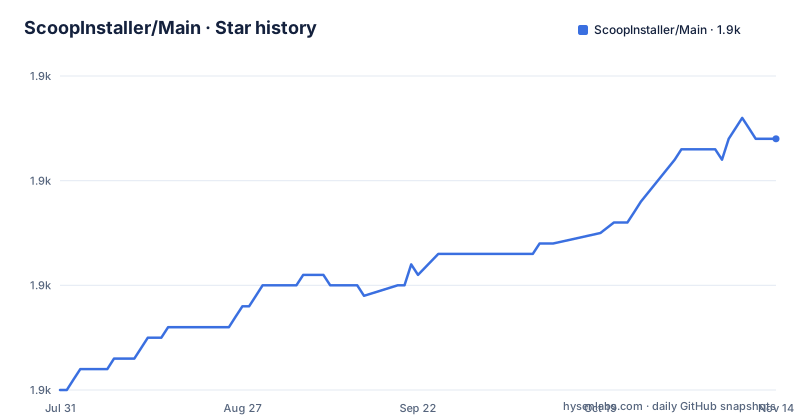
Star history
- ScoopInstaller/Main1,884 ★ · +24
| Repository | 2026-07-31 | 2026-11-14 |
|---|---|---|
| ScoopInstaller/Main | 1.9k | 1.9k |
24 Stars in the last 106 days, measured from the daily GitHub snapshot. Compare with other projects
Editorial analysis
There is no program here, only a folder of manifests
The repository describes itself in one line as the core manifests for Scoop, described on its own site as the Windows command-line installer. A manifest is the file that tells the installer where to fetch a program and how to lay it out, and this repository is a set of those files rather than an application.
The usage instruction is correspondingly short: run `scoop install` with the name of a manifest. There is no setup step, no configuration and no dependency to satisfy, because the bucket is already present. The page repeats the reason twice over, saying this is the default bucket and that it is added by default.
One metadata detail explains the language label. The repository is tagged as PowerShell, but the manifests themselves are data files. The scripting is in the tooling around them, and the root contains a PowerShell test script alongside directories of manifests and helper commands. So the primary-language field describes the maintenance surface rather than the shipped artifact, which is worth remembering before you assume a shell script is where the install logic lives.
Retired manifests are moved to a directory rather than deleted
The root listing has two directories of equal importance. One holds the current manifests. The other is named deprecated.
The README does not mention either of them, so the mechanism has to be inferred from the layout, and the inference is the interesting part. A bucket that deleted a retired manifest would break every machine that had installed it and every script that referenced its name, since the name would simply stop resolving. A deprecated directory keeps the file, and therefore keeps the name, in a place that is no longer offered as a fresh install.
Nothing on the page says how a manifest gets there, who moves it, or whether a deprecated entry is still visible to the updater. Those three questions decide what a deprecated manifest means for an installed copy: whether the user is told to migrate, whether they are left with a package that will never receive an update, or whether the update path still finds the old file.
For anyone maintaining automation against this bucket, that is the detail to check before assuming a name is gone.
The bucket carries a test script and two workflows it never explains
The root contains a PowerShell file whose name is a test suite for the bucket. That is the most concrete piece of engineering in the repository: manifests are structured data that other software parses, and a test script is how a bucket catches a broken one before it reaches an installer.
Two workflow badges sit at the top of the page, pointing at a continuous integration workflow and at a second one named excavator. Neither is described anywhere in the visible text. A repository this small can afford to leave a maintenance bot unexplained, but a reader is left guessing whether the second workflow tests, updates or cleans.
Alongside those sit the directories a maintainer actually works in, a bin folder and a scripts folder, plus editor configuration: an editor config file, a git attributes file, a markdown lint configuration and a directory of editor settings. The markdown lint config is a small signal about the project's priorities. In a bucket of structured data, the prose that gets linted is the readme and the documentation that tells contributors what shape a manifest takes.
The page never shows what a manifest looks like
The README is sixty-two words long. It names what the repository is, gives the one command a user needs, and points at two documents elsewhere. It contains no manifest format, no field list, no worked example and no error message.
For a user that is fine, because the user never writes a manifest. For a prospective contributor it is the entire missing middle, and it is missing because the two things a contributor needs are both off this page. The inclusion criteria for the Main bucket are a wiki page, and the contributing guide is a file in a different repository, held under the ScoopInstaller organisation's shared dotfiles rather than here.
The result is a three-hop path. Start with this readme, follow the criteria link to decide whether a package belongs in Main at all, then follow the contributing link to learn how to write the file. A maintainer who already knows the process will find nothing new here. A maintainer who does not will find the criteria before the syntax, which is an unusual order, and it means the first question asked of any new package is whether it should be here rather than how to express it.
The Unlicense and a description that says the same thing twice
The repository records the Unlicense, a public domain dedication rather than a permissive licence with an attribution clause. For a set of package definitions that is a coherent choice: the manifests describe where to download someone else's software, and the contribution is the packaging knowledge rather than the program. Copyleft would add obligations to a file that mostly holds hashes and URLs.
The repository's own description is less tidy. It reads that this is the default bucket for Scoop, and then repeats that this is the default bucket for Scoop and is added by default. Two sentences, one fact. The readme itself states the same property once and gets on with it.
There are no releases, which is the correct shape for a bucket of data rather than a sign of neglect. What stands in for a changelog is the commit history, and the most recent push to the default branch is dated 2026-09-25. The default branch is named master rather than main, which is a small marker of a repository that was created before that rename became the convention.
Activity here is a stream of edits, not a sequence of versions
Because there are no releases, there is no way to ask what changed in version terms. The signal available to a user worried about whether a package is still current is the push date, and it is a single number for the whole bucket rather than anything per manifest.
That is a meaningful limitation for the job this repository does. A package can be abandoned upstream for a year while the bucket looks busy because other two thousand manifests are being edited on the same day. Conversely, a bucket that has not been pushed to in months may still be perfectly current for the specific package you use.
The practical approach is to look at the history of the individual manifest rather than at the repository, and to use the deprecated directory as a signal in its own right. A name that has moved there is a name whose upstream has changed shape, whether the maintainer moved it because the project was discontinued, renamed, merged or simply no longer met the criteria for the default bucket.
Editorial conclusion
This is infrastructure rather than software, and it should be read that way: nobody installs a bucket, a maintainer reviews manifests against it. The one thing worth acting on is the deprecated directory, because a package that moves there is a package that someone can still have installed. Before contributing, read the criteria page and the contributing guide, because neither is in this repository, and check how recently the manifests you depend on were touched, since there are no releases to look at.
Frequently asked questions
What is the ScoopInstaller Main bucket?
The default bucket for Scoop, described on its own site as the Windows command-line installer. It holds the core manifests, is added automatically, and manifests from it are installed with scoop install followed by the manifest name.
How do I add a manifest to the Scoop Main bucket?
The README points at two documents elsewhere: the criteria for including apps in the Main bucket, which is a page in the Scoop wiki, and the contributing guide, which is a file in a separate repository under the ScoopInstaller organisation. Neither document is in this repository.
What is in the deprecated directory of the Main bucket?
The root listing shows a bucket directory for current manifests and a deprecated directory beside it, and the README does not describe either. The layout implies retired manifests are kept rather than deleted, so their names still resolve even though they are no longer offered as fresh installs.
How is the Scoop Main bucket licensed and released?
The repository records the Unlicense, a public domain dedication. It has no GitHub releases, which fits a repository of package definitions; the freshness signal is the commit history, and the last push to the master branch is dated 2026-09-25.
Official sources
Add this badge to your README
If you maintain this project, the badge below links readers to this analysis and shows its maintenance status from the daily GitHub snapshot. Paste the markdown into your README; add ?metric=license or ?metric=stars to the image URL for a different field.

[](https://hysenlabs.com/projects/scoopinstaller-main)Star history chart for your README
[](https://hysenlabs.com/projects/scoopinstaller-main)Was this useful?