ScriptHookVDotNet Requirements and First Script Setup
An ASI plugin for Grand Theft Auto V, which allows running scripts written in any .NET language on the .NET Framework runtime in-game.
At a glance
- What is it?
- ScriptHookVDotNet runs .NET Framework scripts inside Grand Theft Auto V through ScriptHookV. Its main complication is version coupling: the ASI loader, API DLLs, game version, and .ini settings must be handled as one coordinated setup.
- Who is it for?
- Adopt ScriptHookVDotNet if you specifically develop Grand Theft Auto V scripts that run through ScriptHookV and can manage its tightly coupled runtime files. Do not choose it for cross-game scripting, ordinary .NET applications, or systems that cannot provide the required native and managed dependencies.
- Can I use it commercially?
- Yes. Zlib is a permissive licence: you can use, modify and sell software built on it, as long as you keep its copyright and licence notices.
- Is it still maintained?
- Yes. The repository last received commits 6 days ago.
- What is it written in?
- Mainly C#, according to GitHub's language statistics.
Answers come from the project's GitHub data, last synced on November 7, 2026, and from our analysis. They are not legal advice.
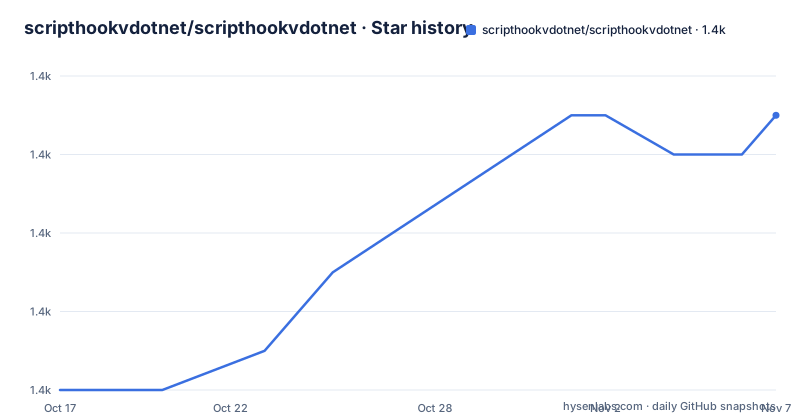
Star history
- scripthookvdotnet/scripthookvdotnet1,379 ★ · +7
| Repository | 2026-10-17 | 2026-11-07 |
|---|---|---|
| scripthookvdotnet/scripthookvdotnet | 1.4k | 1.4k |
7 Stars in the last 21 days, measured from the daily GitHub snapshot. Compare with other projects
Editorial analysis
Why ScriptHookVDotNet Exists for GTA V Script Authors
ScriptHookVDotNet, abbreviated as SHVDN, is an ASI plugin for Grand Theft Auto V. According to the README, it builds on Alexander Blade's C++ ScriptHook and allows scripts written in any .NET language to execute in the game on the .NET Framework runtime. Its intended users are GTA V mod and script developers who already depend on ScriptHookV and need access to native game functionality through a managed programming model.
This is not a general-purpose .NET hosting service or a standalone game scripting framework. The dependency chain includes C++ ScriptHookV, a compatible SHVDN distribution, .NET Framework 4.8 or later, and the Microsoft Visual C++ Redistributable. That makes SHVDN appropriate when the target really is Grand Theft Auto V running under ScriptHookV. It is the wrong tool for code that should run without GTA V, across unrelated games, or under a standard server or desktop runtime.
The project is primarily distributed under the zlib license. The README points developers and redistributors to `LICENSE.txt` and `COPYRIGHT.md` for its terms, while the repository also contains `THIRD-PARTY-NOTICES.md`. These files should be reviewed when distribution or third-party obligations matter. The README does not offer a legal interpretation of them.
The ScriptHookV, ASI, and API DLL Loading Chain
The repository description identifies SHVDN as an ASI plugin, while the installation instructions identify three files that form the relevant runtime set:
ScriptHookVDotNet.asi
ScriptHookVDotNet2.dll
ScriptHookVDotNet3.dll
The `.asi` loader and API DLLs must come from the same archive because their internal structure may change without notice. The numbered DLL names also represent separate API generations rather than interchangeable copies. From v3.6.0 nightly builds onward, raw scripts default to API v3. An older raw script filename such as `Script.cs` must be renamed with its intended version, for example `Script.2.cs`, when the file name does not otherwise identify an API generation.
This architecture makes SHVDN version-coupled at several levels. A script compiled against one API may depend on surface that is absent from another. A nightly-only API may also change without notice. The README therefore recommends compiling public or production scripts against stable API versions, even when end users need a nightly loader because no current stable build supports their game version.
There is another behavioral boundary in nightly releases. Some scripts that depend on GTA V's main game thread may fail because SHVDN ticks from a dedicated thread rather than ScriptHookV's fiber. The project uses that design to avoid compatibility problems with RAGE Plugin Hook and C++ scripts that use `try-catch` blocks. This is a concrete wrong-tool case for a script whose correctness depends on main-thread game logic.
Selecting SHVDN for the Installed GTA V Build
Before installation, identify the exact GTA V game build. The README singles out game version `v1.0.3258.0` and later because stable `v3.6.0` and `v3.5.1` have a documented compatibility problem with those game versions. For user installation on such builds, the README directs users to nightly version `v3.6.0-nightly.89` or later. It alternatively says to downgrade the game to `v1.0.3179.0` or earlier. That choice affects both the plugin compatibility path and the user's installed game version.
Stable archives are available from the repository Releases page. Nightly archives come from the separate `scripthookvdotnet-nightly` releases page and do not require signing in to download. Users of nightly builds must also use the `.ini` file shipped with that nightly release because settings changed from v3.6.0. SHVDN does not automatically add missing settings, so retaining an older configuration can leave the runtime without keys it expects.
The latest listed stable release is `v3.6.0`, published on 2022-12-29. The repository's last push was on 2026-10-08. Recent repository activity does not itself establish a newer stable release, so stable and nightly compatibility must be evaluated separately. A current source tree and an old stable package can present different API surfaces.
Installing SHVDN Beside GTA5.exe
Download the archive that matches the selected compatibility path, then extract its root files into the folder containing `GTA5.exe`. The README excludes `README.txt` and the archive's two folders from that instruction. Its `Docs` directory contains XML files intended only as API documentation for script developers, so the folder is not required as copied game content.
There is no documented shell command, installer, or package-manager workflow in the README. A first installation is therefore a manual file operation: extract the archive, place the files beside `GTA5.exe`, and leave out the named documentation items and folders. The destination should be checked before starting GTA V because SHVDN is tied to the game directory rather than a system-wide .NET application location.
The host prerequisites are also part of installation. The README lists C++ ScriptHookV by Alexander Blade, .NET Framework 4.8 or later, and the latest supported v14 Microsoft Visual C++ Redistributable. It specifically warns against v14.0. The README does not provide commands for installing or verifying these prerequisites.
Script developers also need Visual Studio 2022 or later to open the solution. The project expects the Script Hook V SDK to be extracted into the repository's `sdk` directory. The repository includes `ScriptHookVDotNet.sln` and an `examples` project, but the README does not document a complete command-line build sequence, so the installation procedure cannot be reduced to a verified `dotnet` command without adding assumptions.
Preparing a Stable SHVDN Script Project
The first developer decision is whether a script targets stable API v2 or v3, or whether it is deliberately testing a nightly-only API. The README states that v2 is less maintained and receives no new features, while v3 is the current generation. It also says v2 may still receive compatibility fixes for new game updates in the near future. New public features should not be treated as stable merely because they appear in a nightly archive.
For nightly releases from v3.6.0, the raw-script filename carries the API generation. A source file that previously relied on the old default must be renamed so its version is explicit:
Script.cs
Script.2.cs
The `.cs` and `.vb` extensions identify raw C# and Visual Basic scripts according to the README's nightly-version notes. The repository's primary language is C#, and the `examples` directory includes `Examples.csproj` plus examples such as `EuphoriaDemo.cs`, `ExitVehicle.cs`, `IndicatorControl.cs`, and `ScriptInstance.cs`. These files establish which examples exist, but the README does not provide their build or loading commands.
A practical first script should reference a stable SHVDN API package, keep nightly-only calls out of production builds, and use an end-user runtime whose API matches the compilation target. The README links the `scripthookvdotnet3` NuGet package and warns that using a runtime different from the compilation target can cause scripts not to work as intended. It does not show a minimal complete script, so the repository examples are the relevant starting files to inspect.
Keeping SHVDN Loader, DLLs, and Settings Together
Updates are not file-by-file operations. The README requires updating all three runtime components together:
ScriptHookVDotNet.asi
ScriptHookVDotNet2.dll
ScriptHookVDotNet3.dll
Mixing components from releases is explicitly unsupported when it causes problems. The same-version archive rule matters because the internal structure can change without notice. An upgrade must also account for the `.ini` file when moving to nightly v3.6.0 or later because SHVDN does not add missing settings.
Maintenance status has to be split between repository activity and release maturity. The last push was on 2026-10-08, while the most recent listed stable release remains `v3.6.0` from 2022-12-29. Recent commits can therefore coexist with an old stable release line. That distinction matters when deciding whether to depend on public APIs or accept compatibility risk for a particular game build.
The upgrade cost is operational as well as technical. A user may need to select between stable and nightly distributions, coordinate several files, replace configuration after nightly changes, rename raw scripts when API-version notation becomes necessary, and ensure that scripts compile against a stable API matching the runtime. The README does not document an in-place upgrade command or automatic migration tool.
Native ScriptHookV Versus the Managed SHVDN Path
The closest confirmed alternative is to use only C++ ScriptHookV with a native C++ mod. That approach avoids the .NET Framework runtime, managed API DLLs, SHVDN script naming rules, and managed-to-native compatibility concerns, but it requires working in C++ through the native SDK. SHVDN instead lets script authors use any .NET language supported by the target .NET Framework environment and supplies managed API DLLs for each API generation.
The tradeoff is therefore concrete. Native ScriptHookV keeps the integration within the native mod stack. SHVDN adds a managed runtime and versioned API libraries, which can suit developers who prefer C#, Visual Basic, or another .NET language but also introduces loader, DLL, and API alignment requirements. Neither approach removes the need to account for the installed GTA V version.
SHVDN is also unsuitable when main-thread timing cannot be changed. The documented dedicated-thread behavior can affect raw scripts that rely on the game's main thread for game logic. A developer facing that requirement should resolve the timing constraint before selecting the current nightly architecture, because the README states that the project had not found a way to tick on the main game thread at the time it was written.
Editorial conclusion
Adopt ScriptHookVDotNet if you specifically develop Grand Theft Auto V scripts that run through ScriptHookV and can manage its tightly coupled runtime files. Do not choose it for cross-game scripting, ordinary .NET applications, or systems that cannot provide the required native and managed dependencies. Before writing a script, verify the installed GTA V build, select a compatible SHVDN release, and confirm that the target API exists in a stable release rather than only a nightly build.
Frequently asked questions
What does ScriptHookVDotNet do?
It is an ASI plugin for Grand Theft Auto V that allows scripts written in any .NET language to run in-game on the .NET Framework runtime. It depends on C++ ScriptHookV.
What are the ScriptHookVDotNet requirements?
The README requires C++ ScriptHookV, .NET Framework 4.8 or later, and the latest supported v14 Microsoft Visual C++ Redistributable. It warns against using v14.0 of that redistributable.
Can I mix ScriptHookVDotNet files from different releases?
No. The README says to update `ScriptHookVDotNet.asi`, `ScriptHookVDotNet2.dll`, and `ScriptHookVDotNet3.dll` together because files from the same release must match.
Which SHVDN version should script developers compile against?
The README recommends stable versions for public or production scripts. Nightly versions are intended mainly for testing new APIs whose surface may change without notice.
Official sources
Add this badge to your README
If you maintain this project, the badge below links readers to this analysis and shows its maintenance status from the daily GitHub snapshot. Paste the markdown into your README; add ?metric=license or ?metric=stars to the image URL for a different field.

[](https://hysenlabs.com/projects/scripthookvdotnet-scripthookvdotnet)Star history chart for your README
[](https://hysenlabs.com/projects/scripthookvdotnet-scripthookvdotnet)Was this useful?