scroll-into-view-if-needed: Scrolling Only When an Element Is Hidden
Element.scrollIntoView ponyfills for things like "if-needed" and "smooth"
At a glance
- What is it?
- scroll-into-view-if-needed is an MIT-licensed JavaScript ponyfill for conditional and smooth scrolling through Element.scrollIntoView. It is suited to browser applications that need nearest-edge positioning, center alignment, or optional smooth behavior without depending on identical native support.
- Who is it for?
- Adopt this package when browser code needs `scrollMode: 'if-needed'`, nearest-edge positioning, or a consistent call shape for conditional scrolling. Do not adopt it as a complete smooth-scrolling polyfill, because its default package delegates smooth motion to browser support.
- Can I use it commercially?
- Yes. MIT is a permissive licence: you can use, modify and sell software built on it, as long as you keep its copyright and licence notices.
- Is it still maintained?
- Yes. The repository last received commits 11 days ago.
- What is it written in?
- Mainly JavaScript, according to GitHub's language statistics.
Answers come from the project's GitHub data, last synced on November 7, 2026, and from our analysis. They are not legal advice.
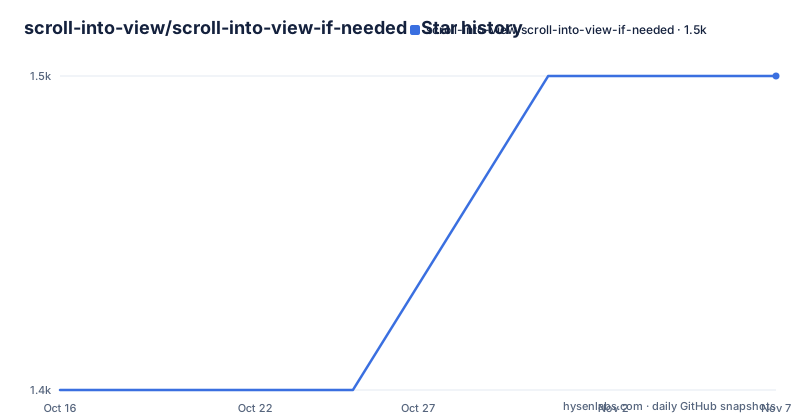
Star history
- scroll-into-view/scroll-into-view-if-needed1,450 ★ · +1
| Repository | 2026-10-16 | 2026-11-07 |
|---|---|---|
| scroll-into-view/scroll-into-view-if-needed | 1.4k | 1.5k |
1 Stars in the last 22 days, measured from the daily GitHub snapshot. Compare with other projects
Editorial analysis
Why scroll-into-view-if-needed Exists
scroll-into-view-if-needed addresses browser code that should move a target element only when the user cannot see it. Its conditional model is similar to the former `Element.scrollIntoViewIfNeeded` proposal and to the proposed `Element.scrollIntoView` option `scrollMode: 'if-needed'`. That distinction matters for interface actions such as focusing an off-screen form control or bringing a selected item into view without moving the page every time the action fires.
The package is for JavaScript and TypeScript projects that need one API across browsers with different levels of native support. It also provides positioning choices such as `block: 'nearest'`, `inline: 'nearest'`, and `block: 'center'`. By default, `scrollMode` is `'always'`, so callers must request `'if-needed'` when visibility should be checked before scrolling. This is not a drop-in mutation of every browser's native method. Application code imports the package function and passes an element plus options.
The repository describes the package as a ponyfill rather than a global polyfill. It does not automatically patch `Element.prototype`. That narrower design avoids changing browser behavior for unrelated code, but it also means developers must update their imports and call sites. The current `package.json` publishes ESM and CommonJS entry points and declares `sideEffects: false`, which is useful for bundlers that perform tree shaking.
The scrollMode and Positioning Model
The central option is `scrollMode`. With `scrollMode: 'if-needed'`, the README says the call is a no-op when the target is already visible. The accompanying `block` and `inline` values determine where the target should be placed when scrolling is required. The nearest values are intended to avoid unnecessary movement when any part of the element is already visible, while `block: 'center'` requests centered placement.
The visible example defines a target element and invokes the imported function directly. It does not first query the element's bounds and calculate container offsets in application code. Instead, `package.json` identifies `compute-scroll-into-view` as the runtime dependency, so the package delegates the scroll-position computation to that dependency before coordinating the scroll operation. The repository layout shows the TypeScript source under `src/` and tests under `tests/`, but the README does not expose the internal calculation sequence, so a more detailed algorithm would be speculation.
The API also accepts a `Function` for `behavior`, according to the README's option type. The visible documentation for the default `'auto'` value says that the browser decides whether scrolling should be smooth according to user preference and the CSS `scroll-behavior` property. This creates a clear division between positioning behavior owned by the package and animation quality owned partly by the browser.
Installing and Making the First Conditional Scroll
The README documents installation through npm. The command installs the current package into a JavaScript project:
npm i scroll-into-view-if-neededFor an application that bundles modules, import its default export and select an existing element. This first call asks for conditional scrolling and nearest positioning on both axes:
import scrollIntoView from 'scroll-into-view-if-needed'

const node = document.getElementById('hero')

scrollIntoView(node, {
  scrollMode: 'if-needed',
  block: 'nearest',
  inline: 'nearest',
})
When `hero` is already visible, the README describes the operation as a no-op. When it is outside the visible area, the requested nearest-edge behavior applies. If `hero` is missing, this example obtains `null` and passes it to the package. The README does not define validation behavior for a missing target, so applications should ensure the lookup succeeded before invoking the function.
A CDN import is also documented through `esm.sh`. It is an ESM dynamic import rather than an npm installation:
const { default: scrollIntoView } = await import(
  'https://esm.sh/scroll-into-view-if-needed'
)
The repository lists `type` as `module` and exposes `./dist/index.js` for imports plus `./dist/index.cjs` for `require`. It also publishes TypeScript declarations at `./dist/index.d.ts`. This package shape supports both module-oriented and CommonJS consumers, although the documentation excerpt does not give a separate CommonJS usage example.
Native Smooth Scrolling and the Bundle-Size Trade-off
Setting `behavior: 'smooth'` does not guarantee that unsupported browsers will receive a JavaScript animation. The core package supports native smooth scrolling only. Its README explains the bundle-size reason: embedding an animation implementation in this package would increase the payload for consumers who only request conditional scrolling, even when their browser already handles smooth motion.
The simplest call passes the option through the same function:
scrollIntoView(node, {
  behavior: 'smooth',
  scrollMode: 'if-needed',
})
The documentation treats this as progressive enhancement. A browser without native smooth scrolling may perform the move immediately instead. That is acceptable when load time and the smallest application payload matter more than identical animation behavior. It is a poor choice for a product specification that requires every supported browser to animate the movement.
The default `behavior: 'auto'` value has another nuance. The browser can account for user preferences and the `scroll-behavior` CSS property when deciding whether movement should be smooth. Developers should therefore avoid assuming that `'auto'`, `'smooth'`, and a fixed-duration animation have equivalent semantics. They represent different control levels: browser preference, requested native smoothing, and package-defined fallback behavior.
When smooth-scroll-into-view-if-needed Is the Better Fit
The README names `smooth-scroll-into-view-if-needed` as the companion package for browsers that lack native smooth scrolling. Its approach differs directly from this core package. The core package requests native motion and accepts an instant fallback. The companion package is selected when the same smooth experience must be supplied across browsers and environments.
For consistent motion, the documentation imports the companion's default function directly:
import smoothScrollIntoView from 'smooth-scroll-into-view-if-needed'

smoothScrollIntoView(node, { behavior: 'smooth' })
That approach removes dependence on the browser's native smooth implementation, but it adds another package and its implementation cost. The README frames the choice among load time, consistency, and quality. It also documents a hybrid selection based on support for the CSS `scroll-behavior` property:
import scrollIntoView from 'scroll-into-view-if-needed'
import smoothScrollIntoView from 'smooth-scroll-into-view-if-needed'

const scrollIntoViewSmoothly =
  'scrollBehavior' in document.documentElement.style
    ? scrollIntoView
    : smoothScrollIntoView

scrollIntoViewSmoothly(node, { behavior: 'smooth' })
Here, supported browsers keep the smaller core path while unsupported browsers use the companion fallback. This is more explicit than silently expecting every environment to animate. However, it is still not a guarantee that every browser will have identical easing or timing, because supported browsers retain their native implementation.
Release History, Maintenance, and MIT Obligations
The repository is not archived, and its last push was on 2026-10-13. That indicates recent source activity, but it should not be confused with a guarantee of a release schedule. The listed releases are `v3.1.0` from 2023-09-13, `v3.0.10` from 2023-04-10, and `v3.0.9` from 2023-04-09. Before upgrading an existing dependency, inspect `CHANGELOG.md` for version-specific changes because this release list alone does not establish compatibility across every upgrade.
The migration cost is potentially greater than a routine patch update. The README says the package was rewritten from the soon-to-be-deprecated `scrollIntoViewIfNeeded` design toward the proposed `scrollMode: 'if-needed'` specification. It also lists breaking changes from v1, including the move away from v1 options such as `centerIfNeeded`, `duration`, `easing`, `handleScroll`, `offset`, and the older function signature. Code moving from those versions should expect import, option, or return-shape reviews rather than a straight dependency bump.
The package is published under the MIT license. That permissive license allows use, modification, distribution, and sublicensing subject to its notice and license conditions. The MIT text should remain with copies or substantial portions of the licensed software. This is a statement of the repository's declared licensing model, not legal advice about a particular distribution.
The runtime also carries a declared dependency on `compute-scroll-into-view` at `^3.0.2`. Package updates therefore require checking both the top-level release and the compatible dependency range selected by the package manager. The repository includes `package-lock.json`, and its scripts include `npm run build` and `npm run typecheck`; contributors can use those exact scripts when preparing or validating changes.
Editorial conclusion
Adopt this package when browser code needs `scrollMode: 'if-needed'`, nearest-edge positioning, or a consistent call shape for conditional scrolling. Do not adopt it as a complete smooth-scrolling polyfill, because its default package delegates smooth motion to browser support. Verify first that `compute-scroll-into-view` produces the required positions for your layout and that fallback behavior in `smooth-scroll-into-view-if-needed` meets your consistency and bundle-size requirements.
Frequently asked questions
How do I install scroll-into-view-if-needed?
The README documents `npm i scroll-into-view-if-needed`. It also provides a dynamic import from `https://esm.sh/scroll-into-view-if-needed` for CDN use.
How do I scroll an element only when it is not visible?
Pass `scrollMode: 'if-needed'` to the imported function. The README describes this as a no-op when the target is already visible.
Does scroll-into-view-if-needed smooth-scroll in every browser?
No. The core package supports native smooth scrolling, while `smooth-scroll-into-view-if-needed` supplies the documented fallback for browsers that lack it.
What is the default scrolling mode?
The README states that `scrollMode` defaults to `'always'`. Applications that want conditional movement must explicitly pass `scrollMode: 'if-needed'`.
Official sources
Add this badge to your README
If you maintain this project, the badge below links readers to this analysis and shows its maintenance status from the daily GitHub snapshot. Paste the markdown into your README; add ?metric=license or ?metric=stars to the image URL for a different field.

[](https://hysenlabs.com/projects/scroll-into-view-scroll-into-view-if-needed)Star history chart for your README
[](https://hysenlabs.com/projects/scroll-into-view-scroll-into-view-if-needed)Was this useful?