seagullz4/hysteria2: Python one-command server installer
hysteria2一键安装精简版/hy2一键安装/hysteria2 install/نصب با یک کلیک hysteria2
At a glance
- What is it?
- seagullz4/hysteria2 is a Python-based installation utility for setting up Hysteria2 on a server. It is aimed at administrators who prefer a guided shell workflow over manually assembling dependencies, certificates, configuration files, and a `hy2` terminal shortcut.
- Who is it for?
- Adopt seagullz4/hysteria2 if you operate your own compatible server and want the README's guided Debian or Ubuntu installation path. Do not adopt it if you require a formally managed distribution, documented rollback, or a clean separation between the GPL-2.0 code and the README's additional noncommercial use restriction.
- Can I use it commercially?
- Yes, with conditions. GPL-2.0 is a copyleft licence: if you distribute software that includes it, you must release that software's source code under the same licence. Running it internally without distributing it does not trigger that obligation.
- Is it still maintained?
- Yes. The repository last received commits 66 days ago.
- What is it written in?
- Mainly Python, according to GitHub's language statistics.
Answers come from the project's GitHub data, last synced on October 24, 2026, and from our analysis. They are not legal advice.
Star history
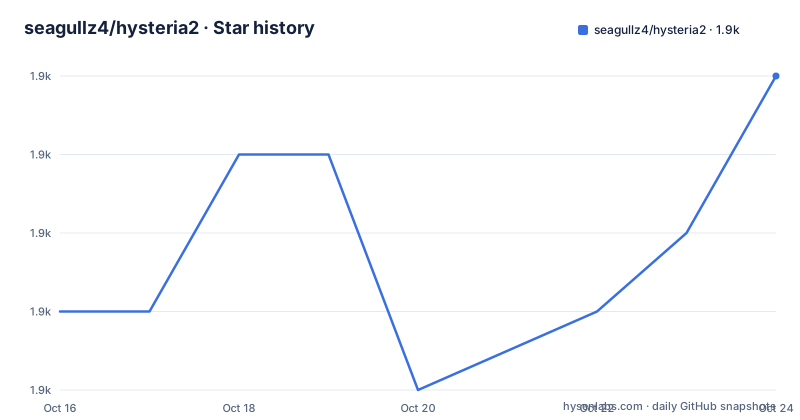
- seagullz4/hysteria21,897 ★ · +3
| Repository | 2026-10-16 | 2026-10-24 |
|---|---|---|
| seagullz4/hysteria2 | 1.9k | 1.9k |
3 Stars in the last 8 days, measured from the daily GitHub snapshot. Compare with other projects
Editorial analysis
What seagullz4/hysteria2 Automates
seagullz4/hysteria2 addresses the setup work required to run Hysteria2 on a remote Linux server. The README presents it as a lightweight, one-click installer and recommends Debian or Ubuntu, while saying that it may work on most other systems. That recommendation matters because the documentation does not publish a precise support matrix for Python versions, distributions, init systems, firewall tools, or kernel versions.
The intended operator is someone with server access who wants a guided installation instead of assembling the installation manually. The repository supports two presentation layers: `phy2.sh` prepares installation dependencies, and `hysteria2.py` is the recommended Python installer. After setup, the README says the project adds a terminal shortcut named `hy2`, allowing the installer to be launched again without repeating the download command.
This is an installer around Hysteria2 rather than a separate Hysteria2 implementation. The README directs readers to the upstream project at `https://github.com/apernet/hysteria` for the original Hysteria2 repository. The practical distinction is that seagullz4/hysteria2 aims to reduce setup effort on a server, while the client applications listed in the README connect to the resulting server.
Repository Flow and Python Installer Boundary
Based on the repository layout, the installation path is split across shell and Python entry points. `phy2.sh` is fetched first and executed with Bash, while `hysteria2.py` is fetched separately and run with `python3`. The ordering in the README is explicit: the dependency script is intended to be executed once before the Python installer.
This structure gives the project a narrow administrative surface. The Python file is the main interactive program, the shell file handles its preparation stage, and `install.sh` is also present in the repository, although the README does not explain when or how that file should be used. The documentation does not describe internal functions, prompts, downloaded binaries, generated paths, service names, or configuration-file locations. Consequently, the exact installation mechanism cannot be reconstructed from the README alone.
The README says users with a domain can request a certificate through ACME, while users without a domain can use a self-signed certificate. That choice affects trust and client configuration. A self-signed certificate does not receive the same automatic trust from a conventional client as a certificate issued through a recognized ACME process, although the README does not document the exact trust steps. Domain ownership and DNS control therefore become important prerequisites for the ACME path.
Installing the Python Installer on Debian or Ubuntu
Start in a server terminal with sufficient privileges to install software and configure networking. The README calls Debian and Ubuntu the recommended systems, so those are the safest documented starting point for a first use. First download and execute the dependency preparation script. The shell chaining downloads the file, grants execute permission, and starts it with Bash.
wget -O phy2.sh https://raw.githubusercontent.com/seagullz4/hysteria2/main/phy2.sh && chmod +x phy2.sh && bash phy2.shAfter that stage completes, download the Python installer, make it executable, and start it with `python3`.
wget -O hy2.py https://raw.githubusercontent.com/seagullz4/hysteria2/main/hysteria2.py && chmod +x hy2.py && python3 hy2.pyThe README does not state expected terminal output, supported prompts, or a noninteractive mode. It also does not document whether the second command can be rerun safely or whether the installer overwrites existing configuration. Those details should be established before running it on a server that already contains important files. The project is not a documented rollback tool: the README contains no backup or rollback procedure.
First Use Through the `hy2` Terminal Shortcut
The first operational step after installation is opening a new terminal and invoking `hy2`, which the README calls the newly added shortcut. This is useful for repeated server administration because it removes the need to repeat the raw GitHub download command. The repository does not document what subcommands or interactive menus the shortcut exposes, so it would be misleading to claim that it can generate subscriptions, rotate certificates, or change every server setting.
The README also describes client-side use. It links to third-party applications for Android, iOS, macOS, Linux, and Windows, including Shadowrocket, NekoBoxForAndroid, husi, Clash Meta, Hiddify, v2rayNG, v2rayN, and Clash Verge. Those applications are listed as possible clients, not dependencies installed by `hysteria2.py`. The phrase “one-click import” indicates that generated or supplied connection information may be imported into a compatible client, but the repository does not document the exact file format, QR code, URL structure, or import menu.
The README additionally links to an external subscription-conversion website that it says supports conversion among several protocols. That service is outside this repository. Its availability, privacy practices, supported formats, and security are not established by the project documentation, so it should not be treated as part of the installer itself.
Certificates, Clients, and BBRv3 Boundaries
The installer addresses two server-side concerns that matter for a usable Hysteria2 deployment. First, it supports certificate acquisition through ACME for users with a domain and self-signed certificates for users without one. Second, it states support for installing the XanMod kernel with BBRv3 acceleration, using a script attributed in the README to `ylx2016/Linux-NetSpeed`.
The BBRv3 option should be read narrowly. The README claims support for installing XanMod and using BBRv3, but it does not identify the target distribution, kernel compatibility matrix, reboot sequence, verification command, or rollback procedure. Kernel changes are more invasive than installing a userspace application because a failed change can prevent a server from booting normally. The documentation gives no recovery path if the selected kernel is incompatible.
Client compatibility is similarly broad but lightly documented. The linked clients come from separate projects and may support different subsets of Hysteria2 configuration. The README recommends particular applications, but it does not state their minimum versions or provide a tested interoperability matrix. An application appearing in the README's list should therefore be treated as a candidate client, not proof that every configuration generated by this installer will import without manual edits.
Maintenance Scope and Upgrade Constraints
The repository is not archived, and its last push was on 2026-08-19. The only listed release is `v25.4.15`, dated 2025-04-14. These facts describe repository activity and release history, but they do not establish compatibility with a particular upstream Hysteria2 release or operating-system image.
The README explicitly says the script reduces maintenance and updates because its initial implementation was not concise or clear. It also says a Python version would follow and that most functions were expected to be supported. Since `hysteria2.py` is now presented as the recommended installer, the documentation appears to describe a transition, but it does not map old shell behavior to the Python version or explain the upgrade process. There is no documented migration command, version pin, compatibility table, or rollback path.
Updates also have a supply-chain dimension. Both commands fetch files from the repository's `main` branch rather than pinning them to `v25.4.15`. Repeating the documented command retrieves whatever content is present at that branch when the request occurs. The README does not provide checksums or signed release artifacts. Administrators who need repeatable deployments cannot rely on the documented command alone to guarantee that two executions obtain identical scripts.
GPL-2.0 Code and README Restrictions
The repository identifies its license as GPL-2.0, while the README adds a disclaimer stating that the program is for learning, is noncommercial, must be deleted within 24 hours after download, and must not be used commercially. It also requires compliance with applicable laws in the server's location and the user's location.
These statements create a licensing question that should not be glossed over. The repository metadata identifies GPL-2.0, but GPL-2.0 includes its own permissions and conditions. The README's additional use restrictions may conflict with those permissions. The README and repository metadata do not provide legal analysis or explain how the author reconciles the two statements. This article does not determine which term controls in a particular situation.
For organizations, that discrepancy is more important than the installer commands. Before deployment, inspect the `LICENSE` file in the selected revision and obtain appropriate legal review for the intended use. Pinning a reviewed commit also matters because downloading `main` can change both executable code and accompanying documentation without a versioned release.
Editorial conclusion
Adopt seagullz4/hysteria2 if you operate your own compatible server and want the README's guided Debian or Ubuntu installation path. Do not adopt it if you require a formally managed distribution, documented rollback, or a clean separation between the GPL-2.0 code and the README's additional noncommercial use restriction. Verify the script contents, certificate requirement, operating-system compatibility, and client import workflow before exposing a server.
Frequently asked questions
What operating systems does seagullz4/hysteria2 support?
The README says the script should work on most systems, but it specifically recommends Debian and Ubuntu. It does not provide a complete compatibility list.
How do I install seagullz4/hysteria2 with its Python installer?
Run `phy2.sh` once for dependency preparation, then download and execute `hysteria2.py` with `python3`. The README does not describe unattended installation or expected command output.
Does seagullz4/hysteria2 need a domain name?
A domain is needed for the documented ACME certificate path. The README says users without a domain should use a self-signed certificate instead.
Official sources
Add this badge to your README
If you maintain this project, the badge below links readers to this analysis and shows its maintenance status from the daily GitHub snapshot. Paste the markdown into your README; add ?metric=license or ?metric=stars to the image URL for a different field.

[](https://hysenlabs.com/projects/seagullz4-hysteria2)Star history chart for your README
[](https://hysenlabs.com/projects/seagullz4-hysteria2)Was this useful?