chatGPT-discord-bot ships under four names and accepts three Python versions
Integrate ChatGPT into your own discord bot
At a glance
- What is it?
- A self-hosted Discord bot fronting OpenAI, Claude, Gemini, Grok, DeepSeek, local servers and CLI accounts. The interesting parts are in the packaging: a distribution named discord-ai-conversations, an image pinned to one Python minor, and a lockfile whose contents change per interpreter.
- Who is it for?
- This repository suits someone who wants a Discord front end they host themselves, with the choice of provider left per conversation and history kept per server, channel and thread. Before deploying it, check five things.
- Can I use it commercially?
- Yes, with conditions. GPL-2.0 is a copyleft licence: if you distribute software that includes it, you must release that software's source code under the same licence. Running it internally without distributing it does not trigger that obligation.
- Is it still maintained?
- Yes. The repository last received commits 63 days ago.
- What is it written in?
- Mainly Python, according to GitHub's language statistics.
Answers come from the project's GitHub data, last synced on November 13, 2026, and from our analysis. They are not legal advice.
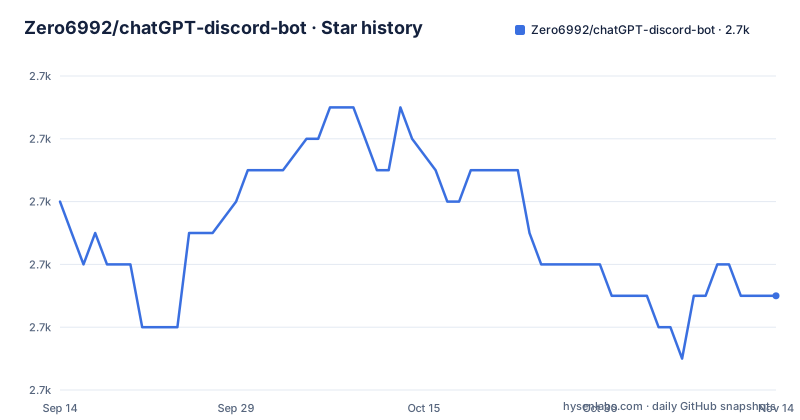
Star history
- Zero6992/chatGPT-discord-bot2,731 ★ · -3
| Repository | 2026-09-14 | 2026-11-13 |
|---|---|---|
| Zero6992/chatGPT-discord-bot | 2.7k | 2.7k |
-3 Stars in the last 60 days, measured from the daily GitHub snapshot. Compare with other projects
Editorial analysis
The same project carries four different names
The repository is called chatGPT-discord-bot and its description says it integrates ChatGPT into your own Discord bot. The distribution inside it is called something else entirely. pyproject names the project `discord-ai-conversations`, describes it as Discord conversations with official APIs, local models and isolated CLI backends, and puts it at version 4.0.0.
The command names are a third naming layer. Two console scripts are declared, `discord-ai-bot` pointing at `main:main` and `cli-auth` pointing at `src.cli_accounts:main`, neither of which shares a word with the repository name. The quick start then tells you to ignore both and run `python main.py`, which is the fourth spelling of the same entry point.
The ChatGPT framing is looser than the repository name suggests. The README opens by offering OpenAI, Claude, Gemini, Grok, DeepSeek, and models running on your own machine, and the backends table adds CLI accounts for Codex, Claude Code and Grok Build. OpenAI is one of seven routes, and it is reached through an alias named `openai` whose default model ID is `gpt-5.6-terra`. Nothing in the packaging treats ChatGPT as the special case the repository name does. The release history explains the version in the manifest. Three tags are visible: v2.1.2 in May 2024, v3.0.0 in July 2025, and v4.0.0 in September 2026, which matches the 4.0.0 in pyproject. The gaps between them are measured in a year, and the step from 3 to 4 crosses a feature boundary rather than a patch range. That is why a migration guide sits in the documentation, and why the install section tells existing users to follow it before replacing configuration or dependencies. The last push to the default branch is dated 2026-09-12, four days after the tag.
The container pins one Python minor while the package accepts three
Three different numbers describe the Python requirement. The quick start asks for Python 3.12 to 3.14. `requires-python` in pyproject reads `>=3.12,<3.15`, which is the same range expressed as bounds. The Dockerfile starts `FROM python:3.12-slim`, which is one specific minor inside that range.
So the Docker path is narrower than the package. Anyone using the container gets 3.12 and nothing else, whatever the package would accept on a bare machine. For a project whose quick start says Linux, WSL and macOS are supported and Windows users should use WSL, the container is the only path that does not depend on the host interpreter at all.
The lockfile makes the difference concrete rather than theoretical. requirements.txt is generated by `uv pip compile --universal pyproject.toml`, and exactly two of its entries carry environment markers: `audioop-lts` is pinned only for Python 3.13 and above, and `typing-extensions` only below 3.15. Both come in through discord.py. So a plain `pip install -r requirements.txt` resolves to a different package set on 3.12 than on 3.13 or 3.14, and inside the container the 3.13 branch never runs at all.
The install path uses the generated lockfile, not the four declared dependencies
git clone https://github.com/Zero6992/chatGPT-discord-bot.git
cd chatGPT-discord-bot
python3 -m venv .venv
source .venv/bin/activate
python -m pip install -r requirements.txt
cp .env.example .env
cp config.example.toml config.toml
The quick start installs with `python -m pip install -r requirements.txt`, so the file that decides what lands on your machine is the generated one. pyproject declares four direct dependencies with exact versions, discord.py 2.7.1, python-dotenv 1.2.3, httpx 0.28.1 and aiosqlite 0.22.1, and requirements.txt expands those into a full transitive set of nineteen pinned packages including aiohttp, anyio, certifi, h11, httpcore, idna, multidict, yarl and attrs.
Having both files is not redundant, and the header of the lockfile explains itself: it records the exact `uv pip compile` invocation that produced it. What it does mean is that there are two places a version can change, and only one of them is hand-written. A contributor editing pyproject without re-running the compile step would leave the documented install path untouched.
One naming detail makes the two files look more different than they are. pyproject writes the dependency as `discord.py`, and the lockfile writes `discord-py`, which is the distribution name on the index; both are pinned to 2.7.1. The Dockerfile follows the same order, installing from requirements.txt first and then running `pip install --no-deps .`, so the image's dependency set comes entirely from the lockfile and the pyproject install contributes the package itself.
The compose file sets a config path variable the quick start never names
docker-compose.yml defines one service that builds from the repository root, loads `.env` through `env_file`, and then sets a single environment variable of its own: `BOT_CONFIG` pointing at `/app/config.toml`. The quick start never mentions that variable. It says only that credentials go in `.env` and that model aliases and access settings go in `config.toml`, which is the file the compose service mounts.
The mount itself is read-only, `./config.toml:/app/config.toml:ro`, and the only other volume is `./data:/app/data`. The container's root filesystem is marked `read_only: true`, with `/tmp` supplied as a tmpfs of 64m carrying noexec and nosuid. So of everything a running bot might want to write, one directory is writable and it is `/data`.
That matters because aiosqlite is one of the four direct dependencies and the README promises that conversations survive a restart and can be reset or deleted from Discord. With the root filesystem read-only and `/data` the only writable path, the persistent history has nowhere else to live. The compose file therefore determines where the database goes, and it does so without saying so in words. A second example configuration sits at the root as config.account.example.toml, named for the account login flow, and the quick start never mentions it. The install step copies only config.example.toml to config.toml, so anyone setting up the CLI account backends has to find that other file themselves and merge it by hand. Between it and the BOT_CONFIG variable that the compose service sets without explanation, the container path asks for two things the walkthrough never states.
The image drops every capability and creates one unprivileged user
The Dockerfile builds a dedicated account before copying any code. It runs `groupadd -g 1001 bot`, creates a system user with `useradd -r -u 1001 -g bot bot`, makes `/data`, and hands that directory to the new user. The final image switches to `USER 1001:1001` and starts `python main.py`, so nothing in the running container executes as root.
The compose service then removes what little the image might still have. It drops all capabilities with `cap_drop: [ALL]`, sets `security_opt: [no-new-privileges:true]`, and adds the noexec and nosuid flags to the tmpfs. Combined with the read-only root, the effective surface is a single non-root user, no Linux capabilities, no new privileges, and one writable directory.
Two omissions are worth knowing. The image copies `requirements.txt`, then `pyproject.toml`, `README.md`, `LICENSE`, `main.py`, `src` and `utils`, and nothing else. Neither `config.example.toml` nor `.env.example` is copied, so a bare `docker run` has no configuration file at all until one is supplied from outside, which is what the compose mount does. Logging is capped at a 10m file with three rotations, and the service is set to restart unless stopped, so a crash comes back on its own.
Live provider tests are deselected before the suite starts
The pytest configuration ends every default run with `-m 'not live'`, combined with `--strict-markers`, so the live tests do not execute unless a name is passed explicitly. The marker definition says why: live means explicitly opted-in live provider tests that may incur charges. Running the suite as configured costs nothing and touches no paid API.
The README is candid about what that leaves uncovered. It says the adapters have offline contract coverage, with live checks for OpenAI, Anthropic and xAI chat, for native CLI account text, and for xAI video, and that other paths have outstanding live verification or provider errors. Gemini, DeepSeek, the local and custom servers, and the media paths are therefore exercised against recorded expectations rather than a real endpoint.
The development extras match that posture. Alongside pytest and pytest-asyncio sit ruff, mypy, build and pip-audit, and the mypy configuration is the strictest line in the file: it sets `disallow_untyped_defs = true`, checks `src`, `utils` and `main.py`, and warns on unused ignores. The ruff rules are a selected subset rather than the default set, with a line length of 100.
Everyone can chat by default in every backend mode
The example configuration ships with `allowed_user_ids = []` and an inline comment stating that everyone can chat, and that this is the default in every mode. The backends section repeats it: leave the field empty or omit it, and set Discord user IDs only when you want to limit access.
That default holds for the API providers, the local servers and the CLI account backends alike. The one narrow control the README describes for CLI mode is `owner_id`, and it governs account login, status, logout and cancellation rather than who may chat. So a deployment that adds a paid provider key without editing one line of configuration exposes that provider to a whole server.
The command table shows the other half of the design. Replies start private, `/public` makes future slash replies visible in the channel, and `/private` returns you to a separate private conversation, with each user holding separate history per server, channel and thread. The slash commands themselves work without Discord's Message Content Intent, which the quick start says to enable only for automatic channel replies. The rest of the command surface is small and is worth reading as a set. /models lists configured models, their capabilities and their authentication modes, which is the quickest way to see what a configuration actually registered. /provider with no argument shows the current backend and model ID, and with one selects a configured chat alias. /switchpersona changes the personality of the conversation, and /reset clears the current history, the native session state and media jobs. A user can therefore inspect, switch, restyle and wipe a conversation without ever leaving Discord.
A failed provider call never reroutes to another model
One sentence in the feature list sets the policy: provider failures never silently select another model or billing mode. The same refusal appears in the configuration section as unsupported settings failing explicitly, which together rule out a fallback chain and a silent default.
The capability boundaries are just as explicit. Text chat accepts text only, and vision, audio, streaming and general agent tools are not exposed. Long replies arrive as a text attachment to preserve formatting, so a long answer changes shape rather than being silently truncated. Image generation, attachment editing, video creation and image search all require explicitly selected API backends, and the backends table splits those across providers, with Veo video on Gemini and both text-to-video and image search on Grok.
One consequence of the no-restart rule deserves attention. Model IDs, aliases and supported parameters live in TOML, new aliases do not require Python changes, and each alias declares its own capabilities with chat, search and media using separate aliases. But configuration changes require restarting the bot, so adding a provider means a restart rather than a reload.
Editorial conclusion
This repository suits someone who wants a Discord front end they host themselves, with the choice of provider left per conversation and history kept per server, channel and thread. Before deploying it, check five things. Confirm your interpreter, because the package accepts 3.12 through 3.14 while the container gives you exactly 3.12 and the lockfile installs different packages on 3.13 and up. Read the access-control section, since everyone can chat by default in every backend mode and an empty allowed_user_ids is the documented default. Work out where BOT_CONFIG points before using Docker, because the compose file sets it and the quick start never mentions it. Know which backends have actually been verified live, since the project says most paths still carry outstanding verification. And treat the four names as one project, since pip, the console scripts and the repository all label it differently.
Frequently asked questions
What Python versions does chatGPT-discord-bot support?
The quick start asks for Python 3.12 to 3.14 and requires-python reads >=3.12,<3.15. The Dockerfile pins python:3.12-slim, so the container always runs 3.12. The generated requirements.txt also installs audioop-lts only on 3.13 and above.
How do I restrict who can chat in chatGPT-discord-bot?
Set Discord user IDs in bot.allowed_user_ids in config.toml. The example ships with an empty list, and the README states that everyone can chat by default in every mode. Discord Developer Mode is needed to copy user IDs.
Which model providers does chatGPT-discord-bot support?
OpenAI for text chat with image generation and editing, Anthropic for Claude text chat, Google Gemini for text chat plus Veo text-to-video and image-to-video, xAI Grok for text chat, image search and text-to-video, DeepSeek for text chat, plus local or custom servers speaking compatible Chat Completions and CLI backends for Codex, Claude Code and Grok Build.
Can chatGPT-discord-bot use a local model?
Yes. Keep default_model set to local, put the model ID under [models.local], and set a base URL: http://127.0.0.1:11434/v1 for Ollama, http://127.0.0.1:1234/v1 for LM Studio, or http://127.0.0.1:8000/v1 for vLLM. The local example uses auth = none and needs only the Discord token.
Does chatGPT-discord-bot support vision, audio or streaming?
No. Text chat accepts text only, and vision, audio, streaming and general agent tools are not exposed. Long replies arrive as a text attachment to preserve formatting, and media features require explicitly selected API backends.
How are the chatGPT-discord-bot tests run?
Pytest runs with -ra --strict-markers -m 'not live', so live provider tests are deselected by default because they may incur charges. The README states that live checks cover OpenAI, Anthropic and xAI chat, native CLI account text and xAI video, and that other paths have outstanding live verification.
Official sources
Add this badge to your README
If you maintain this project, the badge below links readers to this analysis and shows its maintenance status from the daily GitHub snapshot. Paste the markdown into your README; add ?metric=license or ?metric=stars to the image URL for a different field.

[](https://hysenlabs.com/projects/zero6992-chatgpt-discord-bot)Star history chart for your README
[](https://hysenlabs.com/projects/zero6992-chatgpt-discord-bot)Was this useful?