IOSSecuritySuite is priced by headcount, and the EULA is not in the repository
iOS platform security & anti-tampering Swift library
At a glance
- What is it?
- A pure Swift library that checks iOS devices for jailbreaks, debuggers, emulators and reverse engineering tools, mapped to OWASP MASVS v8, with three levels of jailbreak answer. The licence terms live behind a link and the repository metadata names no licence at all.
- Who is it for?
- Adopt IOSSecuritySuite if you need client-side signals for OWASP MASVS v8, want them in Swift, and value per-check filtering on the jailbreak module more than a single boolean. Do not adopt it expecting an open source dependency: the README sends you to an EULA for the terms and prices the library by headcount, free up to 99 people and 3k EUR a year above that, while the repository metadata names no licence.
- Can I use it commercially?
- Check first. The repository uses a licence we do not classify automatically, so read its LICENSE file before any commercial use.
- Is it still maintained?
- Yes. The repository last received commits 102 days ago.
- What is it written in?
- Mainly Swift, according to GitHub's language statistics.
Answers come from the project's GitHub data, last synced on November 15, 2026, and from our analysis. They are not legal advice.
Star history
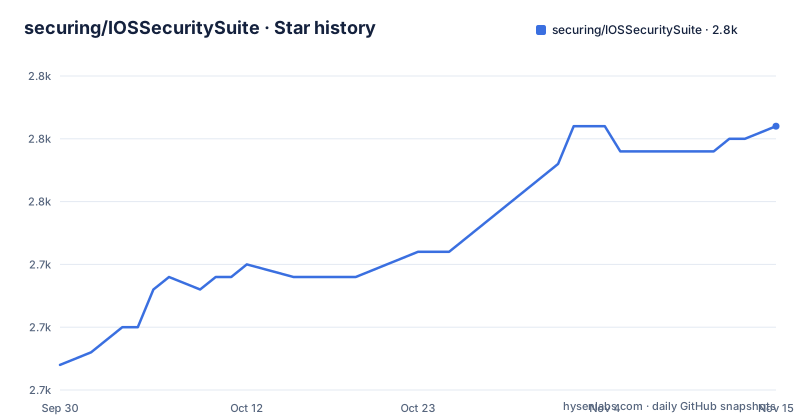
- securing/IOSSecuritySuite2,756 ★ · +19
| Repository | 2026-09-30 | 2026-11-15 |
|---|---|---|
| securing/IOSSecuritySuite | 2.7k | 2.8k |
19 Stars in the last 46 days, measured from the daily GitHub snapshot. Compare with other projects
Editorial analysis
The README opens with a course advert, then prices the library
The first line of the file is not about the library. It asks whether you want to become a certified iOS Application Security Engineer and links to a paid online course, with four UTM parameters on the URL so the click is attributable. The library documentation starts underneath that.
Then the Pricing section, which is the fact an adopting team needs first. If your company employs 0 to 99 people the library is free to use. At 100 to 1000 it is 3k EUR a year, and at 1000 or more it is 10k EUR a year. Selling a module that uses IOSSecuritySuite without using it directly in your app is a separate 10k EUR a year line.
The terms themselves are one sentence: check the EULA licence for the details. The repository root holds a LICENSE file and the project metadata names no licence identifier, so the file a scanner or a package manager reads and the document the project points you at are not established to be the same thing.
None of this is a reason to skip the library. It is a reason to send the licence question to whoever owns the EULA before the code review does.
Four install routes, and three of them are package managers
Setup is presented as four equal options. You can add the `IOSSecuritySuite/*.swift` files to your project directly. You can use CocoaPods with `pod 'IOSSecuritySuite'`. You can use Carthage with `github "securing/IOSSecuritySuite"`. Or you can use Swift Package Manager:
.package(url: "https://github.com/securing/IOSSecuritySuite.git")The repository supports all four in practice: IOSSecuritySuite.podspec and Package.swift are both at the root, alongside an IOSSecuritySuite.xcodeproj/ directory and the IOSSecuritySuite/ source directory that the first route copies from.
A .swift-version file at the root pins the Swift toolchain used for development, though the file's contents are not part of the documentation. Four routes for a pure Swift library is generous; the practical decision is between vendoring the source, which gives you the files and the update burden, and one of the three package managers, which does not.
Note what is not here: no minimum deployment target, no Swift version requirement, and no platform matrix. Those live on the EULA-linked pages or nowhere on the visible file.
Without four URL schemes in Info.plist, the scheme checks are dead
The jailbreak detection module uses `canOpenURL(_:)`, and iOS only permits that call for schemes the application declares. So the setup instructions continue past installation with a required Info.plist edit:
<key>LSApplicationQueriesSchemes</key>
<array>
    <string>undecimus</string>
    <string>sileo</string>
    <string>zbra</string>
    <string>filza</string>
</array>
Four package manager schemes, which is how a jailbroken device is detected by asking the system whether those installers are present. This is the only piece of host-app configuration in the whole document, and it is easy to skip because nothing fails loudly: `canOpenURL` returns false for an undeclared scheme exactly as it does for an absent one, so a missing Info.plist entry produces a device that looks clean.
That is the most important operational detail on the page. A detection library that reports a negative result because of a configuration omission is worse than no library, and this one fails that way by design of the platform rather than by its own logic.
Three jailbreak answers, and the third is the one worth having
The jailbreak module comes in three shapes, which is unusual for a detection library and is the strongest argument for it. The simplest returns a Bool from `amIJailbroken()`. The verbose form returns a status object:
let jailbreakStatus = IOSSecuritySuite.amIJailbrokenWithFailMessage()
if jailbreakStatus.jailbroken {
	print("This device is jailbroken")
	print("Because: \(jailbreakStatus.failMessage)")
} else {
	print("This device is not jailbroken")
}
The `failMessage` is a String of comma-separated indicators. The documented example is a single string listing three of them: `sileo:// URL scheme detected, Suspicious file exists: /Library/MobileSubstrate/MobileSubstrate.dylib, Fork was able to create a new process`. That is a log line, not just a boolean, which is what makes it useful in a support ticket.
The third shape is the one the documentation gives a use case for. `amIJailbrokenWithFailedChecks()` returns a list of individual checks, so you can look for devices that were jailbroken in the past but are jailed now, by requiring both `.existenceOfSuspiciousFiles` and `.suspiciousFilesCanBeOpened` to be present. That distinction between a device that was compromised and a device that is compromised right now cannot be expressed through the other two call shapes.
denyDebugger is one line, and the other detectors are one boolean each
The debugger module offers two calls: `amIDebugged()` returns a Bool, and `denyDebugger()` takes no arguments and no return value. The enforcement function is the one that changes how your process behaves, and the page says nothing about what happens to the process, whether the check is reversible, or how it interacts with a debugger attached after start-up.
Everything else is single-call. `amIRunInEmulator()` for emulator detection, `amIReverseEngineered()` for reverse engineering evidence, `amIProxied(considerVPNConnectionAsProxy: true)` which the page frames as detecting whether an app is connected to a VPN, and `amIInLockdownMode()` for Lockdown Mode.
That asymmetry is the design's main limitation. The jailbreak detector gives you three granularities and per-check filtering; the reverse engineering detector has a filterable variant behind `amIReverseEngineeredWithFailedChecks()`; everything else is a bare Bool with no way to ask which signal fired. If you are building a risk score rather than a boolean gate, most of the library will not feed it.
Two of the four experimental modules have no complete example
The experimental section covers four modules, and two of the code samples stop mid-expression. The MSHook detector example ends on an unfinished binding, and the MSHook deny example ends inside an `unsafeBitCast` call. Neither tells you what to check the result against, which is the only hard part of that technique.
The symbol hook deny module is the exception, and its example is instructive because of the mangled name:
// If we want to deny symbol hook of Swift function, we have to pass mangled name of that function
denySymbolHook("$s10Foundation5NSLogyySS_s7CVarArg_pdtF")   // denying hooking for the NSLog function
NSLog("Hello Symbol Hook")

denySymbolHook("abort")
abort()
A Swift function has to be referred to by its mangled symbol, and the value in the example is the mangling of Foundation's NSLog. Anyone using this on their own code has to generate that string, and the page gives no tool for doing so.
The file integrity verifier is the most production-shaped of the group and takes three kinds of check:
if IOSSecuritySuite.amITampered([.bundleID("biz.securing.FrameworkClientApp"),
    .mobileProvision("2976c70b56e9ae1e2c8e8b231bf6b0cff12bbbd0a593f21846d9a004dd181be3"),
    .machO("IOSSecuritySuite", "6d8d460b9a4ee6c0f378e30f137cebaf2ce12bf31a2eef3729c36889158aa7fc")]).result {
    print("I have been Tampered.")
}
else {
    print("I have not been Tampered.")
}
A bundle identifier, a provisioning profile hash and a Mach-O hash. The two 64-character strings are SHA-256 values that have to change with every build, so this check is a build pipeline concern, not a line of application code. The next paragraph, which covers manually verifying the hash of a loaded dylib, ends on an incomplete `if let ha`.
Apple Silicon Macs are out of scope, and MASVS v8 is the target
There is a Notice section, and it is one sentence: iOS Security Suite is meant to be used on iOS and iPadOS and should not be used on Macs with Apple Silicon.
That is worth taking literally rather than as a disclaimer. The detectors look for the artefacts of a jailbroken iOS device, and on Apple Silicon hardware those artefacts are different or absent, so a negative result on a Mac is not evidence about the Mac. Any project that runs the same binary on both platforms has to gate the call itself.
The target standard is stated at the top: OWASP MASVS chapter v8. The four things the library detects are a jailbreak, an attached debugger, an app run in an emulator, and common reverse engineering tools running on the device.
That last one is the one to read precisely. The page says reverse engineering tools running on the device, not that the app has been instrumented. It is a signal about the environment, and on a developer machine or a jailbroken test device it will fire for reasons that have nothing to do with your release build.
The repository is a framework, one demo app, and two marketing images
The tree is small and legible. IOSSecuritySuite/ holds the library source that the add-source route copies, IOSSecuritySuite.xcodeproj/ is the project, FrameworkClientApp/ is a client application, and Package.swift, IOSSecuritySuite.podspec, LICENSE, README.md and .gitignore complete the set.
The demo app is the one whose identifier appears in the integrity example, `biz.securing.FrameworkClientApp`, so the sample you can read is the sample the documentation hashes. That is a good sign for a project whose business is integrity checking.
The other two entries are `iase_bg.png` and `logo.png`, which are images for the course advertised at the top of the README. Marketing assets in the root of a security library is a small thing, and it does tell you what the repository is optimised for.
Release history is three versions in view: 2.1.0 on 2024-05-20, 2.2.0 on 2025-07-09 and 2.3.0 on 2026-08-05. The last push to the branch was on the same day as 2.3.0, so the tag and the branch agree.
Editorial conclusion
Adopt IOSSecuritySuite if you need client-side signals for OWASP MASVS v8, want them in Swift, and value per-check filtering on the jailbreak module more than a single boolean. Do not adopt it expecting an open source dependency: the README sends you to an EULA for the terms and prices the library by headcount, free up to 99 people and 3k EUR a year above that, while the repository metadata names no licence. Verify first which of the three jailbreak call shapes you need, add the LSApplicationQueriesSchemes entries before the canOpenURL checks mean anything, and read the EULA yourself rather than the LICENSE file, because the page never says what that file contains.
Frequently asked questions
What does IOSSecuritySuite detect?
It detects a jailbreak, an attached debugger, whether the app was run in an emulator, and common reverse engineering tools running on the device. The library is positioned against OWASP MASVS chapter v8 and is written in pure Swift.
How do you install IOSSecuritySuite?
The page gives four routes: add the `IOSSecuritySuite/*.swift` files to your project, use CocoaPods with `pod 'IOSSecuritySuite'`, use Carthage with `github "securing/IOSSecuritySuite"`, or use Swift Package Manager with the repository URL. Both a podspec and a Package.swift are present at the repository root.
What must I change in Info.plist for IOSSecuritySuite?
Add an LSApplicationQueriesSchemes array, because the jailbreak module uses `canOpenURL(_:)` and iOS only allows that call for declared schemes. The example lists undecimus, sileo, zbra and filza. Without the entries, those checks return false for the same reason they would on a clean device.
How much does IOSSecuritySuite cost?
The README prices it by company size: free to use for 0 to 99 people, 3k EUR a year for 100 to 1000, and 10k EUR a year for 1000 or more. Selling a module that uses it without using it directly in your app is 10k EUR a year. It points to its EULA licence for the details.
Official sources
Add this badge to your README
If you maintain this project, the badge below links readers to this analysis and shows its maintenance status from the daily GitHub snapshot. Paste the markdown into your README; add ?metric=license or ?metric=stars to the image URL for a different field.

[](https://hysenlabs.com/projects/securing-iossecuritysuite)Star history chart for your README
[](https://hysenlabs.com/projects/securing-iossecuritysuite)Was this useful?