vphone-ws is a window onto someone else's command line tool
A native macOS app for managing virtual iPhones - browse, create, and boot iOS research VMs from a single window.
At a glance
- What is it?
- vPhone Workstation is a SwiftUI front end for vphone-cli, the tool that boots virtual iPhones on Apple's Virtualization.framework using PCC research VMs. It does the browsing, the wizard and the progress display, and the readiness checks are the interesting part: to run a guest at all, the host has to allow research guests and get AMFI out of the way.
- Who is it for?
- vPhone Workstation is worth installing if you already use vphone-cli from a terminal and want a library of guests instead of a list of identifiers, because the app adds live state, search, a create wizard and exportable logs on top of the same underlying tool. Two things to weigh first.
- Can I use it commercially?
- Yes. MIT is a permissive licence: you can use, modify and sell software built on it, as long as you keep its copyright and licence notices.
- Is it still maintained?
- Yes. The repository last received commits 95 days ago.
- What is it written in?
- Mainly Swift, according to GitHub's language statistics.
Answers come from the project's GitHub data, last synced on November 15, 2026, and from our analysis. They are not legal advice.
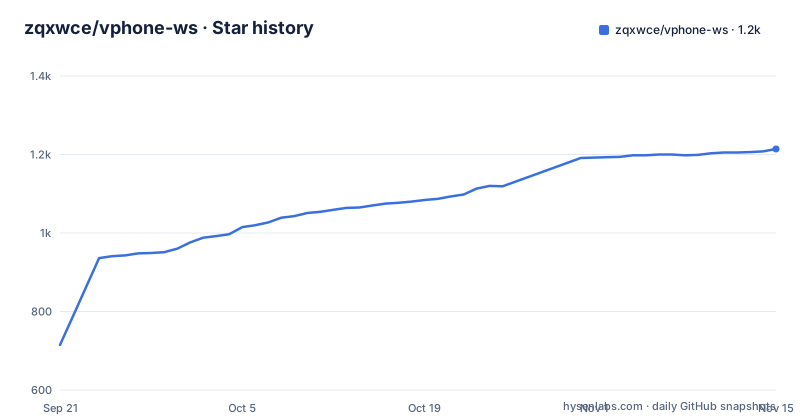
Star history
- zqxwce/vphone-ws1,214 ★ · +499
| Repository | 2026-09-21 | 2026-11-15 |
|---|---|---|
| zqxwce/vphone-ws | 715 | 1.2k |
499 Stars in the last 55 days, measured from the daily GitHub snapshot. Compare with other projects
Editorial analysis
The app boots nothing, the CLI does
The one sentence that defines this project is that vPhone Workstation is a SwiftUI front end for vphone-cli, the command-line tool that boots virtual iPhones on Apple's Virtualization.framework using PCC research VMs. The macOS app adds an interface; the virtualization work belongs to the CLI, which lives in a different repository under a different owner.
That split shows up in how creation works. The create wizard shows live step-by-step progress streamed from vphone-cli rather than a local spinner, and the log it produces can be exported for issue reports. So the app is a renderer and a collector of state, and every operation it performs is something the CLI already knows how to do.
For a user that also means the two tools have to agree on versions, and there is no statement in the documentation about which vphone-cli release a given vphone-ws expects. The host readiness check looks for the CLI and reports a clear message when it is missing, which is the shape of a dependency the app cannot control.
Host readiness asks you to take AMFI out of the way
The readiness check is the most consequential part of the app, because it checks five host conditions before it will create anything. It verifies that vphone-cli is found, that macOS is new enough, that the host is not itself a virtual machine, that research guests are allowed through csrutil allow-research-guests, and that AMFI is bypassed. Each failure gets its own actionable message rather than a generic error.
The AMFI condition is the one to read twice. It is satisfied by the amfi_get_out_of_my_way boot-argument or by the amfidont daemon, which means Apple Mobile File Integrity is disabled at the system level on the host you are working on. That is not scoped to the guest. It is a change to the machine's code-signing enforcement, applied to everything that runs on it, and the boot-argument route persists across reboots until it is removed.
The research-guest requirement is narrower and is the reason the check exists at all: without it the Virtualization.framework path used for these guests is closed off. The host-is-not-a-VM check exists because nested virtualization of this kind is not something the underlying framework expects.
The wizard ends at a firmware pairing
The create flow is four decisions in a fixed order, and the second one is the interesting list. You choose a name, then a variant, then a firmware pairing, then resources for CPU, memory and disk. The variants are Less, Regular, Developer, Jailbreak and Experimental, which is a ladder from a lightly modified guest to one that is meant to be broken into.
Firmware pairing comes next because the variant constrains what can be paired with it, and the app recommends one rather than letting you discover an incompatible combination after a long image download.
The screenshot caption describes this as picking how much of iOS's security to peel back and then taking a recommended firmware pairing, which is an accurate summary of the whole flow. Progress is streamed live from the CLI and the log is exportable, so a failed creation produces something you can attach to a bug report instead of a screenshot of a spinner.
Resources are the last step and are the ordinary ones: CPU count, memory and disk size, per-VM adjustable afterwards in settings.
Both binaries come from one tap, and the CLI belongs to someone else
Installation is two Homebrew lines. The app installs with:
brew install zqxwce/tap/vphone-wsand the CLI it drives installs with:
brew install zqxwce/tap/vphone-cliThe tap is the author's own, so both come from one place, which is convenient. What is worth noticing is that the tool named vphone-cli is not this author's project: its source repository is under a different account entirely, and this repository distributes it through its own tap. Anyone auditing the install path has to check two repositories rather than one.
Neither install is a notarized download from a vendor site. There is no signed and stapled disk image in the documentation, only a Homebrew formula, and the app itself is built by a shell script rather than packaged for distribution by Apple tooling.
Export is a .tar.xz, and the app bundle comes from a shell script
Building from source is two commands:
./scripts/bundle.sh          # swift build -c release + bundle .build/vphone-ws.app
open .build/vphone-ws.app
The comment tells you the whole pipeline: a release Swift build followed by assembling the .app bundle in .build, which you then open. There is no Xcode project in the tree, and the repository is a Swift package instead, with Package.swift at the root, Sources/ for the code, tests/ for the test target, Resources/ for assets, docs/ for documentation and scripts/ holding the bundle script.
That layout is worth naming because it is the difference between a SwiftUI app you can open in Xcode and a Swift package that produces a bundle through a script. It also means the same command works for anyone who has a Swift toolchain, without a Mac-specific IDE step.
The document-management surface mirrors the CLI's own verbs: clone, rename, export as .tar.xz, delete, plus per-VM settings. A .tar.xz export is a compressed archive of a guest, which is portable between machines with the same tooling and opaque to anything else.
Library state is live, and the overview lists the UDID
The library view lists every guest with its running or stopped state shown live, the iOS and cloudOS build, and a search box. The detail overview puts the build, variant, CPU, memory, disk, network, device and UDID on one screen, which is the identification set you need when you are scripting anything against a guest.
Lifecycle control is three actions: start, stop, and bring the running iPhone window to the front. That last one is the piece a terminal cannot give you, since the guest has its own window that has to be surfaced, and it is the clearest example of why a GUI layer exists at all over a command-line tool.
Nothing here is a database of past runs. The state is read from the same place the CLI reads it, which is why the live label matters: a guest that booted elsewhere still shows correctly, and a guest that crashed shows as stopped rather than as whatever the app last remembered.
Three 0.0.x tags in nine days, then nothing since August
The release history is three tags in nine days. v0.0.1 landed on 2026-08-04, v0.0.2 on 2026-08-12 in the early afternoon, and v0.0.3 on 2026-08-12 a few hours later. The last push to the default branch was also on 2026-08-12.
That date is worth holding on to. Nothing has been pushed since, which for a project at version 0.0.x whose underlying CLI is developed elsewhere means the compatibility question in the first section is live: the app is frozen while the tool it drives may not be.
The floor is equally specific. An Apple Silicon Mac, macOS 15 Sequoia or newer, and the CLI. No Intel Mac, no older macOS, and no statement anywhere about which macOS releases are tested rather than merely permitted. The project is MIT licensed with 988 stars, 80 forks and a single open issue, which is a small amount of visible activity on a codebase that also has to keep up with a CLI owned by someone else.
Editorial conclusion
vPhone Workstation is worth installing if you already use vphone-cli from a terminal and want a library of guests instead of a list of identifiers, because the app adds live state, search, a create wizard and exportable logs on top of the same underlying tool. Two things to weigh first. What the readiness check asks of your machine: enabling research guests and bypassing AMFI weaken the host for everything that runs on it, not just inside the guest, and the boot-argument route in particular survives reboots in a way that is easy to forget. And what it adds in trust: the app installs from a Homebrew tap and the CLI it drives is another organization's project, so you are trusting a tap, a front end and a CLI, with all three at version 0.0.x and the last push dated 2026-08-12. On a work machine, none of that is a decision to make casually.
Frequently asked questions
What does vphone-ws do on its own?
It boots nothing by itself. It is a SwiftUI front end for vphone-cli, which boots virtual iPhones on Apple's Virtualization.framework using PCC research VMs, and the wizard streams its step-by-step progress from that CLI.
What does vphone-ws need in order to run?
An Apple Silicon Mac running macOS 15 Sequoia or newer, plus vphone-cli installed with brew install zqxwce/tap/vphone-cli. The app installs separately with brew install zqxwce/tap/vphone-ws.
What does the vphone-ws host readiness check verify?
That vphone-cli is found, that macOS is new enough, that the host is not itself a virtual machine, that research guests are allowed through csrutil allow-research-guests, and that AMFI is bypassed, either by the amfi_get_out_of_my_way boot-arg or by the amfidont daemon.
What can the vphone-ws create wizard choose?
A name, a variant from Less, Regular, Developer, Jailbreak and Experimental, a recommended firmware pairing, and resources for CPU, memory and disk. Progress is streamed live and the log can be exported for issue reports.
Has vphone-ws been released?
It has three tags, v0.0.1 on 2026-08-04 and v0.0.2 and v0.0.3 both on 2026-08-12, all below version 1.0, and the last push to the default branch was also 2026-08-12. The repository is MIT licensed.
Official sources
Add this badge to your README
If you maintain this project, the badge below links readers to this analysis and shows its maintenance status from the daily GitHub snapshot. Paste the markdown into your README; add ?metric=license or ?metric=stars to the image URL for a different field.

[](https://hysenlabs.com/projects/zqxwce-vphone-ws)Star history chart for your README
[](https://hysenlabs.com/projects/zqxwce-vphone-ws)Was this useful?