SecurityRiskAdvisors VECTR for Red and Blue Team Measurement
VECTR is a tool that facilitates tracking of your red and blue team testing activities to measure detection and prevention capabilities across different attack scenarios
At a glance
- What is it?
- SecurityRiskAdvisors VECTR tracks red and blue team testing activities through assessment groups, campaigns, and test cases. It is aimed at security teams that need a shared record for evaluating detection and prevention capabilities across attack scenarios.
- Who is it for?
- VECTR suits security teams that already structure adversary simulations around campaigns and test cases and need a shared record across offensive and defensive work. It is a poor fit for teams seeking a complete attack execution platform, because the README describes tracking and assessment rather than test execution.
- Can I use it commercially?
- Not without permission. GitHub finds no licence file in the repository, and without a licence all rights are reserved by default: you may read the code but not reuse it. Check the README, or ask the authors, before using it.
- Is it still maintained?
- Yes. The repository last received commits 85 days ago.
- What is it written in?
- GitHub does not report a main language for this repository.
Answers come from the project's GitHub data, last synced on November 7, 2026, and from our analysis. They are not legal advice.
Star history
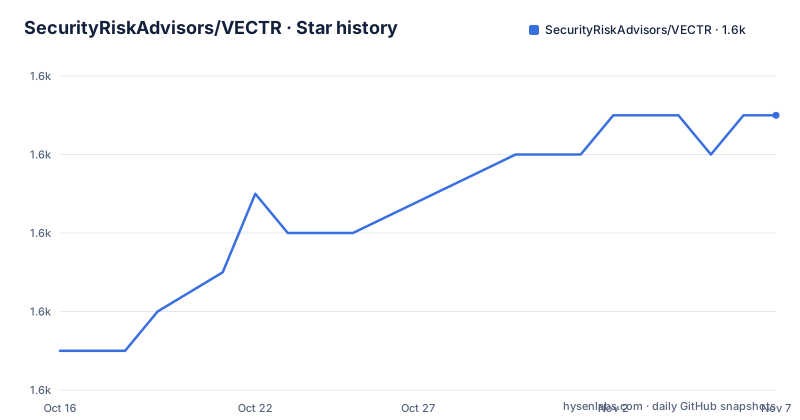
- SecurityRiskAdvisors/VECTR1,625 ★ · +6
| Repository | 2026-10-16 | 2026-11-07 |
|---|---|---|
| SecurityRiskAdvisors/VECTR | 1.6k | 1.6k |
6 Stars in the last 22 days, measured from the daily GitHub snapshot. Compare with other projects
Editorial analysis
VECTR's Campaign and Test Case Model
SecurityRiskAdvisors VECTR addresses a measurement problem rather than an execution problem. The README says it facilitates tracking of red and blue team testing activities so teams can assess detection and prevention capabilities across different attack scenarios. Its primary unit is an assessment group, which contains Campaigns and supporting Test Cases. A Campaign can cover activity across a kill chain, including initial compromise, privilege escalation, and lateral movement, or it can focus on a particular detection layer, tool, or infrastructure. This gives teams a way to organize tests around a defined scenario instead of treating every activity as an isolated exercise. The documented model is especially relevant to red and blue teams that need to compare what was attempted with what defenders were able to observe, prevent, or improve.
Behavior Tracking Across Red and Blue Teams
VECTR is focused on common indicators of attack and behaviors that can be performed by different threat actor groups with different objectives and levels of sophistication. The README also says that VECTR can reproduce step-by-step TTPs associated with particular groups and malware campaigns, while identifying the primary purpose as behavior that spans multiple groups and campaigns. That distinction matters for adoption. The tool is not limited to a single adversary profile in its stated design, although teams can still model a narrower scenario when their detection objective requires it. The repository presents VECTR as a record for repeated, targeted campaigns. Over time, that structure can support improvement of red team skills and blue team detection capabilities, but the README does not document automated scoring rules, pass criteria, or a formal calculation for detection success. Those details would need to be confirmed in the external documentation.
VECTR Presentation Layer and API Boundary
The repository describes a Vue 3 presentation layer with some legacy AngularJS components, plus a GraphQL API. This indicates that the user interface and application interface are distinct parts of the system. The README does not describe the API schema, authentication mechanism, query names, mutation workflow, or data model beyond the user-facing Campaign and Test Case concepts. Consequently, an engineering team should not assume that GraphQL access means every tracking operation is available or stable without checking the documentation. The architecture also raises an integration question: VECTR can represent testing activities, but the repository does not state that it automatically receives telemetry from SIEM, EDR, or identity systems. Any ingestion from external tools would therefore be an integration task rather than a documented built-in feature. The listed repository entries include `cti/`, but the README does not explain whether that directory is part of VECTR's runtime data path.
Reporting and Visibility Features Shown by VECTR
The README includes images identified as a VECTR heatmap, resilience trending heatmap, data import, attack escalation graph, and attack automation. These labels suggest that VECTR provides visual representations of tracked activity, supports imported data, and includes views for escalation and automation. The README does not explain the metrics behind those images, so the names should not be treated as evidence of a particular statistical model. In particular, the repository does not define how a heatmap cell is calculated, what qualifies as a resilience trend, or how imported records are validated. The available documentation also does not state whether attack automation means executing adversary procedures or recording automated test results. Based on the repository description, the safest interpretation is that VECTR provides tracking and visualization around testing activities. Teams that require a particular measure, such as detection latency or prevention coverage, should confirm the exact definition in the product documentation before using it for reporting.
Installation and First Use Through the VECTR Guide
The README does not provide installation commands or a first-use code example. It directs users to the external VECTR documentation and specifically links to the Install Guide at `https://docs.vectr.io/Installation/`. It also instructs readers to follow the documentation for upgrading an existing VECTR installation. The only supported server operating system named in the repository is the current Ubuntu LTS version, 22.04, and community support is limited to that runtime environment. The README says VECTR should run in most containerization environments, but it does not give a Dockerfile, Compose file, image name, port, environment variable, or startup command. For browsers, it names current Chrome and Firefox as recommended, while also stating that most modern browsers such as Chrome, Firefox, and Chromium-based Edge are supported up to two prior releases. Because no install steps are supplied here, there is no command to reproduce in this article. The first concrete step for a new user is to follow the linked Install Guide and verify that the deployment target matches the documented Ubuntu and browser requirements.
Upgrade Scope, Support Boundary, and Community Edition Constraints
The repository contains a file named `VECTR Community Edition EULA.pdf`, so licensing is governed by a project-specific EULA rather than an automatically confirmed open source license identifier. The README does not summarize the permissions, restrictions, redistribution conditions, or obligations in that document. This is a material adoption constraint because the repository also identifies Community Edition behavior, including automatic generation of an untrusted self-signed certificate or the option to supply certificates. A deployment exposed beyond a trusted development environment should therefore account for TLS configuration before use. Upgrade guidance is maintained as a separate documentation topic, which suggests that upgrades are an expected operational concern, but the README does not describe migration steps, backup requirements, database compatibility, or rollback. The repository is not archived, and the last push was on 2026-08-14. Recent releases include `ce-9.14.1` on 2026-08-14, `ce-9.14.0` on 2026-08-07, and `ce-9.9.1` on 2025-07-21. That release history gives concrete version points, not a guarantee of compatibility for an untested upgrade path.
Editorial conclusion
VECTR suits security teams that already structure adversary simulations around campaigns and test cases and need a shared record across offensive and defensive work. It is a poor fit for teams seeking a complete attack execution platform, because the README describes tracking and assessment rather than test execution. Before adoption, verify the documented installation procedure, the intended Ubuntu 22.04 environment, the EULA requirements, and whether its reporting model matches your existing testing process.
Frequently asked questions
What is SecurityRiskAdvisors VECTR used for?
The README says VECTR tracks red and blue team testing activities to measure detection and prevention capabilities across attack scenarios. It organizes that work through assessment groups, Campaigns, and supporting Test Cases.
Does VECTR execute attacks, or only record testing activity?
The repository describes VECTR as a tracking tool for red and blue team activities, campaigns, and test cases. It does not document VECTR as an attack execution engine, so the supported behavior should be confirmed in the external documentation if execution is required.
What operating systems and browsers does VECTR support?
The README names the current Ubuntu LTS version, 22.04, as the supported server operating system for community support. It recommends current Chrome or Firefox and says most modern Chrome, Firefox, and Chromium-based Edge browsers are supported up to two prior releases.
Official sources
Add this badge to your README
If you maintain this project, the badge below links readers to this analysis and shows its maintenance status from the daily GitHub snapshot. Paste the markdown into your README; add ?metric=license or ?metric=stars to the image URL for a different field.

[](https://hysenlabs.com/projects/securityriskadvisors-vectr)Star history chart for your README
[](https://hysenlabs.com/projects/securityriskadvisors-vectr)Was this useful?