sema: a Lisp where an LLM call is just another form of evaluation
A Lisp with first-class LLM primitives, implemented in Rust
At a glance
- What is it?
- A Scheme-like Lisp written in Rust and compiled to a bytecode VM, where prompts are s-expressions, conversations are persistent data structures and tool definitions are lambdas with schemas, so the retry, caching, cost-cap and rate-limit scaffolding that every agent script reimplements moves into the runtime instead of your source.
- Who is it for?
- Sema fits a team that keeps rewriting the same agent loop in whatever language it happens to be using, since retries, caching, cost caps and tool dispatch stop being your code. It does not fit if you need streaming from a provider outside the table, or if you want a language your models have already seen in training, since Sema is new and its own documentation admits agents have not met it yet.
- Can I use it commercially?
- Yes. MIT is a permissive licence: you can use, modify and sell software built on it, as long as you keep its copyright and licence notices.
- Is it still maintained?
- Yes. The repository last received commits 1 day ago.
- What is it written in?
- Mainly Rust, according to GitHub's language statistics.
Answers come from the project's GitHub data, last synced on October 21, 2026, and from our analysis. They are not legal advice.
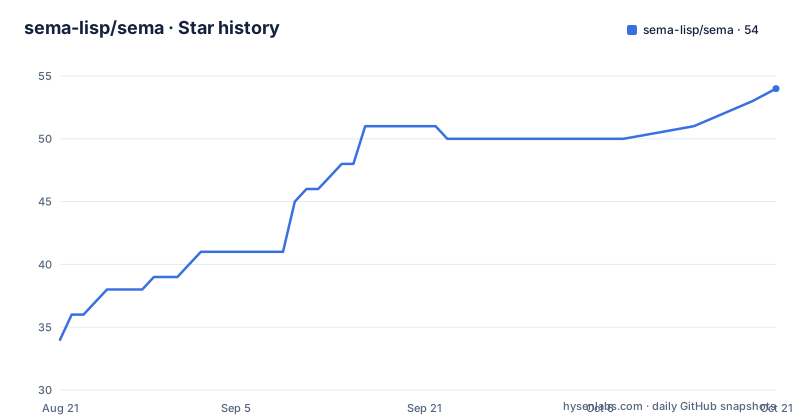
Star history
- sema-lisp/sema54 ★ · +20
| Repository | 2026-08-21 | 2026-10-21 |
|---|---|---|
| sema-lisp/sema | 34 | 54 |
20 Stars in the last 61 days, measured from the daily GitHub snapshot. Compare with other projects
Editorial analysis
The scaffolding every agent script rewrites is the runtime here
The argument starts from a familiar annoyance: every LLM script grows the same surrounding code, retries, caching, cost caps, rate limits, tool dispatch and conversation state, and that code is bigger than the idea. Sema moves it into the runtime so the script stays the size of its idea, compiles to a fast bytecode VM, and ships as a single binary. The language itself is Scheme-like, with prompts written as s-expressions, conversations as persistent data structures, and LLM calls as just another form of evaluation. Syntax is Clojure-flavoured: keywords such as :foo, map literals with the {:key val} shape, and vector literals like [1 2 3]. The claim about your coding agent is part of the pitch, and it comes with its own remedy further down the page.
deftool turns a lambda plus a schema into a model-callable tool
Tools are defined in the source, not registered in a JSON sidecar. A deftool form takes a name, a description string, a schema map and a lambda, and the example shows a working file-editing agent in about forty lines. read-file declares a path argument as {:path {:type :string :description "File path"}} and the body checks whether the file exists before reading it. edit-file declares path, old and new, and writes the replacement back. run-command declares a shell command string. The schema is what the model sees as the tool contract, and the lambda is what runs once the model has chosen it, so adding a capability means adding a function to your program.
Extraction returns a map, classification returns a keyword
The three key primitives differ in what they hand back, and that is the design. A plain completion takes a string and returns text. Extraction takes a schema and a sentence and returns a map rather than a string, so a call that extracts vendor, amount and date from a purchase description evaluates to something with :amount, :date and :vendor keys you can destructure, no parsing step. Classification takes a list of candidates and a sentence and returns one of them as a keyword, with :positive and :neutral given as the vocabulary. Conversations are constructed with conversation/new and a model string, and multi-turn ones are immutable data, so a branch is a value rather than a mutation.
Thirteen providers, and the gaps are printed in the table
Provider coverage is presented as a matrix of capabilities rather than prose, which is the honest way to do it. Anthropic, OpenAI, Google Gemini, Ollama and any OpenAI-compatible endpoint all support chat, streaming, tools and vision. Groq, xAI, Mistral and Moonshot cover chat, streaming and tools but not vision. OpenAI is the only chat provider in the list with embeddings; Jina, Voyage and Cohere are embeddings-only. A custom provider written in Lisp gets chat and tools but no streaming, which is the one row worth reading twice before designing around it. Configuration is not manual: every provider is auto-configured from environment variables, so setting the API key is the whole setup step.
Underneath the LLM calls there is a full R7RS numeric tower
The project insists on being a real Lisp rather than a toy, and backs that with specifics. There are hundreds of built-in functions, tail-call optimization, macros, modules and error handling. The numeric tower is R7RS, so (expt 2 100) evaluates to a bignum, (+ 1/2 1/3) gives the exact rational 5/6, and (sqrt -1) yields 0+1i rather than an error. Tail calls are demonstrated with a named let loop computing fibonacci 50 as 12586269025 without stack growth. Beyond that the ordinary functional surface is there: maps, keywords used as functions, f-strings for interpolation, and destructuring in let bindings.
Three install paths and two build profiles
Prebuilt binaries are the default, and no Rust toolchain is needed. On macOS and Linux the install script is a single curl pipe, Windows has a PowerShell one-liner that downloads and runs the release installer, and Homebrew is served from a tap as brew install helgesverre/tap/sema-lang. From crates.io it is `cargo install sema-lang`, and building from source is a clone plus `cargo build --release`. For local development that still needs an optimised binary there is a second profile, jake release-fast or `cargo build --profile release-fast`, which produces the binary under target/release-fast and uses incremental compilation and parallel codegen with no cross-crate LTO. The documentation is explicit that --release is the profile to use for performance measurements and distribution builds, with a separate document covering build times and runtime tradeoffs.
The CLI has five shapes, and one of them skips the LLM entirely
Running the binary covers the usual ground plus a compiler path:
sema -e '(+ 1 2)'
sema --no-llm script.sema
sema build app.sema -o myapp
`sema` on its own starts a REPL with tab completion, and `sema script.sema` runs a file. `sema --no-llm script.sema` runs without initialising the model layer for faster startup, useful for pure computation or for checking that a script's non-LLM half still works. `sema build app.sema -o myapp` compiles a program into a standalone executable that runs without Sema installed at all. Shell completion scripts are generated separately for tab completion in your shell.
Nineteen crates, with the WebAssembly one deliberately left out of default builds
The workspace layout explains a lot. Cargo.toml lists nineteen members covering the core, reader, evaluator, LLM layer, standard library, VM, formatter, language server, debug adapter, notebook, docs, MCP, OpenTelemetry, policy and workflow crates, all at version 1.36.0 under edition 2021 with an MIT licence. One detail is a good example of build hygiene: sema-wasm is a member but is excluded from default-members, because it is wasm32-only in practice and compiling it for the host would drag js-sys, web-sys and wasm-bindgen into every native build for about 25 seconds of serial compile, so it is built explicitly with -p. The container image takes the same minimalism further, building a static musl binary in Alpine and copying it into scratch with the examples directory, exposing port 3000 and running examples/web-server.sema. The playground at sema.run runs entirely in WebAssembly with more than twenty example programs, and the agent-facing answer to a new model is a one-line append of the for-agents crib sheet into AGENTS.md, plus a machine index at llms.txt and a .md suffix that turns any documentation URL into raw Markdown.
Editorial conclusion
Sema fits a team that keeps rewriting the same agent loop in whatever language it happens to be using, since retries, caching, cost caps and tool dispatch stop being your code. It does not fit if you need streaming from a provider outside the table, or if you want a language your models have already seen in training, since Sema is new and its own documentation admits agents have not met it yet. Before adopting it, append the for-agents crib sheet to your agent instructions, and check the provider matrix for the streaming and embeddings gaps before designing around them.
Frequently asked questions
What does sema mean in the sema-lisp repository?
Sema is a Scheme-like Lisp implemented in Rust and compiled to a bytecode VM, where prompts are s-expressions, conversations are persistent data structures, and LLM calls are evaluation forms rather than calls through a separate SDK.
How do I install Sema?
With `curl -fsSL https://sema-lang.com/install.sh | sh` on macOS or Linux, the PowerShell installer one-liner on Windows, `brew install helgesverre/tap/sema-lang`, or `cargo install sema-lang` from crates.io. Building from source is a git clone followed by `cargo build --release`.
Which LLM providers does Sema support?
Thirteen entries in a capability matrix. Anthropic, OpenAI, Gemini, Ollama and any OpenAI-compatible endpoint do chat, streaming, tools and vision; Groq, xAI, Mistral and Moonshot do chat, streaming and tools; OpenAI is the only chat provider with embeddings, while Jina, Voyage and Cohere are embeddings-only, and a custom Lisp provider has no streaming.
What commands does the Sema binary take?
`sema` starts a REPL with tab completion, `sema script.sema` runs a file, `sema -e '(+ 1 2)'` evaluates an expression, `sema --no-llm script.sema` skips the model layer for faster startup, and `sema build app.sema -o myapp` produces a standalone executable.
Official sources
Add this badge to your README
If you maintain this project, the badge below links readers to this analysis and shows its maintenance status from the daily GitHub snapshot. Paste the markdown into your README; add ?metric=license or ?metric=stars to the image URL for a different field.

[](https://hysenlabs.com/projects/sema-lisp-sema)Star history chart for your README
[](https://hysenlabs.com/projects/sema-lisp-sema)