autocontext: a self-improving harness for agent runs, and what it leaves on disk
a recursive self-improving harness designed to help your agents (and future iterations of those agents) succeed on any task
At a glance
- What is it?
- autocontext runs a goal against evaluation, keeps the lessons, and writes traces, playbooks and context bundles to the filesystem. Here is how the loop works, how to install it, and where it stops being the right tool.
- Who is it for?
- Adopt autocontext if you already run coding agents and want the output of each run to be inspectable files rather than a chat transcript: the runs/ and knowledge/ trees are the product, and the promotion rules around context bundles are the part worth studying before you trust a promoted prompt.
- Can I use it commercially?
- Yes. Apache-2.0 is a permissive licence: you can use, modify and sell software built on it, as long as you keep its copyright and licence notices.
- Is it still maintained?
- Yes. The repository last received commits 5 days ago.
- What is it written in?
- Mainly Python, according to GitHub's language statistics.
Answers come from the project's GitHub data, last synced on November 22, 2026, and from our analysis. They are not legal advice.
Star history
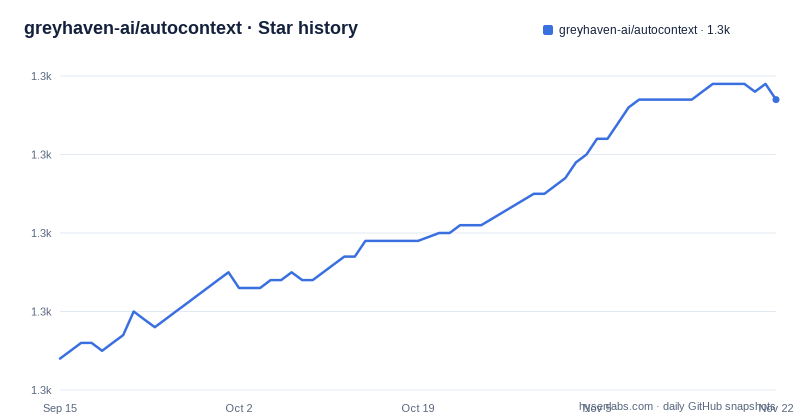
- greyhaven-ai/autocontext1,327 ★ · +33
| Repository | 2026-09-15 | 2026-11-22 |
|---|---|---|
| greyhaven-ai/autocontext | 1.3k | 1.3k |
33 Stars in the last 68 days, measured from the daily GitHub snapshot. Compare with other projects
Editorial analysis
What autocontext solves, and who is meant to run it
Most agent tooling optimises the single conversation. You give an agent a task, it produces an answer, and the next task starts from zero. autocontext is built around the opposite assumption: that the useful output of a run is not the answer but the accumulated material that makes the next run better. The README describes it as a harness that, given a goal, "runs the task against evaluation, keeps the useful lessons, discards dead ends, and leaves traces, reports, playbooks, datasets, and optional local-model training artifacts for the next run."
The intended user is someone who runs agents repeatedly against the same class of problem and wants that repetition to compound. The README lists Pi, MCP clients such as Claude Code and Cursor, and Hermes as entry points, which tells you the project expects to sit behind an existing agent rather than replace it. If you run a single ad hoc prompt a week, nothing here pays for itself. If you run the same evaluation loop daily, the persistence layer is the point.
The run loop: evaluation, generations, and what lands in runs/
A run is identified by a run_id and writes a fixed directory shape. The README shows trace.jsonl, per-generation folders containing strategy.json, analysis.md and score.json, plus report.md and an artifacts directory. The generations are numbered, which means each iteration produces its own strategy and its own score rather than overwriting the previous attempt. That is what makes a run replayable and diffable: you can compare generation 2 against generation 3 and see whether the strategy change actually moved the score.
Alongside runs/, the harness maintains a knowledge/ tree keyed by scenario. It holds playbook.md, hints.md, a tools directory, and context_bundles with subfolders for bundles, candidates, promotions and an active.json pointer. The active.json file is the serving boundary. According to the README, coach and architect context changes are stored as immutable candidates and are not served until matched candidate and incumbent trials confirm them. The live boundary can additionally require a cancellable independent audit and a campaign-wide false-promotion budget.
That design is more conservative than it first appears. A prompt change cannot reach the active set just because it looks better in isolation; it has to beat the incumbent in a matched trial. The README also notes that exact causal credit is accepted only from verified single-component manifest additions, and that controlled component trials feed ablation-backed attribution so prompt selection can demote low-value context without treating edit-size correlation as causation. In other words, the project is explicitly trying not to mistake a bigger diff for a better prompt.
Installing autocontext and running a first solve
There are four install surfaces. The Python CLI installs with uv tool install autocontext==0.17.1, the Python library with uv pip install autocontext==0.17.1, the TypeScript CLI with bun add -g [email protected], and the Pi extension with pi install npm:[email protected]. Note the naming split the README calls out directly: the PyPI package is autocontext, the CLI it installs is autoctx, and the npm package is autoctx, not the unrelated autocontext npm package.
The lowest-friction first run uses Pi, because the README says it reuses your local agent auth. Set the provider and the Pi command as environment variables, then call solve with a plain-language goal and a bounded iteration count.
AUTOCONTEXT_AGENT_PROVIDER=pi \
AUTOCONTEXT_PI_COMMAND=pi \
autoctx solve "improve customer-support replies for billing disputes" --iterations 3
When it finishes you should have a new directory under runs/ containing trace.jsonl, three numbered generation folders, report.md and artifacts. Read report.md first, then compare the score.json files across generations to see whether later iterations actually improved.
If you are not using Pi, the README names anthropic, openai-compatible, openrouter, claude-cli, codex and pi-rpc as alternatives, with the full matrix in autocontext/docs/agent-integration.md. The .env.example file carries the rest of the configuration: AUTOCONTEXT_DB_PATH defaults to runs/autocontext.sqlite3, AUTOCONTEXT_RUNS_ROOT to runs, AUTOCONTEXT_KNOWLEDGE_ROOT to knowledge, and AUTOCONTEXT_EVENT_STREAM_PATH to runs/events.ndjson. For MCP clients the entry point is a server rather than a one-shot command.
autoctx serve mcpThe README also gives the bunx form, bunx autoctx serve mcp, for exposing the tools to Claude Code, Cursor or another MCP client.
Self-hosted models and the constrained-output requirement
Running the loop against a local endpoint is documented separately in autocontext/docs/self-hosted-models.md, which covers vLLM, Ollama and any OpenAI-compatible endpoint. The .env.example exposes the knobs. AUTOCONTEXT_LOCAL_MODEL fills every otherwise-unset role or tier slot, with explicit per-role or per-tier values taking precedence. You can declare where the endpoint runs and the maximum capability it serves with AUTOCONTEXT_PROVIDER_HOSTING and AUTOCONTEXT_PROVIDER_CAPABILITY, and role-specific endpoints use matching ROLE_PROVIDER_* declarations.
The interesting default here is AUTOCONTEXT_CONSTRAINED_OUTPUT=true. The comment in .env.example explains that OpenAI-compatible role generation uses output schemas by default, and that setting it false sends ordinary unconstrained requests and parses the returned Markdown. The README's own framing is that constrained output matters more on open weights. That is a real constraint on your deployment: if your local server cannot enforce schemas, you are falling back to Markdown parsing, and the structured artifacts the harness expects become a parsing problem rather than a guarantee.
Where autocontext is the wrong tool
The promotion machinery is the strongest argument for the project and also the clearest limitation. Context changes sit as immutable candidates until matched candidate and incumbent trials confirm them, and the README describes additional optional gates: a cancellable independent audit and a durable campaign-wide false-promotion budget. Every one of those gates costs evaluation runs. On a task where the evaluation is expensive, slow, or noisy, the trial budget can exceed the value of the improvement you are trying to confirm.
The second limitation is versioning. The README pins specific versions in its install table, 0.17.1 for the Python packages, 0.17.4 for the npm CLI and 0.10.1 for the Pi extension, and the repository has no published GitHub releases. The documentation references features that read as recently added, including kernel campaign receipts and multi-workload studies. If you need a frozen surface with a changelog you can plan upgrades against, pin the version and read CHANGELOG.md rather than tracking main.
There is also a naming trap worth flagging because it will cost someone an afternoon: the npm package is autoctx, and the README states plainly that it is not the unrelated autocontext npm package.
How autocontext differs from plain prompt-and-eval scripts
If you already keep a shell script that runs your agent against a test set, the honest comparison is with that script plus a notes file. The difference is that autocontext formalises the promotion decision. A hand-rolled setup usually promotes a prompt change because a human read the diff and liked it. autocontext requires matched candidate and incumbent trials, and the README states that exact causal credit is accepted only from verified single-component manifest additions. Ablation-backed attribution then lets prompt selection demote low-value context without presenting edit-size correlation as causal.
The other difference is the artifact contract. A script leaves logs; autocontext leaves a run directory with per-generation strategy, analysis and score files, a report, and a parallel knowledge tree with playbooks and context bundles. That structure is what makes the output reusable by a later agent or exportable as a dataset. The trade-off is that you inherit the project's opinions about where files live, which the .env.example lets you move through AUTOCONTEXT_RUNS_ROOT and AUTOCONTEXT_KNOWLEDGE_ROOT but not restructure.
Maintenance, licensing and upgrade cost
The repository is not archived, and the last push was on 2026-09-09, which is recent. It is licensed Apache-2.0, which permits commercial use and modification and includes an explicit patent grant; the LICENSE file at the repository root is the authoritative text, and this is not legal advice. If you vendor or modify the harness, Apache-2.0 requires you to preserve the licence and state significant changes.
The upgrade cost is real because the project spans four independently versioned packages: autocontext on PyPI, autoctx on npm, the Pi extension, and the Python library. The npm CLI and TUI require Node.js 22.19.0 or newer, and contributors are directed to the version pinned in ts/.nvmrc. Any environment where the Node runtime is older than that cannot run the TypeScript surface at all, which is a hard boundary rather than a preference. The README points to autocontext.ai/docs/changelog for release-by-release detail, and CHANGELOG.md sits at the repository root.
Editorial conclusion
Adopt autocontext if you already run coding agents and want the output of each run to be inspectable files rather than a chat transcript: the runs/ and knowledge/ trees are the product, and the promotion rules around context bundles are the part worth studying before you trust a promoted prompt. Do not adopt it if you need a stable API surface, since the README documents packages at 0.17.x, the repository has no published GitHub releases, and the context-bundle promotion logic is still being extended. Verify first that your provider path is covered in agent-integration.md, that Node.js 22.19.0 or newer is present if you want the npm CLI or TUI, and that your endpoint can return constrained output if you plan to self-host.
Frequently asked questions
What is autocontext and what does it actually do?
It is a harness for agent improvement: you give it a goal, it runs the task against evaluation, keeps the useful lessons and discards dead ends. Each run leaves traces, reports, playbooks, datasets and optional local-model training artifacts for the next run.
How do I install autocontext?
The README lists four surfaces: uv tool install autocontext==0.17.1 for the Python CLI, uv pip install autocontext==0.17.1 for the library, bun add -g [email protected] for the TypeScript CLI, and pi install npm:[email protected] for the Pi extension. The PyPI package is autocontext while the CLI it installs is autoctx.
What is the difference between the autocontext and autoctx packages?
autocontext is the PyPI package name and autoctx is the CLI it installs. On npm the package is autoctx, and the README states explicitly that it is not the unrelated autocontext npm package.
Can I run autocontext against a local model instead of a hosted provider?
Yes. The README points to autocontext/docs/self-hosted-models.md, which covers vLLM, Ollama and any OpenAI-compatible endpoint. Self-hosted endpoints can declare AUTOCONTEXT_PROVIDER_HOSTING=local and a fast, mid_tier or frontier AUTOCONTEXT_PROVIDER_CAPABILITY.
What does a finished autocontext run leave on disk?
A runs/<run_id>/ directory containing trace.jsonl, numbered generations with strategy.json, analysis.md and score.json, plus report.md and artifacts. A parallel knowledge/<scenario>/ tree holds playbook.md, hints.md, tools and context_bundles.
Does autocontext work with Claude Code or Cursor?
The README lists MCP clients as an entry point: run autoctx serve mcp, or bunx autoctx serve mcp, and expose the tools to Claude Code, Cursor or another MCP client. Full setup is in autocontext/docs/agent-integration.md.
Official sources
Add this badge to your README
If you maintain this project, the badge below links readers to this analysis and shows its maintenance status from the daily GitHub snapshot. Paste the markdown into your README; add ?metric=license or ?metric=stars to the image URL for a different field.

[](https://hysenlabs.com/projects/greyhaven-ai-autocontext)Star history chart for your README
[](https://hysenlabs.com/projects/greyhaven-ai-autocontext)Was this useful?