RetinaFace: what one detect_faces call actually returns
RetinaFace: Deep Face Detection Library for Python
At a glance
- What is it?
- RetinaFace is a Python face detector that hands back a bounding box and five landmarks per face, and its install story is narrower than the three-backend pitch. It is a solid box-and-landmark producer for Python stacks, sitting next to a packaging setup that still contradicts itself.
- Who is it for?
- RetinaFace earns its place when the job stops at finding faces and marking eyes, nose and mouth, since one detect_faces call returns both the box and the landmarks a recognition pipeline needs. It is the wrong dependency when you need recognition, tracking or a single end to end verify call, because that path runs through ArcFace in deepface.
- Can I use it commercially?
- Yes. MIT is a permissive licence: you can use, modify and sell software built on it, as long as you keep its copyright and licence notices.
- Is it still maintained?
- Yes. The repository last received commits 29 days ago.
- What is it written in?
- Mainly Python, according to GitHub's language statistics.
Answers come from the project's GitHub data, last synced on November 7, 2026, and from our analysis. They are not legal advice.
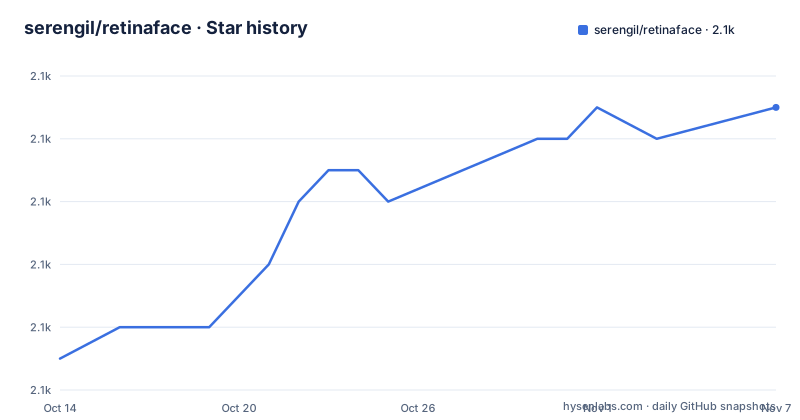
Star history
- serengil/retinaface2,067 ★ · +8
| Repository | 2026-10-14 | 2026-11-07 |
|---|---|---|
| serengil/retinaface | 2.1k | 2.1k |
8 Stars in the last 24 days, measured from the daily GitHub snapshot. Compare with other projects
Editorial analysis
One detect_faces call returns a box and five landmarks
RetinaFace answers one narrow question: where is each face in this picture, and which points on it matter later. The detection function expects an exact path of an image as input, and the call takes that path as its only argument.
resp = RetinaFace.detect_faces("img1.jpg")What comes back is a dictionary keyed by face_1, face_2 and onward. Each entry carries a score, a facial_area list of four numbers, and a landmarks dictionary holding right_eye, left_eye, nose, mouth_right and mouth_left. The eye coordinates in that sample run to five decimal places, which tells you the landmarks are sub-pixel regression outputs rather than points snapped to a grid.
from retinaface import RetinaFaceImporting the package is one line, and what it hands you is the class rather than a module-level function, so the surface a caller has to learn stays small. Everything interesting happens behind that dictionary: which engine computed it, and what you do with five points and a rectangle afterwards.
From the mxnet original to a pip package with the same weights
The lineage matters if you are weighing this package against the implementation it descends from. RetinaFace is the face detection module of the insightface project, and that original implementation is mainly based on mxnet. The tensorflow based re-implementation it follows was published by Stanislas Bertrand, and this repository calls itself heavily inspired by that study.
What changed in the move here is packaging and runtime rather than the model. The source code is simplified and transformed to pip compatible, while the main structure of the reference model and its pre-trained weights stay the same. So the comparison against the mxnet version is not accuracy, since no detection accuracy table is published for this package. It is installation surface. You get something that installs from PyPI under the name retina-face and runs on TensorFlow, PyTorch or ONNX Runtime, instead of a framework this project no longer targets.
What the repository does not carry is the rest of insightface. Recognition there is a separate module, and a face crop with no identity attached is the whole scope of this one.
Installing a backend, and a paragraph that names the wrong library
Installation is one pip line with a backend extra, and the README asks you to pick the engine rather than let the package choose.
pip install retina-face[tensorflow]The commented alternatives in that block are `retina-face[pytorch]` and `retina-face[onnx]`, and a fourth commented line exports `DEEPFACE_BACKEND_ENGINE=onnx` for an existing deepface install. The promise is that the extra in the brackets gets resolved and the other engines stay out.
A source install is documented too, and that paragraph contradicts the commands printed under it. The text introduces the alternative by saying you can also install deepface from its source code, then the commands that follow clone the retinaface repository and install it in editable mode. Nothing in that block touches deepface.
git clone https://github.com/serengil/retinaface.git
cd retinaface
pip install -e .[tensorflow]  # or pip install -e .[pytorch] or .[onnx]
The stated reason for preferring a checkout is that it may carry features not yet published to PyPI, so a source tree and a bare pip install can behave differently.
Five requirement files decide which engine a call loads
Five requirement files sit at the top level, and setup.py parses each one by stripping blank lines and comment lines before handing the rest to the installer.
requirements.txt
requirements_base.txt
requirements_tf.txt
requirements_pth.txt
requirements_onnx.txt
The three backend files feed the three extras, and requirements_base.txt is the engine-neutral list. Version metadata is not hardcoded either: setup.py reads it from package_info.json, and declares README.md, the requirement files and package_info.json as data_files so that they travel with the distribution.
Here is the contradiction worth settling before you write a Dockerfile. One comment in setup.py says requirements.txt still includes tensorflow to avoid breaking `pip install retina-face` for existing users, and that it should switch to requirements_base.txt in the next major version. A comment a few lines earlier says the extras install the backend engine you want without dragging the others in. Both cannot hold for a bare `pip install retina-face`, because requirements.txt pins `tensorflow>=1.9.0` next to `numpy>=1.14.0`, `gdown>=3.10.1`, `requests>=2.27.1`, `Pillow>=5.2.0` and `opencv-python>=3.4.4`.
Alignment crops reuse the same five landmark points
Those landmarks are not just a debugging aid. extract_faces takes an image path and an align flag, and with alignment on it applies the transform implied by the detected eye points before cropping.
import matplotlib.pyplot as plt
faces = RetinaFace.extract_faces(img_path = "img.jpg", align = True)
for face in faces:
  plt.imshow(face)
  plt.show()
The argument for doing that comes from the recognition side of the pipeline. A modern face recognition pipeline is described as detect, align, normalize, represent and verify, and alignment is credited there with an accuracy gain of almost 7% in the deepface experiments directory. That figure belongs to the surrounding recognition experiments rather than to a detector benchmark, and no detection accuracy table is published here. The two accuracy numbers that do appear, 99.40% for ArcFace on the LFW data set and 97.53% for human confidence, describe the model that consumes these crops.
The stage list has its own slip. The same sentence calls the pipeline one of 4 common stages and then names five of them.
RetinaFace stops where deepface and ArcFace begin
If you need an identity, this package points you at another one. Recognition in insightface is ArcFace, and deepface packages the two together for an end-to-end pipeline.
#!pip install deepface
from deepface import DeepFace
obj = DeepFace.verify("img1.jpg", "img2.jpg"
          , model_name = 'ArcFace', detector_backend = 'retinaface')
print(obj["verified"])
Two details in that snippet matter. The pip line at the top shows the block is really a deepface example, and the comma stranded at the start of the continuation line is a documentation artifact rather than a style worth copying. For a RetinaFace user the meaningful argument is `detector_backend = 'retinaface'`, which is how the detector you just installed gets selected inside a verification call.
The consequence is architectural. Alignment, normalization, the embedding and the threshold comparison all happen elsewhere, so a project taking detection from this package and verification from deepface ends up carrying two model downloads and two sets of dependencies.
A path in, a dictionary out, and no documented offline mode
The input contract is narrow in a way that matters for server work. The detection function expects an exact path of an image, and extract_faces names its argument img_path, so both entry points are built around a file on disk. No array input, base64 input, video stream or batch call is documented, and neither is a way to set a detection threshold from Python.
Weights are the second constraint. No model file appears at the top level of the repository, and the default requirement list pulls in gdown and requests, so a first call has to fetch something over the network. Where those weights are hosted is not written down, and neither is an offline mode or a checksum for what arrives. The `DEEPFACE_BACKEND_ENGINE` variable turns up only as a commented line inside the install block: no file listed at the top level and nothing in setup.py reads it, so what it changes for a RetinaFace call is undocumented here.
If your deployment has to run air-gapped, or has to feed frames straight from a camera, you will answer those two questions outside the documentation before you commit.
make test and make lint gate a pull request
Contribution is documented with two commands, and the repository ships a Makefile that defines both of them.
make test
make lint
Those targets wrap a test run and a pylint pass over the package directory.
python -m pytest tests/ -s --disable-warnings
python -m pylint retinaface/ --fail-under=10
The lint target fails anything scoring below 10 out of 10, and a .pylintrc at the top level holds the rule set. Pull requests are expected to have both commands run locally, after which a GitHub test workflow runs automatically and unit test results appear in GitHub actions before approval. The pictures on the front page are committed artifacts of that suite: img3.jpg, alignment-procedure.png and retinaface-arcface.png all live under tests/outputs, so the illustrations come out of the test directory rather than a separate documentation folder. Academic citation is handled by CITATION.cff and the DOI 10.35378/gujs.1794891.
The last push was on 2026-10-03, while the newest tagged release v0.0.17 is dated 2024-04-16 and the two before it, v0.0.16 and v0.0.15, are dated 2024-03-31 and 2024-03-17.
Editorial conclusion
RetinaFace earns its place when the job stops at finding faces and marking eyes, nose and mouth, since one detect_faces call returns both the box and the landmarks a recognition pipeline needs. It is the wrong dependency when you need recognition, tracking or a single end to end verify call, because that path runs through ArcFace in deepface. Before you commit, check two things in your own environment: whether a bare install of retina-face still drags in tensorflow>=1.9.0 through requirements.txt, and whether your first call has network access to fetch weights that the repository does not ship.
Frequently asked questions
Does RetinaFace accept a NumPy array, or only an image file path?
Only a file path is documented. The detection function expects an exact path of an image, and extract_faces takes its image as an img_path keyword. Array input, base64 input, batch calls and video streams are not covered by the documentation.
Which backends does RetinaFace support and how do I pick one at install time?
The package runs on TensorFlow, PyTorch or ONNX Runtime, chosen through the extras `retina-face[tensorflow]`, `retina-face[pytorch]` and `retina-face[onnx]`. A bare `pip install retina-face` still resolves requirements.txt, which pins `tensorflow>=1.9.0`, so an untargeted install keeps TensorFlow in the environment.
Can RetinaFace recognise a face, or does it only detect one?
Detection and landmarks only. Recognition in insightface is ArcFace, and the deepface library wraps that pair for an end-to-end pipeline, selecting this detector through `detector_backend = 'retinaface'`.
Where do the pre-trained weights come from?
The README states the pre-trained weights are the same as those of the reference model, but it does not say where they are hosted. gdown and requests sit in the default requirement list and no weight file appears in the top-level tree, so the fetch path and any offline mode are undocumented.
How do I run the tests and the linter before opening a pull request?
Run `make test` and `make lint` locally. The Makefile expands them into pytest over the tests directory and pylint over retinaface with `--fail-under=10`, and a GitHub test workflow then runs on the pull request before approval.
Official sources
Add this badge to your README
If you maintain this project, the badge below links readers to this analysis and shows its maintenance status from the daily GitHub snapshot. Paste the markdown into your README; add ?metric=license or ?metric=stars to the image URL for a different field.

[](https://hysenlabs.com/projects/serengil-retinaface)Star history chart for your README
[](https://hysenlabs.com/projects/serengil-retinaface)Was this useful?