deploy-rs: Nix flakes that ship profiles instead of whole machines
A simple multi-profile Nix-flake deploy tool.
At a glance
- What is it?
- deploy-rs is a Rust program that deploys Nix profiles to named nodes, with any number of profiles per host and each one carrying its own user. Its post-activation connection check is also the thing that blocks SSH port and IP changes until you turn it off.
- Who is it for?
- Adopt deploy-rs if you already write Nix and want one flake to carry several profiles per host, each under its own user, with an automatic rollback when the post-activation connection fails. Pass on it if you want a single managed configuration per machine, since the shape the README gives you for that is one root profile.
- Can I use it commercially?
- Check first. The repository uses a licence we do not classify automatically, so read its LICENSE file before any commercial use.
- Is it still maintained?
- Yes. The repository last received commits 4 days ago.
- What is it written in?
- Mainly Rust, according to GitHub's language statistics.
Answers come from the project's GitHub data, last synced on October 24, 2026, and from our analysis. They are not legal advice.
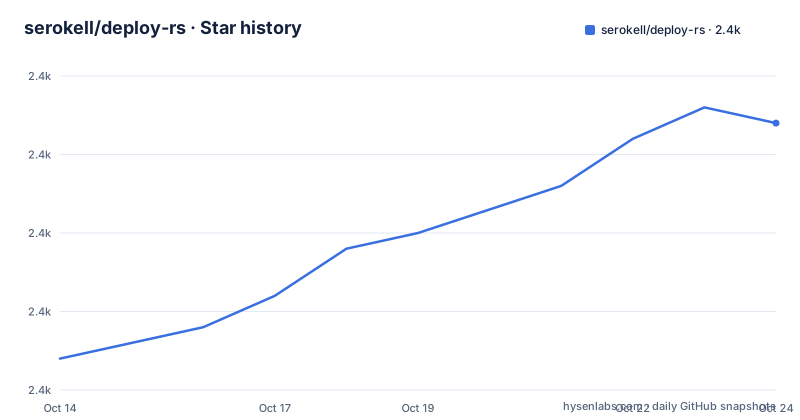
Star history
- serokell/deploy-rs2,387 ★ · +15
| Repository | 2026-10-14 | 2026-10-24 |
|---|---|---|
| serokell/deploy-rs | 2.4k | 2.4k |
15 Stars in the last 10 days, measured from the daily GitHub snapshot. Compare with other projects
Editorial analysis
Profiles, not machines, are the unit of deployment
deploy-rs is a Rust program that takes a Nix flake and deploys the profiles that flake declares to the nodes it names. The unit of work is a profile rather than a machine image, any number of them can live on one node, and each carries its own user. That arrangement is what makes lesser-privileged deployment possible: a home-manager profile can land on an unprivileged account while a NixOS profile goes to root, and the two then move independently of each other. The README frames this as a deliberate move away from more traditional tools like NixOps or morph, and it hands you the translation for the old shape: one profile called system, running as root, containing a nixosSystem. Four example directories ship with the tool, examples/darwin/, examples/groups/, examples/simple/ and examples/system/, and the project says it was built to replace the older serokell/deploy, from which it takes its design.
Magic Rollback verifies you can still connect, and blocks SSH port changes
After a profile activates, deploy-rs connects to the machine to confirm it is still available, and instructs the target node to roll itself back when that confirmation never arrives. The cost is stated as directly as the feature: while magicRollback stays enabled in your configuration or on the command line, you are unable to make changes that would affect how you reach the machine, and the two examples given are changing the SSH port and changing your IP. So the guard that stops a node becoming unreachable also blocks the edits a migration needs most, and disabling it for one deploy means a failed activation leaves the machine wherever the profile put it. Availability is judged by a connection attempt after activation rather than by anything you define, since no health check command, no timeout value and no retry count are documented anywhere in the README.
One failing target rolls back every deploy that already succeeded
For several flakes in a single invocation, the single-flake form is replaced by a targets mode.
deploy --targets <flake> [<flake> ...]Each flake argument takes the same format as before, and if any deploy fails the run is aborted and all successful deploys are rolled back. The escape hatch is `--rollback-succeeded false`, with one catch stated in passing: otherwise the `auto-rollback` argument takes precedence. A flag on your command line therefore loses to a value inside your flake, which is exactly the precedence you want to know about at two in the morning. Failures are handled as a group rather than per target, so a long target list couples the fate of every healthy node to the least healthy one. Group filters narrow that list when you would rather not couple them: a profile is selected when any requested group appears in its merged groups set.
Node, profile and group selectors decide what one invocation touches
The flake argument doubles as the selector. Basic usage, `deploy [options] <flake>`, deploys all profiles the flake specifies while taking into account `profilesOrder`, which is where a close reading pays off: that key appears only as the label of a link to `#node`, and no heading in the README carries that anchor, so the ordering key is named and never defined. Narrowing works through the argument itself, with `my-flake#my-node` for one node and `my-flake#my-node.my-profile` for one profile. A dot inside a node or profile name forces both the name and the flake path into quotes, as in `my-flake#"myserver.com".system`, because the dot would otherwise read as the profile separator.
deploy --groups <group> [<group> ...]Merged is the operative word in the group rule, since membership arrives from everything that contributes to a profile, which means the final group list cannot be read off any single definition.
The starter flake builds deploy-rs from source, not from nixpkgs
A minimal flake declares one input, one node and one profile, and this excerpt leaves out the nixosConfigurations output that sits between them.
{
  description = "Deployment for my server cluster";
  inputs.deploy-rs.url = "github:serokell/deploy-rs";
  outputs = { self, nixpkgs, deploy-rs }: {
    deploy.nodes.some-random-system = {
      hostname = "some-random-system";
      profiles.system = {
        user = "root";
        path = deploy-rs.lib.x86_64-linux.activate.nixos self.nixosConfigurations.some-random-system;
      };
In that shape deploy-rs is built from the flake rather than from nixpkgs, which the README states outright, so the binary cache only comes into play when you add an overlay.
      overlays = [
        deploy-rs.overlays.default
        (self: super: { deploy-rs = { inherit (pkgs) deploy-rs; lib = super.deploy-rs.lib; }; })
      ];
Two things happen at once there, keeping the overlay's lib while forcing the nixpkgs package, and the profile helper is then read from that overlaid package set. A third element is called highly advised, a checks output mapping `deployChecks` over the whole lib attribute set, which is what lets `nix flake check` catch a malformed deployment. That check has a ceiling, because the schema behind it is the JSON file `interface.json` at the repository root, and a JSON schema can confirm a shape without confirming that the derivation will start.
A profile is a derivation plus an activation script run as any user
Under a profile, the `path` attribute is the derivation to install and the script at `${path}/deploy-rs-activate` is what starts it, while both the working directory and `$PROFILE` point to `profilePath` on the target. Wrapping an arbitrary derivation takes a single line.
path = deploy-rs.lib.x86_64-linux.activate.custom pkgs.hello "./bin/hello";That helper is what makes the non-NixOS case cheap, since home-manager can ride the same path on an unprivileged user. A profile may also name an optional install location of its own. One catch belongs to anyone grepping the package for binaries: it ships a second one, `activate`, which the README tells you to ignore, because it exists for use on the deployed machine and for testing or hacking. Another detail sits in the lib attribute set, which is keyed by system, and that is why the example reaches for `deploy-rs.lib.x86_64-linux.activate.nixos` by name and why the checks expression maps across every system entry rather than a single helper.
No install step at all: nix run passes the flake to deploy-rs
The shortest way to see it work skips installation.
nix run github:serokell/deploy-rs your-flakeOnce the binary is on your PATH the form is `deploy [options] <flake>`, and the flake path can be constrained to a single node or profile as described above. Anything after the double dash is handed to the Nix calls, and writing the flake path out explicitly is a requirement of that mechanism, not a stylistic choice.
deploy . -- --impureA signing key needed to push closures goes into the `LOCAL_KEY` environment variable as a path. The README defers the whole flag list to `deploy --help` and tells you to look there before one-time changes such as hostnames, so the flags most operators reach for first are absent from the written documentation by choice. A fallback is documented for old setups: when the available Nix has no flake support, a flake-less mode of operation is selected automatically, and anyone who still wants a flake on such a machine is pointed at `flake-compat`. The repository carries both `flake.nix` and `default.nix` for that reason, with `shell.nix` and `.envrc` beside them.
Edition 2018 and version 0.1.0 under a manifest of current crates
The manifest says a lot about the binary. The package is deploy-rs at version 0.1.0 on edition 2018, authored by notgne2 and Serokell, and its library target is named `deploy` in `src/lib.rs`, a mismatch worth noting when you are looking for the library crate. The build profile is tuned for size rather than speed, with lto turned on, `opt-level = "s"` and `codegen-units = 1`, which suits a program that runs on an operator's machine and then activates on the node. The dependency list reads like the feature set: clap 4 with derive and wrap_help for the CLI, tokio 1.44.0 with the full feature list, notify 8.0 for file watching, fork 0.2 for child processes, rnix 0.8 alongside serde 1.0.219 and serde_json 1.0.140, toml 0.8, indicatif 0.17.8 with tokio and futures for progress output, flexi_logger 0.16 with log 0.4, signal-hook 0.3, rpassword 7.3.1 for a password prompt, whoami 1.6 and dirs 6 for the local environment, then futures-util 0.3.31, tokio-stream 0.1.16, thiserror 2.0, unescape 0.1.0, merge 0.1.0 and yn 0.1. Edition 2018 next to clap 4 says the manifest was never re-swept, and a version string parked at 0.1.0 tells a reader nothing about how current the code is. The licensing picture is less tidy: both the README header and this manifest carry `SPDX-License-Identifier: MPL-2.0`, while GitHub records the repository as Other, a custom licence it cannot classify, leaving the terms in the LICENSE file beside a LICENSES/ directory. The last push was on 2026-09-28.
Editorial conclusion
Adopt deploy-rs if you already write Nix and want one flake to carry several profiles per host, each under its own user, with an automatic rollback when the post-activation connection fails. Pass on it if you want a single managed configuration per machine, since the shape the README gives you for that is one root profile. Before a first production deploy, read `deploy --help` for the flags the README omits, wire `deployChecks` into your flake so `nix flake check` runs, and find out in the `#deploy-rs:matrix.org` room what `profilesOrder` is meant to do, because the README names that key and then links to an anchor that does not exist.
Frequently asked questions
How do I install deploy-rs?
You do not have to install anything to try it: `nix run github:serokell/deploy-rs your-flake` runs the tool straight from the flake. Once the binary is on your PATH, the basic form is `deploy [options] <flake>`, and a flake-less mode is selected automatically when the available Nix has no flake support.
What happens when one of several deploy-rs targets fails?
Under `deploy --targets <flake> [<flake> ...]`, a failure aborts the run and rolls back every deploy that already succeeded. `--rollback-succeeded false` changes that, except that the `auto-rollback` argument in the flake takes precedence over the flag.
Why does deploy-rs refuse to change my SSH port or IP address?
While magicRollback is left enabled, deploy-rs connects to the machine after activation and instructs the node to roll back if that connection does not confirm it is available. The README states that this makes you unable to make changes that would affect how you connect, naming the SSH port and the machine's IP address, so you have to disable magicRollback for that deploy.
How does deploy-rs differ from NixOps or morph?
A node holds any number of profiles, each with its own user, instead of one system configuration, which the README presents as allowing lesser-privileged deployments and independent updates. It also gives the translation for people who want the traditional shape: a single profile called system, running as root, containing a nixosSystem.
Which licence is deploy-rs published under, and is it versioned?
The README header and the Cargo.toml both carry `SPDX-License-Identifier: MPL-2.0`, while GitHub records the repository as Other, a custom licence it cannot classify, with the terms left in the LICENSE file. The repository has no GitHub releases and the Cargo.toml package version is still 0.1.0, so the manifest version is not a guide to how current the code is.
Official sources
Add this badge to your README
If you maintain this project, the badge below links readers to this analysis and shows its maintenance status from the daily GitHub snapshot. Paste the markdown into your README; add ?metric=license or ?metric=stars to the image URL for a different field.

[](https://hysenlabs.com/projects/serokell-deploy-rs)Star history chart for your README
[](https://hysenlabs.com/projects/serokell-deploy-rs)Was this useful?