A platform marker in the dependency list is what makes Apple silicon work
SGLang-Omni is a high-performance serving framework for audio models (TTS, ASR) and unified multimodal models.
At a glance
- What is it?
- SGLang-Omni serves speech and omni models by splitting generation across a pipeline of named stages, each with its own scheduler, and exposes an OpenAI-shaped API. The dependency manifest is where the real engineering decisions are visible: a platform marker that swaps the CUDA-bound scheduler for MLX on Apple silicon, three exact pins inside a list of two dozen lower bounds, six separate build manifests for six accelerator backends, and a package version that is not in the manifest at all.
- Who is it for?
- SGLang-Omni fits a team serving speech, music or omni models that outgrow a single-stage runtime, and it composes with an existing scheduling project rather than replacing it, which is the cheaper path in. Three things to check before you commit.
- Can I use it commercially?
- Yes. Apache-2.0 is a permissive licence: you can use, modify and sell software built on it, as long as you keep its copyright and licence notices.
- Is it still maintained?
- Yes. The repository received new commits within the last day.
- What is it written in?
- Mainly Python, according to GitHub's language statistics.
Answers come from the project's GitHub data, last synced on November 13, 2026, and from our analysis. They are not legal advice.
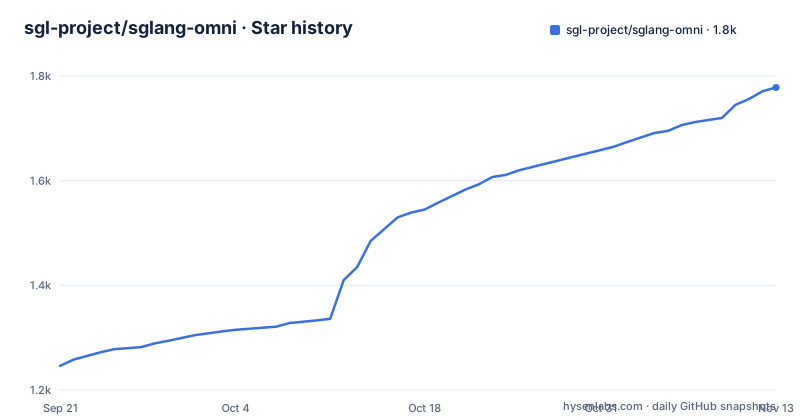
Star history
- sgl-project/sglang-omni1,778 ★ · +532
| Repository | 2026-09-21 | 2026-11-13 |
|---|---|---|
| sgl-project/sglang-omni | 1.2k | 1.8k |
532 Stars in the last 53 days, measured from the daily GitHub snapshot. Compare with other projects
Editorial analysis
One platform marker decides whether the CUDA dependency is installed at all
The dependency list contains two lines that decide the whole installation path on a Mac, and the comment above them explains why they exist.
"sglang==0.5.20; sys_platform != 'darwin' or platform_machine != 'arm64'",
"mlx>=0.32.0; sys_platform == 'darwin' and platform_machine == 'arm64'",
The comment says the upstream scheduling project's published wheel carries unconditional CUDA dependencies, so an Apple silicon install pulls that exact tag from source and uses a different compute path instead. In other words the framework is not merely compatible with a Mac; it changes what it depends on so that a Mac does not try to install a CUDA runtime. The second line even carries a note that the version floor is enforced elsewhere in that dependency's own runtime gate, which is the sort of cross-package coupling that makes a version bump a coordinated event rather than a routine one.
Three exact pins sit inside a list of two dozen lower bounds
Nearly everything in the manifest is a lower bound, which is the polite way to let a resolver choose. Three entries are not. The deep learning framework, its vision counterpart, and the transformers library are all pinned to an exact version, and the transformers pin carries a one-line justification: it has to match the pinned stack of the scheduling project it composes with. That is a defensible choice for a framework whose correctness depends on the exact behaviour of those libraries' initialisation paths, and the manifest also pulls in an acceleration helper specifically for empty-weight initialisation on meta device, which is the kind of thing that breaks silently on a minor bump. The cost is that two of these pins are ahead of most published guidance, so an installation following a blog post rather than the manifest will not resolve.
Six build manifests, one per accelerator backend
The root holds one manifest and five siblings, named for the hardware they target: a plain CPU one, and then musa, npu, rocm and xpu. That is a deliberate structure rather than a mess, because the accelerator-specific dependencies are the part of a machine learning install most likely to conflict, and splitting them means each backend's extra requirements are opt-in through its own file. The installation documentation reinforces it: the Intel path has its own guide and the backend is described as auto-detected. What the layout does not do is tell you which of the six is the default, and the plain manifest is the one whose name carries no hardware at all, which is a reasonable convention and a small ambiguity.
Apple silicon is experimental, and exactly one model is documented on it
The hardware table has three rows and they are not symmetrical. The CUDA row is the default with full model coverage and says nothing else. The Apple silicon row is marked experimental and names one model family, with a link to a guide for it and an installer script. The Intel row is also marked experimental and then does the opposite: it names four model families that serve end to end, with a note about decode graphs on one of them and tensor parallelism across devices on another. So the row with less evidence carries more detail. The practical reading is that CUDA is the only backend to treat as a target, and that the Apple path exists to prove the MLX route works rather than to serve the catalogue.
Generation is split into seven named stage types, each behind its own scheduler
The design target is stated as multi-stage decoding: generation split across stages with different compute patterns, different dependency structures and different resource needs. The runtime models that as seven roles, listed in order: preprocessing, encoders, autoregressive engines, talkers, decoders, vocoders and aggregators. Each stage runs behind a scheduler matched to its workload, and the page contrasts those schedulers explicitly, from the full autoregressive scheduler borrowed from the upstream project down to lightweight preprocessing loops and a streaming vocoder loop. That vocabulary is unusual enough to be worth reading twice, because a talker stage and a vocoder stage are not the same kind of computation and treating them uniformly is how single-loop runtimes get slow.
Four tensor transports sit behind one relay data plane
The split between a control plane and a data plane is explicit. The control plane coordinates requests; the relay data plane moves the actual tensor payloads, and it names four backends it can move them over: shared memory, a collective-communication library, and two transfer libraries. That is a portability statement more than a feature list, and it is the difference between a runtime that only works when every stage is on one node and one that can put a vocoder on a different accelerator from a talker. The manifest is consistent with that shape: a message queue library and a message serialisation library are core dependencies, with a comment tying the queue to control-plane messaging.
A capitalised directory sits at the root and nothing explains it
The top level contains the two Python packages, the tests, the docs, the examples, benchmarks, a playground, a scripts directory, and three directories whose purpose is not stated in the visible documentation. One of them is a capitalised, product-shaped name that appears nowhere in the page, in a repository whose other top-level directories are all lowercase snake case. The second Python package is easier to place, since the page describes a router: a multi-worker front door offering health, readiness, lifecycle and capability discovery, with its own guide. That is exactly the surface you need before you can run more than one worker, so its presence as a sibling package rather than a subcommand is a deliberate boundary. The third directory is the playground, which the page never mentions either.
One vendor endpoint sits among the OpenAI-shaped ones, and the version is not in the manifest
The serving surface is mostly OpenAI-shaped: speech generation, batch speech, streaming speech, uploaded voices, transcription, and multimodal chat. Three paths appear literally on the page.
/v1/audio/speech
/v1/audio/transcriptions
/generate
The third is not part of the OpenAI API, and it is where the editing capability lives, so a client written against the OpenAI shape will need one special case. The transcription endpoint has its own extension too: a verbose response format that adds speaker labels and timestamps. Separately, the manifest declares its version as dynamic, so the number is not in the file at all, and the news section installs an exact version with a pre-release flag because the package publishes as a pre-release. That combination means version pinning has to come from the release feed rather than from the source tree.
Editorial conclusion
SGLang-Omni fits a team serving speech, music or omni models that outgrow a single-stage runtime, and it composes with an existing scheduling project rather than replacing it, which is the cheaper path in. Three things to check before you commit. Python support stops below 3.13, which is narrower than most current machine learning environments. Apple silicon is experimental with one model documented on it, so the rest of the catalogue is CUDA-only in practice even though the dependency graph resolves. And the package publishes as a pre-release, so pin an exact version and pass the pre-release flag when installing.
Frequently asked questions
What does sglang-omni do differently from a single-stage serving runtime?
It splits generation into coordinated stages with different compute patterns and resource needs, running preprocessing, encoders, autoregressive engines, talkers, decoders, vocoders and aggregators behind schedulers matched to each. It owns the topology, the stage lifecycle, the transport between stages and the API surface, and composes with another project for the autoregressive scheduling.
Does sglang-omni work on Apple silicon?
It is marked experimental, and one speech recognition model is documented on it, running through MLX or Torch MPS on macOS arm64. The dependency manifest excludes the CUDA-dependent wheel of the scheduling project on that platform and requires an MLX runtime instead, which is why the install resolves there at all.
How do I install a specific version of sglang-omni?
With the installer flag for pre-releases and an exact version, as the news section shows. The manifest declares its version as dynamic, so the number is not in the source file and has to come from the release feed.
Which Python versions does sglang-omni support?
From 3.10 up to but not including 3.13. The manifest also carries a separate file for CPU-only installs and four more named for specific accelerator backends, so the accelerator-specific dependencies are opt-in through their own manifest.
what is sglang omni
It is a multi-stage serving runtime for speech, music and omni models. Generation is split across named stages, each behind its own scheduler, with tensor payloads moved between stages over shared memory, collective communication, or one of two transfer libraries, behind an OpenAI-compatible API.
Official sources
Add this badge to your README
If you maintain this project, the badge below links readers to this analysis and shows its maintenance status from the daily GitHub snapshot. Paste the markdown into your README; add ?metric=license or ?metric=stars to the image URL for a different field.

[](https://hysenlabs.com/projects/sgl-project-sglang-omni)Star history chart for your README
[](https://hysenlabs.com/projects/sgl-project-sglang-omni)Was this useful?