claude-code-best-practice is a map from every Claude Code feature to the file path where it lives, with worked examples beside it
from vibe coding to agentic engineering - practice makes claude perfect
At a glance
- What is it?
- shanraisshan/claude-code-best-practice is an MIT-licensed reference repository that pairs each Claude Code concept, from subagents to memory, with its on-disk location, a best-practice note and an implementation file. It is most useful as an index into the official docs and a set of copyable .claude/ examples, less useful as a stable, versioned guide.
- Who is it for?
- Use claude-code-best-practice if you already run Claude Code and want one page that tells you where subagents, commands, skills, hooks, MCP servers and memory files go, plus a working .claude/ directory to copy from. Skip it if you want a versioned, vendor-reviewed manual: it has no releases, it carries sponsor placements, and several rows only point outward to code.claude.com or to the author's other repositories.
- Can I use it commercially?
- Yes. MIT is a permissive licence: you can use, modify and sell software built on it, as long as you keep its copyright and licence notices.
- Is it still maintained?
- Yes. The repository received new commits within the last day.
- What is it written in?
- Mainly HTML, according to GitHub's language statistics.
Answers come from the project's GitHub data, last synced on November 15, 2026, and from our analysis. They are not legal advice.
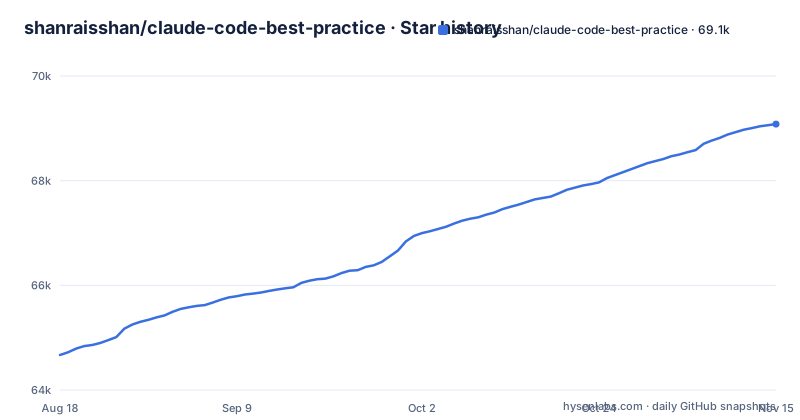
Star history
- shanraisshan/claude-code-best-practice69,081 ★ · +4,413
| Repository | 2026-08-18 | 2026-11-15 |
|---|---|---|
| shanraisshan/claude-code-best-practice | 64.7k | 69.1k |
4,413 Stars in the last 89 days, measured from the daily GitHub snapshot. Compare with other projects
Editorial analysis
Each Claude Code concept is pinned to a path on disk
The core of the repository is a concepts table with three columns: feature, location and description. The location column is where it earns its keep. Subagents go in .claude/agents/<name>.md. Commands go in .claude/commands/<name>.md. Skills go in .claude/skills/<name>/SKILL.md, one folder per skill. Hooks sit under .claude/hooks/. MCP servers are configured in .claude/settings.json or .mcp.json, and general settings and the status line also live in .claude/settings.json. Memory is spread across four places: CLAUDE.md, .claude/rules/, ~/.claude/rules/ for user-wide rules, and ~/.claude/projects/<project>/memory/. Checkpointing is listed as automatic file-edit tracking with no file at all. For someone who has seen these features named in release notes but never found where to put them, this column answers the question faster than reading each documentation page in turn.
best-practice/ holds the advice and implementation/ holds the working version
For subagents, commands and skills, each row links twice: once to a note in best-practice/, such as best-practice/claude-subagents.md, and once to a matching file in implementation/, such as implementation/claude-subagents-implementation.md. The MCP, settings and CLI rows link to best-practice/claude-mcp.md, best-practice/claude-settings.md and best-practice/claude-cli-startup-flags.md. The repository then uses its own configuration as the example: the MCP row points at the root .mcp.json, the settings and status line rows at .claude/settings.json, and the memory row at the root CLAUDE.md. That makes the repository itself a sample project you can open in Claude Code. Around those two folders sit agent-teams/, development-workflows/, orchestration-workflow/, tips/, tutorial/, videos/, presentation/ and reports/, plus a changelog/ directory and a .codex/ folder next to .claude/.
A weather orchestrator command is the worked example for multi-step workflows
The Workflows row does not point to an abstract description. It points to one concrete command file, .claude/commands/weather-orchestrator.md, and to orchestration-workflow/orchestration-workflow.md, which walks through it. The README legend marks agents, commands and skills with separate icons so you can see which of the three building blocks each step of a workflow uses. The choice of a weather task keeps the example small and readable. The consequence is that the example shows wiring, not judgment: it tells you how a command can hand work to agents and skills, but a weather lookup carries none of the risks of a real codebase, such as file edits, permissions or long context. Treat it as a template for structure and expect to write your own guard rails for anything that touches production code.
The Hot table lists flags and slash commands, and the explanation stays on code.claude.com
A second table, labelled Hot, collects newer features by their invocation. Ultrareview appears as /code-review ultra and claude ultrareview [target]. Auto Mode is --permission-mode auto or Shift+Tab. No Flicker Mode is /tui fullscreen or the CLAUDE_CODE_NO_FLICKER=1 environment variable. Fast Mode is /fast or "fastMode": true in settings. Advisor is /advisor, the advisorModel setting or --advisor. Chrome is --chrome plus an extension, and Channels is --channels. Sessions are handled with --resume, --continue, /resume and /branch, and the context window with /compact, /clear and /context. Most of these rows link straight to a code.claude.com page or a post on X rather than to a note in this repository. The consequence is that the table tells you a feature exists and how to call it, but for what it does, its limits and its defaults, you still have to read the linked official page.
Hooks and the status line are in separate repositories
Two rows that look complete in the table point outside the repository for their substance. The Hooks row links to shanraisshan/claude-code-hooks plus the official hooks guide, and the Status Line row links to shanraisshan/claude-code-status-line alongside the local .claude/settings.json. The Ralph Wiggum Loop row links to the plugin in anthropics/claude-code, to ghuntley/how-to-ralph-wiggum, and to shanraisshan/ralph-wiggum-self-evolving-loop. The AI Terms row points to a report in yet another repository, shanraisshan/claude-code-codex-cursor-gemini. If you clone only claude-code-best-practice expecting a full set of hook scripts or a status line implementation, you will not have them. You need to fetch the other repositories, and each one has its own history and maintenance pace that this guide does not control.
No releases means the guide changes under you
The repository has no GitHub releases. Its last push was on November 2, 2026, and it is not archived, so it is current, but there is no tagged snapshot that says this set of advice matched this version of Claude Code. That matters because the Hot table tracks features by exact flag and slash command names, and those names are the part most exposed to change. A team that adopts a convention from here, for example storing project rules in .claude/rules/ or turning on "fastMode": true, cannot point to a release to show what the guidance was when they adopted it. The practical workaround is to record the commit hash you read, and to check the changelog/ directory in the repository when something you copied stops behaving as described.
A personal project with sponsor slots, not Anthropic documentation
The repository is maintained by shanraisshan, its homepage is a personal LinkedIn profile, and the code is MIT licensed. It links three posts on X by Boris Cherny near the top, and it links Anthropic sources throughout, including the official best practices page at code.claude.com/docs/en/best-practices, the anthropics/skills repository for official skills, and the prompt engineering interactive tutorial. The README also carries sponsor placements for disrupt.com and claudekit.cc, with tracking parameters marking the claudekit.cc link as sponsorship. None of this makes the content wrong, but it changes how to read it. Readers searching for best practices from the Anthropic team will find those on the linked code.claude.com pages; this repository is one practitioner's arrangement of them, with commercial links mixed in.
Editorial conclusion
Use claude-code-best-practice if you already run Claude Code and want one page that tells you where subagents, commands, skills, hooks, MCP servers and memory files go, plus a working .claude/ directory to copy from. Skip it if you want a versioned, vendor-reviewed manual: it has no releases, it carries sponsor placements, and several rows only point outward to code.claude.com or to the author's other repositories. Before copying any flag or setting from it, confirm it against the linked official page, and note the commit you took it from.
Frequently asked questions
What are the best practices for using Claude Code, according to claude-code-best-practice?
The claude-code-best-practice repository organizes them by feature: each concept, such as subagents in .claude/agents/<name>.md or memory in CLAUDE.md and .claude/rules/, gets a note in best-practice/ and a working file in implementation/. It also links the official best practices page on code.claude.com.
What is the most effective way to use Claude Code with this repository?
claude-code-best-practice points readers to its How to Use section first, then to the concepts table, which pairs each Claude Code feature with its file location, a best-practice note and an implementation example.
What are the best practices for writing Claude Code skills in claude-code-best-practice?
Skills live in .claude/skills/<name>/SKILL.md. The repository covers them in best-practice/claude-skills.md and implementation/claude-skills-implementation.md, links the official anthropics/skills collection, and has a report on skills for larger mono-repos.
Official sources
Where developers are discussing it
Posts on Hacker News, dev.to and Lobsters that link to this repository, found by our scan of those communities. 1 in the last 30 days; newest first.
- Your CLAUDE.md Is Probably Too Longdev.to · Oct 20, 2026 · 4 points · 1 comments
Add this badge to your README
If you maintain this project, the badge below links readers to this analysis and shows its maintenance status from the daily GitHub snapshot. Paste the markdown into your README; add ?metric=license or ?metric=stars to the image URL for a different field.

[](https://hysenlabs.com/projects/shanraisshan-claude-code-best-practice)Star history chart for your README
[](https://hysenlabs.com/projects/shanraisshan-claude-code-best-practice)Was this useful?