vivid builds LS_COLORS from a filetype database and a separate theme file
A themeable LS_COLORS generator with a rich filetype datebase
At a glance
- What is it?
- sharkdp/vivid is a Rust command line tool that prints a value for the LS_COLORS variable. This look covers the split between database and theme, the 8-bit fallback, the config search paths and the macOS ls problem.
- Who is it for?
- Use vivid if you want ls, fd or tree colors that come from a named theme you can swap with one word, and your terminal handles 24-bit color or you accept 8-bit output. Skip it if your ls is the BSD one and you will not install GNU coreutils, since BSD ls ignores LS_COLORS.
- Can I use it commercially?
- Yes. Apache-2.0 is a permissive licence: you can use, modify and sell software built on it, as long as you keep its copyright and licence notices.
- Is it still maintained?
- Yes. The repository last received commits 1 day ago.
- What is it written in?
- Mainly Rust, according to GitHub's language statistics.
Answers come from the project's GitHub data, last synced on November 7, 2026, and from our analysis. They are not legal advice.
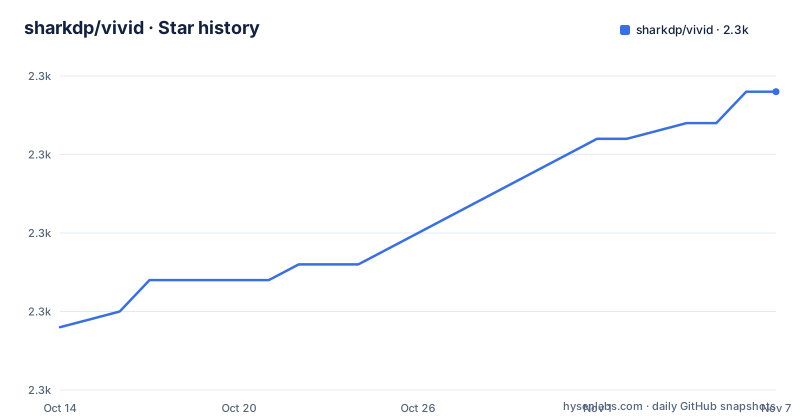
Star history
- sharkdp/vivid2,289 ★ · +15
| Repository | 2026-10-14 | 2026-11-07 |
|---|---|---|
| sharkdp/vivid | 2.3k | 2.3k |
15 Stars in the last 24 days, measured from the daily GitHub snapshot. Compare with other projects
Editorial analysis
The database of file types and the color theme are two different YAML files
vivid writes the LS_COLORS environment variable, the one that decides how ls, tree, fd, bfs, dust and other tools paint file names. Its input is YAML, and it reads two kinds of file: a filetype database at config/filetypes.yml and a set of color themes in the themes folder.
The split is the stated difference from dircolors, where extensions and colors sit in one file. With vivid, a user can change the theme without touching the list of file extensions, and add extensions without redoing a theme. A theme is picked by name on the command line, for example molokai, and the preview in the repository shows snazzy, molokai, ayu and lava.
The repository root also holds a schemas folder, a tests folder and a CHANGELOG.md, so the YAML formats are described by schema files in the source tree.
Colors are written as RRGGBB and converted for you
Themes avoid raw ANSI escape codes. A color is given as an RRGGBB hex value, and vivid translates it into truecolor (24-bit) ANSI codes by default. For older terminals it can emit 8-bit codes instead.
The switch is the --color-mode option, with -m as its short form, and 8-bit is the value to use when the terminal has no 24-bit support. The conversion is interpolation: the 8-bit mode generates interpolated 8-bit colors, so a theme designed in exact hex will land on the nearest palette entries and can look different.
export LS_COLORS="$(vivid -m 8-bit generate molokai)"The ansi theme takes the opposite route. It uses the 16-color ANSI palette of your terminal's own theme, so colors follow the terminal when you switch between light and dark mode. The cost is that you get your terminal's palette and not a fixed look.
export LS_COLORS="$(vivid generate ansi)"Wiring vivid into a shell takes one export line, and Fish needs different syntax
vivid does not change anything by itself. It prints a string, and your shell has to assign it. For Bash and Zsh the line goes into ~/.bashrc or ~/.zshrc:
export LS_COLORS="$(vivid generate molokai)"Fish does not accept that form, so the Fish line uses set:
set -gx LS_COLORS (vivid generate molokai)The command runs on every shell start, so the generate step is part of your startup time. The repository gives no measurement of that cost.
To choose a theme, vivid themes lists the bundled names. A loop in the repository tries every one against GNU ls in the current directory:
for theme in $(vivid themes); do
    echo "Theme: $theme"
    LS_COLORS="$(vivid generate "$theme")" ls --color=always
    echo
done
Custom databases and themes are found through a fixed list of directories
Custom filetypes.yml files are picked up from /usr/share/vivid, $HOME/.config/vivid or $XDG_CONFIG_HOME/vivid on POSIX systems. On Windows the location is %APPDATA%\vivid. Custom color themes go in a themes subfolder of the same directories.
A theme can also live anywhere if you give vivid its path: vivid generate path/to/my_theme.yml. The bundled themes are the suggested starting point for writing your own.
The repository does not state which location wins when the same file exists in more than one of those directories, so keep a single copy to avoid a surprise. The dependency list includes etcetera, which handles the platform config paths, and rust-embed, which bundles the default database and themes into the binary, so the tool works with no files on disk.
BSD ls ignores LS_COLORS, which breaks the default macOS setup
A generated LS_COLORS only works with a program that reads it. The BSD version of ls does not, and that is the version macOS ships. The macOS section installs vivid with brew install vivid, then adds a workaround: install GNU coreutils and alias ls to its g-prefixed binary.
brew install coreutils
alias ls="gls --color"
Anyone who runs vivid on a Mac and sees no change in plain ls has hit this. The theme was generated correctly and nothing consumed it. The alternatives listed in the tool's own scope, such as fd, tree and dust, are a separate matter, since vivid only produces the variable and each program decides whether to read it.
Install options differ by platform, and the Debian example points at an old release
The package routes in the repository are: dpkg -i on a downloaded .deb for Debian-based systems, pacman -S vivid on Arch Linux, emerge vivid from the GURU overlay on Gentoo, pkg install vivid on FreeBSD, and brew install vivid on macOS. Other distributions get binary builds from the releases page.
The Debian example is where to be careful. It downloads vivid_0.10.1_amd64.deb from the v0.10.1 release, while the newest releases are v0.11.0 and v0.11.1, published on 2026-04-08 and 2026-04-09. Copying the example as written installs an older version than the one you can get.
wget "https://github.com/sharkdp/vivid/releases/download/v0.10.1/vivid_0.10.1_amd64.deb"
sudo dpkg -i vivid_0.10.1_amd64.deb
Building from source needs Rust 1.88.0 or higher, matching the rust-version field in Cargo.toml, and the command is:
cargo install vividThe repository also has a Dockerfile that builds a release binary and runs it as user 1001 in a distroless image.
Its scope stops at the variable, and the project points to other LS_COLORS tools
vivid does not edit your terminal theme, does not configure ls flags and does not ship its own ls. It outputs one string. If a program does not read LS_COLORS, vivid cannot color it.
The repository lists related projects for comparison: dirchromatic, the trapd00r LS_COLORS collection, a web generator at geoff.greer.fm/lscolors, and fixed dircolors themes for solarized, zenburn, nord, jellybeans and moonshine. Those are static files, and the difference from vivid is that vivid generates the value from a theme and database you can edit.
On upkeep, the repository is not archived and was last pushed to on 2026-10-19. The latest tagged version is v0.11.1 from 2026-04-09, which followed a v0.11.1-pre release whose title says it fixed a build that reported the wrong version id. The license is Apache-2.0 in the repository metadata, while the README offers Apache or MIT at your option, so check LICENSE-APACHE and LICENSE-MIT if the exact terms matter to you.
Editorial conclusion
Use vivid if you want ls, fd or tree colors that come from a named theme you can swap with one word, and your terminal handles 24-bit color or you accept 8-bit output. Skip it if your ls is the BSD one and you will not install GNU coreutils, since BSD ls ignores LS_COLORS. Before relying on the Debian instructions, replace the v0.10.1 file name in the example with the current release, because the latest tag is v0.11.1.
Frequently asked questions
How do I use vivid?
Pick a theme such as molokai and add export LS_COLORS="$(vivid generate molokai)" to ~/.bashrc or ~/.zshrc. Fish users run set -gx LS_COLORS (vivid generate molokai) instead.
Does vivid work on terminals without true color?
Yes. Run it with the --color-mode 8-bit option, or -m 8-bit, and it generates interpolated 8-bit colors in place of 24-bit codes.
Why does vivid change nothing on macOS?
The BSD version of ls does not use LS_COLORS. Install GNU coreutils with brew install coreutils and use gls with the --color flag.
Official sources
Add this badge to your README
If you maintain this project, the badge below links readers to this analysis and shows its maintenance status from the daily GitHub snapshot. Paste the markdown into your README; add ?metric=license or ?metric=stars to the image URL for a different field.

[](https://hysenlabs.com/projects/sharkdp-vivid)Star history chart for your README
[](https://hysenlabs.com/projects/sharkdp-vivid)Was this useful?