hlchunk.nvim: chunk and indent highlighting without the stutter
This is the lua implementation of nvim-hlchunk, you can use this neovim plugin to highlight your indent line and the current chunk (context) your cursor stayed
At a glance
- What is it?
- hlchunk.nvim is a Lua rewrite of nvim-hlchunk that highlights the indent line and the code chunk your cursor sits in, split into four independently configurable mods. The author measured an average render time of 0.7ms and got there with asynchronous rendering, cached extmarks and throttled batches, and the README is unusually specific about the costs of all of that.
- Who is it for?
- hlchunk.nvim fits a Neovim user who wants to see the enclosing block of code at a glance, who is bothered by the stutter of indent rendering in plugins like indent-blankline, and who is willing to set the indent width for files that do not declare one.
- Can I use it commercially?
- Yes. MIT is a permissive licence: you can use, modify and sell software built on it, as long as you keep its copyright and licence notices.
- Is it still maintained?
- Yes. The repository last received commits 94 days ago.
- What is it written in?
- Mainly Lua, according to GitHub's language statistics.
Answers come from the project's GitHub data, last synced on November 7, 2026, and from our analysis. They are not legal advice.
Star history
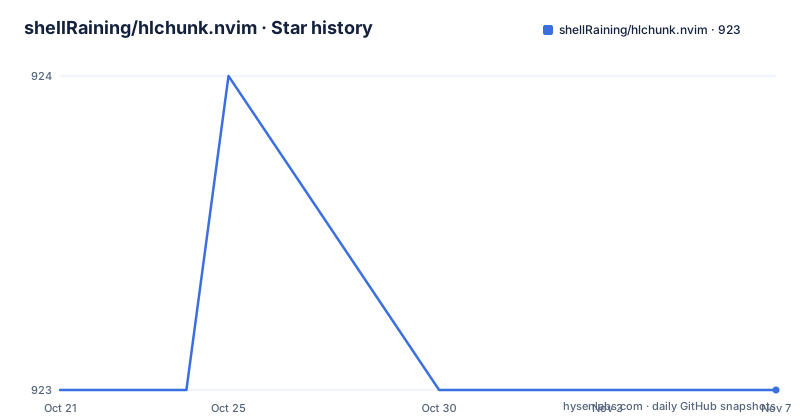
- shellRaining/hlchunk.nvim923 ★ · +0
| Repository | 2026-10-21 | 2026-11-07 |
|---|---|---|
| shellRaining/hlchunk.nvim | 923 | 923 |
0 Stars in the last 17 days, measured from the daily GitHub snapshot. Compare with other projects
Editorial analysis
Four mods that can be switched on separately
hlchunk.nvim is the Lua implementation of nvim-hlchunk, and the README positions it next to indent-blankline as a plugin that can highlight the indent line and highlight the code chunk according to the current cursor position. What the cursor is inside is the more interesting of the two: the enclosing function or block gets a visible region, so you can see the extent of the code you are in without scrolling. The plugin is not one feature but four mods, chunk, indent, line_num and blank, each with its own documentation page under docs/en and its own style options. Because they are separate, you can run only the chunk highlight and leave the rest off, which matters when the other mods are not what you want to look at. Requiring a single mod directly is supported, and the README is explicit that you must call the enable method yourself when you do it that way, since the plugin does not enable anything on a plain require.
The rendering budget is measured and published
The performance section is the most detailed part of the README. Using profile.nvim for the analysis, all experiments were run on macOS with alacritty, with a Neovim window height of 66 lines, on a file called typescript.js, from the first line to the five hundredth. The reported figure is an average rendering time of 0.7ms per render. The author's framing is that the plugin is aimed at people who want to reduce sudden stuttering when scrolling the window, and the measurement conditions are stated precisely enough that you can judge whether your setup resembles the one they used. That precision is unusual in a plugin README and it is worth noticing, because most of the alternatives simply say they are fast. The detailed optimisation write-up lives in the author's blog, written in Chinese, at a profile page under their own site.
Four things that get the render time down
The README lists the optimisation work as four items. Rendering is asynchronous, which reduces stuttering by moving work off the path that must finish before a frame is shown. Some function calls are made through C functions, to cut the cost of the calls themselves. Extmarks are cached for each line as much as possible, which avoids recalculating indentation for lines that have already been measured. And throttle functions batch the rendering process as much as possible, so a burst of updates becomes one pass rather than many. Each of these trades something for something else, and the trade-offs are different. Caching extmarks means a line whose content changes may need invalidation, which is why the cache is described as applying as much as possible. Throttling means some updates are deliberately delayed, so a chunk highlight can lag a keystroke by a small amount. Asynchronous rendering moves latency around rather than removing work. The result is a plugin that does considerably more per frame than a plain indent guide and still fits the frame budget, provided your files set their indent width.
Priority decides which mod is drawn on top
The common configuration is a small set of options that apply to every mod. The README shows the defaults:
local default_conf = {
    enable = false,
    style = {},
    notify = false,
    priority = 0,
    exclude_filetypes = {
        aerial = true,
        dashboard = true,
        -- some other filetypes
    }
}
Each mod starts disabled, style holds per-mod style options, notify controls whether a mod shows notification messages through the notify function, exclude_filetypes lists file types where a mod is not enabled, and priority controls rendering priority with the higher value drawn on top. The default ordering is chunk over indent over blank over line_num, which is a sensible precedence because the chunk region is the most informative signal and the indent line is the least. Setting up the whole plugin goes through the setup function with a table of mod names, each holding its own enable flag, and each mod also has its own documentation page describing its style options in detail.
shiftwidth is the accuracy trap
The notice section is short and matters more than it looks. Because the plugin uses the shiftwidth function to get the indent width, files that do not set the indent width manually may produce inaccurate results, and the fix is to set it yourself, for example with vim.bo.shiftwidth. If setting it by hand is tedious, the README points at two plugins that guess the indent automatically, guess-indent.nvim and indent-o-matic. This is the real limitation of the plugin, and it is a design consequence rather than a bug: an indent-aware chunk highlighter has to know how wide one level of indentation is, and Neovim does not know it for files that have never been edited with an indent setting. A file with mixed or absent indentation will produce chunk boundaries in the wrong place, and the result looks like a rendering bug rather than a missing setting. There is also a runtime escape hatch: the DisableHLxxxx command disables a mod by name, for example DisableHLchunk, and EnableHLxxxx turns it back on, which the README recommends when performance rather than appearance is the problem. Mods left disabled do not create a user command at all.
Installing it and running the project checks
The plugin needs Neovim 0.10.0 or newer. With lazy.nvim the install is a single spec, and the event list means the plugin loads on buffer read rather than at startup:
{
  "shellRaining/hlchunk.nvim",
  event = { "BufReadPre", "BufNewFile" },
  config = function()
    require("hlchunk").setup({})
  end
},
If you want to work on the plugin, the repository ships a lightweight pre-commit hook that runs selene and stylua --check on staged Lua files, and the README asks you to enable it once per clone:
git config core.hooksPath .githooksBefore opening a pull request the local commands are:
make selene && make stylua && make testThe Makefile drives the tests through plenary.nvim, cloned at a pinned commit into a vendor directory under .ci, and the same file pins the neodev.nvim commit, so the CI cache keys off those pinned revisions. The repository also carries AGENTS.md with the project map and ARCHITECTURE.md describing the module layout, plus a selene configuration, a stylua configuration and a neovim.yml.
Editorial conclusion
hlchunk.nvim fits a Neovim user who wants to see the enclosing block of code at a glance, who is bothered by the stutter of indent rendering in plugins like indent-blankline, and who is willing to set the indent width for files that do not declare one. It does not fit a setup where shiftwidth is unknown or unset, because the plugin reads that value and will misjudge indentation, and it does not fit a project that needs a release cadence to judge freshness, because the newest tagged release is v1.3.0 from 2024-07-13 even though the last push was on 2026-08-06. Verify first that your file types set shiftwidth, then compare the chunk and indent mods against indent-blankline on your own editing workload. The licence field on the repository says MIT, and the plugin requires Neovim 0.10.0 or newer.
Frequently asked questions
What does hlchunk.nvim do?
It is the Lua implementation of nvim-hlchunk. It highlights the indent line and highlights the code chunk the cursor is currently in, and it is described as similar to indent-blankline for the indent part.
Which Neovim version does hlchunk.nvim require?
Neovim 0.10.0 or newer, according to the requirements section of the README.
How do I install hlchunk.nvim with lazy.nvim?
Add the plugin spec with the event list set to BufReadPre and BufNewFile, and call require("hlchunk").setup({}) in the config function. The setup call itself does not enable any mod, since each mod starts disabled and has to be turned on in the configuration table.
Why does the chunk highlight look wrong in some files?
The plugin uses the shiftwidth function to get the indent width, so files that do not set the indent width manually can produce inaccurate results. You can set vim.bo.shiftwidth yourself, or use guess-indent.nvim or indent-o-matic to guess it automatically.
What rendering time does hlchunk.nvim report?
The README reports an average rendering time of 0.7ms per render, measured with profile.nvim on macOS with alacritty, a Neovim window height of 66 lines, on typescript.js from the first to the five hundredth line.
Official sources
Add this badge to your README
If you maintain this project, the badge below links readers to this analysis and shows its maintenance status from the daily GitHub snapshot. Paste the markdown into your README; add ?metric=license or ?metric=stars to the image URL for a different field.

[](https://hysenlabs.com/projects/shellraining-hlchunk-nvim)Star history chart for your README
[](https://hysenlabs.com/projects/shellraining-hlchunk-nvim)Was this useful?