personal-homepage-skill: a reference-first skill that ships a Gallery and a portable Hero page
An AI skill for generating high-quality personal homepages and HTML slide decks: reference-first approach, 19 templates, hero-video homepages, portable HTML, and quality checks.
At a glance
- What is it?
- shengjidaguai-china/personal-homepage-skill is a JavaScript AI Skill plus template gallery for Claude Code and similar coding agents, covering two modes, personal homepages and 16:9 HTML decks, with a layered npm check chain and an offline shareable Hero build.
- Who is it for?
- Adopt this skill if you already know what your homepage should say and you want the reference you supplied to survive the generation, since reference-first ordering and the DESIGN_REVIEW acceptance list are the parts with actual rules behind them. Skip it if you want a finished site handed to you, because eighteen of the nineteen template entries are style previews rather than complete pages, and the one complete Hero template still needs your own content dropped in.
- Can I use it commercially?
- Check first. The repository uses a licence we do not classify automatically, so read its LICENSE file before any commercial use.
- Is it still maintained?
- Yes. The repository last received commits 59 days ago.
- What is it written in?
- Mainly JavaScript, according to GitHub's language statistics.
Answers come from the project's GitHub data, last synced on November 15, 2026, and from our analysis. They are not legal advice.
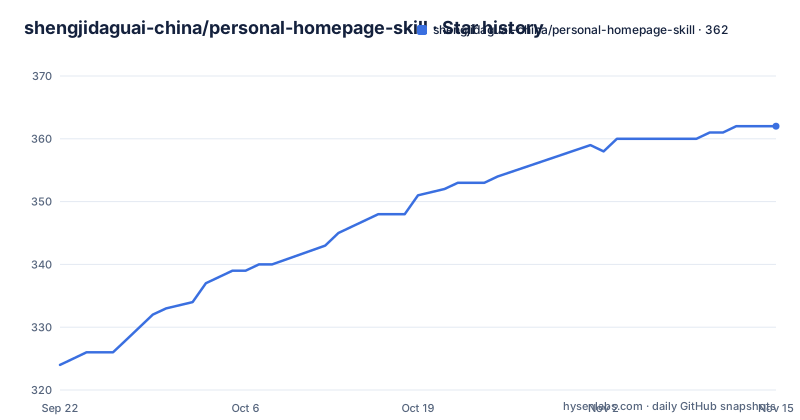
Star history
- shengjidaguai-china/personal-homepage-skill362 ★ · +38
| Repository | 2026-09-22 | 2026-11-15 |
|---|---|---|
| shengjidaguai-china/personal-homepage-skill | 324 | 362 |
38 Stars in the last 54 days, measured from the daily GitHub snapshot. Compare with other projects
Editorial analysis
Eighteen style previews are not eighteen finished sites
The Gallery lists eighteen template names, from Cinematic Scroll Personal Brand and Terminal Hacker Homepage to Art Museum Portfolio and Spatial Project Gallery, and the repository description counts nineteen templates. The difference is stated plainly: eighteen style previews do not equal eighteen complete websites or presentations. Only one entry, the Hero template, ships as a full built site.
That gap decides how you use this repository. `references/template-selection.md` is the maintainable index that maps each name to a Chinese search term, an actual preview and the implementation file, so you can move from a name to something real. The selection rule is equally direct. When you name a template, the agent follows it. When nobody names one, it chooses by person, scene and assets.
During actual generation the agent is told to prioritise the reference you supplied and reach for a template only when the direction is unclear or you pick one by name. So the Gallery is a fallback and a preview surface, not a catalogue of finished pages you can install unchanged. Note also that the four highlighted demos, an NFT space landing, a figurine carousel, a cinematic scroll brand page and the Hero neural page, are described as selected representative outputs, which is a different claim from being the complete template set.
Two modes share one editing and export path
`SKILL.md` is only a router. It recognises the task and loads the rest on demand, which is how two very different deliverables live in one repository. Homepage work goes to `HOMEPAGE_GENERATION_WORKFLOW.md` for continuous scrolling pages, responsive layout, work display and scroll interaction, and is judged against the acceptance list in `DESIGN_REVIEW.md`. HTML PPT work goes to `PRESENTATION_WORKFLOW.md` and `PPT_VISUAL_QA.md` for a fixed 16:9 frame, page by page playback, per page focus and a complete speaker script, with a standalone presenter mode documented in `references/presenter-mode.md`.
The two branches rejoin at `references/html-editing-export.md`, which is maintained as shared code and carries two base HTML templates that can be opened, edited, saved and exported again directly. Putting the export logic in one shared file is the design decision that lets a single install serve both a portfolio site and a conference talk.
The deck branch also carries content rules that only bite when someone is presenting live. Build a few representative pages with real content first and look at the actual rendering before extending to the whole deck. Keep words on the page sparse while the script stays complete. If you ask for the original text to be preserved, save the script in its original language and order, and if you explicitly ask for the full text on screen, follow that instead. One instruction here is unusual enough to repeat: do not add steps that wait for the user to confirm.
The Hero portable build is the one file you can send to a stranger
One template breaks out of the site generation flow and becomes a deliverable you can hand to another person. The Hero template embeds its original video plus a static end screen photo. You supply a name, an introduction, projects or a video and the matching content is replaced; anything you leave out keeps the template asset, which is why an unedited Hero page still has a finished ending rather than an empty player.
The build produces a directory that opens without a server:
npm run build:hero-portableThe result lands in `templates/hero/portable/`, where `index.html` opens on a double click with no build step and no local server. Sharing it means sending the whole `portable` folder or a ZIP of it, because the page depends on the assets sitting beside it. That constraint is the point of the feature. The recipient opens a file rather than cloning a repository and installing a toolchain to see anything, which is a different delivery model from everything else the project does.
npm run check never reaches check:visual or any browser test
The check scripts are layered, and reading the layering is the difference between a green run that means something and one that does not.
npm run checkThat expands to `check:spec`, then `check:templates`, then `build`, and `build` is `tsc -b && vite build`. So a passing `check` tells you the document references resolve, the template index stays consistent, and the TypeScript project compiles. It does not run `check:visual`, and it runs none of the tests.
The wider target is `check:all`, which adds `check:visual` and then chains six test suites: `test:homepage-qa-rules`, `test:ppt-qa`, `test:homepage-regression`, `test:hero-template`, `test:hero-portable` and `test:html-runtime`. Each is a plain `node` invocation of a file under `tests/`, and playwright sits in the dev dependencies, so the browser facing parts of that chain need a browser binary present. Two further scripts belong to neither chain and have to be called on their own: `verify:ppt-stage` for checking a deck stage and `capture:ppt` for capturing slides. If you are evaluating this project, `check:all` is the command that exercises what the README claims.
Seven complaints the design review is built to catch
The reason the project exists is written as a list of complaints about generated personal pages, and each complaint maps onto a rule file rather than a vague instruction. Hero copy so vague you cannot tell who the person is. Purple gradients and random glowing spheres everywhere. A skills section that is nothing but a wall of logos. Project cards that never state the problem, the role, the function or the result. Invented metrics and invented testimonials. A visual reference you supplied and the agent ignored. A page with no unified visual system and no content hierarchy.
The prescribed order of operations answers that list: understand the person and the content goal first, then follow the reference, then organise the information architecture, and only then run the visual and content quality check. Reference comes before template, which is the reverse of how most generators behave, and it is why `IMAGE_WORKFLOW.md`, `MOTION_PATTERNS.md` and `HOMEPAGE_SECTIONS.md` exist as separate files rather than as one style guide. `DATA_SCHEMA.md` defines the page data structure those section rules fill in.
The fabricated metrics complaint is the one worth taking seriously as a user. Any skill that writes your own testimonials and performance numbers for you is a liability on a job page, and naming that failure mode up front is a better position than a template gallery that quietly invents them.
package.json is private, so the skill arrives as a folder copy
There is no package to install from a registry. `package.json` sets `private` to true and the version to 0.4.0, so the supported route is the one in the quick start: put the folder in a compatible skills directory, for example `.claude/skills/personal-homepage-skill/`, then let the agent generate or optimise a homepage, portfolio page or HTML presentation. Nothing in the repository publishes to npm.
The JavaScript toolchain exists to serve the Gallery rather than the skill itself.
npm install
npm run dev
That starts a Vite app under `src/`, built with React 18, Tailwind 3, TypeScript, `framer-motion` for animation and `lenis` for smooth scrolling, with `lucide-react` for icons. The manifest requires Node 22 or newer through its `engines` field. Two demos need none of that tooling: `demo/template-gallery.html` and `demo/personal-homepage-skill-overview.html`, the latter a self contained HTML deck explaining the workflow and quality rules. So there are two ways to see the output. A static file opens in a browser immediately, while the interactive Gallery that shows full preview components only renders under `npm run dev`.
The asset rules name three sites the skill refuses to copy
The copyright section is unusually specific, because a template gallery is exactly the kind of repository that ends up redistributing other people's design work. The rules forbid copying paid templates, proprietary code, private screenshots and any asset whose licence is unclear, and then they name three sources outright. MotionSites is off limits for paid templates, code, copy, prompts, images and exact template structure. Google Arts & Culture is off limits for images, artworks, text, collection data and exact page structure. passer-by.com is off limits for source, avatars, logos, copy and project data.
Reusing open source code is allowed on two conditions from the same list: check the licence, and keep the attribution. The principle behind all of it is that the skill learns public design patterns and references you authorise, and that learning a pattern does not grant permission to copy an asset. `REFERENCE_PRODUCTS.md` holds the longer explanation.
Licensing of the repository itself is thinner than those rules. A `LICENSE` file exists and the README ends by pointing at it for usage terms, but no licence is named in that text and no recognisable licence identifier appears anywhere else in the repository. Anyone planning to build on these templates has to read that file before shipping anything.
V3 automation stops short of screenshots and reduced motion
The roadmap is arranged as three versions and it is candid about where the work sits today. V1 was the documentation layer: the skill entry point, the visual template library, motion patterns, section rules, component patterns, the data schema, the design checklist, usage examples, a demo deck and the Gallery with preview images. V2 added the runnable parts, a React and Tailwind example, a single file HTML example, a 16:9 presentation example and the interactive Gallery. V3 is automated verification, and its three named items are a template registry check, a skill document structure check and a static visual rule check.
The same section admits what is not covered yet. Screenshot verification, mobile checks and reduced motion checks are listed as later additions. Read against the current script list, that means the visual check that runs today is a static rule check over source rather than a rendered comparison, so a page can satisfy it while still being wrong on a phone or unreadable for a reader who has asked the system to reduce motion. With `lenis` and `framer-motion` driving scroll and animation behaviour, that gap is not cosmetic.
The repository is not archived and its last push was on 2026-09-17, with no GitHub releases, so the 0.4.0 in `package.json` is the only version marker available.
Editorial conclusion
Adopt this skill if you already know what your homepage should say and you want the reference you supplied to survive the generation, since reference-first ordering and the DESIGN_REVIEW acceptance list are the parts with actual rules behind them. Skip it if you want a finished site handed to you, because eighteen of the nineteen template entries are style previews rather than complete pages, and the one complete Hero template still needs your own content dropped in. Before you commit, read the LICENSE file yourself, since the README names no licence and nothing else in the repository identifies one, then confirm your Node version is 22 or newer and run check:all rather than check if you care about the visual rules, since the shorter chain skips check:visual and every browser test.
Frequently asked questions
What does personal-homepage-skill actually produce?
Two things: personal homepages, portfolio sites, resume pages, creator pages and personal project pages, plus 16:9 HTML presentations that play page by page in a browser. Both share one editing and export reference, and the deck mode also supports a standalone presenter mode.
How many templates does personal-homepage-skill contain?
The Gallery lists eighteen style previews, and the repository description counts nineteen templates. The documentation explains the difference: eighteen style previews do not equal eighteen complete websites or presentations, because only the Hero template ships as a full built site.
How do I install personal-homepage-skill?
Copy the folder into a compatible skills directory such as .claude/skills/personal-homepage-skill/ and then let the agent work. There is no registry install, because the manifest sets private to true. Node 22 or newer is required for the Gallery toolchain.
What does npm run check verify in personal-homepage-skill?
It runs check:spec, then check:templates, then the build, which is tsc -b followed by vite build. It does not run check:visual and it runs none of the tests. The command that adds the visual rule check and six test suites is check:all.
Can a personal-homepage-skill Hero page be opened without installing anything?
Yes. Running npm run build:hero-portable writes a result into templates/hero/portable/, where index.html opens on a double click. Sharing it means sending the whole portable folder or a ZIP, because the page relies on the assets next to it.
Official sources
Add this badge to your README
If you maintain this project, the badge below links readers to this analysis and shows its maintenance status from the daily GitHub snapshot. Paste the markdown into your README; add ?metric=license or ?metric=stars to the image URL for a different field.

[](https://hysenlabs.com/projects/shengjidaguai-china-personal-homepage-skill)Star history chart for your README
[](https://hysenlabs.com/projects/shengjidaguai-china-personal-homepage-skill)Was this useful?