Opinionated, suppressively named, and configurable down to attribute order
An opinionated Blade file formatter for VSCode
At a glance
- What is it?
- The Blade formatter for VS Code advertises five behaviors for Blade markup and about a dozen settings you can argue with, and several of those settings are named after what they suppress rather than what they turn on. Its real escape hatch is not a setting, it is the standalone formatter the extension depends on.
- Who is it for?
- Install this extension if your team already agrees with it, because four of its behaviors are on by default: PSR-2 formatting inside directives, spacing around template markers, markup indentation, and PHP 8 syntax handling, with Tailwind class sorting as an opt-in. Skip it, or fence it to one workspace, if your house style disagrees, since the settings that would resolve the argument are mostly defaults you must change project by project.
- Can I use it commercially?
- Yes. MIT is a permissive licence: you can use, modify and sell software built on it, as long as you keep its copyright and licence notices.
- Is it still maintained?
- Yes. The repository last received commits 8 days ago.
- What is it written in?
- Mainly TypeScript, according to GitHub's language statistics.
Answers come from the project's GitHub data, last synced on November 7, 2026, and from our analysis. They are not legal advice.
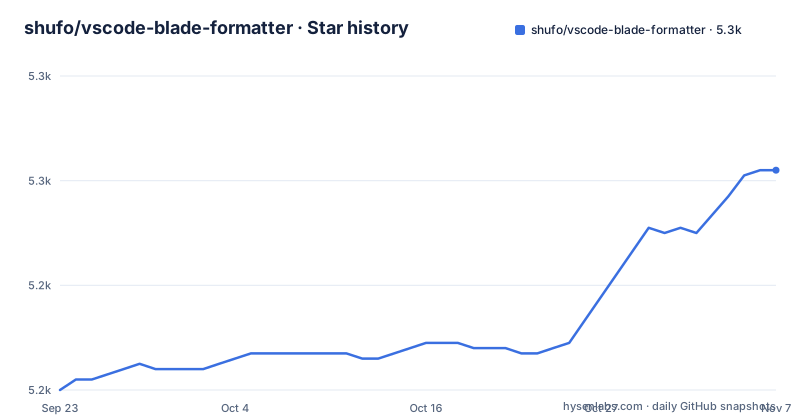
Star history
- shufo/vscode-blade-formatter5,262 ★ · +42
| Repository | 2026-09-23 | 2026-11-07 |
|---|---|---|
| shufo/vscode-blade-formatter | 5.2k | 5.3k |
42 Stars in the last 45 days, measured from the daily GitHub snapshot. Compare with other projects
Editorial analysis
Five behaviors are on before you touch a setting
The extension's own description calls it opinionated, and the feature list is where that word earns its place. It indents markup inside directives, adds spacing to Blade template markers, formats inside directives following PSR-2, handles PHP 8 syntax including the null safe operator and named arguments, and sorts Tailwind CSS classes with respect to your `tailwind.config.js`. Apart from Tailwind class sorting, none of these wait for configuration.
That last one is the interesting commitment. Sorting classes means the formatter has to read a JavaScript config file to know what order is correct, so behavior that looks like text formatting depends on a file outside the extension. The setting that turns it on, `Blade Formatter: format Sort Tailwind Css Classes`, defaults to `false`, which means the feature is advertised and yet off until you opt in.
The other half of the project is worth naming. This extension relies on a separate formatter, the `blade-formatter` project, and you can format programmatically with the same syntax through it. So the rules you are arguing with live in a library, not in the editor layer, and any of them can be bypassed by calling the library from a script.
The settings are named after what they suppress, not what they do
Defaults first, because they are where most surprises come from. Indent size is 4, wrap line length is 120, wrap attributes is `auto`, minimum attributes for the force wrap options is 2, tabs are off, sorting HTML attributes is `none`, indenting inner HTML is off, collapsing multiple blank lines is off, and the PHP syntax check is on. In the extension manifest those become keys under `bladeFormatter.format`:
"bladeFormatter.format.enabled": {
  "type": "boolean",
  "default": true,
  "markdownDescription": "Whether it enables format"
},
"bladeFormatter.format.indentSize": {
  "type": "integer",
  "default": 4,
  "markdownDescription": "Indent size
Now the naming. Three settings are phrased as prohibitions, so the boolean means the opposite of what the words suggest. `Blade Formatter: format No Single Quote` set to true makes the formatter use double quotes for PHP expressions. `Blade Formatter: format No Trailing Comma Php` set to true stops it printing trailing commas. `Blade Formatter: format No PHP Syntax Check` set to true suppresses syntax error reporting entirely, which is the one to think hardest about: it turns off the signal that tells you a file will not parse.
Wrap Attributes has seven modes and one of them only wraps the first attribute
Attribute wrapping is the setting with the widest blast radius, because it decides whether a diff touches every tag in a file. The documented values are `auto`, `force`, `force-aligned`, `force-expand-multiline`, `aligned-multiple`, `preserve`, and `preserve-aligned`, with `auto` as the default. Two of those are alignment modes, two are preservation modes that leave existing layout alone, and one behaves differently from its name.
The exception is `force-expand-multiline`, and the table says so in a sentence worth reading twice: the minimum attributes setting governs the force wrap options, and the first attribute is wrapped only if `force-expand-multiline` is specified. So the same minimum that governs the force wrap options also decides whether the first attribute wraps under `force-expand-multiline`, which is the kind of detail that produces a reformat nobody can explain in review.
Pair it with `Blade Formatter: format Indent Inner Html`, off by default, which indents `<head>` and `<body>` sections in HTML. Turn both on at once and every template's outer HTML reflows. That is a two line change in settings and a large commit in a codebase with history.
Attribute sorting documents five orders and needs a sixth to work
`Blade Formatter: format Sort HTML Attributes` takes `none`, `alphabetical`, `code-guide`, `idiomatic`, or `vuejs`, and `none` is the default. Each of the named orders points at somebody else's rulebook: codeguide.co for the code guide order, the idiomatic-html attribute order, and the Vue JS ESLint attributes-order rule.
The inconsistency worth knowing about is in the custom path. There is a separate setting, `Blade Formatter: format Custom Html Attributes Order`, that takes a comma separated list and allows regular expressions, with the example `id, data-.+, class, name`. Its own description says you must set the sort option to `custom` for it to apply, and `custom` is not one of the five values the table lists. If you go looking for a sixth option in the settings UI and do not see it, that is why.
The regex support is the part with real leverage. `data-.+` places every data attribute in a fixed position rather than alphabetically, which is the only way to keep attribute order stable once a template grows.
Project settings can live in a file the editor validates as you type
Two filenames are recognized as configuration, and both are wired to a JSON schema shipped inside the extension:
"jsonValidation": [
  {
    "fileMatch": ".bladeformatterrc.json",
    "url": "./schemas/bladeformatterrc.schema.json"
  },
  {
    "fileMatch": ".bladeformatterrc",
    "url": "./schemas/bladeformatterrc.schema.json"
  }
]
That is worth more than it first appears. A checked-in `.bladeformatterrc` validated against a bundled schema means a bad key name is flagged while you type it, and it means the whole team's formatting lives in version control instead of in personal settings. The cost is that the schema and the settings table are two separate sources of truth.
The manifest also registers the language side. A language with id `blade`, aliases `Blade` and `blade`, and the extension `.blade.php` is contributed, along with a json language binding for the `.bladeformatterrc` filename. Exactly one command is contributed, `vscode-blade-formatter.format`, titled `Blade: Format Document`, and the extension is listed under the `Formatters` category. If your workflow depends on format on save, that comes from the editor's own settings for a registered formatter rather than from a command here, so check it against your own configuration rather than assuming.
The engine floor is old, and the build is webpack, jest, and biome
The manifest declares what it needs to run:
"engines": {
  "vscode": "^1.57.0",
  "node": ">= 10.0.0"
}
A VS Code floor of 1.57 and a Node floor of 10 are conservative numbers for an extension whose bundle is produced by `esbuild.mjs`, tested with `jest.config.ts`, and linted with `biome.json` alongside both `tsconfig.json` and `jsconfig.json`. The bundle entry point is `./dist/extension.js`. Read those together and the pattern is familiar: a wide declared floor keeps the extension installable on older editors, and the build toolchain is free to be current.
Dependencies come from `package-lock.json`, releases are automated with `release-please-config.json` and `.release-please-manifest.json`, and `CHANGELOG.md` sits at the root. Publishing is narrowed by `.vscodeignore`, and `CONTRIBUTING.md` is the other file worth reading before a pull request.
The version line is the part to watch. The three most recent releases are 0.26.2 on 2025-08-11, 0.26.3 on 2026-03-25, and 0.26.4 on 2026-10-25, and the package is `0.26.4`. No 1.0 has shipped, so pin the version and read the changelog before upgrading.
Instrumentation comes from an environment variable, not a committed key
The repository ships an environment sample with a single entry:
APP_INSIGHT_INSTRUMENT_KEY=exampleThe value is a placeholder. For an extension distributed through a marketplace, that is the seam where usage measurement lives, and it is also the file to look at if you fork this extension and need to know whether anything is being sent anywhere.
Two smaller pieces round out the packaging. `sponsor.config.ts` and `sponsorkit/` are the sponsorship tooling, `icon.png` is the marketplace icon, and `screencast.gif` is what the README's screencast section shows, whose README heading has no text under it. And the extension has a sibling project by the same author, `blade-formatter`, which the README points to for programmatic formatting with the same syntax.
That sibling is the answer to a disagreement with the opinions. If the defaults do not match your house style and the settings are too blunt, the formatter itself is a separate dependency you can call from a script and run in CI.
Editorial conclusion
Install this extension if your team already agrees with it, because four of its behaviors are on by default: PSR-2 formatting inside directives, spacing around template markers, markup indentation, and PHP 8 syntax handling, with Tailwind class sorting as an opt-in. Skip it, or fence it to one workspace, if your house style disagrees, since the settings that would resolve the argument are mostly defaults you must change project by project. Before you commit a repo to it, verify two things: run the one command it contributes, `Blade: Format Document`, across your existing templates to see the real diff volume, and decide now whether `Blade Formatter: format No PHP Syntax Check` should stay off, because enabling it suppresses syntax error reporting.
Frequently asked questions
What is the Blade Formatter extension for VS Code?
It is an opinionated formatter for Laravel Blade templates, published by shufo as `shufo.vscode-blade-formatter` and registered for the `.blade.php` extension under the language id `blade`. It contributes a single command, `Blade: Format Document`, and its rules come from the separate `blade-formatter` project it relies on.
How do I change the indent size and line wrap in the Blade Formatter?
The settings are `Blade Formatter: format Indent Size`, which defaults to 4, and `Blade Formatter: format Wrap Line Length`, which defaults to 120. The first is declared in the manifest as `bladeFormatter.format.indentSize`, an integer with default 4, and tabs are used only if `Blade Formatter: format use Tabs` is enabled.
Can I sort HTML attributes the way I want in Blade Formatter?
Yes, with a caveat. `Blade Formatter: format Sort HTML Attributes` offers `none`, `alphabetical`, `code-guide`, `idiomatic`, and `vuejs`, while `Blade Formatter: format Custom Html Attributes Order` takes a comma separated list that supports regular expressions, such as `id, data-.+, class, name`. Its description says the sort option must be set to `custom`, a value the settings table does not list.
Does the Blade Formatter check that my PHP is valid?
There is a PHP syntax check on by default, and `Blade Formatter: format No PHP Syntax Check` disables it. Enabling that setting suppresses syntax error reporting.
Can the Blade formatter be used outside VS Code?
Yes. The extension relies on the separate `blade-formatter` project, and the README points to it for formatting programmatically with the same syntax. That library is also the way to run the same formatting in a script or in CI.
How do I sort Tailwind CSS classes in Blade templates?
Enable `Blade Formatter: format Sort Tailwind Css Classes`, which defaults to `false`. When it is on, the formatter sorts classes with respect to your `tailwind.config.js`.
Official sources
Add this badge to your README
If you maintain this project, the badge below links readers to this analysis and shows its maintenance status from the daily GitHub snapshot. Paste the markdown into your README; add ?metric=license or ?metric=stars to the image URL for a different field.

[](https://hysenlabs.com/projects/shufo-vscode-blade-formatter)Star history chart for your README
[](https://hysenlabs.com/projects/shufo-vscode-blade-formatter)Was this useful?