AI Manus starts five containers, mounts the Docker socket, and hands browser control to the agent
AI Manus is a general-purpose AI Agent system that supports running various tools and operations in a sandbox environment.
At a glance
- What is it?
- A general purpose agent system that runs each task in its own Ubuntu container, created at runtime through the host Docker socket, with browser sessions exposed to the web UI over VNC turned into a websocket. The page claims a minimal deployment needs nothing but an LLM service, while the compose file it ships with starts MongoDB and Redis.
- Who is it for?
- AI Manus suits someone who wants to see and interrupt an agent mid task rather than receive a final answer, because the browser, the shell and the files all live in a container the UI can watch and take over. Two things to settle before deploying it.
- Can I use it commercially?
- Yes. MIT is a permissive licence: you can use, modify and sell software built on it, as long as you keep its copyright and licence notices.
- Is it still maintained?
- Yes. The repository last received commits 6 days ago.
- What is it written in?
- Mainly Python, according to GitHub's language statistics.
Answers come from the project's GitHub data, last synced on November 14, 2026, and from our analysis. They are not legal advice.
Star history
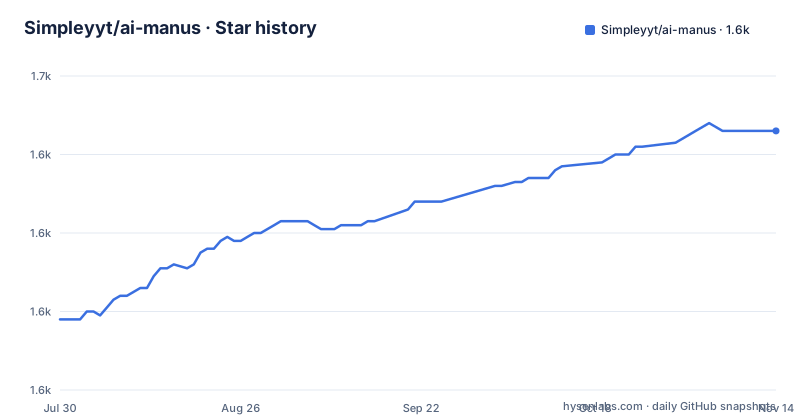
- Simpleyyt/ai-manus1,646 ★ · +48
| Repository | 2026-07-30 | 2026-11-14 |
|---|---|---|
| Simpleyyt/ai-manus | 1.6k | 1.6k |
48 Stars in the last 107 days, measured from the daily GitHub snapshot. Compare with other projects
Editorial analysis
The minimal setup claim and the five services in the compose file
The feature list opens by promising that a minimal deployment needs only an LLM service and no other external service. The compose file committed to the repository starts five containers.
  backend:
    image: ${IMAGE_REGISTRY:-simpleyyt}/manus-backend:${IMAGE_TAG:-latest}
    depends_on:
      - sandbox
      - mongodb
      - redis
    volumes:
      - /var/run/docker.sock:/var/run/docker.sock:ro
There is a frontend, a backend, a sandbox image puller, MongoDB 7.0 and Redis 7.0, and the backend declares dependencies on the last two. The compose snippet printed on the page is a different, shorter file: it has the frontend, the backend and the sandbox only, with no database and no cache, and the project ships that snippet as `docker-compose-example.yml` while the working one is `docker-compose.yml`. Both are in the repository. Session history is described elsewhere on the same page as managed through MongoDB or Redis, so the claim and the file disagree about what a minimal install pulls in, and the page does not say which of the two files a new user is expected to copy. MongoDB keeps its data in a named volume, `manus-mongodb-data`, so state survives a compose down.
The sandbox container is configured to exit on purpose
The sandbox service in the compose file is not meant to run.
  sandbox:
    image: ${IMAGE_REGISTRY:-simpleyyt}/manus-sandbox:${IMAGE_TAG:-latest}
    command: /bin/sh -c "exit 0"  # prevent sandbox from starting, ensure image is pulled
    restart: "no"
Its command exits immediately, its restart policy is off, and an inline comment gives the reason: pull the image, do not start it. The page repeats the point from the other direction, telling readers that seeing the sandbox container exit with code 0 is normal because it confirms the image was pulled successfully. Real sandboxes are created later, one per task, by the backend through the host's Docker socket, which is mounted at `/var/run/docker.sock`. That mount is marked read only, which is a filesystem attribute on the socket path rather than a limit on the API reachable through it. The practical consequence is that the backend container holds the same Docker API access that created it, so the isolation between tasks is container to container, not backend to host.
Copying the environment example leaves the model pointed at a mock server
The development setup says to copy the example file and then change at minimum one value, the API key. The example file ships with the API base already set to an internal address.
API_KEY=
API_BASE=http://mockserver:8090/v1
MODEL_NAME=deepseek-chat
TEMPERATURE=0.7
MAX_TOKENS=2000
That endpoint is the project's mock LLM server, one of the four sub-projects in the tree, used for development and testing. The page's own configuration snippet shows different values, an OpenAI base URL and `gpt-4o` as the model, so the two documented starting points disagree. Following the minimum instruction literally, copying the example and filling in a key, leaves the backend requesting completions from a container that only exists in the development compose file. Model capabilities are also a hard requirement rather than a preference: the page asks for a LangChain chat model provider, defaulting to `openai`, with native tool calling, because plans and step results are submitted through structured output tools named `create_plan` and `complete_step` instead of being parsed out of prompt text.
One of the two model switches is ignored when the other is set
The environment file carries a provider selector and a second, separate integration switch, and the comments spell out a precedence that is easy to miss.
MODEL_PROVIDER=openai
# LLM gateway provider: langchain (default) or openai.
# - langchain: uses init_chat_model, supports many providers via MODEL_PROVIDER.
# - openai:    talks to OpenAI / OpenAI-compatible endpoints (API_BASE) directly
#              via the official openai Python SDK (MODEL_PROVIDER is ignored).
#LLM_PROVIDER=langchain
With the integration switch on its default, the provider name selects among built-in choices: openai, deepseek, anthropic, ollama and orcarouter, resolved through LangChain's `init_chat_model`. With the integration switch set to `openai` instead, the provider name stops mattering entirely and the backend talks to whatever base URL is configured through the official SDK. Both are legitimate, and the file says which one wins, but nothing warns at startup that a carefully chosen provider name is being discarded. OpenAI compatible endpoints are handled on the first path by pairing the openai provider with a custom base URL, which is how DeepSeek, OneAPI and vLLM style gateways are meant to be used.
Two browser engines, one payload shape, and a VNC bridge for viewing
Browser control is pluggable and the two options promise the same interface.
# Options: browser_use (default), playwright
# - browser_use: drives Chrome through the browser-use library's event bus
# - playwright:  lightweight Playwright-over-CDP engine emitting the same
#                tool payload shape (element tree, Markdown content, console)
#BROWSER_ENGINE=browser_use
The default drives Chrome through an event bus with a DOM serializer and watchdog managed waits and tab switching; the alternative is a lighter Playwright over CDP engine that emits the same tool payload, so swapping the engine does not change what the planner sees. Viewing is a separate path built on a headless browser. The sandbox starts a VNC service through xvfb and x11vnc, converts VNC into a websocket with websockify, and the browser component in the web UI connects through the server's websocket forward. That is what makes real time viewing and takeover work, and it is also why the development setup exposes a sandbox port in the 5900 range for the VNC side.
Session storage starts with no credentials and no published ports
The two state services come up with their access controls commented out.
  mongodb:
    image: mongo:7.0
    volumes:
      - mongodb_data:/data/db
    #ports:
    #  - "27017:27017"

  redis:
    image: redis:7.0
    restart: unless-stopped
The MongoDB port mapping is present but disabled, which keeps the database off the host's network, and the environment example leaves the MongoDB user name and password and the Redis password commented out with empty values. On the bridge network the compose file creates, with a single frontend, backend, sandbox, MongoDB and Redis attached, nothing else can reach either service, so the defaults hold. Move any of it to a shared host, expose a port, or attach another container that was not written with this file in mind, and the defaults become the weakest point in the deployment. The Redis service also has no volume at all, while MongoDB keeps one named `manus-mongodb-data`, so session history and cache state have different durability.
Four sub-projects, three shell scripts, and a port list that stops mid line
The project is split into a frontend, a backend, a sandbox and a mock LLM server, with `dev.sh`, `run.sh` and `build.sh` at the root and compose files for development, example and normal use. The three application images are overridable through an image registry variable and an image tag variable that both default to values under the maintainer's namespace, and each carries a bake section listing Linux amd64 and arm64 as the target platforms. The development entry point runs everything in reload mode and exposes five ports: 5173 for the web frontend, 8000 for the server API, 5678 for remote Python debugging, 8080 for the sandbox API, and a 5902 entry whose description stops partway through its own line. The repository also carries `AGENTS.md`, `CLAUDE.md`, a `.cursor` directory, a workspace file and an example MCP server configuration. The roadmap lists deploy and expose for tools, mobile and Windows sandbox access, and Kubernetes and Docker Swarm multi-cluster deployment, and it names a Celery backend among the completed items while the compose file contains no worker service. Releases move in minor steps, three of them between 2026-08-02 and 2026-09-14, and the last recorded commit on main is dated 2026-09-24.
Skills arrive as packages and are loaded into the sandbox on demand
Reusable capability is packaged rather than written into a prompt. A skill is a package that can come from the official catalog, be uploaded directly, or be pulled from a GitHub repository, and the management path is Settings, then Features, then Skills. Invocation is by prefix, with a slash or a plus opening the picker, and the chat history keeps a chip for each skill with a tooltip describing it. The loading is progressive rather than eager: the agent pulls a skill in through a `load_skill` call and the package is then synced into the sandbox, which is what keeps the initial context small when a session has many skills available. External tool servers plug in through MCP, with an example configuration file at the repository root and a commented mount line in the compose file that would attach it at `/etc/mcp.json`. Around that, session state is kept in MongoDB or Redis with support for background tasks, and the sidebar library aggregates attachments and artifacts across sessions with type filters, search, per file favorites, preview and a jump back to the task that produced the file.
Editorial conclusion
AI Manus suits someone who wants to see and interrupt an agent mid task rather than receive a final answer, because the browser, the shell and the files all live in a container the UI can watch and take over. Two things to settle before deploying it. The Docker socket on the backend is what makes per task sandboxes possible and it is the widest permission in the file, so treat the backend container as equivalent to root on the host and scope it accordingly. And the shipped environment example points the model endpoint at the project's own mock server, so setting only the API key, as the page's minimum instruction says, leaves the agent talking to a stub. Session storage also starts with no credentials configured, which is fine on a private bridge network and wrong on anything else.
Frequently asked questions
What does AI Manus need before it will run a task?
Docker 20.10 or newer with Docker Compose, and a chat model that supports native tool calling. The page recommends Deepseek or GPT models with reliable tool calling, and defaults the provider selection to openai.
Why does the AI Manus sandbox container stop right away?
Its command is /bin/sh -c "exit 0" and its restart policy is off, which the compose file explains is there to ensure the image is pulled. Real sandboxes are created per task by the backend through the host Docker socket, and the page says an exit with code 0 is normal.
Which environment values must change before the first AI Manus run?
The API key at minimum, and in practice the API base as well, since the shipped example points it at the project's own mock LLM server on port 8090 and names deepseek-chat as the model. The page's own snippet uses an OpenAI base URL and gpt-4o instead.
Can AI Manus run against DeepSeek, Anthropic or Ollama?
Yes, through the provider selector, whose built-in values are openai, deepseek, anthropic, ollama and orcarouter, resolved with LangChain's init_chat_model. OpenAI compatible endpoints work by pairing the openai provider with a custom API base. Setting the separate gateway switch to openai bypasses the provider selector entirely.
How does AI Manus show the agent's browser to the user?
The sandbox headless browser starts a VNC service through xvfb and x11vnc, converts VNC into a websocket with websockify, and the web interface connects to it through the server's websocket forward. That path is what supports real time viewing and takeover.
Official sources
Add this badge to your README
If you maintain this project, the badge below links readers to this analysis and shows its maintenance status from the daily GitHub snapshot. Paste the markdown into your README; add ?metric=license or ?metric=stars to the image URL for a different field.

[](https://hysenlabs.com/projects/simpleyyt-ai-manus)Star history chart for your README
[](https://hysenlabs.com/projects/simpleyyt-ai-manus)Was this useful?