Defaults documents five platform floors and no Swift version
💾 Swifty and modern UserDefaults
At a glance
- What is it?
- Defaults is a small Swift package that puts a typed facade in front of UserDefaults, declaring each key with its type and default value in one place. Its install step is a single click in Xcode, the page lists five platform minimums but no minimum compiler, the promised Toggle component never appears in an example, and the production claim points at a link rather than at the apps.
- Who is it for?
- Defaults suits a Swift or SwiftUI app that wants one declaration site for preference keys and their default values, and that wants Codable types in preferences rather than only the property list types UserDefaults accepts natively.
- Can I use it commercially?
- Yes. MIT is a permissive licence: you can use, modify and sell software built on it, as long as you keep its copyright and licence notices.
- Is it still maintained?
- Yes. The repository last received commits 143 days ago.
- What is it written in?
- Mainly Swift, according to GitHub's language statistics.
Answers come from the project's GitHub data, last synced on November 13, 2026, and from our analysis. They are not legal advice.
Star history
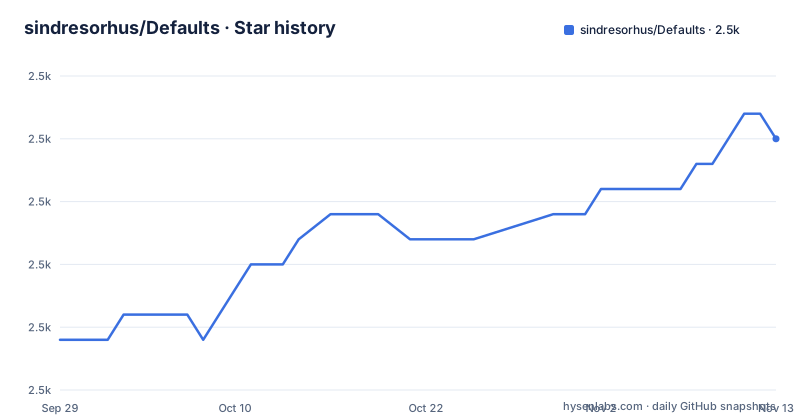
- sindresorhus/Defaults2,510 ★ · +8
| Repository | 2026-09-29 | 2026-11-13 |
|---|---|---|
| sindresorhus/Defaults | 2.5k | 2.5k |
8 Stars in the last 45 days, measured from the daily GitHub snapshot. Compare with other projects
Editorial analysis
Five platform floors and no compiler floor at all
The compatibility section is a list of five minimums: macOS 11, iOS 14, tvOS 14, watchOS 9 and visionOS 1. That is the complete set of version constraints on the page. There is no minimum Swift version, no minimum Xcode version and no note about which SwiftUI features the package needs, even though the repository holds a `Package.swift` that necessarily declares a tools version. The gap matters most for the highest floor in the list, since visionOS 1 is the only entry that pins a brand new platform while the others are several releases old, and a package that supports all five has to compile against the oldest one it claims. The package is at version 9.0.9, tagged on 2026-06-23, after 9.0.8 in March and 9.0.7 earlier the same month, so it is a nine year old line with recent maintenance and a floor that has not moved with it.
Installation is one click in a settings tab
The install section is three lines long and all of them point at Xcode's user interface:
Add `https://github.com/sindresorhus/Defaults` in the “Swift Package Manager” tab in XcodeThere is no command line equivalent on the page, no version range to write into a manifest, and no dependency snippet showing what the resolved entry would look like. So the documented path is: open Xcode, find the package dependency tab, paste a repository URL, and let the tool resolve the version for you. That works for a person building an app in the IDE, and it is the whole of what the page says about getting the code. Everything else about consuming the package is left to the documentation site, which is hosted on the Swift Package Index rather than in the repository, so the repository itself is not where you learn how to depend on it from a build script.
A key carries its type and its default in one declaration
The usage example is four lines and it is the whole argument for the package. You extend the key namespace with one static property, giving the key name and the type and the default together:
extension Defaults.Keys {
	static let quality = Key<Double>("quality", default: 0.8)
}

Defaults[.quality]
//=> 0.8
Reading and writing then go through a subscript keyed by that same name, so `Defaults[.quality] = 0.5` writes it. The type is not inferred from a stored value and the default is not remembered at the point of use, both live at the declaration, which is the specific thing the benefits section claims over the property wrapper it compares itself to. In a view the same key becomes a property wrapper, `@Default(.quality) var quality`, which the example drives with a slider bounded from zero to one, matching the Double and the 0.8 default. The declaration is also where you would add a Codable type, which the highlights say you can store any Codable value in.
The highlight named Observation sits above an iOS 14 floor
One bullet in the highlights list is called Observation, with the explanation that you can observe changes to keys. The compatibility list floors the package at iOS 14, and the framework that framework name refers to arrived several major releases later, so the page is either describing the package's own change notifications under that heading or claiming a capability below the version that would ship it, and it does not say which. The other bullets are more concrete. Codable support and NSSecureCoding support mean the store accepts your own value types. Debuggable is explained as the data being stored as JSON-serialized values, which is what lets you read a preference file and see what is in it. Customizable means you can serialize and deserialize your own type in your own way. iCloud support is stated as automatic synchronization between devices.
The promised components never appear in an example
Count what the page shows against what it claims. There are two code examples in total. The first declares a key, reads it and writes it. The second wraps the same key in a property wrapper and puts it in a slider. That is all. So five of the listed capabilities are named without a line of code: observation of key changes, Codable storage, custom serialization, iCloud synchronization, and the convenience SwiftUI Toggle that the benefits section lists as a component you get. The Toggle in particular is described as if it were a thing you drop in, and it is the one feature in the list that would change how a view is written rather than how a value is stored, so it is the one a reader most wants to see. Its absence is not a contradiction in the package, only a gap in the page, and the package index documentation is where the page sends you.
The production claim is a link to a list of apps
The adoption claim is one sentence in the introduction: it is used in production by all the author's apps, with 4 million or more users behind that phrase, and the link goes to a page listing those apps rather than to any of them. So the number is an aggregate across an unspecified set of applications, with no release date, no version range, no breakdown by platform, and no indication of whether every app in the list uses the package or only some. Two maintainers are named at the bottom, the repository owner and a second account, which is a small project with one very active owner. For a package this small the adoption claim is probably the strongest signal available, and it is also the one that cannot be checked from the repository at all.
Lowercase file names and a committed resolution file
The root of the repository is short and a few entries are worth naming. The readme is `readme.md` and the licence file is `license`, both lowercase, while the links elsewhere in the ecosystem assume the conventional capitalised names, which matters to tools that look for an exact case. `Package.resolved` is committed, which in a library pins the versions the project's own development resolved rather than the versions a consumer will get. The configuration files show the toolchain: `.swiftlint.yml` for linting, `.swiftpm/` for Swift Package Manager settings, `.spi.yml` declaring the package to the package index that hosts its documentation, `.editorconfig` and `.gitattributes`. The related section closes with a link that is not a project but a GitHub search restricted to that owner's non-archived Swift repositories, so the list of things considered related to this one is generated rather than curated.
Editorial conclusion
Defaults suits a Swift or SwiftUI app that wants one declaration site for preference keys and their default values, and that wants Codable types in preferences rather than only the property list types UserDefaults accepts natively. Before adopting it, check the compiler and platform floor against your own deployment target, because the page states five platform minimums and no minimum Swift version at all, and install it through Swift Package Manager rather than through the Xcode tab if you script your dependencies. Expect to look past this page for the rest, since the documentation lives on a package index site and the features the highlights promise, observation, custom serialization, iCloud synchronization and the Toggle component, are named but not shown. It is a facade, not a store: the data still lands in UserDefaults underneath.
Frequently asked questions
What is sindresorhus/Defaults?
It is a Swift facade over UserDefaults that stores key-value pairs across app launches. Keys are declared with their type and default value in one place, values are held as JSON-serialized data, and Codable and NSSecureCoding types are supported. The current version is 9.0.9 under the MIT license.
How do I add Defaults to a Swift project?
The page documents one method: add `https://github.com/sindresorhus/Defaults` in the Swift Package Manager tab in Xcode. No package manager command, version range or manifest snippet appears on it, and the fuller documentation is hosted on the Swift Package Index rather than in the repository.
Which platforms does Defaults support?
macOS 11 and newer, iOS 14 and newer, tvOS 14 and newer, watchOS 9 and newer, and visionOS 1 and newer. The page lists those five minimums and does not state a minimum Swift or Xcode version.
How do I use Defaults with SwiftUI?
Declare the key in an extension on Defaults.Keys with its type and default, then use the property wrapper in the view, as in `@Default(.quality) var quality` feeding a slider. The wrapper updates the view when the stored value changes, and the same key is readable outside SwiftUI through the Defaults subscript.
How does Defaults store its values?
It uses UserDefaults underneath and stores the data as JSON-serialized values, which the page lists as the reason the data is debuggable. You can also supply your own serialization for your own types, and the store accepts any Codable or NSSecureCoding value.
Official sources
Add this badge to your README
If you maintain this project, the badge below links readers to this analysis and shows its maintenance status from the daily GitHub snapshot. Paste the markdown into your README; add ?metric=license or ?metric=stars to the image URL for a different field.

[](https://hysenlabs.com/projects/sindresorhus-defaults)Star history chart for your README
[](https://hysenlabs.com/projects/sindresorhus-defaults)Was this useful?