p-queue is feature complete and says so, and that changes how you use it
Promise queue with concurrency control
At a glance
- What is it?
- p-queue limits how many promises run at once and how fast they start, and its readme opens by telling you the project is finished. Pull requests are reviewed; no further development is planned; email support is not answered. What remains is a documentation surface worth reading closely, because the two rate-limiting modes do not behave the same way and one option silently does nothing when the other is enabled.
- Who is it for?
- This module fits a script or service that already has its work expressed as promises and needs a ceiling on how many run at once, or a rate limit against an API that enforces one. It does not fit someone building a job system that must survive a restart, because the readme points servers at a database-backed queue instead, and it does not fit someone who expects new features to arrive.
- Can I use it commercially?
- Yes. MIT is a permissive licence: you can use, modify and sell software built on it, as long as you keep its copyright and licence notices.
- Is it still maintained?
- Yes. The repository last received commits 30 days ago.
- What is it written in?
- Mainly TypeScript, according to GitHub's language statistics.
Answers come from the project's GitHub data, last synced on November 15, 2026, and from our analysis. They are not legal advice.
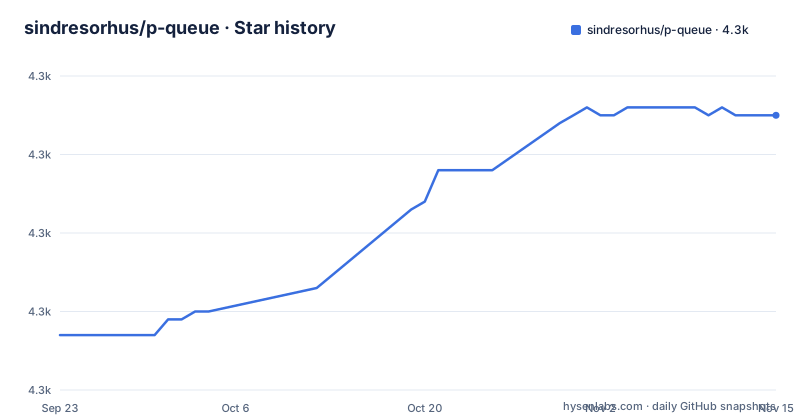
Star history
- sindresorhus/p-queue4,305 ★ · +28
| Repository | 2026-09-23 | 2026-11-15 |
|---|---|---|
| sindresorhus/p-queue | 4.3k | 4.3k |
28 Stars in the last 53 days, measured from the daily GitHub snapshot. Compare with other projects
Editorial analysis
The readme opens by saying the project is finished
Three sentences near the top of the page, and they are not a disclaimer bolted on.
The project is feature complete. Pull requests are welcome and will be reviewed. No further development is planned. Email support questions are not answered.
Then, before any of that, a routing note: for servers, you probably want a database-backed job queue instead.
Both statements shape what this module is for. It is a concurrency primitive for work that already exists in memory, not a durable queue. The second sentence about pull requests is unusually precise: review is not the same as a roadmap, so a merged fix is a contribution and a new capability is not coming.
The refusal of email support is worth noting because it is a boundary drawn by the author about their own time, stated once and without apology.
Together they mean this is a finished dependency rather than a platform. That is a good thing to know before you build on it and a bad thing to discover after.
The fixed window lets a full extra burst through the boundary
There are two rate-limiting modes and the readme explains the difference with a worked example, which is the clearest thing on the page.
The default is a fixed window. The counter resets at intervals. That means a task can execute just before a boundary and the next task just after it, so with a cap of two per second you can get four executions inside one millisecond.
Strict mode is a sliding window. No more than the cap executes in any rolling window of the interval length.
The trade is stated as a cost and a recommendation. Strict mode is more resource-intensive because it tracks individual execution timestamps, and the page says to use it when you need guaranteed compliance with a rate limit, such as an API that enforces one strictly.
So the default is cheap and bursty, and the alternative is accurate and more expensive. Neither is wrong; they answer different questions.
What matters for your choice is whether your API counts per fixed bucket or per rolling window, because the queue's two modes only match correctly if you know which one the other side implements.
One option does nothing when strict mode is on
There is a third option that interacts with the two modes, and the page buries its interaction in a note.
The carryover option controls whether pending promises count against the next window's cap. If it is on, a pending task carries over and is counted; if it is off, a pending task does not count towards the next window.
Then the note: the carryover option has no effect when strict mode is enabled.
That follows from how strict mode works, since it tracks actual execution timestamps rather than counting pending tasks, and the page explains that reasoning.
But it means you can set both and get neither behaviour you expected. Someone who wants strict rate limiting and also wants to carry pending tasks over has to pick, and the readme does not say which way the choice should go.
The default for carryover is false, and the default for strict is also false, so the shipped default is the cheap bursty fixed window with pending tasks not counted. That is a reasonable default and it is also the combination most likely to surprise someone who sets one option and assumes the other still applies.
Awaiting the add promise defeats the point of the queue
There is a callout marked important on the method that adds a task, and it is the most useful warning in the documentation.
The method returns a promise that settles when the task completes, not when it is added.
If you await that promise, you wait for the task to finish, which may defeat the purpose of using a queue for concurrency.
That is a real trap and it is easy to fall into, because the natural shape of the example code awaits everything. The usage section demonstrates the fix: it calls `.add()` twice without awaiting either call, then awaits `queue.onIdle()`.
The second note is about failure and it is more dangerous. If your tasks can throw, you must handle those errors from the returned promise, or they may be reported as an unhandled rejection and potentially cause the process to exit immediately.
So the queue does not swallow errors, and it does not isolate them either. A rejected task in a server can take the server down unless you catch it at the call site.
Aborting removes a queued task but cannot stop a running one
The cancellation option is an abort signal, and its documentation is precise about where it stops working.
When the signal is aborted, the task is removed from the queue and the call rejects with the signal's reason.
If the operation is already running, the signal has to be handled by the operation itself.
That is the correct semantics and it is worth stating plainly: a queue can cancel work it has not started, and cannot cancel work it has started. Everything about cancelling in-flight work is up to your task body.
The task receives `{signal}` as its first argument, and the readme suggests passing it on, for example to `fetch()`, to stop the work.
The task body receives a signal it has to opt into
The signature of a task is one line and it changes what you can write inside one.
A task is a promise-returning or async function, and when it is executed it receives an object containing a signal as its first argument.
So the queue always passes a signal-shaped argument, whether or not you asked for cancellation. A task that ignores it is unaffected; a task that uses it can participate in the cancellation contract.
That is a clean design, and it has a consequence for how you write tasks: a task is not a bare function of no arguments, so a helper that takes unrelated arguments cannot be passed directly without wrapping.
The options available per task are small and specific. Priority decides scheduling order, with higher values scheduled first. An identifier lets you change a task's priority before it runs, and if you do not supply one the queue assigns an incrementing number as a string.
The auto-increment detail is small and useful: it means you can refer to a task by a generated identifier without having named it yourself.
Two runtime dependencies and a build that emits only dist
The manifest is compact and worth reading for what it excludes.
No runtime dependencies: the readme lists zero dependencies among its highlights, and package.json declares only devDependencies. The API section says the queue instance is an EventTarget.
The timeout option's documentation is worth reading closely. The option is documented as a per-operation timeout in milliseconds, with operations throwing a timeout error if they do not finish in time, and the timer starting when the operation is dequeued and begins executing rather than while it waits.
That last clause matters more than it looks. A queue with a long backlog does not time out its backlog; it times out each task once it starts. So the timeout bounds your slowest request, not your slowest batch.
The published files list contains one entry. The build script removes the output directory and compiles. The type declarations are declared in the main export rather than as a separate path, and the package is marked as having no side effects and as being native ESM only.
Native ESM only, and the readme tells you not to ask about it
The install section has one warning and it is longer than the install command.
The package is native ESM and no longer provides a CommonJS export. If your project uses CommonJS, you have to convert to ESM, and a conversion guide is linked.
Then the sentence that tells you where not to file things: please do not open issues for questions regarding CommonJS or ESM.
That is a support boundary, stated as firmly as the email one. Combined with the feature-complete notice, it makes the project's posture clear: the design is settled and the migration path is the documentation.
The engine requirement is a Node major version with no patch floor, which is looser than you might expect for a native ESM package.
So there is one thing to check before you add it, and it is not a version: whether your build can consume an ESM-only dependency. Everything else about this module is mature and settled, and the one decision that will cost you time is a module-system one you have to make before installing.
Editorial conclusion
This module fits a script or service that already has its work expressed as promises and needs a ceiling on how many run at once, or a rate limit against an API that enforces one. It does not fit someone building a job system that must survive a restart, because the readme points servers at a database-backed queue instead, and it does not fit someone who expects new features to arrive. Before you depend on it, check four things. Whether your tasks can throw, because the readme warns that an unhandled rejection from a task can take the process down. Whether you want a fixed window or a sliding one, since they differ by up to a full extra burst at a boundary. Whether you need per-task cancellation, because aborting only removes a task that has not started. And whether your task bodies are safe to abandon, since a signal does not stop running code.
Frequently asked questions
what is p queue
p-queue is a promise queue with concurrency control for Node. It is useful for rate-limiting asynchronous or synchronous operations, such as calls to a REST API or CPU and memory intensive tasks. You create it with a concurrency limit and add tasks to it, and it runs at most that many at a time. The project states it is feature complete with no further development planned.
What are the four types of queues?
p-queue describes one thing: a promise queue with a concurrency limit, a rate limit with a fixed or sliding window, per-task priority, per-task timeout, and abort-signal cancellation. For durable work it points servers at a database-backed job queue instead, which is the closest the page comes to naming an alternative.
How do I use a p queue with a rate limit?
Set the interval cap to the maximum number of runs allowed and the interval to the window length in milliseconds, then add tasks. The default is a fixed window that resets at the boundary, so a burst can cross it; enable strict mode for a sliding window in which no more than the cap start in any period of that length, at the cost of tracking individual timestamps. The carryover option does nothing in strict mode.
Official sources
Add this badge to your README
If you maintain this project, the badge below links readers to this analysis and shows its maintenance status from the daily GitHub snapshot. Paste the markdown into your README; add ?metric=license or ?metric=stars to the image URL for a different field.

[](https://hysenlabs.com/projects/sindresorhus-p-queue)Star history chart for your README
[](https://hysenlabs.com/projects/sindresorhus-p-queue)Was this useful?