CloneTTS ships no source, and its precision dial runs from 2 to 8 with nothing above 8
A lightweight, offline Android Text-to-Speech (TTS) engine enabling seamless system-wide voice cloning and high-fidelity text reading.
At a glance
- What is it?
- CloneTTS is an offline Android text-to-speech engine that clones a voice from one to three seconds of speech and registers as a system engine so ordinary reader apps can use it. The repository is a readme and a docs folder, not source, so the interesting material is in the operating details: the accuracy floor you have to clear, the RTF self-check, and a device list for the hardware acceleration.
- Who is it for?
- Use it if you want to read long text aloud on an Android phone with a voice you supplied, on a device that can pass its own real-time-factor check, and you are willing to hand the operating system a background exemption to keep it alive. The system TTS registration is the right integration and it means no reader-specific work, the local HTTP API covers the readers that need one, and a voice needs only one to three seconds of clean audio plus a transcript typed exactly.
- Can I use it commercially?
- The repository metadata does not identify a licence. Check the project’s published terms and any component-specific licences before reuse.
- Is it still maintained?
- Yes. The repository last received commits 1 day ago.
- What is it written in?
- GitHub does not report a main language for this repository.
Answers come from the project's GitHub data, last synced on November 25, 2026, and from our analysis. They are not legal advice.
Star history
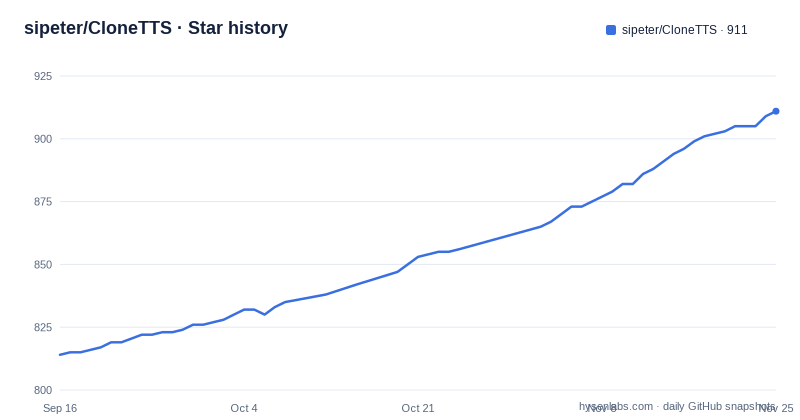
- sipeter/CloneTTS911 ★ · +97
| Repository | 2026-09-16 | 2026-11-25 |
|---|---|---|
| sipeter/CloneTTS | 814 | 911 |
97 Stars in the last 70 days, measured from the daily GitHub snapshot. Compare with other projects
Editorial analysis
The repository is a readme and a docs folder, and the artifact is an APK
Start with the repository shape, because it reframes everything else. The top level contains two entries: a readme and a docs directory. There is no source directory, no build configuration and no licence file recorded, and the platform reports the primary language as unknown. What you install is an application package, downloaded from the releases page of this repository as the latest APK file, or from a Google Play closed beta channel under one application identifier. The beta has its own enrolment sequence rather than a link: you join a Google group to obtain access, accept the testing opt-in, and then install or update from the Play listing. The stated contents of the beta are neural noise reduction and built-in device benchmarking, so the closed channel is where the next features land before they reach the APK on the releases page.
That means the documentation is the whole of the inspectable surface, and it is unusually operational for a consumer application. It walks through mandatory setup, first launch, cloning a voice, managing voices, tuning pronunciation, two integration modes, and a contact section with two group numbers and a broadcast channel. The docs folder is referenced throughout as the place with a beginner guide, including the details on hardware acceleration and the walkthrough for reader integration.
Two consequences follow. You cannot audit what the model does, so the trust decision is a distribution decision: whether you are willing to install a binary from a release page. And you cannot contribute a fix, which is why the communication channels are group chat numbers rather than an issue tracker or a pull request path.
One to three seconds of audio, and a transcript that has to be exact
The cloning step is the product, and its input contract is narrow and specific. Reference audio is one to three seconds long, a single clear sentence, with no background noise. You either record it in the app's own studio for what is described as high-fidelity capture, or pick an existing file from storage.
The second input is the reference transcript, and the instructions for it are unusually stern: type the exact text spoken in the audio, because a mismatch will severely degrade synthesis quality. Nothing in the documentation suggests the engine checks this for you, which means the quality of your voice is bounded by your transcription accuracy rather than by the model's tolerance. For a three-second clip that is a short sentence you know by heart, so the failure mode is unusual: you have to be more careful than the task looks, and you get no diagnostic when you are not.
Voice management is built around that same record. Each voice card carries a display name and an alias, and both are editable, with what is described as real-time duplicate alias checking. The alias is the part that matters later, because it is the binding key external readers use when they request a specific voice over the HTTP API. Voices can be bulk deleted, and the whole set exports and imports as a zip archive with either append or overwrite behaviour, which is the migration path for a device that has accumulated a dozen cloned voices.
The precision dial defaults to 2 and stops being useful at 8
Synthesis quality is exposed as one number called compute precision, with values from 2 to 8. The default of 2 is recommended for the best speed. Setting 4 gives higher quality at the cost of slower synthesis. Eight is the maximum, and the documentation states plainly that values above 8 do not improve quality further.
That is a small, honest quality dial, and the shape of it tells you what kind of model sits underneath. A curve that flattens by 8 is a discrete step count, not a continuous knob, which is consistent with a denoising or refinement loop that runs a fixed number of passes. Because the default favours speed, a first-time user gets the fast version and has to opt into the slower one, and because the upper bound is documented as useless past 8, nobody is left wondering whether they should try 16.
A third control is quieter and worth knowing about: a model management view that shows which model is currently loaded, which matters on a device where the backend and the model are both switchable and you would otherwise be guessing which combination is running.
Two other tuning controls sit next to it in the same tab. Custom pronunciation rules are plain text or regular expression substitutions for characters and names the engine gets wrong, which is the practical answer to a Chinese text-to-speech engine meeting a specific person or product name. And the sentence splitting pattern can be customised to control how long paragraphs are cut into speakable sentences, with a reset to defaults if you misconfigure it. Both are the kind of setting that becomes load-bearing the first time a book has a table of contents or a dialogue.
A real-time factor above 1 is the device failing its own test
The installation flow asks you to run a benchmark after first launch, and it tells you how to read the result: if the real-time factor is above 1, the device may not keep up for smooth real-time synthesis. That single threshold is the honest version of a compatibility claim, because it tells you the answer on your hardware in a number rather than in a device compatibility table.
The same panel shows which decoding backend is currently in use, whether the neural processor or the processor, and how threads are allocated. Those two fields exist because the backend can change at runtime on some devices, and without them a user cannot tell whether a fast result came from the hardware or from a quiet machine. The first launch also extracts model data in the background and the app asks you to wait, so a slow first run is expected rather than a fault.
For anyone who wants the detail, there is a monitoring console behind a detailed-logging switch that shows the precise real-time factor and inference latency for every audio chunk in a waterfall-style log panel, which the documentation says removes guesswork about your device's capabilities. That is a debugging surface rather than a setting, and it is the right place to look when a long book stutters on chapter boundaries.
The hardware acceleration is a named list of four Snapdragon families
Neural processor acceleration arrived in the current release and its scope is stated precisely: supported Qualcomm Snapdragon flagship devices, specifically the 8 Gen 2, the 8 Gen 3, 8 Elite and 8 Elite Gen 5. On those, synthesis is offloaded to the on-device processor for roughly double the speed and noticeably lower heat.
Everything else runs on the processor. There is no claim of acceleration elsewhere and no fallback wording to read carefully, which means the practical read is that this is a flagship-feature release and the rest of the Android population gets the same engine on the processor. That is a reasonable engineering boundary, since a neural processor differs per vendor and the same instructions do not exist across them.
The other change in the same release is device-independent and the more useful one. Sentence splitting was reworked: pauses are now graded by punctuation, dialogue quotes no longer get split apart, and long mixed Chinese and English phrases are no longer chopped. The documentation says this benefits every device. Read aloud Chinese is mostly dialogue, so splitting a quoted line in half is the difference between a voice that sounds like it is reading and one that sounds like it is reciting, and that fix needs no special hardware.
Three reader endpoints encode three different voice-binding policies
There are two integration modes. The first is registration as an Android system text-to-speech engine: set the preferred engine in the system speech settings and any reader that speaks aloud, including the two named readers, will use it, with variable speech rate supported. That is the widest-compatibility path and it involves no configuration in this app beyond installation.
The second is a built-in local HTTP server, switched on in settings, whose address you paste into a reader's web-based speech configuration. The general endpoint takes a GET request of the form `http://127.0.0.1:8080/api/tts?text={{speakText}}&voice=voiceName` on the loopback interface on port 8080, where the two curly-brace placeholders are substituted by the reader, and the voice parameter matches by name or by alias. A POST form exists as well, accepting form-encoded and JSON bodies, and the documentation names long texts as the reason to prefer it.
On top of that, three reader-specific endpoints were added in an earlier minor release, and they are worth reading as a policy menu rather than as three URLs. One always follows whichever voice is currently selected as the default, so a single import rule in the reader keeps working when you switch voices. One takes an alias and locks to that voice regardless of the default. One drives a multi-character flow, where the role tags and fixed roles are configured inside the app first. Choosing wrongly is recoverable but annoying: a reader rule pointing at the default endpoint will silently change voice when you change your default, and a rule pointing at an alias breaks if you rename it.
Keeping the process alive is a manual step, and one brand has no gesture for it
The first section of the installation guide is marked as critical, and it is not about permissions. Before anything works reliably, the app's battery optimisation policy has to be changed to unrestricted or to allow background activity, or the system will kill the reading process when the screen is off. The second half is a recents-view gesture: swipe down on the app card or tap the lock icon so the card is not cleared, with the documentation noting that this varies by device brand and that some phones do not have the option at all.
That is an unusual admission to have to make, and it is worth reading as a property of the platform rather than of the app. Android's power management is designed to end background processes, and a long-form read-aloud session is precisely the workload that optimisers are tuned to kill. The documented workaround is therefore a per-brand gesture with an escape hatch on some devices, which means the experience of this app on a given phone depends on that phone's manufacturer as much as on the app.
The rest of the operating envelope is benign: speech rate from half to double, volume from zero to two hundred percent, and a closed beta track on Google Play whose stated contents are neural noise reduction and built-in device benchmarking. Three releases in three months show the cadence, with the last commit on record dated 2026-07-30, and the counters are 828 stars, 25 forks and no open issues.
Editorial conclusion
Use it if you want to read long text aloud on an Android phone with a voice you supplied, on a device that can pass its own real-time-factor check, and you are willing to hand the operating system a background exemption to keep it alive. The system TTS registration is the right integration and it means no reader-specific work, the local HTTP API covers the readers that need one, and a voice needs only one to three seconds of clean audio plus a transcript typed exactly. Do not treat it as an open project. There is no source in the repository, no recorded licence, and the artifact is an APK from the releases page or a closed beta channel, so you are evaluating a binary rather than reading a codebase. Before you install it, check four things. Run the built-in benchmark first and read the real-time factor, because a value above one means the device will not keep up and no setting fixes that. Type the reference transcript exactly as spoken, because the documentation says a mismatch severely degrades the voice and you will not see a warning. Decide which voice binding you want before you set up readers, because the three reader endpoints follow the current default, lock to one alias, or drive multiple roles, and they are not interchangeable afterwards. And confirm the voice you are cloning is yours to clone. The workflow asks for a recording and the words in it, which is the shape of a consent check, but the enforcement is entirely yours.
Frequently asked questions
How does CloneTTS clone a voice?
You supply one to three seconds of reference audio as a single clear sentence with no background noise, either recorded in the app's studio or picked from a file, plus the exact text spoken in that audio. The transcript has to match perfectly, because a mismatch severely degrades synthesis quality. A compute precision setting from 2 to 8 trades speed against quality, with 2 recommended and 8 the maximum.
Does CloneTTS need an internet connection?
No. All inference runs locally on the device and the engine works without a connection. The only network-facing feature is a built-in local HTTP server on the loopback interface, which exists so reader apps can request speech from a local address rather than a remote one.
Which devices get NPU acceleration in CloneTTS?
Supported Qualcomm Snapdragon flagship devices, specifically the 8 Gen 2, the 8 Gen 3, the 8 Elite and the 8 Elite Gen 5, where synthesis is offloaded to the on-device neural processor for roughly double the speed and lower heat. Everything else runs on the processor, and the settings panel shows which backend is active along with thread allocation.
How do reader apps talk to CloneTTS?
Two ways. Register CloneTTS as the preferred engine in the system text-to-speech settings, which supports variable speech rate in any reader that speaks aloud. Or enable the local HTTP API service and point the reader at its address, using either the general endpoint with a voice parameter that matches a name or an alias, or one of three reader-specific endpoints added in v0.6.0 that follow the current default voice, lock to one alias, or drive a multi-character role flow.
Why does CloneTTS tell me to disable battery optimisation?
Because the system will otherwise kill the reading process when the screen is off. The guide marks this as a mandatory first step and asks you to set the app's battery policy to unrestricted or allow background activity, then to lock the app card in the recents view by swiping down or tapping the lock icon. It notes that the gesture varies by device brand and that some phones do not offer it.
Official sources
Add this badge to your README
If you maintain this project, the badge below links readers to this analysis and shows its maintenance status from the daily GitHub snapshot. Paste the markdown into your README; add ?metric=license or ?metric=stars to the image URL for a different field.

[](https://hysenlabs.com/projects/sipeter-clonetts)Star history chart for your README
[](https://hysenlabs.com/projects/sipeter-clonetts)Was this useful?