conchord: a Typst package that computes chord diagrams instead of tabulating them
Typst package to easily write lyrics with chords and generate colorful fretboard diagrams
At a glance
- What is it?
- A Typst package for string instruments that ships no chord table. A music theory engine compiled to WebAssembly interprets the chord name you type and returns every playable voicing, which is why the same import works for guitar, ukulele, bass and mandolin.
- Who is it for?
- conchord fits anyone writing songs or method books in Typst who is tired of pasting fretboard images, and it is the practical choice for a chord library that has to survive a change of tuning. Leave it if your chords come from MIDI or a notation file, since the input is a chord name typed by hand, and if you need a shape you can trust without reading the diagram.
- Can I use it commercially?
- Yes. MIT is a permissive licence: you can use, modify and sell software built on it, as long as you keep its copyright and licence notices.
- Is it still maintained?
- Probably not. The repository last received commits 14 months ago, on August 27, 2025.
- What is it written in?
- Mainly Typst, according to GitHub's language statistics.
Answers come from the project's GitHub data, last synced on October 23, 2026, and from our analysis. They are not legal advice.
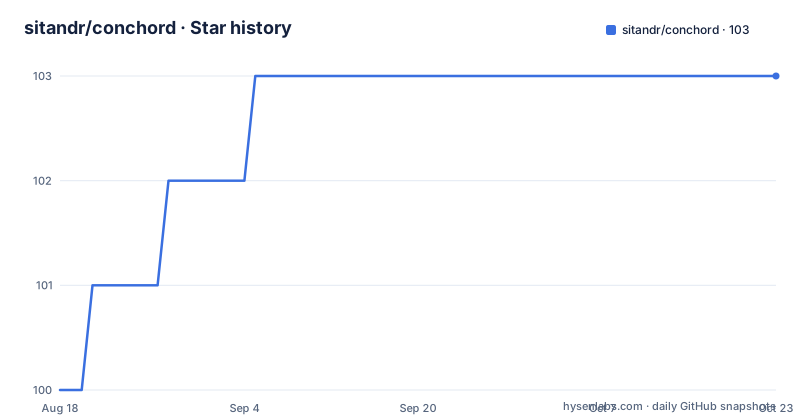
Star history
- sitandr/conchord103 ★ · +3
| Repository | 2026-08-18 | 2026-10-23 |
|---|---|---|
| sitandr/conchord | 100 | 103 |
3 Stars in the last 66 days, measured from the daily GitHub snapshot. Compare with other projects
Editorial analysis
The chord table is computed at compile time, not stored
The unusual thing about conchord is what is absent. There is no lookup table of chord shapes, no JSON of guitar fingerings, no per-instrument asset directory holding pre-rendered diagrams. A separate music theory engine, compiled to WebAssembly, interprets the chord name and returns every voicing it can construct for the tuning you named. That is the design decision the whole package rests on, and it is why the import line is the same for every instrument rather than a per-instrument module.
The trade is that you give up control over which shape appears. The engine applies heuristics to rank its results, and the author is blunt about the consequence: the further down the ranking you go, the worse the variants get, and sometimes the ones it picks are not the ones a guitarist would have reached for first. For a chord library in a song sheet, that is a reasonable price. For a method book where a specific shape is being taught, it is not.
smart-chord takes the name, at picks the fret, n picks the variant
The everyday entry point is smart-chord, and the whole API is four lines:
#import "@preview/conchord:0.4.0": smart-chord

#box(smart-chord("Am"))
// at what fret to play the chord
#box(smart-chord("Am", at: 5)) // chord at fifth fret
// what variant number to select
#box(smart-chord("Am", n: 4)) // forth "best" chord
// what tuning to use; note first, then octave (1-9)
#box(smart-chord("C", tuning: "G1 C1 E1 A1")) // ukulele
`at` is the position on the neck, `n` is the rank in the engine's ordering, and `tuning` is a string of note-plus-octave pairs where the octave runs 1 to 9. One detail catches everyone: the returned diagram is a block, not inline content, so putting several on one line means wrapping each in a box yourself. The author recommends a wrapper function so the margins stay consistent instead of being repeated at every call site.
Red diagrams mean the perfect fifth is missing on purpose
Some diagrams come out red, and the reason is musical rather than a bug. Those are voicings where the perfect fifth is not actually present in the shape; on most instruments that interval can be heard anyway through overtones, so the chord is close enough to work but not exact. The engine marks such a voicing with a question mark at the end of its tabstring, and the function red-missing-fifth is a chordgen that renders those in red so you can see at a glance which ones are approximations.
Because that is the default, an unexpected red diagram is not a failure. smart-chord uses red-missing-fifth unless you pass your own through smart-chord(chordgen: ...), so the behaviour to remember is that red means approximate rather than wrong. If you want every shape to look the same regardless of accuracy, supply a plain chordgen and the distinction disappears from the page entirely.
true-bass exists because guitar defaults ruin ukulele chords
By default the generator insists the lowest note in the voicing be the root of the chord. On guitar that assumption is nearly always right, which is why it is the default. On ukulele and similar re-entrant instruments it produces shapes that sound wrong, because the bass string is the one that moves. The fix is a flag rather than a separate code path:
= `Am`
`true-bass = true`, default:

#for c in n-best(get-chords("Am", tuning: "G1 C1 E1 A1"), n: 5) {
  box(red-missing-fifth(c))
}

`true-bass = false`:

#for c in n-best(get-chords("Am", tuning: "G1 C1 E1 A1", true-bass: false), n: 5) {
  box(red-missing-fifth(c))
}
Passing true-bass: false drops the requirement, and the engine will place a note other than the root in the bass. This is the clearest case in the package where the abstraction earns its keep, since the same code produces idiomatic shapes for two instruments whose conventions disagree.
A custom chord is a string of frets, so barres need no geometry
When you already know the shape, you bypass the engine entirely. A custom chord is written as a tab string, with x for a closed string, 0 for open, and a number for a fret, and the drawing routine works out where the barre goes:
#import "@preview/conchord:0.4.0": new-chordgen

// creating new chordgen without any parameters
#let chord = new-chordgen()

#box(chord("x32010", name: "C"))
#box(chord("x33222", name: "F#m/C#"))
#box(chord("x,9,7,8,9,9"))
Two conventions come with it. Frets above 9 must be comma separated, which is why the last example is written x,9,7,8,9,9 rather than with bare digits. And you can override the barre decision per chord by appending a character to the string: ! forces one, * suppresses it. new-chordgen also takes the presentation side, including a colors argument keyed by shadow-barre, grid, hold and barre, plus number-to-left, shown-frets-number and thick-nut.
Song sheets, chord libraries, and a tab language with stated limits
The README is organised around what you make with the package, and the table of contents runs well past chord drawing. Song sheets place chords above lyrics. A chord library is the named region of a page where diagrams are collected, so a song can reference shapes defined once and used throughout. Transposing, or swapping the tuning or the instrument, updates that library without you touching the individual diagrams, which is the feature that makes conchord worth the setup on a long document.
Tabs get their own chapter with duration, bars and repetitions, linebreaks, ties and slides, bends and vibratos, custom content and a rhythm section. The stated limit is honest and brief: the tab language is compact, it has limitations, and writing anything tab-related is possible with some effort. That is a warning rather than a promise, and it is the one place where the package asks for patience rather than handing you a result.
One release, 0.4.0, and a version string you have to keep in step
conchord has published exactly one release, 0.4.0, on 2025-08-27, and the last push to the repository carries the same date. Every example in the documentation imports from a pinned path, `@preview/conchord:0.4.0`, which is a Typst universe reference rather than a local file. That has a consequence worth planning for: a document that compiles today depends on that exact version resolving from the package registry, so a project pinned to an older Typst compiler may not be able to resolve it at all, and the documentation gives no minimum compiler version.
The repository itself is small and legible. lib.typ sits at the top level next to typst.toml, with directories for chords, gen, reference and tabs, and an examples folder pairing each demo as a .typ source with a rendered .png so you can see the intended output without compiling anything. The licence is MIT.
Editorial conclusion
conchord fits anyone writing songs or method books in Typst who is tired of pasting fretboard images, and it is the practical choice for a chord library that has to survive a change of tuning. Leave it if your chords come from MIDI or a notation file, since the input is a chord name typed by hand, and if you need a shape you can trust without reading the diagram. Verify first that your Typst compiler resolves the pinned @preview import path, and pin the version in your own source, because the only published release is 0.4.0 from 2025-08-27 and the last push was on the same date.
Frequently asked questions
How do I install conchord in a Typst document?
Import it from the Typst universe by pinning the version in your import line, for example #import "@preview/conchord:0.4.0": smart-chord. There is no separate install step, and 0.4.0 is the version the published examples use.
What does a red chord diagram mean in conchord?
The voicing is close but not exact: the perfect fifth is missing and can only be heard through overtones. The engine marks these with a question mark at the end of the tabstring, and red-missing-fifth renders them in red. smart-chord uses that renderer by default.
Does conchord work for ukulele and bass, not just guitar?
Yes. Because the shapes are generated rather than stored, you pass a tuning such as tuning: "G1 C1 E1 A1" for ukulele and the engine builds the voicings for it. For re-entrant instruments you also want true-bass: false, since the default assumption that the bass note is the root is a guitar convention.
Can I draw a chord shape the engine did not generate?
Yes. new-chordgen takes a plain tab string such as x32010 and draws it, working out the barre placement itself. Use x for a closed string, 0 for an open one, comma separate any fret above 9, and append ! or * to force or suppress the barre.
Official sources
Add this badge to your README
If you maintain this project, the badge below links readers to this analysis and shows its maintenance status from the daily GitHub snapshot. Paste the markdown into your README; add ?metric=license or ?metric=stars to the image URL for a different field.

[](https://hysenlabs.com/projects/sitandr-conchord)Star history chart for your README
[](https://hysenlabs.com/projects/sitandr-conchord)Was this useful?