rime-pure: a packaged Rime configuration for phones and desktops
基于 Rime(小狼毫 / 同文)的极简、优雅、好用的中英文输入方案整合包。 包含:四叶草九宫格拼音 / 四叶草拼音 / 小鹤双拼 / 极品五笔 / QQ五笔 / 徐码 / 郑码 等主流方案。
At a glance
- What is it?
- rime-pure is an MIT-licensed bundle of Rime input method configurations that gathers mainstream Chinese schemes, themes and dictionaries into one installable set for the Trime Android app and the Xiaolanghao desktop app. The judgement is that its real work is packaging and mobile tuning rather than input method innovation, and the README is unusually candid about that.
- Who is it for?
- rime-pure fits a user who has chosen Rime for its open source nature and its refusal to collect input data, and who wants a working Chinese input method on both a phone and a desktop without assembling configuration files by hand.
- Can I use it commercially?
- Yes. MIT is a permissive licence: you can use, modify and sell software built on it, as long as you keep its copyright and licence notices.
- Is it still maintained?
- Yes. The repository last received commits 13 days ago.
- What is it written in?
- Mainly C++, according to GitHub's language statistics.
Answers come from the project's GitHub data, last synced on November 7, 2026, and from our analysis. They are not legal advice.
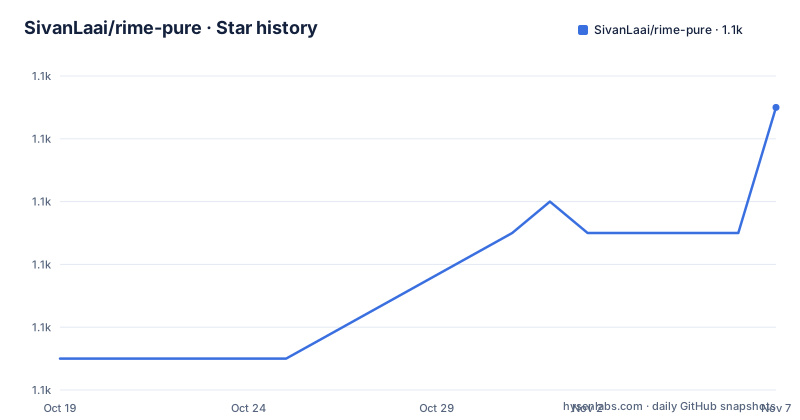
Star history
- SivanLaai/rime-pure1,147 ★ · +8
| Repository | 2026-10-19 | 2026-11-07 |
|---|---|---|
| SivanLaai/rime-pure | 1.1k | 1.1k |
8 Stars in the last 19 days, measured from the daily GitHub snapshot. Compare with other projects
Editorial analysis
The problem is that Rime is powerful and hard to set up
The project's own description of the problem is the clearest statement of what it does.
Rime is described as an open source input method that supports multiple platforms, and being open source means you do not have to worry about your input data being collected by the input method. The catch the documentation names directly is that making it genuinely usable has a high threshold, mainly because dictionary and configuration optimisation is involved, the dependencies are many, and the configuration is complex.
So the purpose of the project is stated as one-stop configuration of Rime for both Android phones and Windows PCs, to reach a state of being low effort and good to use. And the reason the author spent less time on the PC side is given: there are already many established configurations there, so the work was mostly collecting and organising, while the mobile side is where the effort went.
That second point is the project's identity. The documentation says it found that mobile optimisation had never been done well, that the bulk of the work was on the mobile side, and that every stage cost time, from resource collection and skin design to full-keyboard button design and nine-grid key design, with many details needing repeated adjustment of files and deployments, and some unclear configuration points requiring reading the source code. After a week of optimisation the mobile side was described as working smoothly.
The repository structure follows the two targets directly: a `trime/` directory for the Android app and a `weasel/` directory for the desktop, with `schemes/` holding the input schemes, `Res/` for resources, `src/` for sources, and `docs/` for documentation.
One APK replaces the file copying ritual
The installation story is the most practical part of the project, and the 2.0.0 update is entirely about it.
The update notice explains the delay: the author was busy for a long time, and the previous theme configuration files had compatibility and adaptation problems on the latest version of the Trime app. The response was a full compatibility pass and a large simplification of the installation process.
The simplification is the Debug package. The new install method packages all the configuration, dictionaries and style files together as a Debug package, so there is no need to repeatedly copy and replace configuration files by hand, and no risk of parse errors from a file you forgot to delete or change. The documentation says you can uninstall the Debug version at any time and install the regular Release version instead.
The Android side installs the latest published Debug APK directly, and after installation you can open the theme and settings page in Trime to switch. The documentation is explicit about the current scope: the package currently contains only the nine-grid layout, the nine-grid pinyin and the QQ86 wubi configuration, and more layouts will be added as needed.
For the themes and backgrounds, there are two supported routes. The built-in route has the `backgrounds` files and style resources already inside the Debug APK, so nothing needs copying. The manual route is for advanced users and long-term customisation: download the `backgrounds` folder from the repository and copy it in full to the `rime` root directory on the phone's internal storage, where Trime reads external files, which is the route that makes it easier to modify skins independently, to override them later, or to use them with a non-bundled Release version.
The PC side has its own installation and advanced tutorial, and the README points at a separate guide for it rather than duplicating it here.
The gesture bindings are the part users will notice first
The Trime mobile configuration defines a set of gestures and hidden functions, and the documentation presents them as very important, with separate bindings for the full keyboard and the nine-grid state.
Hiding the keyboard is a downward swipe on the `G` key in the full keyboard state, and a downward swipe on the segmentation key in the nine-grid state. Editing, meaning copy, paste and cut, is a long press on the `G` key in the full keyboard and the edit key in the nine-grid. Clearing the text is a leftward swipe on the delete key, in both states.
Switching theme means going into settings in the full keyboard, and a long press on the key marked with a diamond symbol in the nine-grid. Switching input method is a long press on the key marked with a pen symbol in both states. And entering settings is a long press on the gear key in the full keyboard, and pressing the gear key in the nine-grid.
That asymmetry between the two layouts is the interesting engineering detail, because the nine-grid has far fewer keys than a full QWERTY layout and every one of them has to do more work. The nine-grid state is a design response to the constrained key count, and it is why the project says both states received targeted optimisation.
There is one more feature aimed at people learning wubi or using it daily: a wubi root mnemonic keyboard. The Trime mobile app supports a one-click enable for it, and the documentation strongly recommends pairing it with the main skin called Wubi White, because that is said to have the clearest root layout.
The steps for it are specific. Switch the theme to Wubi White through Trime's settings or the long press on the diamond key. Open the keyboard, enter the function menu, and swipe or tap the two-dot control at the bottom of the menu to move to the mnemonic page. Select the mnemonic option and the keyboard switches in real time to show the wubi root distribution. To go back to the ordinary keyboard, tap the default option in the same menu.
Which schemes are actually included
The list of included input schemes is broad on the desktop side and narrow on the mobile side, and the documentation is honest about the difference.
The scheme list names Clover pinyin nine-grid, which is the project's own Android scheme, Clover earth pinyin, Jidian wubi, Xiaohé shuangpin, Clover simplified pinyin, uppercase numerals, natural shuangpin, QQ86 wubi, Xuma and Zhengma.
Two entries have their own notes. The Clover pinyin nine-grid is the scheme the author built for the phone side, named to acknowledge the original author's work, and the documentation says it no longer uses the original dictionary because that dictionary had many problems, with only the name kept. And QQ86 wubi is extracted from the QQ wubi input method, with the dictionary considered more reasonable, and it is the author's own daily scheme and the one he recommends.
The other schemes are credited by link rather than by authorship: the Clover pinyin nine-grid and Clover earth pinyin point back to this repository, Jidian wubi points to a separate project by a different author, Xiaohé shuangpin points to the flypy site, Clover simplified pinyin points to another repository, and Xuma and Zhengma point to their own project sites.
So the project's claim is not that it wrote nine input methods. It is that it assembled the mainstream ones, fixed the one it cared about most, and packaged the set so a user does not have to hunt for each scheme's repository and work out how to install it.
The topic tags match that scope: `config`, `configs`, `configuration`, `opencc`, `pinyin`, `rime`, `rime-trime`, `setting`, `settings`, `sougou`, `terra`, `tongwen`, `wubi`, `xuma` and `zhengma`, with `opencc` and `terra` indicating the simplified and traditional conversion and the Lua extension engine, and `sougou` and `tongwen` referring to the platform apps.
Skins are credited, and the wubi mnemonic depends on one of them
The skin gallery is unusually careful about attribution, and every entry names both the colour scheme and the keyboard layout author.
On the mobile side the skins are labelled with both credits, for example the Trime-style optimised edition with colour scheme by SivanLaai and keyboard layout by SivanLaai, the default iFlytek skin with the same two credits, a Cherry mechanical keyboard skin called Xiao Xiansheng, a minimal skin, a wubi root skin credited to an anonymous author, and a colourful skin credited to SivanLaai for the keyboard layout alone.
On the PC side the credits come from other people entirely: a simple modern blue skin with the colour scheme by XNOM, a green skin by Fuzhen, an Aqua skin also by Fuzhen, an Android skin by Patricivs, a dark one by Fuzhen, and an isolated temple skin by Fuzhen.
That the desktop skins are largely credited to other people is a good signal about what this project is. The work is in the mobile skin and button design, in the nine-grid key design, in the dictionary and configuration assembly, and in making the whole thing installable in one step.
The wubi mnemonic feature ties back into the gallery, because the documentation says the Wubi White skin is the recommended pairing for the clearest root display and best key position feedback. The root keyboard is therefore not a standalone feature, it depends on a specific skin being active.
The mobile screenshots also show the app's utility panels: an emoji panel, a clipboard and a symbols panel, with separate images for the history bar, the clipboard and the sticker collection. There is also a screenshot of simplified and traditional conversion, which is the `opencc` layer doing its work inside the scheme configuration.
The release status is the part to plan around
The version history is short and the gap in it is large.
The tagged releases are 1.1.6 on 2021-10-20, 1.1.7 on 2022-12-25 and 2.0.0 on 2026-07-30. So there was a long period of relative quiet followed by a major version, and the last push was on 2026-07-30, the same day as the 2.0.0 tag. The repository is not archived.
The 2.0.0 changelog entry, dated 2026-07-30, lists what the major update did: full adaptation to the new Trime app, fixing the theme style scrambling and key misalignment problems caused by the version change, optimising the visual experience while keeping the minimal design idea, adding a preview of the nine-grid layout with clean colours and refined key feedback, and integrating the Debug package so that configuration, dictionaries and style files are packaged together for one-click installation. It also records the near-term plan, to formally release a complete release version adapted to the latest Trime, and an invitation to try it and report issues.
That last item is the honest status. The repository currently ships a debug package rather than a finished release for the new app version, and the coming-soon checklist has the formal release as an unchecked box.
The earlier history entry, dated 2023-12-19, is worth noting for a different reason. It describes upgrading the bigram language model, first using IDA reverse analysis and then writing C code to extract and convert the Huayu pinyin v7 model into Rime format, along with optimising the bigram frequencies and parameters to improve the accuracy of phrase and sentence prediction.
That entry explains the `src/` directory in the repository, and it is a good illustration of the scale of effort this configuration work involves. The project is MIT licensed with a `LICENSE` file at the repository root, and the homepage is the author's own project page.
Editorial conclusion
rime-pure fits a user who has chosen Rime for its open source nature and its refusal to collect input data, and who wants a working Chinese input method on both a phone and a desktop without assembling configuration files by hand. It does not fit a user who needs a stable release rather than a debug package, since the repository states the release build for the latest Trime is still planned, and it does not fit anyone who needs the full set of schemes on Android today, because the debug package currently contains only the nine-grid layout, the nine-grid pinyin and the QQ86 wubi configuration. Verify first that the schemes you actually want are present, since the desktop side and the mobile side are not at parity, that the theme you pick does not fight the gesture bindings the project configures, and that you are comfortable with a configuration bundle that has to be re-applied when the underlying app changes version.
Frequently asked questions
How do I install rime-pure on an Android phone?
Download the latest published Debug APK from the project and install it. The package bundles all configuration, dictionaries and style files, so no files need to be copied by hand, and the documentation notes the package currently contains only the nine-grid layout, the nine-grid pinyin and the QQ86 wubi configuration.
How do I use a custom skin with rime-pure?
There are two routes. The Debug APK already has the `backgrounds` files built in, so you can switch skins from the Trime theme and settings page. For independent editing, overrides or a non-bundled Release version, download the `backgrounds` folder from the repository and copy it in full to the `rime` root directory on the phone's internal storage, where Trime reads external files.
Which input schemes does rime-pure include?
The list names Clover pinyin nine-grid, Clover earth pinyin, Jidian wubi, Xiaohé shuangpin, Clover simplified pinyin, uppercase numerals, natural shuangpin, QQ86 wubi, Xuma and Zhengma. Most are credited by link to the original projects, and the QQ86 wubi scheme is the one the author recommends and uses himself.
What is the wubi root mnemonic keyboard in rime-pure?
It is a Trime mobile feature for people learning or regularly using wubi, showing the wubi root distribution on the keys. The documentation strongly recommends pairing it with the Wubi White skin for the clearest root layout, and explains how to reach it through the function menu and how to return to the default keyboard.
Is rime-pure currently a stable release for the latest Trime version?
Not yet. The 2.0.0 update adapted the configuration to the new Trime app and introduced the one-click Debug package, and the coming-soon checklist still has the formal release version as an outstanding item, with an invitation to try the debug build and report issues.
Official sources
Add this badge to your README
If you maintain this project, the badge below links readers to this analysis and shows its maintenance status from the daily GitHub snapshot. Paste the markdown into your README; add ?metric=license or ?metric=stars to the image URL for a different field.

[](https://hysenlabs.com/projects/sivanlaai-rime-pure)Star history chart for your README
[](https://hysenlabs.com/projects/sivanlaai-rime-pure)Was this useful?