jest-codemods: rewriting AVA, Mocha and Chai tests into Jest
Codemods for migrating to Jest https://github.com/facebook/jest 👾
At a glance
- What is it?
- jest-codemods is a collection of jscodeshift transforms that convert test files from AVA, Mocha, Chai, Jasmine, Tape, Sinon and several assertion libraries into Jest syntax, with an interactive CLI that picks the transform for you. It automates the mechanical part of a migration and leaves the judgement calls to you.
- Who is it for?
- Use jest-codemods when you are moving a large JavaScript or TypeScript suite onto Jest, because the mechanical rewrites of assertion and hook syntax are what cost the most time by hand, and the tool covers ten source libraries with one CLI. Do not treat the result as a finished migration, since the project states that manual intervention and tweaks to your tests are to be expected.
- Can I use it commercially?
- Yes. MIT is a permissive licence: you can use, modify and sell software built on it, as long as you keep its copyright and licence notices.
- Is it still maintained?
- Yes. The repository last received commits 8 days ago.
- What is it written in?
- Mainly TypeScript, according to GitHub's language statistics.
Answers come from the project's GitHub data, last synced on November 7, 2026, and from our analysis. They are not legal advice.
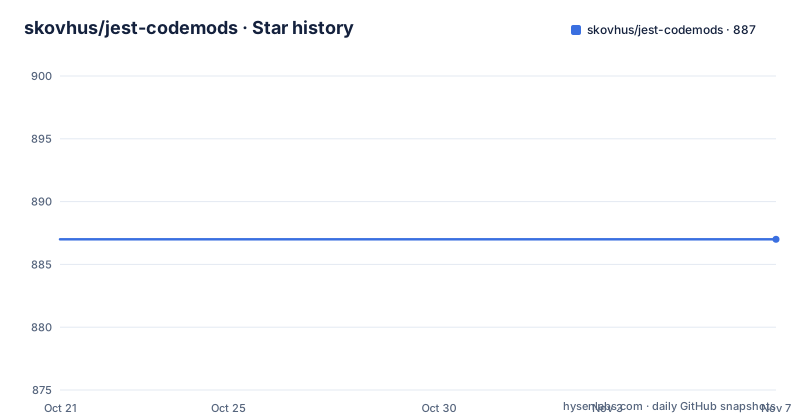
Star history
- skovhus/jest-codemods887 ★ · +0
| Repository | 2026-10-21 | 2026-11-07 |
|---|---|---|
| skovhus/jest-codemods | 887 | 887 |
0 Stars in the last 17 days, measured from the daily GitHub snapshot. Compare with other projects
Editorial analysis
Ten source libraries, one target syntax
The scope is broader than the AVA to Jest case the project is best known for. The transforms cover AVA, Chai, Expect.js, Expect at 1.x, Jasmine, Mocha, proxyquire, Should.js, Tape, Sinon and Node-Tap. Each of those arrives with its own assertion vocabulary and its own lifecycle hooks, and Jest does not accept any of them. What the codemods do is rewrite the calls and the imports so the same assertions read as Jest calls. The project describes them as small programs that help you automate changes to your codebase, and as search and replace on steroids, which is an accurate framing for a jscodeshift transform. The value is not that the output is elegant, it is that a thousand call sites change shape in one pass instead of a thousand manual edits.
The interactive CLI picks the transform for you
The normal entry point is an interactive prompt. Running npx jest-codemods starts it, and it asks about your test environment before applying anything. If you do not have npx installed, the README points out that you can install the command globally with npm install -g jest-codemods. The full option list is short, and it is worth reading it before the first run because one of the flags changes how safe the operation is.
$ npx jest-codemods --help

    Usage:      npx jest-codemods <path> [options]

    Examples:   npx jest-codemods src
                npx jest-codemods src/**/*.test.js

    Options:
      -f, --force       Bypass Git safety checks and force codemods to run
      -d, --dry         Dry run (no changes are made to files)
A dry run makes no changes to files, and the force flag bypasses the Git safety checks the tool applies by default. To transform every test file in a directory, the README says to run jest-codemods . in your terminal. The console output is where the tool reports what it could not do automatically.
One transformer file per source library
Under the interactive CLI there is a jscodeshift transformer per migration, and the CLI is only a wrapper that selects the right file. The README recommends the CLI for simplicity but shows the underlying invocations, which matter when you want to run one specific transform across a specific folder. The transformer names map closely to the source library, with separate files where a library has more than one assertion style.
$ npm install -g jscodeshift
$ npm install jest-codemods
$ jscodeshift -t node_modules/jest-codemods/dist/transformers/ava.js test-folder
$ jscodeshift -t node_modules/jest-codemods/dist/transformers/chai-assert.js test-folder
$ jscodeshift -t node_modules/jest-codemods/dist/transformers/mocha.js test-folder
$ jscodeshift -t node_modules/jest-codemods/dist/transformers/jasmine-globals.js test-folder
The naming shows the design. There are separate Chai transformers for assert and should styles, separate Jasmine ones for globals and for this-based assertions, and a dedicated transformer for importing Jest globals where the source file did not import them. Running them by hand is also the way to re-run a single transform after you have already migrated most of the suite.
The environment question decides whether Jest gets imported
The one decision the CLI asks about has real consequences. If you are using Jest as your test runner and executing tests on Node.js, you want the default option when prompted, and in that case jest-codemods assumes that global values such as expect and jest are provided, so it will not require() them explicitly. If instead you are using a different test runner, or you are executing Jest tests in a browser, you may need the option with explicit require() calls. That second case has a follow-up step, because after running the codemods you might need to install a few dependencies.
yarn add --dev expect jest-mock

npm install --save-dev expect jest-mock

pnpm install --save-dev expect jest-mock
Three package managers are shown because the tool is used across different setups. This is the part of the migration where a wrong answer produces failures at runtime rather than at transform time, which is why the prompt is worth answering carefully.
Quoting style is preserved and incompatible packages get warnings
The transformations section is brief but sets expectations. Where possible, import and require statements determine whether any transformation is carried out at all, so a file that imports its assertion helpers explicitly is treated differently from one that relies on globals. The original code quoting style is preserved, which matters more than it sounds: a codemod that rewrote every string literal in your suite would produce a diff nobody could review, and preserving the style keeps the change reviewable. The tool also warns when packages are used that are incompatible with Jest, so the console output is a short list of things you will have to deal with by hand. The project is direct about this: some manual intervention and tweaks to your tests are to be expected.
The code is small, TypeScript, and pinned hard
Looking at the dependency list tells you what the tool actually is: a thin CLI on top of jscodeshift, which it pins at 0.16.1, plus chalk, execa, globby, inquirer, is-git-clean, meow and update-notifier. The source is TypeScript, built with tsc, with the compiled output and the bin directory published to npm, and the package declares the command as bin/jest-codemods.js. The engine requirement is node >=12, which is permissive by current standards but still excludes Node 10. Development is pnpm-based, with the scripts a contributor would run being verify for build, lint and test together, plus separate build, lint, test, test:cov and test:watch commands, and lint-staged wiring eslint and jest --findRelatedTests to staged files. The project also uses husky and renovate, and the repository ships a release.sh script.
Where a codemod cannot reach
There are clear limits. A codemod works on syntax, and a migration is not only syntax. Custom assertion helpers that wrap your own library, test setup files that configure your old runner, and fixtures built around the previous runner's lifecycle all have to be read and rewritten by hand. The list of supported sources is also a list of exclusions: a suite written on a framework the transforms do not cover gets nothing. And the tool assumes a shape of test files that the transforms recognise, so a heavily abstracted suite with heavy indirection around its assertions is exactly the case where you will spend more time fighting the output than editing it. The project says as much in its own terms, since it promises a smoother migration rather than a completed one.
Provenance: three separate tools became one
The lineage explains the transformer list better than any single upstream project could. The CLI setup and the original idea came from avajs/ava-codemods. Mocha and Chai assert support began at paularmstrong/mocha-to-jest-codemod. Chai should and expect support came from AlexJuarez/chai-to-jasmine. So the tool is a consolidation of three separate efforts into one package with a single interactive entry point, which is why it covers libraries that have no relation to each other and why the transformer names do not all follow the same convention. The links section also points at the official Jest migration guide and at several write-ups of real migrations, including pieces on moving 2,000 or more specs from Karma to Jest and a PayPal team migration.
Editorial conclusion
Use jest-codemods when you are moving a large JavaScript or TypeScript suite onto Jest, because the mechanical rewrites of assertion and hook syntax are what cost the most time by hand, and the tool covers ten source libraries with one CLI. Do not treat the result as a finished migration, since the project states that manual intervention and tweaks to your tests are to be expected. Verify first that your Node version satisfies the node >=12 engine requirement, that the transform you need exists in the transformer list, and that the dry run output matches what your suite actually contains before you let it write to files.
Frequently asked questions
How do I run jest-codemods on my test files?
Run the interactive CLI with npx jest-codemods, or install it globally with npm install -g jest-codemods. To transform all test files in a directory the README says to run jest-codemods . in your terminal, and the console output will report errors and the cases that need manual intervention.
Can I preview the changes before jest-codemods writes them?
Yes. The --dry or -d flag runs a dry run where no changes are made to files, and the --force or -f flag bypasses the Git safety checks that normally guard the run.
Which test frameworks can jest-codemods migrate from?
The transforms cover AVA, Chai, Expect.js, Expect at 1.x, Jasmine, Mocha, proxyquire, Should.js, Tape, Sinon and Node-Tap. There are separate transformers for Chai assert and should styles, and for Jasmine globals and this-based assertions.
Do I need to install extra packages after running jest-codemods?
In the case where you chose the option with explicit require() calls, you might need to install a few dependencies, and the README lists expect and jest-mock for yarn, npm and pnpm.
What are the requirements to run jest-codemods?
The package declares the engines requirement node >=12. The CLI itself depends on jscodeshift, which it pins at 0.16.1, along with chalk, execa, globby, inquirer, is-git-clean, meow and update-notifier.
Official sources
Add this badge to your README
If you maintain this project, the badge below links readers to this analysis and shows its maintenance status from the daily GitHub snapshot. Paste the markdown into your README; add ?metric=license or ?metric=stars to the image URL for a different field.

[](https://hysenlabs.com/projects/skovhus-jest-codemods)Star history chart for your README
[](https://hysenlabs.com/projects/skovhus-jest-codemods)Was this useful?