Skyvern's Docker quickstart runs a published image, not your checkout
Automate browser based workflows with AI. Automate Browser-based workflows using LLMs and Computer Vision Skyvern automates browser-based workflows using LLMs and computer vision.
At a glance
- What is it?
- Skyvern automates browser workflows by having a swarm of agents look at pages with vision models instead of matching XPaths, and it ships both a Playwright extension and a hosted cloud service. The parts worth reading before you install are unglamorous: the compose file pulls a prebuilt image, credentials are written into your working tree, and two release-breaking install bugs are documented for version 1.0.31.
- Who is it for?
- Skyvern fits a team automating an authorised browser workflow whose target site changes often enough that selector-based scripts stop being maintainable, and that can run a browser during the build. It does not fit a setup that needs a defect-free documented install, since the README still carries workarounds for two bugs in 1.0.31, and it does not suit a security review that objects to a generated API key and a credential vault inside the repository directory.
- Can I use it commercially?
- Yes, with strict conditions. AGPL-3.0 is a network copyleft licence: if people use a modified version over a network, for example as a hosted service, you must offer them its source code under the same licence.
- Is it still maintained?
- Yes. The repository received new commits within the last day.
- What is it written in?
- Mainly Python, according to GitHub's language statistics.
Answers come from the project's GitHub data, last synced on November 13, 2026, and from our analysis. They are not legal advice.
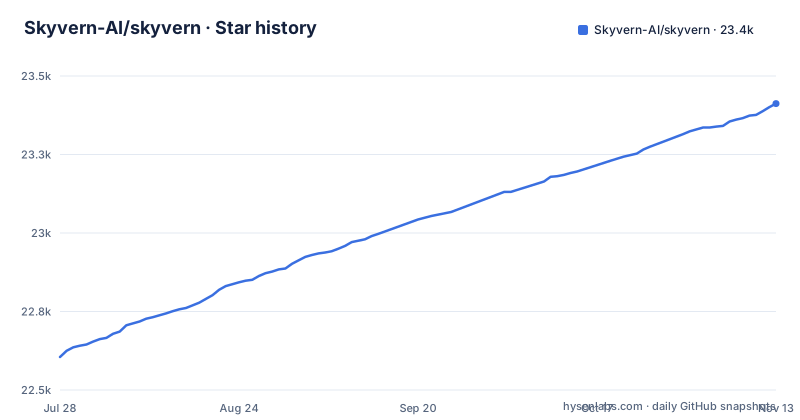
Star history
- Skyvern-AI/skyvern23,412 ★ · +807
| Repository | 2026-07-28 | 2026-11-13 |
|---|---|---|
| Skyvern-AI/skyvern | 22.6k | 23.4k |
807 Stars in the last 108 days, measured from the daily GitHub snapshot. Compare with other projects
Editorial analysis
The compose file runs the published image unless you edit it
The Docker quickstart is five steps, and the command that starts everything hides the detail that matters.
git clone https://github.com/skyvern-ai/skyvern.git && cd skyvernCopy the environment file, add your provider key, then start everything.
docker compose up -dThe hidden detail is in docker-compose.yml, where the service is defined as an image, not a build.
image: public.ecr.aws/skyvern/skyvern:latestThe build context is there in the file, commented out, with a note explaining that for local backend development you should replace the image line with a build block using the Dockerfile, or keep the public image and uncomment the source mounts for skyvern and alembic.
So the documented command starts a prebuilt image from a public registry, and the code you just cloned is not what runs. That is a reasonable default for a quick look and a serious trap for a developer, because the failure mode is subtle: your edits produce no behaviour change, and the natural conclusion is that the feature is broken rather than that you are running someone else's binary.
Compose does also always use the bundled Postgres service, which is the other half of that default.
A credential vault and a generated API key land inside your checkout
Read the volume list in the compose file and one entry stands out among the ordinary ones.
Alongside artifacts, videos, har, log, downloads and browser_sessions there is a credential_vault directory, mounted at /data/credential_vault. And then there is a volume mounting ./.skyvern into the container at /app/.skyvern, carrying a comment that generated credentials allow the UI to pick up the local API key on first startup.
So a working install writes a credential store and an API key into a path inside your working tree.
That is not a criticism of the design, it is a fact about where the files land. The consequence is that the directory you are working in now contains a secret, which makes the ignore rule the only thing keeping it out of a commit, and makes the permissions on your machine part of the security boundary for a key that grants access to your automation instance.
The rest of the tree backs this up. There is a bitwarden-cli-server/ directory at the repository root, PyJWT with the crypto extra in the dependencies, and an artifacts volume for the outputs your runs produce. Credential handling is a first-class part of this project rather than something delegated to the site being automated.
Every LLM provider ships disabled, and the cloud product bundles three more capabilities
The environment example is a catalogue of switches, and they all start off.
# ENABLE_OPENAI: Set to true to enable OpenAI as a language model provider.
ENABLE_OPENAI=false
# OPENAI_API_KEY: Your OpenAI API key for accessing models like GPT-4.
OPENAI_API_KEY=""
The same pattern repeats for xAI, Anthropic and Azure. So the local install arrives with no model configured, and a key alone is not enough, you have to flip the ENABLE flag as well.
Two more example files sit at the root, env.litellm.example and env.ollama.example, and litellm is in the dependency list. The provider surface is wider than four flags suggest.
Then there is the other product. Skyvern Cloud is described as a managed version that allows multiple instances in parallel and comes bundled with anti-bot detection mechanisms, a proxy network and CAPTCHA solvers.
Read that boundary honestly. The open source SDK here is a Playwright extension that drives a browser; the proxy and CAPTCHA solving are capabilities of the hosted service, and they exist to get past the bot protection that many sites put in front of automated traffic. Using that against a site you are authorised to automate is a different question from using it against one you are not.
The troubleshooting section still carries workarounds for 1.0.31
Two bugs are documented by name, and both are pinned to a specific release.
The first shows up as an sqlite3 error.
rm ~/.skyvern/data.db   # remove the leftover SQLite file
pip install --upgrade skyvern   # 1.0.32+ contains the fix
skyvern quickstart
The second is a dependency resolution failure, named as ResolutionImpossible with litellm and fastmcp, also in 1.0.31, and also fixed by upgrading to 1.0.32 or by installing through uv instead.
What that tells you about the install path is more useful than the individual fixes. An earlier release, 1.0.31, had a bug that made the database unusable on first run, and a second bug that made the documented pip install fail outright at resolution. Both are in the same minor line, both were fixed together, and the current release is 1.0.56.
The practical advice that follows is narrow. Do not pin to 1.0.31, and if you hit either error while working from an older environment, the workaround is to delete the SQLite file rather than to debug the schema, because the file itself is the thing left in a broken state.
pip is told not to resolve dependencies, because uv already did
The Dockerfile contains one of the more instructive comments in this repository, and it is about a dependency conflict rather than about the image.
# --no-deps: requirements.txt is fully resolved by uv, including the
# pyproject overrides that loosen litellm's jsonschema==4.23.0 pin.
# Letting pip re-resolve here would re-introduce that conflict.
RUN pip install --no-cache-dir --no-deps -r requirements.txt
So the image resolves nothing with pip. A requirements stage compiles pyproject.toml with uv at a fixed Python version, and the runtime install is told to trust it with --no-deps because a specific transitive conflict involving litellm and a jsonschema pin is already resolved through pyproject overrides.
The consequence is a difference between the supported path and the obvious one. Install from the compiled requirements.txt and the conflict is gone. Letting pip re-resolve, the Dockerfile comment says, would re-introduce that conflict.
That is also why the requirement stage pins --python-version 3.11, and why the Dockerfile carries the instruction to run skyvern init llm before building to generate the .env file.
The local extra is a Forge-backed bridge, and the manifest admits it
One comment in pyproject.toml describes the local install mode more honestly than the documentation does.
It says embedded local mode is currently a Forge-backed compatibility bridge. It is smaller than the full server install because it excludes backend process, Postgres, MCP server and cloud product packages, but it is not a minimal browser-only runtime until local stops importing Forge internals.
Three things follow from that sentence. The word currently marks this as temporary. The size advantage is real but partial, since local still imports Forge internals.
That local extra is also where the heavy dependencies live, and it is not small. Alongside openai, sqlalchemy, fastapi, alembic and aioboto3, it pulls both Azure blob storage and Google Cloud storage, tldextract, fuzzysearch, filetype and websockets, plus litellm and playwright.
The core dependency list is tiny in comparison, ten packages covering dotenv, pydantic, settings, cachetools, orjson, structlog, typer, click, httpx and rich. Which tells you the repository is split between a small client-shaped core and a heavy server install that shares a name with it.
Playwright is pinned to 1.46.0 on Python 3.11 and floating on 3.12
The local extra pins playwright exactly, to 1.61.0, and sets greenlet to >=3.1.1, with no split by interpreter version.
The declared range is >=3.11,<3.15, and the README lists Python 3.11, 3.12 or 3.13 as supported, adding Rust and VS Code with C++ dev tools and the Windows SDK on Windows.
So every supported interpreter gets the same exactly pinned Playwright version.
Editorial conclusion
Skyvern fits a team automating an authorised browser workflow whose target site changes often enough that selector-based scripts stop being maintainable, and that can run a browser during the build. It does not fit a setup that needs a defect-free documented install, since the README still carries workarounds for two bugs in 1.0.31, and it does not suit a security review that objects to a generated API key and a credential vault inside the repository directory. Verify first whether you are running your checkout or the published image, then confirm which LLM provider is actually enabled, because every provider ships disabled.
Frequently asked questions
What does Skyvern do?
It automates browser-based workflows using LLMs and computer vision, exposing a Playwright-compatible SDK that adds AI to Playwright plus a no-code workflow builder. Instead of code-defined XPath interactions it relies on vision LLMs to learn and interact with websites, using a swarm of agents to comprehend a site and plan and execute its actions.
How do you install Skyvern?
With Python 3.11, 3.12 or 3.13, run pip install "skyvern[all]" and then skyvern quickstart, which defaults to a SQLite database at ~/.skyvern/data.db. The alternative is Docker Compose, cloning the repository, copying .env.example to .env with a provider key, and running docker compose up -d, then opening http://localhost:8080.
How does Skyvern compare to Playwright?
It is built on Playwright rather than instead of it. Skyvern is described as a Playwright extension that adds AI-powered browser automation, so you keep Playwright's API and gain four commands on the page object including page.act, page.extract and page.validate, alongside natural language prompts.
Is Skyvern open source?
Yes. The repository is licensed under AGPL-3.0, with the licence file at the root, and the current version is 1.0.56. A hosted managed service called Skyvern Cloud is offered separately, with parallel instances, anti-bot detection, a proxy network and CAPTCHA solvers.
Is Skyvern safe?
The repository does not make a safety claim, and the mechanics are worth reviewing. The compose file mounts a credential_vault directory and writes generated credentials into ./.skyvern inside your working tree, the project ships a bitwarden-cli-server directory, and the installed code executes a browser while an LLM decides the actions. The hosted service additionally bundles a proxy network and CAPTCHA solvers.
How much does Skyvern cost?
The repository states no price. It describes a free and open source codebase under AGPL-3.0 and a separate managed offering, Skyvern Cloud at app.skyvern.com, which runs multiple instances in parallel and bundles anti-bot detection, a proxy network and CAPTCHA solvers.
Official sources
Add this badge to your README
If you maintain this project, the badge below links readers to this analysis and shows its maintenance status from the daily GitHub snapshot. Paste the markdown into your README; add ?metric=license or ?metric=stars to the image URL for a different field.

[](https://hysenlabs.com/projects/skyvern-ai-skyvern)Star history chart for your README
[](https://hysenlabs.com/projects/skyvern-ai-skyvern)Was this useful?