Khoj: A Self-Hostable AI Second Brain with Custom Agents and Automations
Your AI second brain. Self-hostable. Get answers from the web or your docs. Build custom agents, schedule automations, do deep research. Turn any online or local LLM into your personal, autonomous AI (gpt, claude, gemini, llama, qwen, mistral). Get started - free.
At a glance
- What is it?
- Khoj is a Python-based, AGPL-3.0 personal AI app that answers from your docs and the web, runs with local or online LLMs, and scales from on-device to enterprise. This review covers its architecture, setup, limitations, and alternatives.
- Who is it for?
- Adopt Khoj if you want a self-hostable, open-source AI assistant that can index a wide range of document formats and connect to multiple LLM providers, and if you are comfortable with the AGPL-3.0 license. Do not adopt it if your organization has policies against AGPL code.
- Can I use it commercially?
- Yes, with strict conditions. AGPL-3.0 is a network copyleft licence: if people use a modified version over a network, for example as a hosted service, you must offer them its source code under the same licence.
- Is it still maintained?
- Yes. The repository last received commits 104 days ago.
- What is it written in?
- Mainly Python, according to GitHub's language statistics.
Answers come from the project's GitHub data, last synced on November 13, 2026, and from our analysis. They are not legal advice.
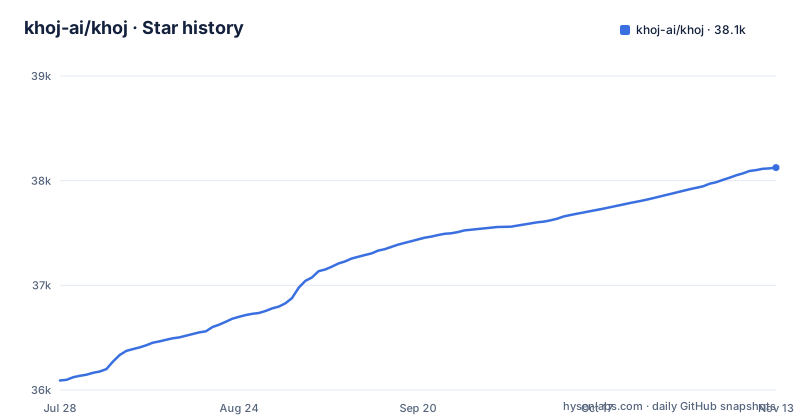
Star history
- khoj-ai/khoj38,125 ★ · +2,034
| Repository | 2026-07-28 | 2026-11-13 |
|---|---|---|
| khoj-ai/khoj | 36.1k | 38.1k |
2,034 Stars in the last 108 days, measured from the daily GitHub snapshot. Compare with other projects
Editorial analysis
What Khoj Solves and Who It Is For
Khoj addresses a common pain: your knowledge lives in many places, from PDFs and Markdown files to Notion and org-mode, and you want to query it in natural language. It also pulls answers from the web, so you can ask a question and get a synthesis of your own documents plus live sources. The intended user is someone who wants a personal AI that runs on their own hardware, not a proprietary cloud service. The README positions it as scaling from an on-device personal AI to a cloud-scale enterprise AI, which suggests a broad audience, but the self-hostable nature makes it particularly attractive to privacy-conscious individuals and teams that need data to stay in-house. If you are a developer, a researcher, or a knowledge worker with a large local document collection, Khoj is aimed squarely at you.
Core Mechanism: Indexing, Chat, and Agents
The documentation describes Khoj as a personal AI app, but the repository reveals a more specific architecture. It supports chatting with any local or online LLM, including llama3, qwen, gemma, mistral, gpt, claude, gemini, and deepseek. That means Khoj is not tied to a single model provider; it acts as a middleware between your documents and whatever model you choose. The semantic search feature is central: it finds relevant docs quickly, which implies an indexing pipeline that parses your files, chunks them, and embeds them for retrieval. The README mentions advanced semantic search, and the blog post claims excellent performance on modern retrieval and reasoning benchmarks, but the repository itself does not detail the exact retrieval algorithm. Custom agents are a key mechanism: you can create an agent with custom knowledge, persona, chat model, and tools. This suggests that agents are not just prompts but independent configurations that can access specific document sets and call tools. Automations are another layer: you can schedule research tasks, get personal newsletters, and receive smart notifications. The data flow appears to be: ingest documents, index them, then use an LLM to answer queries with retrieval-augmented generation, with agents and automations built on top of that pipeline.
Getting It Running: Setup Paths
The README points to the docs at https://docs.khoj.dev/get-started/setup for self-hosting instructions, but it does not include the actual commands in the repository. The project is on PyPI, so a pip install khoj is likely the simplest path, though the README does not confirm that command. There is also a Docker container available, as indicated by the GitHub packages link, so you can run it in a containerized environment. The web app at https://app.khoj.dev is a hosted option that requires no setup, and the README explicitly says you can use Khoj right away there. For self-hosting, you will need to configure the LLM backend, whether local (like llama3) or online (like OpenAI), and point Khoj at your document directories. The docs will be the authoritative source for exact commands, but the presence of PyPI and Docker images means installation should be straightforward for someone familiar with Python or containers. The beta status of the latest releases (2.0.0-beta.28) suggests that the setup may change between versions, so pinning to a specific release is wise.
Limitations and Failure Modes
Khoj is not a magic bullet. The README lists supported document types, but it says 'and more', which is vague. If you use an obscure format, you may find it unsupported, and the documentation does not guarantee parity across all formats. The semantic search quality depends on the embedding model and the chunking strategy, and the README does not disclose the default embedding model or how to tune it. If your documents are highly technical or domain-specific, the out-of-the-box retrieval may not match a custom solution. Another limitation is the beta status: the latest releases are 2.0.0-beta.x, which means the API and features are not stable. Upgrading between beta versions could break your agents or automations. The AGPL-3.0 license is a significant constraint for enterprises that want to modify the code without open-sourcing their changes. If you need a closed-source fork, Khoj is the wrong choice. Finally, the README mentions that you can generate images and talk out loud, but these features may have additional hardware or API requirements that are not documented in the repository.
Alternative Approaches: RAG Frameworks and Other Assistants
Khoj is not the only way to build a personal AI second brain. A direct alternative is to use a general-purpose RAG framework like LangChain or LlamaIndex, combined with a vector database. The difference in approach is that those frameworks are libraries, not applications. You would write code to ingest documents, create embeddings, and build a chat interface. Khoj is a turnkey application: it handles the indexing, the chat UI, and the agent configuration out of the box. That is a trade-off. With LangChain, you have full control over every component, but you must implement the plumbing yourself. With Khoj, you get a working system quickly, but you are constrained by the project's design choices. Another alternative is a hosted service like Notion AI or a commercial assistant, but those do not offer self-hosting or the same level of model flexibility. Khoj's value proposition is the combination of self-hosting, multi-model support, and a ready-made interface, which you cannot get from a bare RAG framework without significant work.
Maintenance and Upgrade Cost
The release cadence is active: three beta releases in two days (beta.26, beta.27, beta.28) on 25-26 March 2026. That frequency indicates rapid development, but it also means you will need to track changes closely. Each upgrade could introduce new configuration keys or change the behavior of agents and automations. The README does not mention a migration guide or a changelog, so you will have to rely on the GitHub releases page or the docs. The project is not archived and has a default branch of master, so maintenance is ongoing, but the beta label means you should not treat it as production-stable. The license is AGPL-3.0, which has implications if you modify the code and offer it as a service: you must release your modifications under the same license. This is not legal advice, but it is a real consideration for enterprises. The cost of upgrading is not just time; it is the risk of breaking your custom agents and automations, which are the core of the system. If you rely on Khoj for daily research, you should test upgrades in a staging environment before applying them to your main instance.
Who Should Adopt It and What to Verify First
Khoj is a good fit for an individual or a small team that wants a self-hosted AI assistant with semantic search over a personal document collection, and that is comfortable with Python and the command line. It is also suitable for those who want to experiment with different LLMs without locking into one provider. It is not a good fit for an organization that needs a supported, stable product with a clear upgrade path, because the beta status and AGPL license create uncertainty. Before adopting, verify that your document formats are supported, especially if you use Notion or org-mode, because the README lists them but does not specify any limitations. Test the semantic search on a sample of your documents to see if the retrieval quality meets your needs. Check the docs for the exact self-hosting commands and the list of supported LLM providers, since the README only gives examples. Finally, review the recent release notes for beta.28 to see what changed and whether there are any known issues. If you are willing to accept the beta risk and the license terms, Khoj offers a rare combination of self-hosting, multi-model support, and automation in one package.
Editorial conclusion
Adopt Khoj if you want a self-hostable, open-source AI assistant that can index a wide range of document formats and connect to multiple LLM providers, and if you are comfortable with the AGPL-3.0 license. Do not adopt it if your organization has policies against AGPL code. Before committing, verify that your preferred document types (Notion, org-mode, etc.) are fully supported, test the semantic search quality with your own corpus, and check the current beta release notes for known issues, since the project is still in 2.0 beta.
Frequently asked questions
What is Khoj AI?
Khoj is described as your AI second brain, a personal AI app you can run privately on your computer or use as a cloud app at app.khoj.dev. It answers from the internet and your documents, including PDFs, Markdown, Notion, Word and org-mode files, and it can be reached from a browser, Obsidian, Emacs, a desktop app, a phone or WhatsApp.
Is the Khoj app free to use?
The README says you can use Khoj right away at app.khoj.dev with no setup required, and the project is open source and self-hostable under AGPL-3.0-or-later. An Enterprise offering is described separately as a cloud service, on-premises or a hybrid solution.
Is Khoj AI safe?
The code is AGPL-3.0-or-later and self-hostable, but the shipped docker-compose.yml creates the Postgres user with the password postgres, and changing it after the data volume exists does not change the stored password. The compose file also publishes port 5900 for the computer service, which Khoj uses when KHOJ_OPERATOR_ENABLED=True is set on the server service.
What does Khoj mean?
The README does not explain the origin of the name. The project describes itself as a personal AI app for search and semantic search over your documents and the web, and the keywords in pyproject.toml lead with search and semantic-search.
Official sources
Where this project is recommended
Add this badge to your README
If you maintain this project, the badge below links readers to this analysis and shows its maintenance status from the daily GitHub snapshot. Paste the markdown into your README; add ?metric=license or ?metric=stars to the image URL for a different field.

[](https://hysenlabs.com/projects/khoj-ai-khoj)Star history chart for your README
[](https://hysenlabs.com/projects/khoj-ai-khoj)Was this useful?