asynctasks.vim: a vscode style task system inside Vim
:rocket: Modern Task System for Project Building, Testing and Deploying !!
At a glance
- What is it?
- asynctasks.vim gives Vim a declarative task layer modelled on Visual Studio Code's tasks.json, with project-local .tasks files and a global ~/.vim/tasks.ini defining named build, test and deploy commands, macros for file paths, and output routed to quickfix or a terminal. It leans entirely on asyncrun.vim for execution.
- Who is it for?
- asynctasks.vim fits Vim and Neovim users who want one named command per build, test or deploy step, defined in files that can be committed with the project, instead of ad hoc shell escapes in a mapping. It does not fit people who want a batteries-included toolchain, since it defines no compilers, test frameworks or build systems of its own, and it does not fit projects whose task definitions must be shared with a non-Vim editor.
- Can I use it commercially?
- Yes. MIT is a permissive licence: you can use, modify and sell software built on it, as long as you keep its copyright and licence notices.
- Is it still maintained?
- Yes. The repository last received commits 168 days ago.
- What is it written in?
- Mainly Vim Script, according to GitHub's language statistics.
Answers come from the project's GitHub data, last synced on November 7, 2026, and from our analysis. They are not legal advice.
Star history
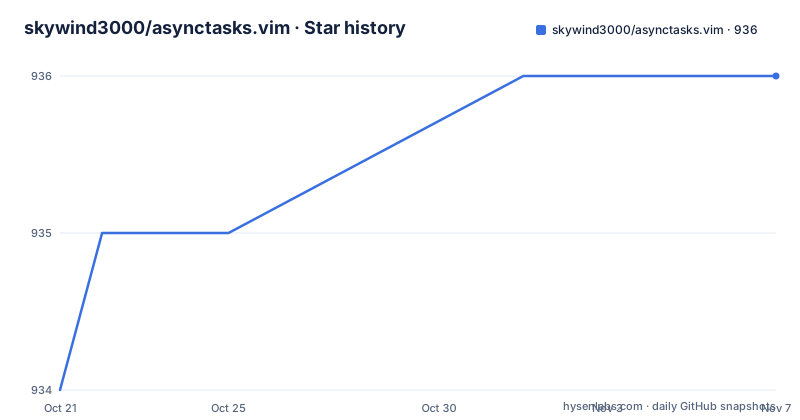
- skywind3000/asynctasks.vim936 ★ · +2
| Repository | 2026-10-21 | 2026-11-07 |
|---|---|---|
| skywind3000/asynctasks.vim | 934 | 936 |
2 Stars in the last 17 days, measured from the daily GitHub snapshot. Compare with other projects
Editorial analysis
Filling a gap Vim still had in 2017
The plugin's own account of why it exists is dated and specific. As Vim 8.0 was released in 2017, the ecosystem filled with plugins for LSP, DAP and asynchronous linters, and things like vimspector became real that had previously been hard to imagine outside Emacs. Yet, in the author's words, Vim still lacked an elegant task system to speed up the inner software development cycle of edit, compile and test, and people kept handling build, test and deploy tasks in primitive or flaky ways. So the plugin was written to bring Visual Studio Code's task mechanisms to Vim. VS Code creates a `.vscode` folder in the project root and defines project-specific tasks in `.vscode/tasks.json`. asynctasks.vim mirrors that shape: a `.tasks` file in your project folders for local tasks, and `~/.vim/tasks.ini` for global tasks that apply to generic projects. The README calls the design very simple, and argues that most good designs start from simple concepts. That simplicity is the feature: tasks are text files, not a plugin-specific project format.
asynctasks.vim does not run anything on its own
The dependency structure is the first thing to understand. asynctasks.vim requires asyncrun.vim 2.4.0 or above, and the README is explicit that you have to set one option for output to be visible at all:
let g:asyncrun_open = 6Without it, the quickfix window does not open automatically and you see nothing of the task output unless you call `:copen` yourself. This tells you how the work is divided. asyncrun.vim is the execution and output engine, and asynctasks.vim is the declaration layer on top of it, the part that gives you named tasks, macros, per-filetype command variants, priorities and profiles. The repository layout reflects the split, with `autoload/`, `bin/`, `doc/`, `ftplugin/`, `plugin/` and `syntax/` directories, where `bin/` holds the command line tool the README documents under Command Line Tool and `doc/` holds the Vim help file. The practical consequence is that if you already use asyncrun.vim for shell commands, this plugin is an upgrade path rather than a new dependency, and if you do not, you are adopting both.
Installing the plugin and its runtime
Installation is a vim-plug declaration of two plugins, the task layer and the runner it depends on:
Plug 'skywind3000/asynctasks.vim'
Plug 'skywind3000/asyncrun.vim'
The README also states that the quickfix window can be opened automatically, otherwise the task output is invisible unless `:copen` is used manually, which is why the `g:asyncrun_open` setting above is part of the setup rather than an optional tweak. The plugin is distributed through the usual Vim channels, with the project also published on vim.org as script number 5853, so installation through a plugin manager or a manual copy into your runtime path both work. The repository holds a Chinese translation of the documentation in `README-cn.md` alongside the English `README.md`, and the Vim help file in `doc/` is the reference for the full option list, which runs to a dozen `g:asynctasks_*` settings covering configuration file naming, runtime path lookup, extra configuration, and terminal position, size, focus, reuse, visibility and closing behaviour.
A first task: build and run the current file
The `.tasks` file is an INI-style file with one section per task. The README's own example defines a compile step and a run step for a single file, with macros in the `$(...)` form substituted when the task starts:
[file-build]
command=gcc -O2 "$(VIM_FILEPATH)" -o "$(VIM_FILEDIR)/$(VIM_FILENOEXT)"
cwd=$(VIM_FILEDIR)

[file-run]
command="$(VIM_FILEDIR)/$(VIM_FILENOEXT)"
cwd=$(VIM_FILEDIR)
output=terminal
Once those sections exist, the tasks are reachable from the directory containing the `.tasks` file and its child directories with the `:AsyncTask` command:
:AsyncTask file-build
:AsyncTask file-run
The README notes the reason for the quoting rule: shell commands need quotation for filenames containing spaces, which is a common source of breakage in file-based build wrappers.
Macros and filetype specific command variants
Two mechanisms make a single `.tasks` file serve a whole project. The first is macro substitution, with the example above using `$(VIM_FILEPATH)`, `$(VIM_FILEDIR)` and `$(VIM_FILENOEXT)`. The second is the filetype-keyed command form, which lets one task name behave differently per language. The README raises the obvious objection, that the F5 and F9 mapping is C and C++ specific and that you would need a `file-run-python` task for every language, and answers that this is unnecessary because commands can match file types:
[file-run]
command="$(VIM_FILEPATH)"
command:c,cpp="$(VIM_PATHNOEXT)"
command:go="$(VIM_PATHNOEXT)"
The same task name, one section, several interpreters, chosen by the buffer's filetype. For the frequent single-file case the README suggests mapping the two tasks to function keys:
noremap <silent><f5> :AsyncTask file-run<cr>
noremap <silent><f9> :AsyncTask file-build<cr>
Put that in your `vimrc` and F9 compiles the current file while F5 runs it. For project-level work there is a `:AsyncTaskEdit` command that opens the `.tasks` file in the current project root for editing, and the README documents a query command for listing available tasks, task priority handling, running the last task again, and profiles for different environments.
Output lands in quickfix, errors get parsed
How output comes back is what makes the plugin feel like a build system rather than a shell escape. The README describes the result of `:AsyncTask file-build` as command output displayed in the quickfix window with errors matched through `errorformat`, and you navigate that output in the quickfix window or use `:cnext` and `:cprev` to jump between errors. The `output=terminal` mode in the sample task is the alternative, and the README covers running in an external terminal as well, including the options that control terminal position, columns, rows, focus, reuse, hidden state and whether it is listed. Because the quickfix window is the default destination and `g:asyncrun_open = 6` is what opens it, the practical first-run experience depends on getting that option right. Teams migrating from a GUI editor's task system will find the mental model familiar: the task list is a file, the output is a buffer of parsed errors, and the terminal mode exists for interactive programs that cannot survive being piped.
No releases, one project file, and Vim Script
The limits of asynctasks.vim are worth naming. It defines no build system, no compiler and no test runner; it is a way to name and run commands you already have. It targets Vim and, judging by the repository topics, Neovim users, but it is written in Vim Script, so an editor that is not Vim or Neovim cannot consume your `.tasks` file, and a team split across editors will end up maintaining task definitions in two places. The README also documents features whose behaviour lives in the asyncrun layer rather than here, so tracing a failed task means reading two projects. On maintenance, the repository has no GitHub releases at all, so there is no version number to pin and no changelog to read, and the only available marker is the last push, which was on 2026-05-24. The licence is MIT, with the `LICENSE` file in the repository root, which matters more than usual here, because a `.tasks` file is a file your team commits and shares. The configuration file naming itself is an option, `g:asynctasks_config_name`, so a project can rename `.tasks` if that name collides with something else in the repository.
Editorial conclusion
asynctasks.vim fits Vim and Neovim users who want one named command per build, test or deploy step, defined in files that can be committed with the project, instead of ad hoc shell escapes in a mapping. It does not fit people who want a batteries-included toolchain, since it defines no compilers, test frameworks or build systems of its own, and it does not fit projects whose task definitions must be shared with a non-Vim editor. Before adopting it, install asyncrun.vim 2.4.0 or above and set g:asyncrun_open to 6, check that your build tools parse into the errorformat you expect, and remember that the repository publishes no GitHub releases, so the last push on 2026-05-24 is the only version reference you get.
Frequently asked questions
How do I install asynctasks.vim?
With vim-plug, declare Plug 'skywind3000/asynctasks.vim' and Plug 'skywind3000/asyncrun.vim'. It requires asyncrun.vim 2.4.0 or above, and you should set g:asyncrun_open to 6 so the quickfix window shows task output.
Where are project tasks defined in asynctasks.vim?
In a .tasks file in the project root, using INI-style sections with a command and a cwd per task. Global tasks for generic projects go in ~/.vim/tasks.ini. Tasks are then run with commands such as :AsyncTask file-build.
Can one task use a different command per file type?
Yes. The README shows commands keyed by filetype in the same section, with entries such as command:c,cpp and command:python, so one task name like file-run resolves to the right interpreter for the current buffer.
Official sources
Add this badge to your README
If you maintain this project, the badge below links readers to this analysis and shows its maintenance status from the daily GitHub snapshot. Paste the markdown into your README; add ?metric=license or ?metric=stars to the image URL for a different field.

[](https://hysenlabs.com/projects/skywind3000-asynctasks-vim)Star history chart for your README
[](https://hysenlabs.com/projects/skywind3000-asynctasks-vim)Was this useful?